深夜提醒

现在是深夜,建议您注意休息,不要熬夜哦~

🏮 🏮 🏮

新年快乐

祝君万事如意心想事成!

share-image
中
ESC

Reverse-Engineering the Ant Afu × ICOMON FG2508WB Bluetooth Body Fat Scale

English 阅读中文版

Recently I got hold of an FG2508WB smart body fat scale — an Ant Afu co-branded ICOMON (Wolai) unit. Normally the data can only be viewed through the Ant Afu app. Since the device is right here at hand, I figured I might as well use Python to reverse-engineer the Bluetooth protocol and write a reading script that doesn’t need a phone.

Device and Goal

  • Device: Ant Afu × ICOMON FG2508WB smart body fat scale
  • Connection: Bluetooth Low Energy (BLE)
  • Goal: read the weight directly with Python + bleak, and parse body-composition data as far as possible
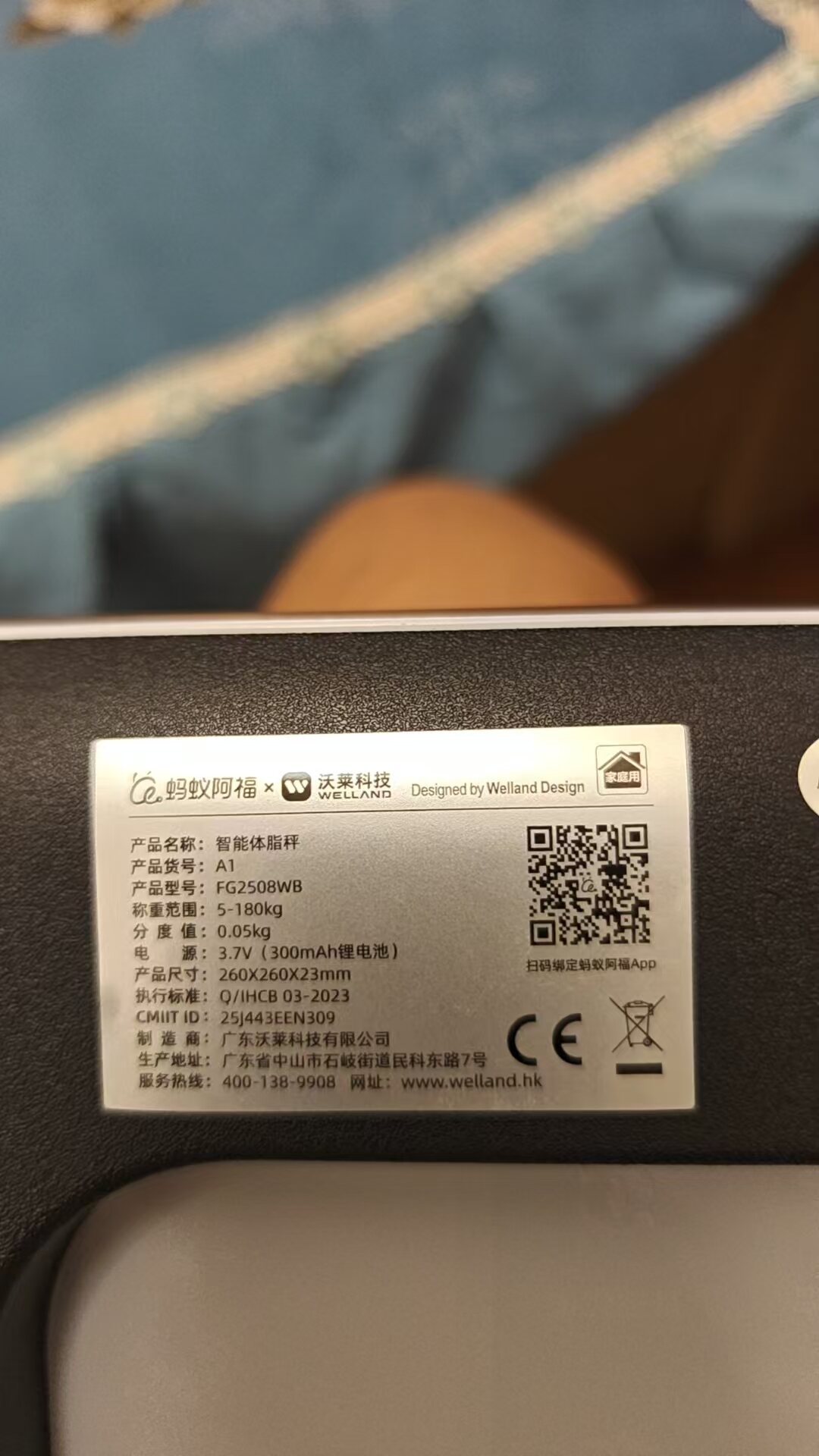
The label on the bottom of the scale

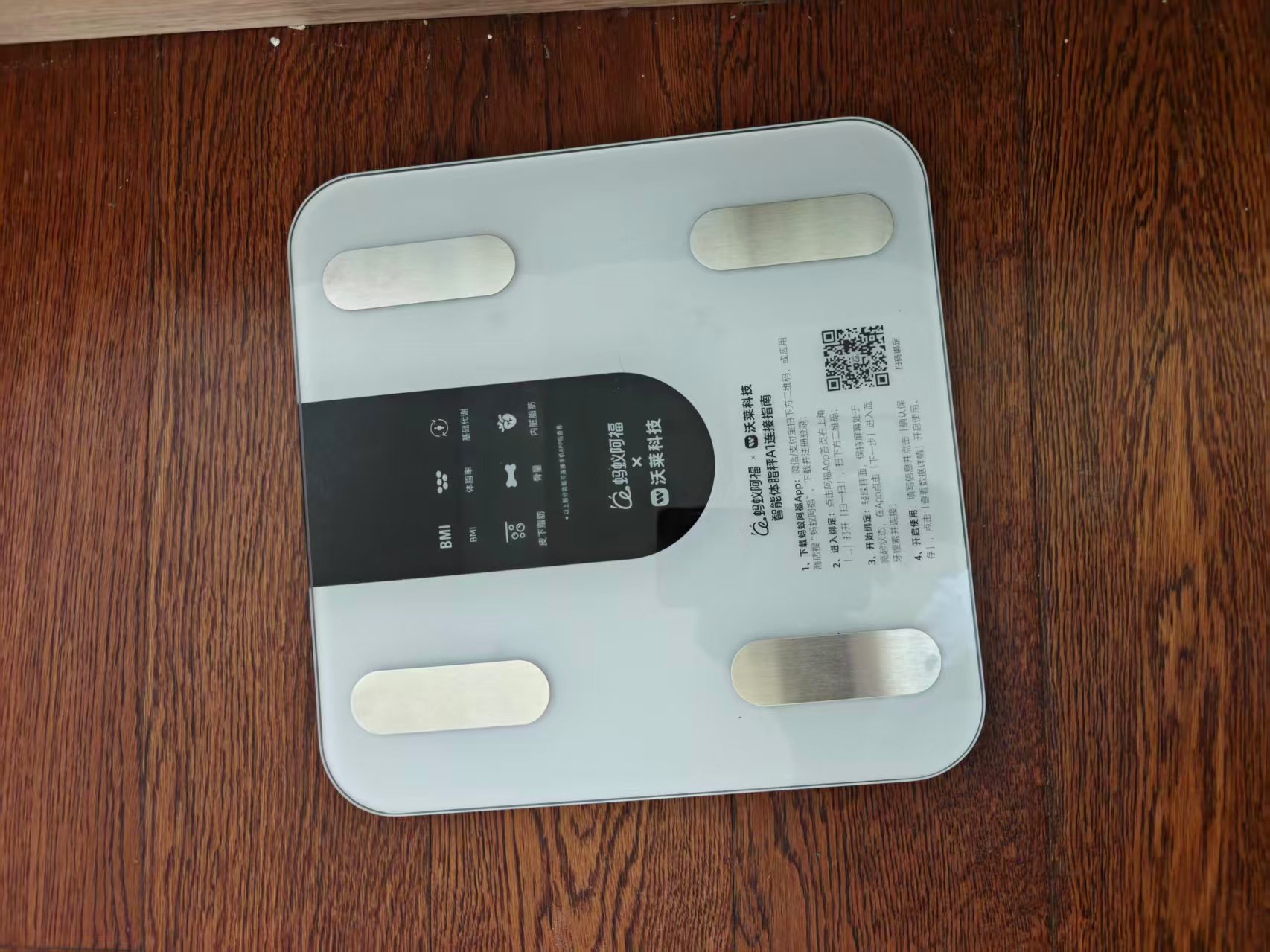
The front of the scale

Environment Setup

On Linux, as long as the system Bluetooth works, you just need to install bleak:

pip install bleak

Check the local Bluetooth controller:

hciconfig -a

Scanning and Connecting

To save power the scale doesn’t advertise normally — it only wakes up when you step on it lightly. Scan with BleakScanner; the device name is usually AFU-WL-TZ-A1:

from bleak import BleakScanner

devices = await BleakScanner.discover(timeout=10.0)
for d in devices:
print(d.address, d.name)

After connecting, the GATT service structure turned out to be:

Service Characteristic Properties
0000ffb0-... 0000ffb1-... write-without-response
0000ffb0-... 0000ffb2-... notify
00001530-... 00001531-... write, notify

The actual data comes out of the notify on 0000ffb2.

Packet Structure

After connecting, write the user parameters (sex/age/height) to trigger a measurement:

cmd = bytes([0x10, 0x00, sex, age, height])
await client.write_gatt_char(WRITE_UUID, cmd, response=False)

Once you step on the scale, it continuously sends 20-byte packets over notify. The common types are:

  • 0x00: real-time weight
  • 0x80: stable but not yet locked
  • 0x02: final result locked

A typical final-result packet looks like this:

ac 29 02 00 02 3f 02 07 01 80 69 06 b2 00 00 00 00 00 29 d6 0d

Parsing the Weight

After comparing several sets of data (empty scale, a person standing on it, milk cartons as ballast), I found that the weight is stored in bytes[10:13] as a 24-bit big-endian integer:

bytes[10:13] = 69 06 b2

The conversion formula:

weight_raw = int.from_bytes(data[10:13], "big")
weight_kg = (weight_raw - 0x680000) / 1000.0

Verification

Scenario Real Weight bytes[10:13] Calculated Result
Milk 13.75 kg 68 35 b6 13.75 kg
Human 67.30 kg 69 06 b2 67.25 kg

Both matched, with an error within 0.05 kg — exactly the scale’s nominal graduation value. Home body fat scales always fluctuate slightly from one weighing to the next; even the same person measured repeatedly can vary between 0.05 and 0.1 kg, which is normal.
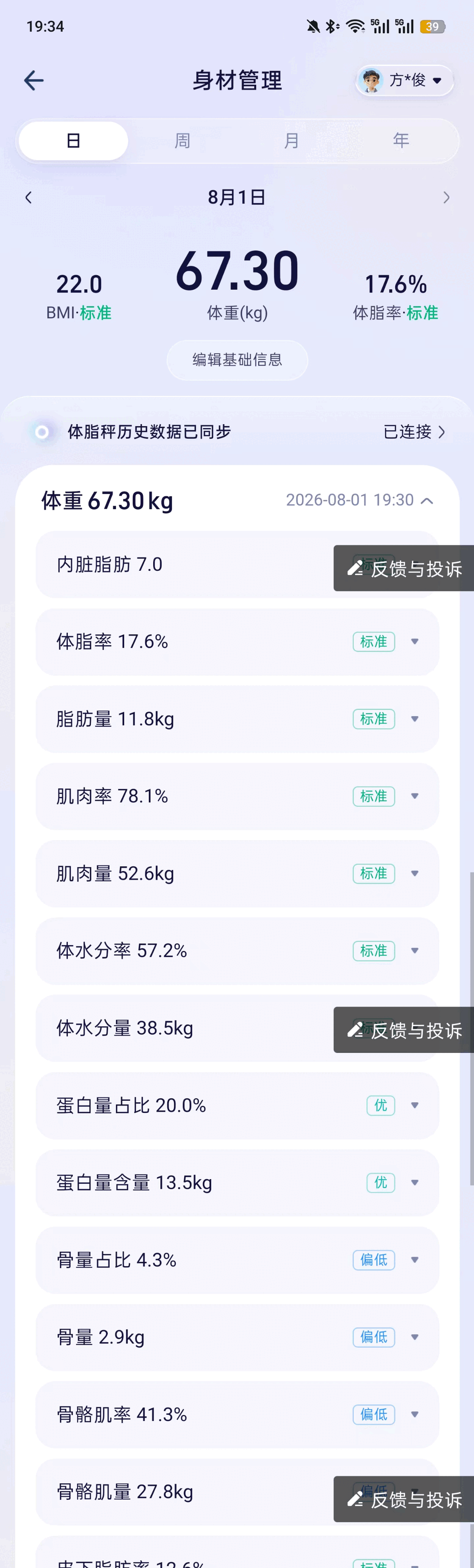
Measurement result in the Ant Afu app

Impedance and Body Composition

In the packet, bytes[4:5] and bytes[6:7] look like impedance values at two frequencies:

02 3f = 575
02 07 = 519

Metrics like body fat percentage, water percentage, BMI, bone mass, and muscle mass are not directly encoded in the Bluetooth packet — they’re calculated on the app side from “weight + impedance + height/age/sex” using a BIA algorithm. Different manufacturers use different algorithm coefficients; the results I got from plugging into the public BIA formulas deviated from the Ant Afu app, so for now the script only outputs weight and raw impedance values.

The Complete Script

The full script is also in this repository at tools/afu_scale_reader.py; copy it, change DEVICE_ADDRESS, and run it.

#!/usr/bin/env python3
"""
蚂蚁阿福 × 沃莱 FG2508WB 体脂秤蓝牙读取脚本

体重协议(已验证):
最终结果包 type=0x02,bytes[10:13] 为 24 位大端整数
weight_kg = (val - 0x680000) / 1000

阻抗协议(待进一步校准):
bytes[4:5]、bytes[6:7] 可能为两个频率下的阻抗值(Ω)
"""

import asyncio
import json
import time
from pathlib import Path
from bleak import BleakScanner, BleakClient

# ============== 用户配置 ==============
DEVICE_ADDRESS = "XX:XX:XX:XX:XX:XX" # 替换为你的秤 MAC
USER_SEX = 2 # 1=女, 2=男
USER_AGE = 35
USER_HEIGHT = 172
SAVE_DIR = Path.home() / ".local" / "share" / "afu_scale"
# ============== 配置结束 ==============

NOTIFY_UUID = "0000ffb2-0000-1000-8000-00805f9b34fb"
WRITE_UUID = "0000ffb1-0000-1000-8000-00805f9b34fb"

latest = {"weight": None, "impedance_1": None, "impedance_2": None, "locked": False}


def parse_measurement(data: bytearray) -> dict:
result = {"type": data[2], "raw": data.hex()}
if len(data) >= 13 and data[0] == 0xAC:
weight_raw = int.from_bytes(data[10:13], "big")
result["weight"] = round((weight_raw - 0x680000) / 1000.0, 2)
if len(data) >= 8:
result["impedance_1"] = int.from_bytes(data[4:6], "big")
result["impedance_2"] = int.from_bytes(data[6:8], "big")
result["locked"] = data[2] == 0x02
return result


def notification_handler(sender, data: bytearray):
parsed = parse_measurement(data)
if "weight" in parsed:
latest.update(parsed)
status = "✓ 已锁定" if parsed.get("locked") else "... 称重中"
print(
f"[{time.strftime('%H:%M:%S')}] {status} "
f"体重={parsed['weight']:.2f}kg "
f"阻抗={parsed.get('impedance_1')}/{parsed.get('impedance_2')}Ω"
)


async def scan_for_device():
print("正在扫描体脂秤,请轻踩一下秤让它唤醒...")
for attempt in range(3):
devices = await BleakScanner.discover(timeout=10.0)
for d in devices:
name = (d.name or "").lower()
if d.address == DEVICE_ADDRESS or "afu-wl" in name:
print(f"找到设备: {d.address} | {d.name}")
return d.address
print(f"第 {attempt + 1} 次扫描未找到,重试...")
raise RuntimeError("未找到体脂秤")


async def main():
address = await scan_for_device()
async with BleakClient(address, timeout=20.0) as client:
print("已连接,请站上秤并保持稳定...")
await client.start_notify(NOTIFY_UUID, notification_handler)
cmd = bytes([0x10, 0x00, USER_SEX, USER_AGE, USER_HEIGHT])
await client.write_gatt_char(WRITE_UUID, cmd, response=False)

for _ in range(30):
await asyncio.sleep(1)
if latest.get("locked"):
break

try:
await client.stop_notify(NOTIFY_UUID)
except Exception:
pass

if latest.get("weight") is not None:
SAVE_DIR.mkdir(parents=True, exist_ok=True)
record = {
"time": time.strftime("%Y-%m-%d %H:%M:%S"),
"weight_kg": latest["weight"],
"impedance_1": latest.get("impedance_1"),
"impedance_2": latest.get("impedance_2"),
"raw": latest["raw"],
}
save_path = SAVE_DIR / f"scale_{time.strftime('%Y%m%d_%H%M%S')}.json"
save_path.write_text(json.dumps(record, ensure_ascii=False, indent=2))
print(f"\n测量完成: 体重 {latest['weight']:.2f}kg")
print(f"数据已保存: {save_path}")
else:
print("\n未读到有效体重数据")


if __name__ == "__main__":
asyncio.run(main())

Run it:

python afu_scale_reader.py

Here’s what it actually looks like when running — from scanning to weighing to locking takes about 3-5 seconds:
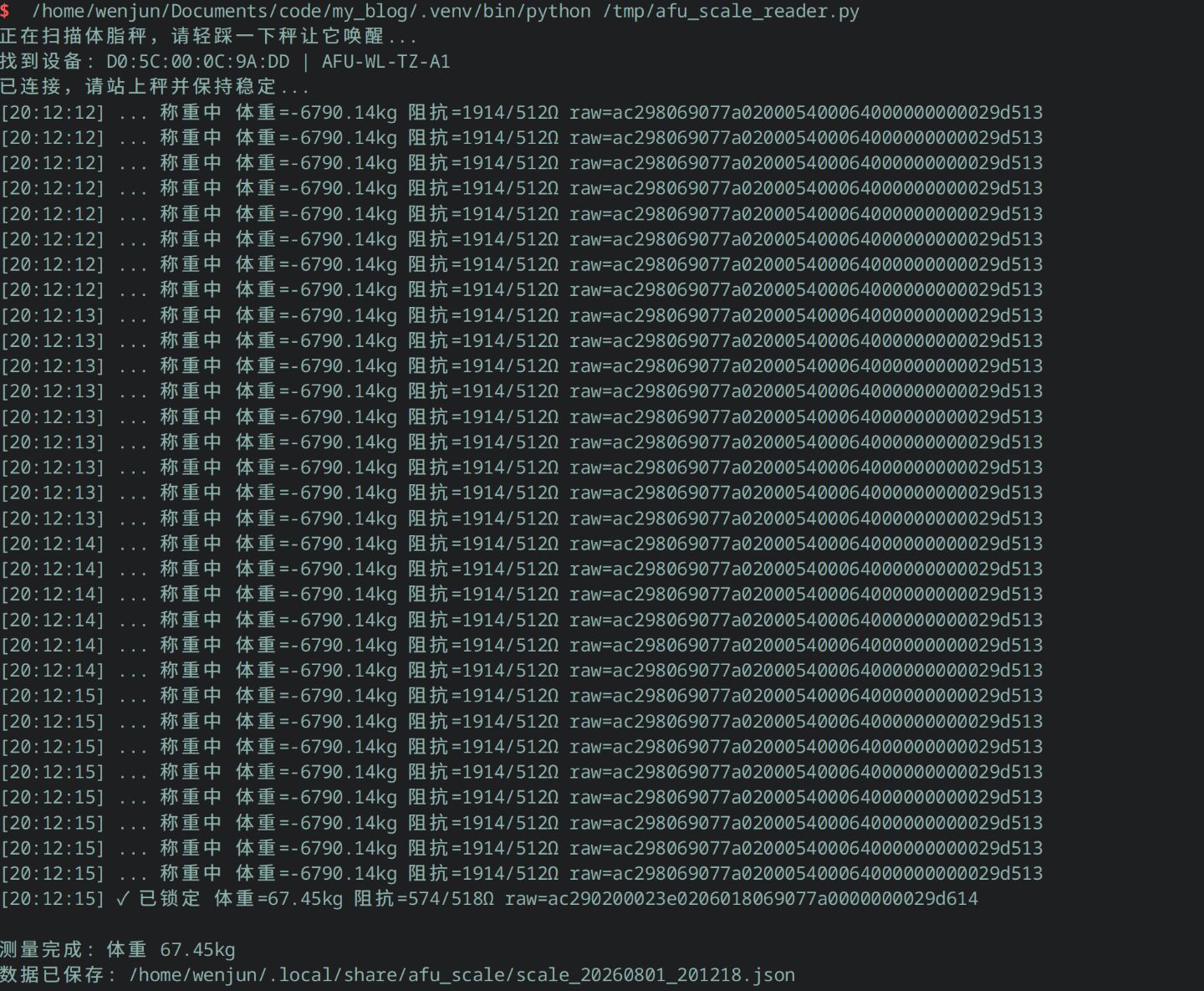
Terminal screenshot of the script running

Summary

  • Weight can be parsed straight out of the BLE packet, with the formula (bytes[10:13] - 0x680000) / 1000.
  • Body composition data — body fat, water, BMI, etc. — requires an additional BIA algorithm and is still being calibrated.
  • Different batches of ICOMON / Ant Afu scales may differ in protocol details, but the service UUID 0000FFB0 and the 20-byte packet structure are common features.

If you’ve also reverse-engineered this scale, or you know the specific coefficients of the body-fat algorithm, please leave a comment — I’d love to exchange notes.

文章作者:阿文
文章链接: https://www.awen.me/post/bca6fedc.html
版权声明:本博客所有文章除特别声明外,均采用 CC BY-NC-SA 4.0 许可协议。转载请注明来自 阿文的博客!

评论

0 条评论
😀😃😄 😁😅😂 🤣😊😇 🙂🙃😉 😌😍🥰 😘😗😙 😚😋😛 😝😜🤪 🤨🧐🤓 😎🥸🤩 🥳😏😒 😞😔😟 😕🙁☹️ 😣😖😫 😩🥺😢 😭😤😠 😡🤬🤯 😳🥵🥶 😱😨😰 😥😓🤗 🤔🤭🤫 🤥😶😐 😑😬🙄 😯😦😧 😮😲🥱 😴🤤😪 😵🤐🥴 🤢🤮🤧 😷🤒🤕 🤑🤠😈 👿👹👺 🤡💩👻 💀☠️👽 👾🤖🎃 😺😸😹 😻😼😽 🙀😿😾 👍👎👏 🙌👐🤲 🤝🤜🤛 ✌️🤞🤟 🤘👌🤏 👈👉👆 👇☝️✋ 🤚🖐️🖖 👋🤙💪 🦾🖕✍️ 🙏💅🤳 💯💢💥 💫💦💨 🕳️💣💬 👁️‍🗨️🗨️🗯️ 💭💤❤️ 🧡💛💚 💙💜🖤 🤍🤎💔 ❣️💕💞 💓💗💖 💘💝💟 ☮️✝️☪️ 🕉️☸️✡️ 🔯🕎☯️ ☦️🛐⛎ ♈♉♊ ♋♌♍ ♎♏♐ ♑♒♓ 🆔⚛️🉑 ☢️☣️📴 📳🈶🈚 🈸🈺🈷️ ✴️🆚💮 🉐㊙️㊗️ 🈴🈵🈹 🈲🅰️🅱️ 🆎🆑🅾️ 🆘❌⭕ 🛑⛔📛 🚫💯💢 ♨️🚷🚯 🚳🚱🔞 📵🚭❗ ❕❓❔ ‼️⁉️🔅 🔆〽️⚠️ 🚸🔱⚜️ 🔰♻️✅ 🈯💹❇️ ✳️❎🌐 💠Ⓜ️🌀 💤🏧🚾 ♿🅿️🈳 🈂🛂🛃 🛄🛅🛗 🚀🛸🚁 🚉🚆🚅 ✈️🛫🛬 🛩️💺🛰️
加载中...

留言反馈

😀😃😄 😁😅😂 🤣😊😇 🙂🙃😉 😌😍🥰 😘😗😙 😚😋😛 😝😜🤪 🤨🧐🤓 😎🥸🤩 🥳😏😒 😞😔😟 😕🙁☹️ 😣😖😫 😩🥺😢 😭😤😠 😡🤬🤯 😳🥵🥶 😱😨😰 😥😓🤗 🤔🤭🤫 🤥😶😐 😑😬🙄 😯😦😧 😮😲🥱 😴🤤😪 😵🤐🥴 🤢🤮🤧 😷🤒🤕 🤑🤠😈 👿👹👺 🤡💩👻 💀☠️👽 👾🤖🎃 😺😸😹 😻😼😽 🙀😿😾 👍👎👏 🙌👐🤲 🤝🤜🤛 ✌️🤞🤟 🤘👌🤏 👈👉👆 👇☝️✋ 🤚🖐️🖖 👋🤙💪 🦾🖕✍️ 🙏💅🤳 💯💢💥 💫💦💨 🕳️💣💬 👁️‍🗨️🗨️🗯️ 💭💤❤️ 🧡💛💚 💙💜🖤 🤍🤎💔 ❣️💕💞 💓💗💖 💘💝💟 ☮️✝️☪️ 🕉️☸️✡️ 🔯🕎☯️ ☦️🛐⛎ ♈♉♊ ♋♌♍ ♎♏♐ ♑♒♓ 🆔⚛️🉑 ☢️☣️📴 📳🈶🈚 🈸🈺🈷️ ✴️🆚💮 🉐㊙️㊗️ 🈴🈵🈹 🈲🅰️🅱️ 🆎🆑🅾️ 🆘❌⭕ 🛑⛔📛 🚫💯💢 ♨️🚷🚯 🚳🚱🔞 📵🚭❗ ❕❓❔ ‼️⁉️🔅 🔆〽️⚠️ 🚸🔱⚜️ 🔰♻️✅ 🈯💹❇️ ✳️❎🌐 💠Ⓜ️🌀 💤🏧🚾 ♿🅿️🈳 🈂🛂🛃 🛄🛅🛗 🚀🛸🚁 🚉🚆🚅 ✈️🛫🛬 🛩️💺🛰️