深夜提醒

现在是深夜,建议您注意休息,不要熬夜哦~

🏮 🏮 🏮

新年快乐

祝君万事如意心想事成!

share-image
中
ESC

WeRead Booklist Sync Extension: A Full-Stack Implementation from Chrome Plugin to Go Backend

English 阅读中文版

As a tech person who loves reading, I’ve accumulated reading notes on hundreds of books in WeRead. But every time I wanted to show a reading list on my own blog, I had to copy and paste it by hand, which was painfully inefficient. So I decided to build an automated booklist sync solution that gives me one-click sync from WeRead to my personal blog.

Project Background and Requirements Analysis

Pain Points

As a long-time WeRead user, I faced the following problems:

  1. Data silo: WeRead’s booklist data is locked inside the app, with no official API for developers to use.
  2. Cumbersome manual sync: To display a booklist on a personal blog, I had to enter each book by hand.
  3. Image hotlink problem: WeRead’s cover images have hotlink protection, so referencing them directly breaks.
  4. Reading progress not synced: I wanted to show each book’s reading progress and reading time.

Goals

Build a complete sync solution:

  • Chrome extension: Intercept data from WeRead’s web version and extract booklist information.
  • Backend service: Receive the data, download cover images, and upload them to my own OSS.
  • Database storage: Save book info, reading progress, reading time, and so on.

Technical Architecture Design

The system architecture is divided into three layers:

Frontend Implementation: Chrome Extension

Manifest V3 Configuration

The Chrome extension uses Manifest V3. The core configuration is as follows:

{
"manifest_version": 3,
"name": "WeRead Booklist Sync",
"version": "1.0.0",
"permissions": [
"storage",
"notifications",
"activeTab"
],
"host_permissions": [
"https://weread.qq.com/*"
],
"content_scripts": [
{
"matches": ["https://weread.qq.com/web/shelf"],
"js": ["content.js"],
"world": "ISOLATED"
}
],
"background": {
"service_worker": "background.js"
}
}

Key point: world: "ISOLATED" is required by Manifest V3, used to isolate the extension code from the page code.

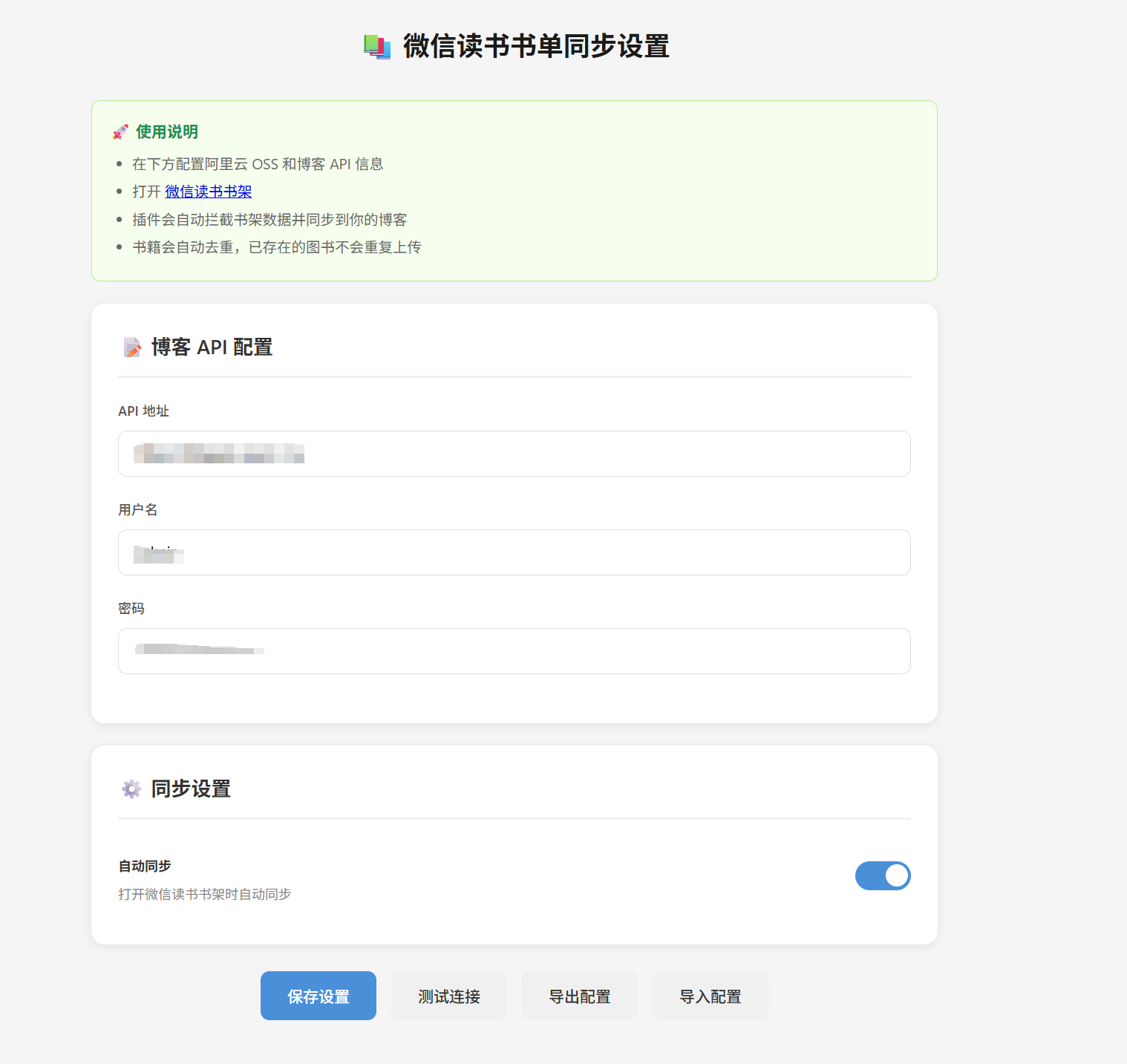
The extension’s configuration page looks like the image below. You only need to fill in the blog API address and login credentials:

Data Interception and Extraction

WeRead’s shelf data is fetched via the /web/shelf/sync API. We need to inject a script into the page context to intercept this request:

// injected.js - runs in the page context
const originalFetch = window.fetch;
window.fetch = async function(...args) {
const [url, config] = args;

// Intercept the shelf sync API
if (url.includes('/web/shelf/sync')) {
const response = await originalFetch.apply(this, args);
const clonedResponse = response.clone();
const data = await clonedResponse.json();

// Extract book data
const books = extractBooksFromAPIData(data);

// Send to the content script
window.postMessage({
type: 'WEREAD_SHELF_DATA',
data: { booksAndArchives: books }
}, '*');

return response;
}

return originalFetch.apply(this, args);
};

Data Parsing and Merging

The data returned by WeRead’s API is split into two parts: books (basic book info) and bookProgress (reading progress). They need to be joined on bookId:

function extractBooksFromAPIData(data) {
const books = [];
const progressMap = {};

// Build the progress map
if (data.bookProgress && Array.isArray(data.bookProgress)) {
data.bookProgress.forEach(progress => {
if (progress.bookId) {
progressMap[progress.bookId] = {
readingTime: progress.readingTime || 0, // reading time (seconds)
progress: progress.progress || 0, // reading progress (percentage)
updateTime: progress.updateTime || 0 // last update time
};
}
});
}

// Merge book info
if (data.books && Array.isArray(data.books)) {
data.books.forEach(book => {
if (book.bookId && book.title) {
const progressInfo = progressMap[book.bookId] || {};

books.push({
bookId: String(book.bookId),
title: book.title,
author: book.author ? String(book.author).replace(/\n/g, ' ').trim() : '',
cover: book.cover ? book.cover.replace(/\\u002F/g, '/') : '',
readingTime: progressInfo.readingTime || 0,
updateTime: progressInfo.updateTime || 0,
progress: progressInfo.progress ? String(progressInfo.progress) : ''
});
}
});
}

return { booksAndArchives: books };
}

User Selection Interface

To avoid syncing all books at once (which might include ones I’ve given up on), I designed a visual selection interface:

async function createSelectionUI(books) {
// Create the modal
const modal = document.createElement('div');
modal.id = 'weread-sync-selection-modal';
modal.style.cssText = `
position: fixed; top: 0; left: 0; width: 100%; height: 100%;
background: rgba(0,0,0,0.7); z-index: 999999;
display: flex; justify-content: center; align-items: center;
`;

// Book list (with checkboxes)
const bookList = document.createElement('div');
books.forEach((book, index) => {
const item = document.createElement('div');
item.innerHTML = `
<input type="checkbox" class="weread-sync-checkbox"
data-index="${index}" checked>
<img src="${book.cover}" style="width: 40px; height: 56px;">
<div>
<div>${book.title}</div>
<div style="color: #999;">${book.author || 'Unknown author'}</div>
</div>
<span style="background: #07C160; color: white; padding: 2px 8px;
border-radius: 10px; font-size: 11px;">
${book.progress}%
</span>
`;
bookList.appendChild(item);
});

// Return the books the user selected
return new Promise((resolve) => {
document.getElementById('weread-sync-confirm').addEventListener('click', () => {
const selectedIndexes = Array.from(document.querySelectorAll('.weread-sync-checkbox:checked'))
.map(cb => parseInt(cb.dataset.index));
const selectedBooks = selectedIndexes.map(i => books[i]);
resolve({ action: 'confirm', books: selectedBooks });
});
});
}

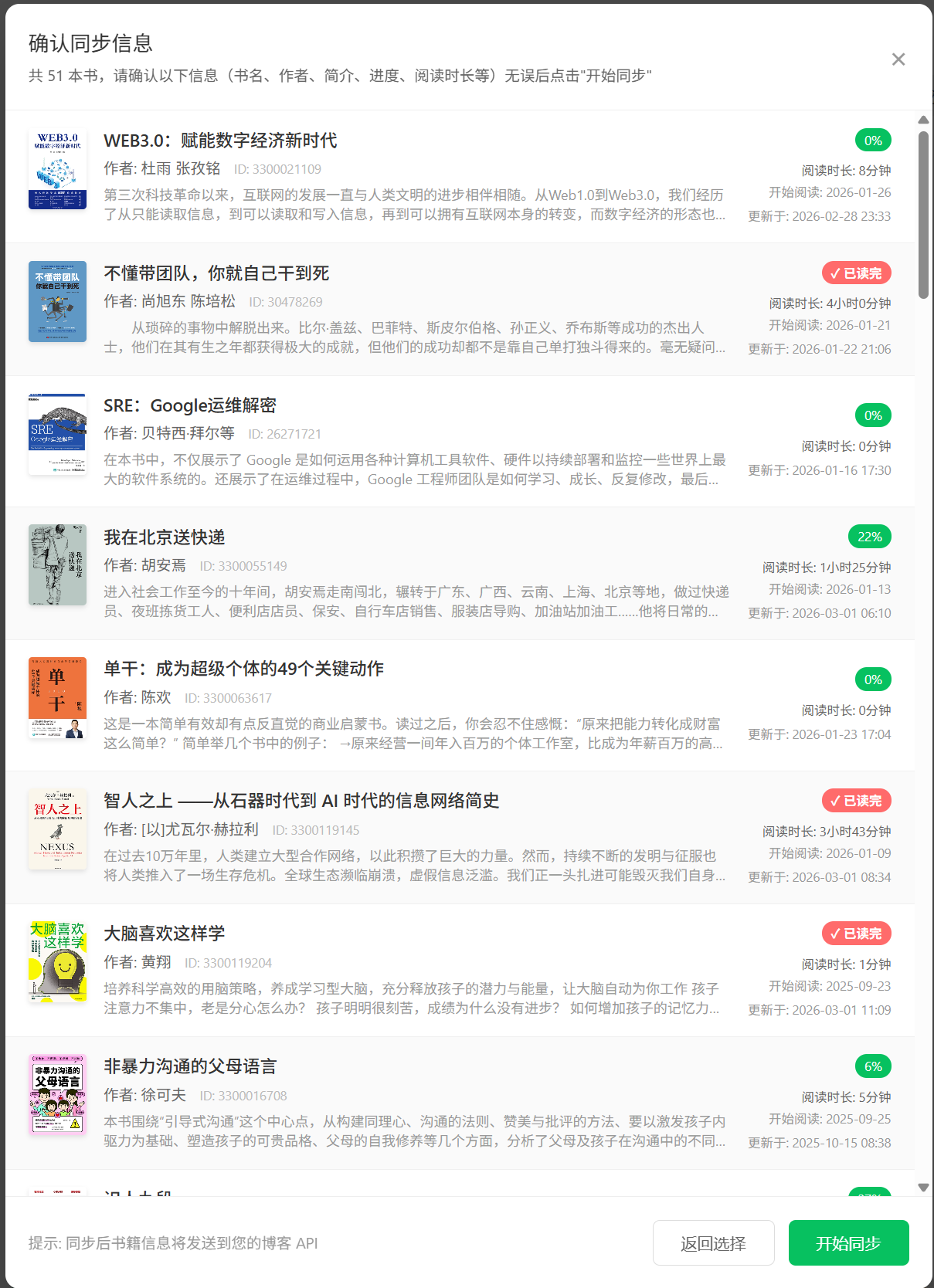
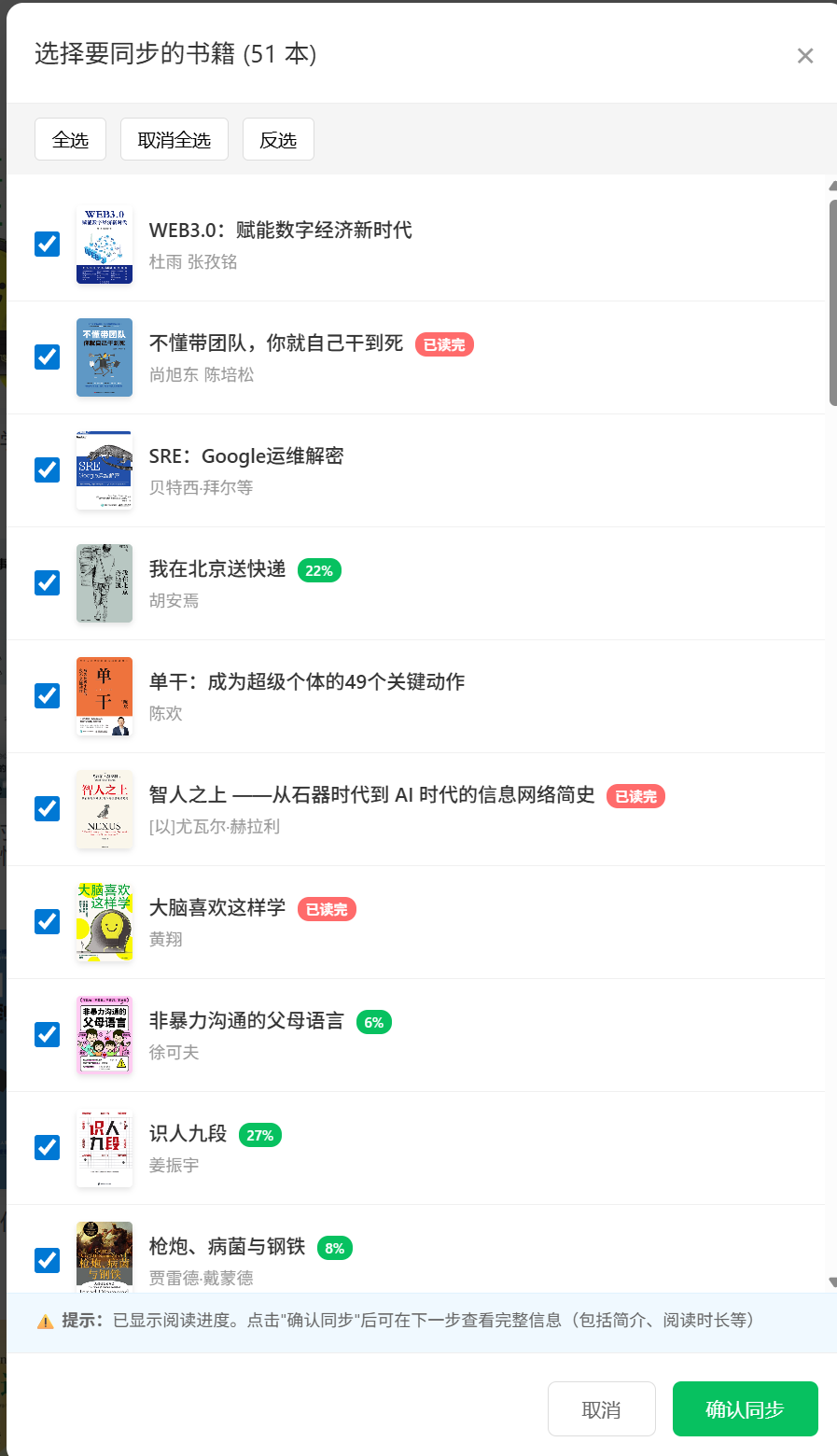
The actual effect is shown below. Users can intuitively see each book’s cover, title, author, and reading progress:

Backend Implementation: Go + Gin + OSS

The backend is built with the Go language and the Gin framework. Its main functions are: receiving extension data, downloading cover images, uploading to Aliyun OSS, and persisting data.

Data Model Design

// models/book.go
type Book struct {
ID uint `json:"id" gorm:"primaryKey"`
BookID string `json:"bookid" gorm:"uniqueIndex;comment:book unique identifier"`
Title string `json:"title" gorm:"not null;index;comment:book title"`
Author string `json:"author" gorm:"comment:author"`
Cover string `json:"cover" gorm:"comment:cover image URL"`
Desc string `json:"desc" gorm:"type:text;comment:book description"`
Rating int `json:"rating" gorm:"default:0;comment:rating 1-5"`
Progress int `json:"progress" gorm:"default:0;comment:reading progress percentage 0-100"`
ReadingDuration int `json:"reading_duration" gorm:"default:0;comment:reading duration (seconds)"`
LastReadingTime CustomTime `json:"last_reading_time" gorm:"comment:last reading time"`
ReadTime string `json:"read_time" gorm:"comment:reading time, format YYYY-MM"`
SortKey string `json:"sort_key" gorm:"index;comment:sort key"`
CreatedAt time.Time `json:"created_at"`
UpdatedAt time.Time `json:"updated_at"`
}

Custom Time Type

Because WeRead returns a Unix timestamp while the backend database stores a datetime, we need a custom type to handle the conversion:

// models/book.go
const TimeLayout = "2006-01-02 15:04:05"

type CustomTime struct {
time.Time
}

// UnmarshalJSON parses time from a JSON string
func (ct *CustomTime) UnmarshalJSON(data []byte) error {
str := string(data)
if str == "null" {
ct.Time = time.Time{}
return nil
}

// Strip the quotes
if len(str) >= 2 && str[0] == '"' && str[len(str)-1] == '"' {
str = str[1 : len(str)-1]
}

parsed, err := time.Parse(TimeLayout, str)
if err != nil {
return err
}
ct.Time = parsed
return nil
}

OSS Service Wrapper

// services/oss.go
type OSSService struct {
client *oss.Client
bucket *oss.Bucket
config config.OSSConfig
httpClient *http.Client
}

// DownloadAndUploadImage downloads an image and uploads it to OSS
func (s *OSSService) DownloadAndUploadImage(imageURL string, bookID string) (string, error) {
// Check whether it's already an OSS domain
if s.config.CustomDomain != "" && strings.Contains(imageURL, s.config.CustomDomain) {
return imageURL, nil
}

// Download the image
data, contentType, err := s.downloadImage(imageURL)
if err != nil {
return "", fmt.Errorf("failed to download image: %w", err)
}

// Generate the OSS object key
objectKey := s.generateObjectKey(bookID, contentType)

// Upload to OSS
err = s.uploadToOSS(objectKey, data, contentType)
if err != nil {
return "", fmt.Errorf("failed to upload image to OSS: %w", err)
}

// Return the custom-domain URL
return s.getAccessURL(objectKey), nil
}

func (s *OSSService) downloadImage(imageURL string) ([]byte, string, error) {
req, err := http.NewRequest("GET", imageURL, nil)
if err != nil {
return nil, "", err
}

// Set headers to mimic a browser
req.Header.Set("User-Agent", "Mozilla/5.0 (Windows NT 10.0; Win64; x64) AppleWebKit/537.36")
req.Header.Set("Referer", "https://weread.qq.com/")

resp, err := s.httpClient.Do(req)
if err != nil {
return nil, "", err
}
defer resp.Body.Close()

data, err := io.ReadAll(resp.Body)
if err != nil {
return nil, "", err
}

return data, resp.Header.Get("Content-Type"), nil
}

API Handler Implementation

// handlers/book.go
func (h *BookHandler) CreateBook(c *gin.Context) {
var req struct {
BookID string `json:"bookid" binding:"required"`
Title string `json:"title" binding:"required"`
Author string `json:"author"`
Cover string `json:"cover"`
Desc string `json:"desc"`
Rating int `json:"rating"`
Progress int `json:"progress"`
ReadingDuration int `json:"reading_duration"`
LastReadingTime models.CustomTime `json:"last_reading_time"`
ReadTime string `json:"read_time"`
}

if err := c.ShouldBindJSON(&req); err != nil {
c.JSON(http.StatusBadRequest, gin.H{"code": 400, "message": err.Error()})
return
}

// Handle image upload
coverURL := req.Cover
if h.OSS != nil && h.OSS.IsEnabled() && req.Cover != "" {
newURL, err := h.OSS.DownloadAndUploadImage(req.Cover, req.BookID)
if err == nil {
coverURL = newURL
}
// Fall back to the original URL if the upload fails
}

// Check whether the book already exists
var existing models.Book
if err := h.DB.Where("book_id = ?", req.BookID).First(&existing).Error; err == nil {
// Update the existing book
updates := make(map[string]interface{})

if coverURL != "" && coverURL != existing.Cover {
updates["cover"] = coverURL
}
if req.ReadingDuration > 0 && req.ReadingDuration != existing.ReadingDuration {
updates["reading_duration"] = req.ReadingDuration
}
if !req.LastReadingTime.IsZero() {
updates["last_reading_time"] = req.LastReadingTime.Time
}
// ... update other fields

if len(updates) > 0 {
h.DB.Model(&existing).Updates(updates)
}

c.JSON(http.StatusOK, gin.H{
"code": 0,
"message": "success",
"data": existing,
"action": "updated",
})
return
}

// Create a new book
book := models.Book{
BookID: req.BookID,
Title: req.Title,
Author: req.Author,
Cover: coverURL,
Desc: req.Desc,
Rating: req.Rating,
Progress: req.Progress,
ReadingDuration: req.ReadingDuration,
LastReadingTime: req.LastReadingTime,
ReadTime: req.ReadTime,
}

h.DB.Create(&book)

c.JSON(http.StatusOK, gin.H{
"code": 0,
"message": "success",
"data": book,
"action": "created",
})
}

Problems Encountered and Solutions

1. CORS Cross-Origin Problem

Problem: The Chrome extension can’t directly access WeRead’s CDN images (cdn.weread.qq.com) from the service worker.

Solution: Move the image download and upload logic to the backend; the frontend only passes the URL.

2. Manifest V3 Limitations

Problem: Manifest V3 requires world: "ISOLATED", which makes the chrome.runtime API unavailable in the page context.

Solution: Use window.postMessage as a bridge for communication between the content script and the injected script.

3. Time Format Conversion

Problem: WeRead returns a Unix timestamp (seconds), and the backend needs to convert it to 2006-01-02 15:04:05 format for storage.

Solution: Format it on the extension side to avoid parsing complexity on the backend:

const date = new Date(updateTime * 1000);
const lastReadingTime = `${date.getFullYear()}-${String(date.getMonth() + 1).padStart(2, '0')}-${String(date.getDate()).padStart(2, '0')} ${String(date.getHours()).padStart(2, '0')}:${String(date.getMinutes()).padStart(2, '0')}:${String(date.getSeconds()).padStart(2, '0')}`;

4. Inconsistent Field Naming

Problem: Go’s binding tags require bookid (lowercase), while error messages show that BookID (upper camel case) is needed.

Solution: Standardize on lowercase plus underscore JSON field names, consistent with the database fields.

Deployment and Usage

Extension Installation

  1. Open the Chrome extension management page chrome://extensions/
  2. Enable Developer mode
  3. Click “Load unpacked”
  4. Select the project directory

Backend Deployment

# Build
go build -o blog-api ./cmd

# Configure environment variables
export OSS_ACCESS_KEY_ID=your-access-key-id
export OSS_ACCESS_KEY_SECRET=your-access-key-secret
export OSS_BUCKET=your-bucket-name
export OSS_REGION=oss-cn-shanghai
export OSS_CUSTOM_DOMAIN=https://file.awen.me

# Start the service
./blog-api

Results

Once configured, click the “Sync shelf” button on the WeRead web version:

  1. A book selection interface pops up, showing each book’s reading progress.
  2. Select the books to sync and click confirm.
  3. The extension automatically extracts the data and sends it to the backend.
  4. The backend downloads the cover images and uploads them to OSS.
  5. A desktop notification reports the sync result.

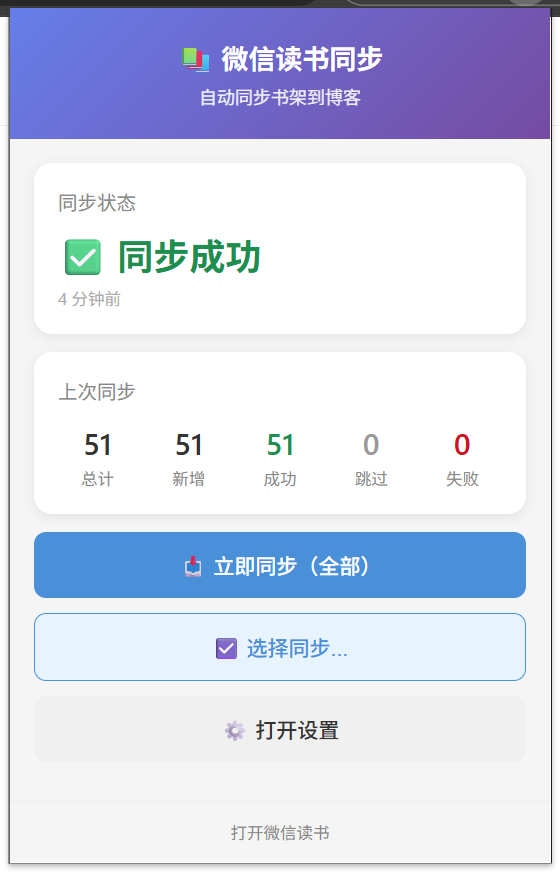
After the sync completes, you get a desktop notification showing the stats for this sync:

Summary

Through this project I built a complete “scrape – process – store” pipeline:

Technical highlights:

  • Best practices for Chrome Extension Manifest V3
  • A front-end/back-end separated architecture
  • An Aliyun OSS image-hosting solution
  • A concise, efficient backend implementation in Go

Extensibility:

  • It can easily be adapted to other reading platforms (like Douban Reading, Kindle, etc.)
  • It supports bulk import and incremental updates
  • Reading data visualization (statistical charts can be added later)

Reference links: “}} (Assistant: Now let’s modify the other few posts. First let’s look at the context of the WeRead post. (Assistant: Now let’s modify the WeRead post. I modified it long ago already, let me check whether there are other posts that need modifying. From the previous grep results, there are still a few posts that contain
文章作者:阿文
文章链接: https://www.awen.me/post/af39e5fb.html
版权声明:本博客所有文章除特别声明外,均采用 CC BY-NC-SA 4.0 许可协议。转载请注明来自 阿文的博客!
本文于 2026-03-01 10:00 发布,已超过半年(230天),请注意甄别内容是否已过期。

评论

0 条评论
😀😃😄 😁😅😂 🤣😊😇 🙂🙃😉 😌😍🥰 😘😗😙 😚😋😛 😝😜🤪 🤨🧐🤓 😎🥸🤩 🥳😏😒 😞😔😟 😕🙁☹️ 😣😖😫 😩🥺😢 😭😤😠 😡🤬🤯 😳🥵🥶 😱😨😰 😥😓🤗 🤔🤭🤫 🤥😶😐 😑😬🙄 😯😦😧 😮😲🥱 😴🤤😪 😵🤐🥴 🤢🤮🤧 😷🤒🤕 🤑🤠😈 👿👹👺 🤡💩👻 💀☠️👽 👾🤖🎃 😺😸😹 😻😼😽 🙀😿😾 👍👎👏 🙌👐🤲 🤝🤜🤛 ✌️🤞🤟 🤘👌🤏 👈👉👆 👇☝️✋ 🤚🖐️🖖 👋🤙💪 🦾🖕✍️ 🙏💅🤳 💯💢💥 💫💦💨 🕳️💣💬 👁️‍🗨️🗨️🗯️ 💭💤❤️ 🧡💛💚 💙💜🖤 🤍🤎💔 ❣️💕💞 💓💗💖 💘💝💟 ☮️✝️☪️ 🕉️☸️✡️ 🔯🕎☯️ ☦️🛐⛎ ♈♉♊ ♋♌♍ ♎♏♐ ♑♒♓ 🆔⚛️🉑 ☢️☣️📴 📳🈶🈚 🈸🈺🈷️ ✴️🆚💮 🉐㊙️㊗️ 🈴🈵🈹 🈲🅰️🅱️ 🆎🆑🅾️ 🆘❌⭕ 🛑⛔📛 🚫💯💢 ♨️🚷🚯 🚳🚱🔞 📵🚭❗ ❕❓❔ ‼️⁉️🔅 🔆〽️⚠️ 🚸🔱⚜️ 🔰♻️✅ 🈯💹❇️ ✳️❎🌐 💠Ⓜ️🌀 💤🏧🚾 ♿🅿️🈳 🈂🛂🛃 🛄🛅🛗 🚀🛸🚁 🚉🚆🚅 ✈️🛫🛬 🛩️💺🛰️
加载中...

留言反馈

😀😃😄 😁😅😂 🤣😊😇 🙂🙃😉 😌😍🥰 😘😗😙 😚😋😛 😝😜🤪 🤨🧐🤓 😎🥸🤩 🥳😏😒 😞😔😟 😕🙁☹️ 😣😖😫 😩🥺😢 😭😤😠 😡🤬🤯 😳🥵🥶 😱😨😰 😥😓🤗 🤔🤭🤫 🤥😶😐 😑😬🙄 😯😦😧 😮😲🥱 😴🤤😪 😵🤐🥴 🤢🤮🤧 😷🤒🤕 🤑🤠😈 👿👹👺 🤡💩👻 💀☠️👽 👾🤖🎃 😺😸😹 😻😼😽 🙀😿😾 👍👎👏 🙌👐🤲 🤝🤜🤛 ✌️🤞🤟 🤘👌🤏 👈👉👆 👇☝️✋ 🤚🖐️🖖 👋🤙💪 🦾🖕✍️ 🙏💅🤳 💯💢💥 💫💦💨 🕳️💣💬 👁️‍🗨️🗨️🗯️ 💭💤❤️ 🧡💛💚 💙💜🖤 🤍🤎💔 ❣️💕💞 💓💗💖 💘💝💟 ☮️✝️☪️ 🕉️☸️✡️ 🔯🕎☯️ ☦️🛐⛎ ♈♉♊ ♋♌♍ ♎♏♐ ♑♒♓ 🆔⚛️🉑 ☢️☣️📴 📳🈶🈚 🈸🈺🈷️ ✴️🆚💮 🉐㊙️㊗️ 🈴🈵🈹 🈲🅰️🅱️ 🆎🆑🅾️ 🆘❌⭕ 🛑⛔📛 🚫💯💢 ♨️🚷🚯 🚳🚱🔞 📵🚭❗ ❕❓❔ ‼️⁉️🔅 🔆〽️⚠️ 🚸🔱⚜️ 🔰♻️✅ 🈯💹❇️ ✳️❎🌐 💠Ⓜ️🌀 💤🏧🚾 ♿🅿️🈳 🈂🛂🛃 🛄🛅🛗 🚀🛸🚁 🚉🚆🚅 ✈️🛫🛬 🛩️💺🛰️