Why I Wanted to Do This
Lately I’ve increasingly felt that the biggest bottleneck for AI coding assistants like Codex isn’t intelligence — it’s the interaction context. When I’m sitting at my computer, using it to edit code is smooth; but when I’m away from the machine and suddenly want to check a log, fix a bug, or have someone take a look at a project, I have to remote back in first, and the experience feels badly fragmented.
Ideas often strike me while commuting, in meetings, or even before bed, things like:
- Why is that service failing to start again — check the logs for me;
- Is there anything wrong with this function’s refactoring plan;
- Hand it a long-running task before I sleep, and look at the result when I wake up.
Feishu’s mobile experience is great, and voice input is convenient. So I wanted to deploy something locally that turns Codex into a bot inside Feishu: I send a message from my phone, it edits code and runs commands directly on my computer, and sends the results back to me.
Choice of Tool: Why SunCodexClaw
At first I searched around, and the related projects fell into roughly two categories:
One category is general-purpose AI Agent chat shells, focused on multi-turn dialogue and memory; the other is execution-oriented bots that specifically hook Codex/Claude Code into Feishu.
I chose SunCodexClaw. What attracted me is that it doesn’t just do a layer of chat forwarding — it strings together Feishu messages, the Codex workspace, local files, cloud-doc progress, multi-account operation, and local-machine execution into a chain that actually gets things done. In short, after receiving a message in Feishu, it directly invokes my local codex exec to do the work, then sends the result back.
Compared with other options, it fits my needs better:
- It runs the local codex directly — it can read, write, and execute;
- It supports inbound and outbound images, files, and voice;
- Each bot can be bound to a different workspace;
- It can write long-task progress into Feishu cloud docs;
- It has local memory, so preferences carry across threads.
The Deployment Process
Environment check
I already had Node.js and the Codex CLI installed locally, so first I confirmed the versions:
|
After confirming everything was fine, I cloned the repo:
|
Here I hit a small pitfall: the ffmpeg-static install script downloads a precompiled binary with a default 30-second timeout, and my network didn’t finish the download before it was cut off. The fix was to lengthen the npm fetch timeout first:
|
After installing, two more packages had install scripts that needed explicit approval:
|
Configuring the Feishu self-built app
SunCodexClaw receives messages through a Feishu self-built app. I created an enterprise self-built app on the Feishu Open Platform, then did the following:
- Enabled the bot capability;
- Added
im.message.receive_v1under event subscriptions; - Enabled permissions for sending/receiving messages, reading group chats, uploading/downloading resources, reading/writing cloud docs, etc.;
- Created a version and published it.
The permission list looked roughly like this (it may vary slightly between tenants):
|
After getting the App ID and App Secret, I put them in a local config file first — never in the repo.
Configuration files
SunCodexClaw’s configuration comes in two layers:
config/secrets/local.yaml: for sensitive information;config/feishu/default.json: for runtime configuration.
The two layers are merged, with local.yaml taking higher priority. I wrote the app_id, app_secret, and codex-related settings into local.yaml:
|
For cwd I initially used /home/wenjun/Documents/code/my_blog, but later changed it to /home/wenjun/Documents/code, because I have several projects under that directory and the bot needs to decide which one to operate on based on the message.
Verification and startup
After configuring everything, I ran a dry-run first:
|
Seeing signals like app_id_found=true, app_secret_found=true, codex_found=true, and ws client ready meant things were basically working.
Then I started it:
|
To avoid starting it manually at every boot, I added a systemd user service:
|
I put the service file at ~/.config/systemd/user/suncodexclaw-feishu-default.service, then:
|
Now it starts automatically after boot and login, and restarts automatically if it crashes.
Take the Security Risks Seriously
I have to stress the permission issue here. To let the bot actually edit code and run commands, I configured:
|
This means instructions from Feishu execute directly with no confirmation. If the bot gets pulled into a public group, or the open_id whitelist is configured too loosely, the risk is substantial.
My approach:
- Only my own Feishu account can trigger it;
- Never add it to external groups;
- Run it on the local machine as an ordinary user — no root;
- Back up important projects first.
If you just want the AI to read code and give suggestions, you can change sandbox to workspace-write and approval_policy to suggest or always, so it asks for confirmation before every execution.
How I Actually Use It
In private chats I send messages directly; in groups I need to @the bot. Here are a few prompts I use often now:
|
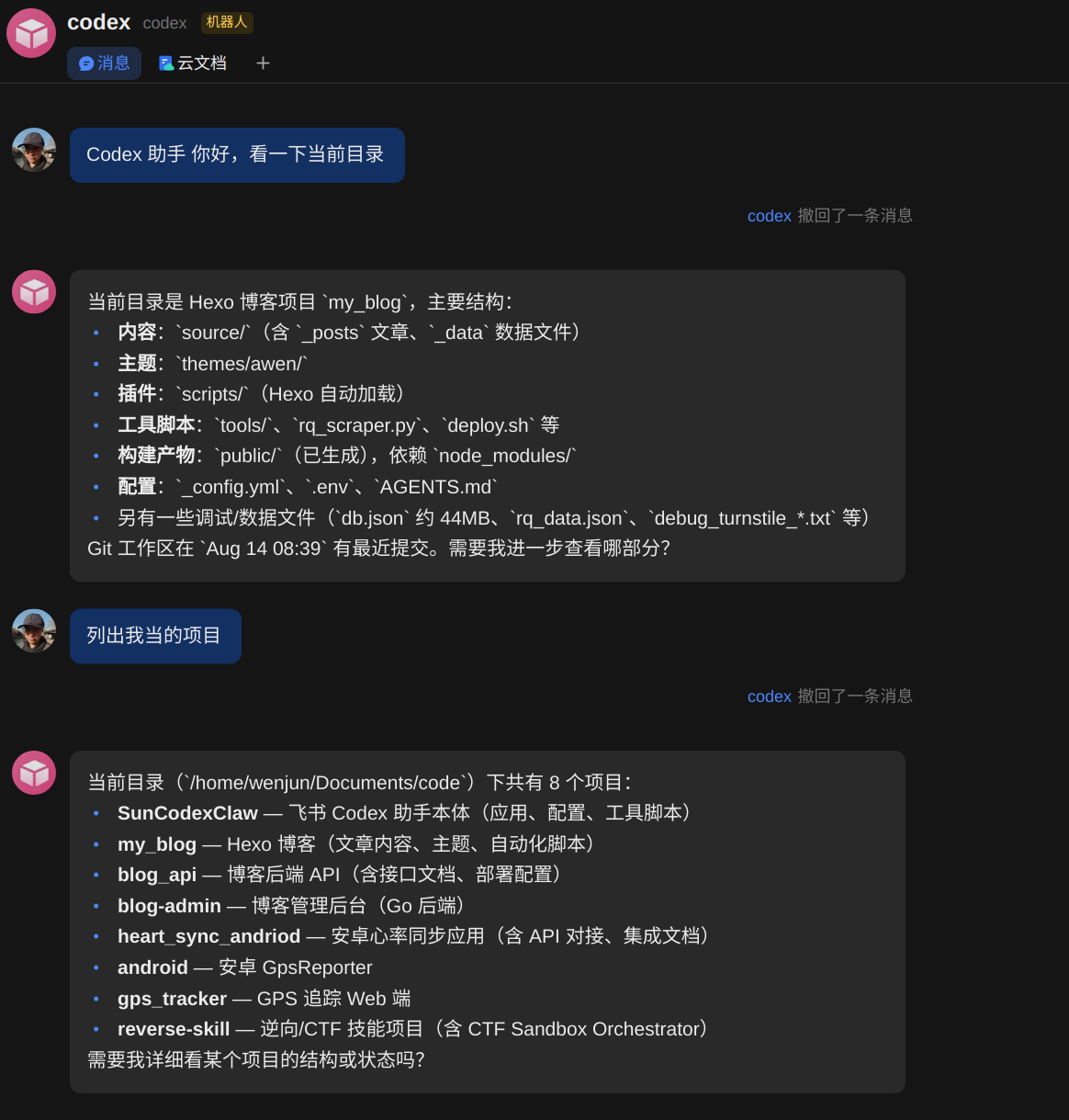
An actual conversation looks something like this:

For long tasks it first replies “Received, executing,” then writes the process into a Feishu cloud doc, and when done sends back the result together with the doc link. Files and images are uploaded automatically too.
Problems Encountered and Takeaways
The whole process wasn’t complicated, but a few details are easy to trip over:
- The
ffmpeg-staticdownload times out — you need to increase the npm fetch timeout and explicitly approve the install script; - The same Feishu app credentials can’t be used by two bots at once — they fight over the WebSocket connection — so I created a separate Feishu app for this deployment;
- Think carefully about the scope of
cwd: too small and it can only operate on one project; too large and relative paths are easy to get wrong; - Security boundaries must be considered separately — don’t hand out maximum permissions by default.
Overall the experience matched my expectations: I send one sentence from my phone, the local Codex starts working, and the results come straight back to Feishu. For scenarios where I want to boss the AI into tweaking code at any moment, this setup is far handier than a remote terminal.
评论
0 条评论