In the Agent era, the command-line tool (CLI) is shedding its skin from “a hand tool for engineers” into “the natural execution surface for AI Agents.” This post systematically sorts out why the Agent era actually needs CLIs even more, how to design Agent-friendly CLIs, and analyzes real cases including OpenCLI, CLI-Anything, DingTalk, Feishu, Google Workspace, and Stripe.
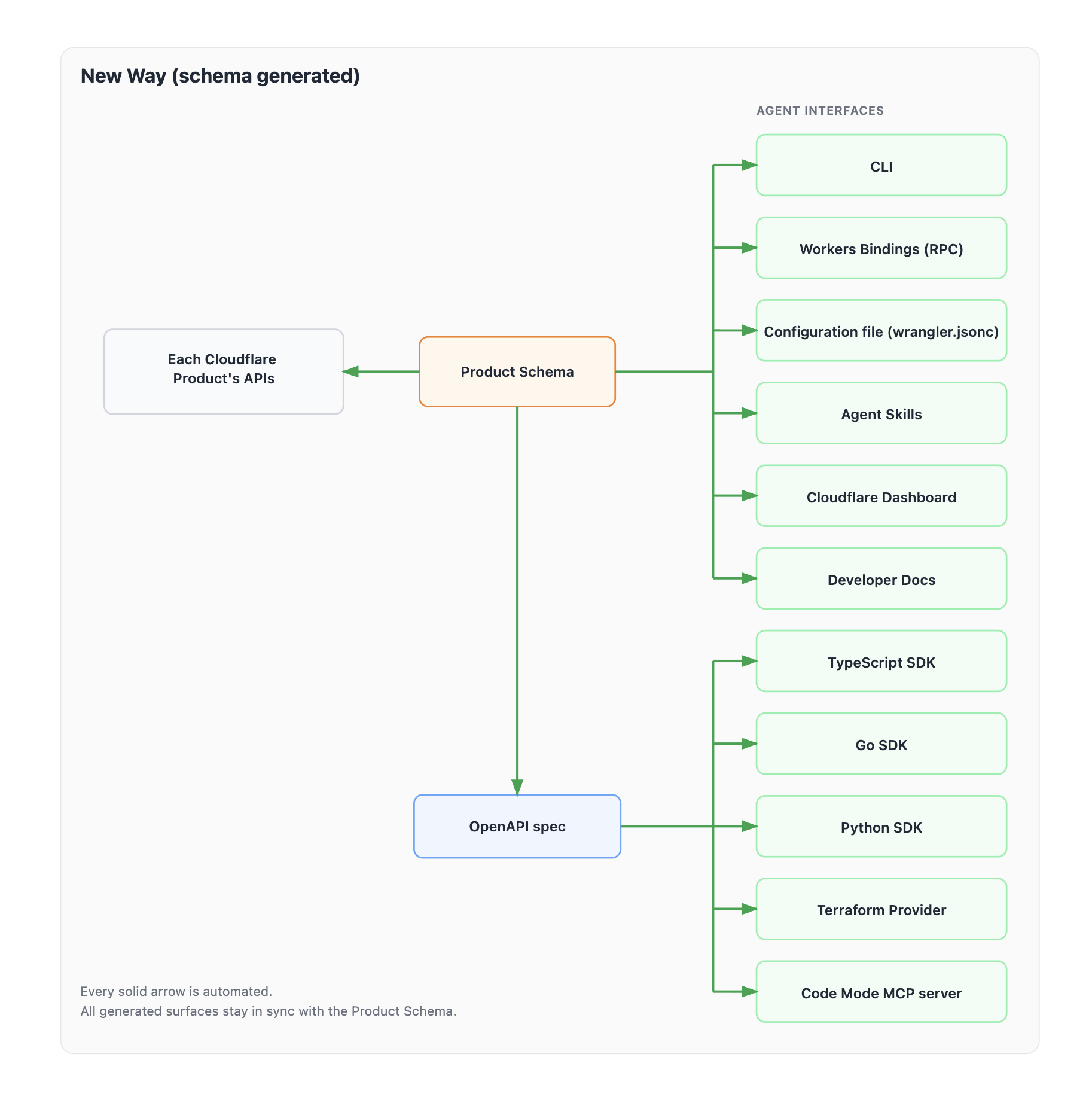
Reference source: Morsuo — Best Design Practices for Agent-Oriented Command-Line Tools (CLI)
Why the Agent Era Needs CLIs Even More
In the past a lot of people saw the CLI as “an old tool for engineers to type commands by hand.” In the Agent era, that judgment is exactly what has gone out of date. For an Agent driven by a large model, the CLI isn’t a backward interface — it’s the most natural kind of execution surface there is:
- It is text in, text out, which matches how an LLM works natively
- It usually ships with
--help,--version, exit codes, stdout/stderr, so it is self-describing - It composes easily and lends itself to being chained by shells, scripts, CI/CD, and sub-Agents
- It requires no extra protocol stack, so deployment and running costs are low
More importantly, an Agent won’t fill in the intent of a CLI the way a human mentally would — it needs explicit commands, clear parameters, and structured output.
The CLI Is the Ideal Interface for Agents
1. A CLI is more stable than GUI automation
GUI automation depends on screenshots, the DOM, pixels, focus state, and timing — fragile by nature. A CLI only requires explicit commands, parameters, and output; the state surface is smaller and reproducibility is stronger.
2. A CLI is closer to an Agent’s workflow than calling an API directly
APIs are important in themselves, of course, but an Agent isn’t necessarily good at assembling HTTP requests, authentication schemes, pagination logic, and error recovery from scratch. A well-designed CLI has already converged that complexity into command semantics that an Agent can discover and invoke directly.
3. A CLI is lighter than a lot of MCP wrappers
MCP is well suited to permission governance, tool registration, context injection, and multi-tool orchestration, but not everything is worth building as a standalone MCP Server. Many MCP implementations are essentially just another layer wrapped around an existing CLI. If the underlying CLI is already well designed, calling the CLI directly is often cheaper, faster, and more in keeping with the Unix philosophy of composition.
In MCP vs CLI benchmarks, Mario Zechner compared the MCP version and the CLI version of terminalcp, and the result is quite representative: both hit a 100% success rate, and the differences came more from the tool design itself than from the name of the protocol.
The protocol is just plumbing; interface quality is what decides whether an Agent succeeds.
When discussing CLI and MCP, a common mistake is treating them as mutually exclusive options. The more accurate understanding is:
- CLI is the execution interface — first turn the underlying capability into a stable, composable, scriptable CLI
- MCP is the tool distribution and governance interface
- API is the product capability interface
The benefits of doing it this way:
- Humans, scripts, and Agents can all reuse the same set of capabilities
- Docs, tests, error codes, and output contracts are maintained in only one place
- If some platform doesn’t support MCP, it still works as long as there’s a shell
7 Design Principles for an Agent-Friendly CLI
1. Non-interactive by default
No command that an Agent might automate should depend on an interactive prompt.
Recommended practice:
- Support
--yes,--force,--quiet,--no-input - Automatically disable interaction when a non-TTY is detected
- Every required item can be supplied via a flag, stdin, a config file, or an environment variable
The reason is straightforward: when an Agent starts a sub-Agent and the sub-Agent then invokes a CLI, there is usually no way to pass “please enter y/n” back up to the top-level user.
2. Emit structured results for machines
If a command returns data rather than pure display information, it should offer a stable machine-readable format.
Recommended practice:
- Provide
--json - Write successful results to stdout
- Write warnings, progress, and errors to stderr
- Keep output field naming stable — don’t call it
idtoday andresource_idtomorrow
This is the foundation of Agent friendliness; otherwise the model can only guess through brittle text parsing.
3. Errors should guide the next fix
An error message acceptable to a human is often not enough for an Agent.
Bad error:
|
Good error:
|
What an Agent needs isn’t only where it went wrong, but how to change it so it’s right next time.
4. Safe to retry, with clear boundaries
Agents retry, recover, and replay. For commands with side effects, CLI design has to account for this.
Recommended practice:
- Make create/update operations idempotent
- Provide
--dry-run - Require explicit confirmation for dangerous operations
- Return auditable identifiers, such as resource IDs, task IDs, and change summaries
5. The help system should support progressive discovery
An Agent usually won’t read the full documentation first. It explores like this:
|
So a good --help should contain at least:
- What the command does
- The shape of the usage
- Required parameters
- Common examples
6. Command structure should be consistent and composable
Agents rely heavily on pattern learning. If posts list uses --limit while comments list switches to --max-results, the model has to memorize one more exception.
Recommended practice:
- Reuse the same flag naming across related commands
- Support stdin / stdout piping
- Keep the subcommand hierarchy stable
7. Output should have boundaries and default to high signal
A human can scroll through 500 lines of logs. An Agent will dump all 500 lines into the context window in one go.
Recommended practice:
- Paginate / limit by default
- Support
--limit,--page,--since - When truncating, tell the user how to keep narrowing the scope
This isn’t about “pinching tokens” — it’s about letting the model put its attention on the information that actually matters.
From an Agent-Friendly CLI to Agent-Friendly Product Design
Push those 7 principles one step further and a bigger question surfaces: what an Agent actually consumes isn’t just some command, it’s the execution surface of the entire product.
In traditional software the main path is usually:
|
But in an Agent-native environment, the more common path starts to look like:
|
And if the product side also starts providing its own agent or a stronger tool layer, that path keeps evolving into:
|
This means a product team can’t just think about “exposing the capabilities.” It also has to think about something else: how to make it easier for the agent that calls you to succeed.
1. Don’t make the Agent guess — write the success conditions out explicitly
Human developers integrating an API are willing to dig through long docs, try a few times, and mentally fill in the rules. Agents usually don’t work that way. They’re more like:
- First look at
--help - Then look at the tool description
- Then read a short passage of the most relevant constraints
- Then immediately attempt to execute
So if your product has special format requirements, domain constraints, or object-model differences, the best move isn’t to bury that information deep in a docs site — it’s to hand it to the Agent proactively at call time.
2. The “help system” shouldn’t only answer how to call a command, but how to avoid mistakes
Many CLIs’ --help stops at “what the parameter is,” but what an Agent really needs is:
- What business semantics this parameter carries
- Which values are the commonly correct ones
- How to choose first when there’s ambiguity
- Which forms are syntactically legal but produce low-quality results
Therefore, in the Agent era the help system should upgrade from a “parameter manual” into a “manual for succeeding.”
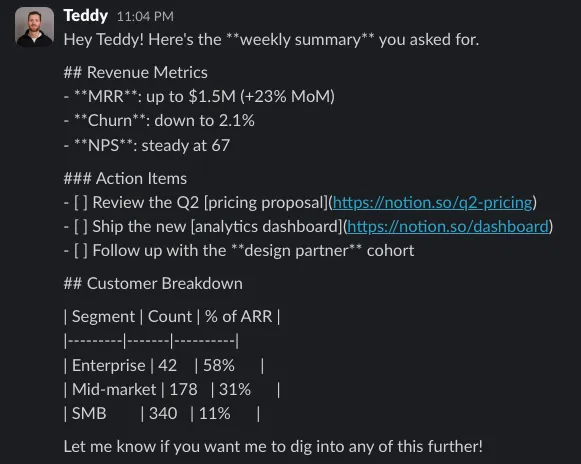
When a tool hasn’t spelled out its format rules explicitly, an Agent tends to output according to “general common sense,” and the result looks wrong in the human interface. The problem isn’t necessarily that the model isn’t strong enough — it’s that the interface didn’t put the rules up front.
Letting Tools Form Their Own Feedback Loop
Beyond “letting the Agent know how to succeed,” something else is equally important: letting the product team know why the Agent failed.
1. Add a rationale to every call
If a CLI or tool requires the caller to attach a rationale field explaining “why this call is being made,” the product team can reconstruct a lot of real task intent without reading the full conversation.
Over the long term these rationales become a very high-value product signal:
- Which needs show up over and over
- Which scenarios always require many detours
- Which tools nominally have users but are in fact only being endured
2. Give the Agent an outlet for “reporting when stuck”
Most tools today define only a success path and an error path, but for an Agent there should also be a third path: a blocked-feedback path.
An Agent should be able to proactively report when it runs into problems like these:
- I know the goal, but I’m missing the necessary context
- I tried several forms and none of them satisfied your rules
- This tool is missing a parameter it obviously should have
- I got the data, but I can’t infer the next step
This kind of feedback is more structured than an ordinary user’s bug report, because an Agent naturally describes what it wanted to do, what it tried, and where it got stuck.
3. Add dedicated context fields for key tools
Some context is very hard to reconstruct later if it isn’t carried explicitly at call time:
- Whether the current task is generating a weekly report or doing an incident retrospective
- Whether this is a summary for a customer or an internal working note
- Whether this query is for archiving or for subsequent automatic execution
Adding a small number of “scenario parameters” to key tools can greatly improve the efficiency of later analysis and iteration.
Designing the “Division of Context” Between Agent and Product
When an Agent calls your CLI, MCP, or API, the two sides’ context is actually asymmetric.
The calling Agent may know:
- What the user has been talking about recently
- The implicit background in the calendar, email, and chat history
- Where the current task sits in a larger workflow
The product’s own system knows better:
- The internal object model and the meaning of fields
- Permission boundaries and business rules
- Historical patterns, state machines, and default policies
A very common bad design is dumping all the internal complexity onto the caller as-is. A better approach is designing the interaction so that the caller supplies the context it knows and the system supplies the business judgment it’s good at.
For example, instead of requiring the Agent to pass a rigid internal field code directly, let it pass:
- Whether this is client entertainment or a team dinner
- Which meeting or project the expense corresponds to
- Whether it belongs to a personal itinerary
Then let the system complete the final mapping according to its own rules.
A good execution interface isn’t just about few parameters and stable output — it also puts the parameters at the right level of abstraction.
CLI-Anything: Turning Any Software Into an Agent-Native CLI
CLI-Anything is one of the most representative projects recently. Its goal is to solve a more fundamental problem: huge amounts of software in the real world only have a GUI, a plugin interface, or an internal code structure, with no command-line surface genuinely suitable for Agent consumption.
Workflow
CLI-Anything turns “generate an Agent-friendly CLI for existing software” into a process and an engineering discipline, summarized as a fully automated 7-stage pipeline:
- Analyze: scan the target codebase, identify the capabilities that can be exposed and the internal call paths
- Design: plan command groups, the state model, and input/output conventions
- Implement: generate a CLI with a REPL,
--help, and--json - Plan tests: generate a test plan
- Write tests: fill in unit tests and end-to-end tests
- Document: generate command documentation and explanations
- Release: package the result into an installable CLI
Its conversion path is not record mouse and keyboard → replay, but map onto capabilities the software already has internally → generate stable CLI commands. That’s also why it suits Agents better than RPA does.
Typical cases
- LibreOffice: an Agent can actually carry out document creation, PDF export, and similar actions
- Blender: build workflows around scenes, rendering, exporting, and batch parameter changes
- GIMP / Audacity: batch cropping, format conversion, filter application, audio noise reduction
OpenCLI: A Unified CLI Hub
OpenCLI solves a different class of problem: a system already has plenty of tools and websites, but the Agent lacks a unified, stable, low-cost entry point.
Core capabilities
- Built-in adapters: converge website actions into deterministic commands (e.g.
opencli hackernews top --limit 5) - Browser Bridge: reuse the browser’s existing login state, with a clear security boundary
- Low-level browser control: open, click, type, screenshot, eval, and so on
- Reverse-generating adapters: distill browser behavior into new adapters
OpenCLI vs CLI-Anything
| Dimension | CLI-Anything | OpenCLI |
|---|---|---|
| Primary target | Software with a codebase | Websites, browsers, Electron, local CLIs |
| Core action | Generate a new formal CLI | Unify scheduling and adapt existing tools/websites |
| Way of working | Code analysis + a 7-stage pipeline | Adapters + browser bridging + command discovery |
| Best-fit scenario | You need to accumulate a formal interface over the long term | You need to quickly take over an existing tool ecosystem |
Official CLI Tools Worth Watching
GitHub CLI
Clear command hierarchy (gh pr, gh issue, gh repo), a complete help system, and many commands support --json — a classic case of official product capabilities already well turned into commands.
Google Cloud CLI
Supports scripting and automation, --quiet can turn off interaction, stdout/stderr are separated, and --format supports json/csv/yaml/value — pretty much the model answer for an Agent-friendly CLI.
Stripe CLI
Wraps authentication, request shapes, and common development actions into stable commands; local webhook forwarding is very well suited to development automation.
Cloudflare Wrangler
A classic “platform-type CLI”: manages Worker projects, integrates deployment with development debugging, and suits scripts and CI.
Feishu CLI
Feishu’s officially open-sourced command-line tool, emphasized as designed specifically for the way AI Agents use it. It covers messaging, calendar, cloud docs, multi-dimensional tables (bitable), email, knowledge base, contacts, and more.
WeCom wecom-cli
“The WeCom open-platform command-line tool, letting both humans and AI Agents operate WeCom from the terminal.” It covers contacts, to-dos, meetings, messages, schedules, docs, and smart sheets.
Summary: A Three-Layer Checklist
1. Discovery layer
The Agent must know what the tool can do: --help, list, a clear command hierarchy, and inferable naming patterns.
2. Execution layer
The Agent must be able to execute stably: non-interactive by default, idempotent or auditable side effects, standard exit codes, stdout/stderr separation.
3. Parsing layer
The Agent must get consumable results: --json, stable fields, high-signal output by default, and support for pagination / filtering / limit.
The CLI Will Become Agent Infrastructure
The CLI is turning from an interface for humans to operate by hand into infrastructure for Agents to consume stably.
- CLI-Anything is filling in infrastructure for software that has no CLI
- OpenCLI is unifying infrastructure for scattered websites and tools
- gh, gcloud, stripe, wrangler, Feishu CLI, wecom-cli show that more and more products are proactively treating the CLI as a formal product surface
If you’re designing an AI-facing product or internal tool today, at a minimum check:
- Does this capability have a stable, discoverable, scriptable CLI surface?
- Does it support
--help,--json, non-interactive execution, and recoverable errors? - Does it put the key format specifications, domain constraints, and success conditions in front of the Agent rather than letting the model guess?
- Can it collect enough rationale, failure feedback, and scenario context to help the team keep improving the tool?
- If Claude Code, Codex, Cursor, or Copilot CLI were hooked up tomorrow, could it be consumed directly?
What’s really missing usually isn’t a smarter Agent — it’s a more respectable execution surface.
References
- Morsuo — Best Design Practices for Agent-Oriented Command-Line Tools (CLI)
- Trevin Chow’s summary of Agent-friendly CLIs
- MCP vs CLI: Benchmarking Tools for Coding Agents
- OpenCLI repository
- CLI-Anything repository
- Feishu CLI introduction
- Stripe CLI docs
- Cloudflare Wrangler docs
- GitHub CLI docs
- WeCom wecom-cli
评论
0 条评论