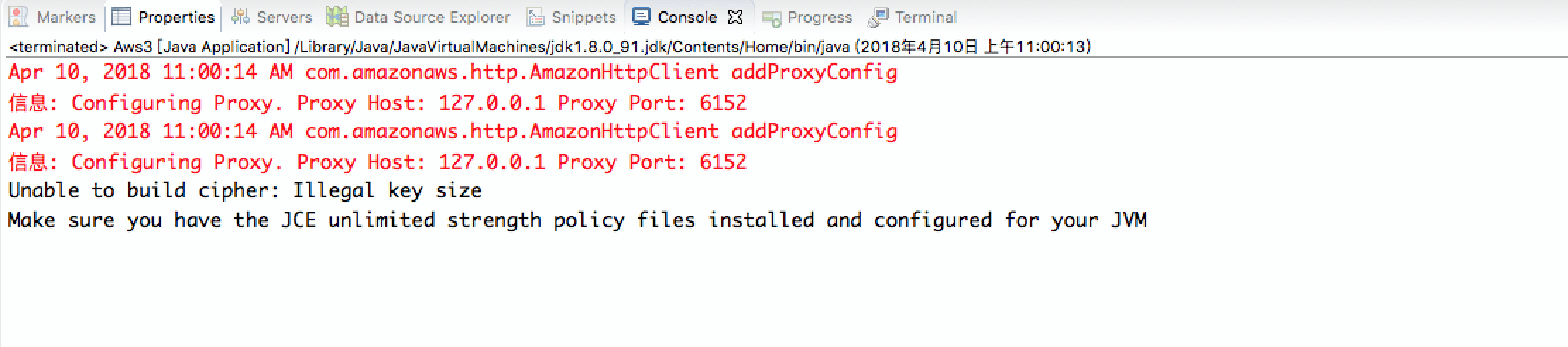
使用 RSA 加密上传文件到网易云存储,发现报错
Make sure you have the JCE unlimited strength policy files installed and configured for your JVM
原因是缺少 Java 加密扩展 JCE
解决办法 我的环境是 Java 8 ,可以去这里下载
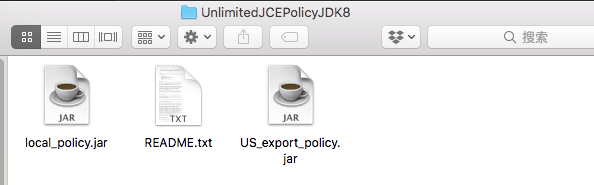
下载后得到2个 jar 文件
我的环境是 mac 将其拷贝到
/Library/ Java/JavaVirtualMachines/ jdk1.8.0 _91.jdk/Contents/ Home/jre/ lib/security
再次运行程序即可。
网易云 AWS S3 RSA 加密方式上传文件代码 package awsnos.awsnos;import java.io.File;import java.io.FileInputStream;import java.io.FileOutputStream;import java.io.IOException;import java.security.KeyFactory;import java.security.KeyPair;import java.security.KeyPairGenerator;import java.security.NoSuchAlgorithmException;import java.security.PrivateKey;import java.security.PublicKey;import java.security.SecureRandom;import java.security.spec.InvalidKeySpecException;import java.security.spec.PKCS8EncodedKeySpec;import java.security.spec.X509EncodedKeySpec;import javax.crypto.KeyGenerator;import javax.crypto.SecretKey;import javax.crypto.spec.SecretKeySpec;import com.amazonaws.ClientConfiguration;import com.amazonaws.Protocol;import com.amazonaws.auth.AWSStaticCredentialsProvider;import com.amazonaws.auth.BasicAWSCredentials;import com.amazonaws.client.builder.AwsClientBuilder;import com.amazonaws.services.s3.AmazonS3Encryption;import com.amazonaws.services.s3.AmazonS3EncryptionClientBuilder;import com.amazonaws.services.s3.model.CryptoConfiguration;import com.amazonaws.services.s3.model.CryptoMode;import com.amazonaws.services.s3.model.CryptoStorageMode;import com.amazonaws.services.s3.model.EncryptionMaterials;import com.amazonaws.services.s3.model.EncryptionMaterialsProvider;import com.amazonaws.services.s3.model.StaticEncryptionMaterialsProvider;public class Aws3 {public static KeyPair loadKeyPairRSA (String path, String algorithm) throws IOException, NoSuchAlgorithmException, InvalidKeySpecException {File filePublicKey = new File (path + "/public.key" );FileInputStream fis = new FileInputStream (filePublicKey);byte [] encodedPublicKey = new byte [(int ) filePublicKey.length()];File filePrivateKey = new File (path + "/private.key" );new FileInputStream (filePrivateKey);byte [] encodedPrivateKey = new byte [(int ) filePrivateKey.length()];KeyFactory keyFactory = KeyFactory.getInstance(algorithm);X509EncodedKeySpec publicKeySpec = new X509EncodedKeySpec (encodedPublicKey);PublicKey publicKey = keyFactory.generatePublic(publicKeySpec);PKCS8EncodedKeySpec privateKeySpec = new PKCS8EncodedKeySpec (encodedPrivateKey);PrivateKey privateKey = keyFactory.generatePrivate(privateKeySpec);return new KeyPair (publicKey, privateKey);public static SecretKeySpec loadKeyPairAES (String path, String algorithm) throws IOException {File keyFile = new File (path);FileInputStream keyfis = new FileInputStream (keyFile);byte [] encodedPrivateKey = new byte [(int ) keyFile.length()];return new SecretKeySpec (encodedPrivateKey, algorithm);public static KeyPair genKeyPair (String algorithm, int bitLength) throws NoSuchAlgorithmException {KeyPairGenerator keyGenerator = KeyPairGenerator.getInstance(algorithm);SecureRandom srand = new SecureRandom ();return keyGenerator.generateKeyPair();public static SecretKey generateCMasterKey () throws IOException, InvalidKeySpecException, NoSuchAlgorithmException {KeyGenerator symKeyGenerator = null ;try {"AES" );catch (NoSuchAlgorithmException e) {256 );return symKeyGenerator.generateKey();public static void saveKeyPair (String dir, KeyPair keyPair) throws IOException {PrivateKey privateKey = keyPair.getPrivate();PublicKey publicKey = keyPair.getPublic();X509EncodedKeySpec x509EncodedKeySpec = new X509EncodedKeySpec (publicKey.getEncoded());FileOutputStream fos = new FileOutputStream (dir + "/public.key" );PKCS8EncodedKeySpec pkcs8EncodedKeySpec = new PKCS8EncodedKeySpec (privateKey.getEncoded());new FileOutputStream (dir + "/private.key" );public static void saveSymmetricKey (String path, SecretKey secretKey) throws IOException {X509EncodedKeySpec x509EncodedKeySpec = new X509EncodedKeySpec (secretKey.getEncoded());FileOutputStream keyfos = new FileOutputStream (path);public static void main (String[] args) throws NoSuchAlgorithmException {String accessKey = "" ;String secretKey = "" ;String bucketName = "cloud201411" ;String keyDir = "/Users/wenjun/Downloads/rsa" ;KeyPair keyPair = null ;try {"RSA" );catch (InvalidKeySpecException e) {catch (IOException e) {EncryptionMaterials encryptionMaterials = new EncryptionMaterials (keyPair);ClientConfiguration configuration = new ClientConfiguration ();CryptoConfiguration cryptoConfiguration = new CryptoConfiguration ();EncryptionMaterialsProvider encryptionMaterialsProvider = new StaticEncryptionMaterialsProvider (ClientConfiguration clientConfiguration = new ClientConfiguration ();EndpointConfiguration endpointConfiguration = new AwsClientBuilder .EndpointConfiguration("nos-eastchina1.126.net" , "us-east-1" );AmazonS3Encryption encryptionClient = AmazonS3EncryptionClientBuilder.standard()new AWSStaticCredentialsProvider (new BasicAWSCredentials (accessKey, secretKey)))String filePath = "tomcat.zip" ;try {"tomcat11111.zip" , new File (filePath));catch (Exception e){
加密后看到存储有2个文件
一个是 tomcat.zip.instruction,一个是 tomcat.zip
tomcat.zip.instruction 记录着加密文件的元信息
x -amz-tag-len":"128" ,"x-amz-iv" :"glBQ2qlgTn+8tJkG" ,"x-amz-wrap-alg" :"RSA/ECB/OAEPWithSHA-256AndMGF1Padding" ,"x-amz-key-v2" :"G/ZrpexIpCaRBHNaU/mBTzAVY61Dm8OlQbvV4EJea2+o4mFcZn2FZ6KXVUb3/qzaYlcol6+nc9gum9J+pNZW1x2tG5RoPJ8e743IOJ9GD7zO5evpUzvk658w4iWbLuaCxTayzha/7VDIBwRiVGClseytCJ2WusadSmFHaIRike4=" ,"x-amz-cek-alg" :"AES/GCM/NoPadding" ,"x-amz-matdesc" :"{}" }
AES 的加密方式请查看这里


评论
0 条评论