如果商家拥有自己的ERP系统或会员系统,希望与有赞云的商城进行打通,那么可以通过使用自用型容器+Mysql 实现将会员的积分信息持久化到独立的数据库中去,有赞云提供了一整套的积分扩展点,包括增加、查询、扣减、消耗积分等扩展点,具体扩展点的用法可以参考文档https://doc.youzanyun.com/doc#/content/EXT/0-3
本文主要针对如何使用积分扩展点以及如何实现与有赞云独立的数据库进行整合进行简单的介绍,本案例中用到的数据库仅为测试使用,且只是为了演示如何使用,不对具体的业务逻辑做具体的实现
操作步骤
1.首先,打开clone 下来的工程,根据如图所示的youzanyun-demo-dal位置添加对应的实体类、Mapper、Mapper.xml文件
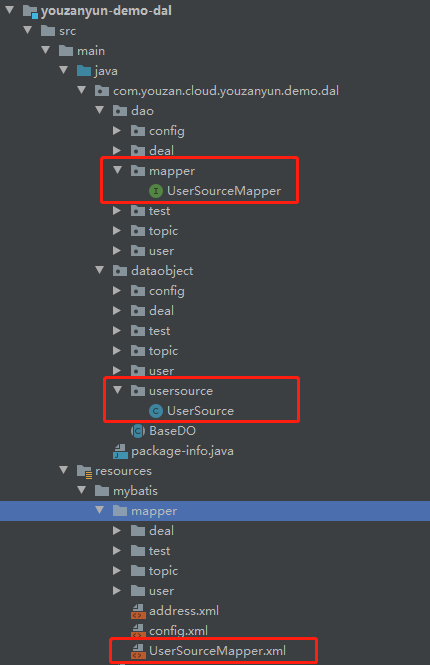
我这里简单贴下我的代码
对应的mapper UserSourceMapper
@Mapper
public interface UserSourceMapper {
    int updateUserSource(UserSource userSource);
}
|
dataobject 中的usersource 下的UserSource
public class UserSource {
private String accountId;
private String accountType;
private Integer amount;
private String description;
private Integer eventType;
private String bizVlue;
private String operatorName;
private Map<String,Object> extraInfo;
|
reources 下的mapper 如下
<?xml version="1.0" encoding="UTF-8" ?>
<!DOCTYPE mapper
        PUBLIC "-//mybatis.org//DTD Config 3.0//EN"
        "http://mybatis.org/dtd/mybatis-3-mapper.dtd">
<mapper namespace="com.youzan.cloud.youzanyun.demo.dal.dao.mapper.UserSourceMapper">
    <update id="updateUserSource" parameterType="com.youzan.cloud.youzanyun.demo.dal.dataobject.usersource.UserSource">
        UPDATE user_source set amount=#{amount},description=#{description},
        account_type=#{accountType},biz_vlue=#{bizVlue},
        operator_name=#{operatorName},event_type=#{eventType} WHERE account_id=#{accountId}
    </update>
</mapper>
|
里面对应的数据库表,会在创建数据库时说明,接下来,我们在有赞云控制台的应用管理-配置管理-应用变量中新增如下配置
| 键 |
值 |
说明 |
| mybatis.mapperLocations |
classpath:mybatis/mapper/*.xml |
mapper文件路径 |
| mybatis.typeAliasesPackage |
com.youzan.cloud.youzanyun.demo.dal.dao |
dao包路径 |
| mybatis.typeAliasesPackage |
com.youzan.cloud.youzanyun.demo.dal.dataobject |
实体类路径 |
| druid.datasource.url |
jdbc:mysql://10.60.164.192:3306/test?characterEncoding=utf-8 |
数据连接地址 |
| druid.datasource.password |
password |
密码 |
| druid.datasource.username |
root |
用户名 |
| druid.datasource.driverClassName |
com.mysql.jdbc.Driver |
驱动 |

然后我们返回工程,我们在如下位置新建一个 IncreasePointsExtPointDemoImpl 积分扩展点实现类,当然你放在自己建的目录中也可以
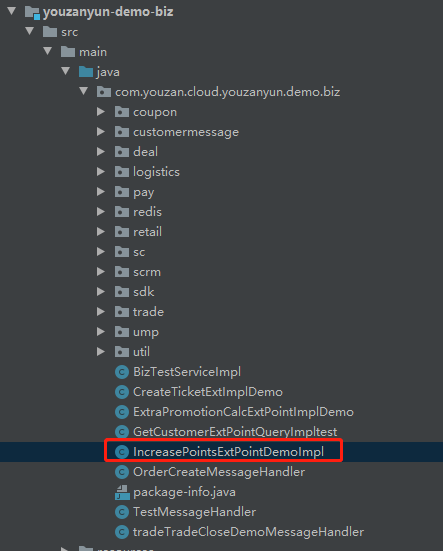
代码如下
@Slf4j
@ExtensionService("increasePointsExtPointDemo")
public class IncreasePointsExtPointDemoImpl implements IncreasePointsExtPoint {
    @Autowired
    private UserSourceMapper userSourceMapper;
    @Override
    public OutParam<Result> invoke(ExtPointsIncreaseDTO extPointsIncreaseDTO) {
        log.info("【北洛-执行扩展点】-增加用户积分 {}",JSON.toJSONString(extPointsIncreaseDTO));
        try {
            UserSource userSource = new UserSource();
            userSource.setAccountId(extPointsIncreaseDTO.getExtCustomerInfoDTO().getAccountId());
            userSource.setAccountType(extPointsIncreaseDTO.getExtCustomerInfoDTO().getAccountType());
            userSource.setAmount(extPointsIncreaseDTO.getAmount());
            userSource.setBizVlue(extPointsIncreaseDTO.getBizValue());
            userSource.setDescription(extPointsIncreaseDTO.getDescription());
            userSource.setEventType(extPointsIncreaseDTO.getEventType());
            userSource.setExtraInfo(extPointsIncreaseDTO.getExtraInfo());
            userSource.setOperatorName(extPointsIncreaseDTO.getOperatorName());
            log.info(userSource.toString());
            userSourceMapper.updateUserSource(userSource);
            return OutParamUtil.successResult(increasePoints(extPointsIncreaseDTO));
        } catch (Exception e) {
            log.error("增加用户积分异常 {}", e);
            return OutParamUtil.failResult("增加用户积分异常:" + e, new Result());
        }
    }

    private Result increasePoints(ExtPointsIncreaseDTO extPointsIncreaseDTO) throws SDKException {
        Long userId = Long.valueOf(extPointsIncreaseDTO.getExtCustomerInfoDTO().getAccountId());
        Result result = new Result();
        result.setData(true);
        return result;
    }
}
|
接下来,我们需要去数据库配置数据库,在应用管理中的组件管理,新增一个mysql

然后点管理,可以看到你的数据库信息,包括IP 端口 用户名和密码
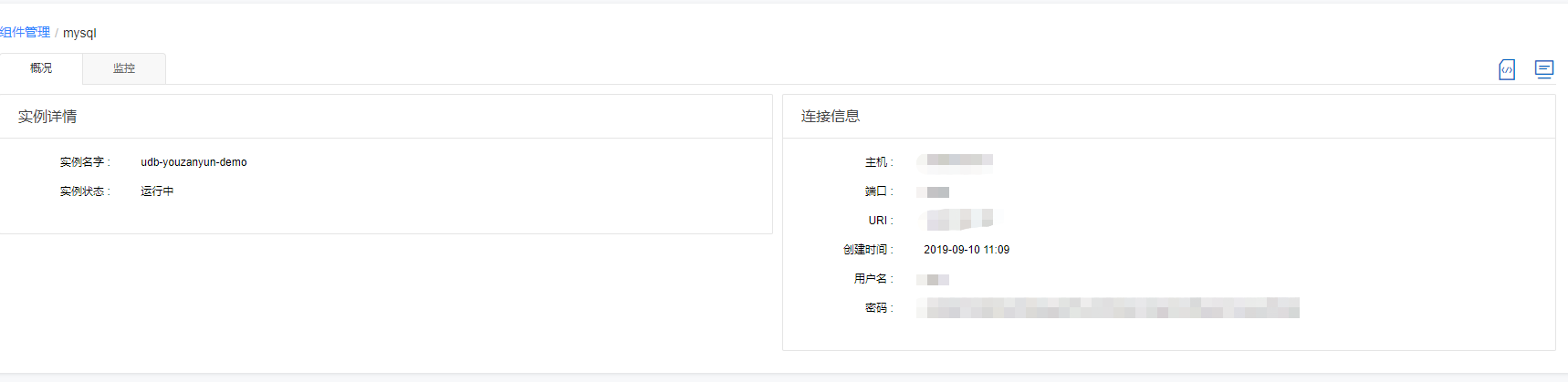
点击管理控制台,登录phpmyadmin
比如我这里创建的数据库
CREATE TABLE `user_source` (
  `id` bigint(20) unsigned NOT NULL AUTO_INCREMENT COMMENT '主键',
  `account_id` varchar(128) DEFAULT NULL,
  `description` varchar(128) DEFAULT NULL,
  `account_type` varchar(64) DEFAULT NULL,
  `amount` int(11) NOT NULL,
  `event_type` int(11) DEFAULT NULL,
  `biz_vlue` int(11) DEFAULT NULL,
  `operator_name` varchar(64) NOT NULL,
  `extra_info` varchar(128) DEFAULT NULL,
  PRIMARY KEY (`id`)
) ENGINE=InnoDB AUTO_INCREMENT=2 DEFAULT CHARSET=utf8mb4
|
然后在里面插入一条数据
INSERT INTO user_source (account_id, account_type, amount, description, event_type , biz_vlue, operator_name, extra_info) VALUES ('17563168', 'YouZanAccount', 10, '1', 100 , 'null', '13148484985', 'null')
|
我们将编写好的代码push 到服务器,然后在业务配置-配置管理中的会员中心后端扩展中开启对应的扩展点。因为是测试,不需要配置业务标识
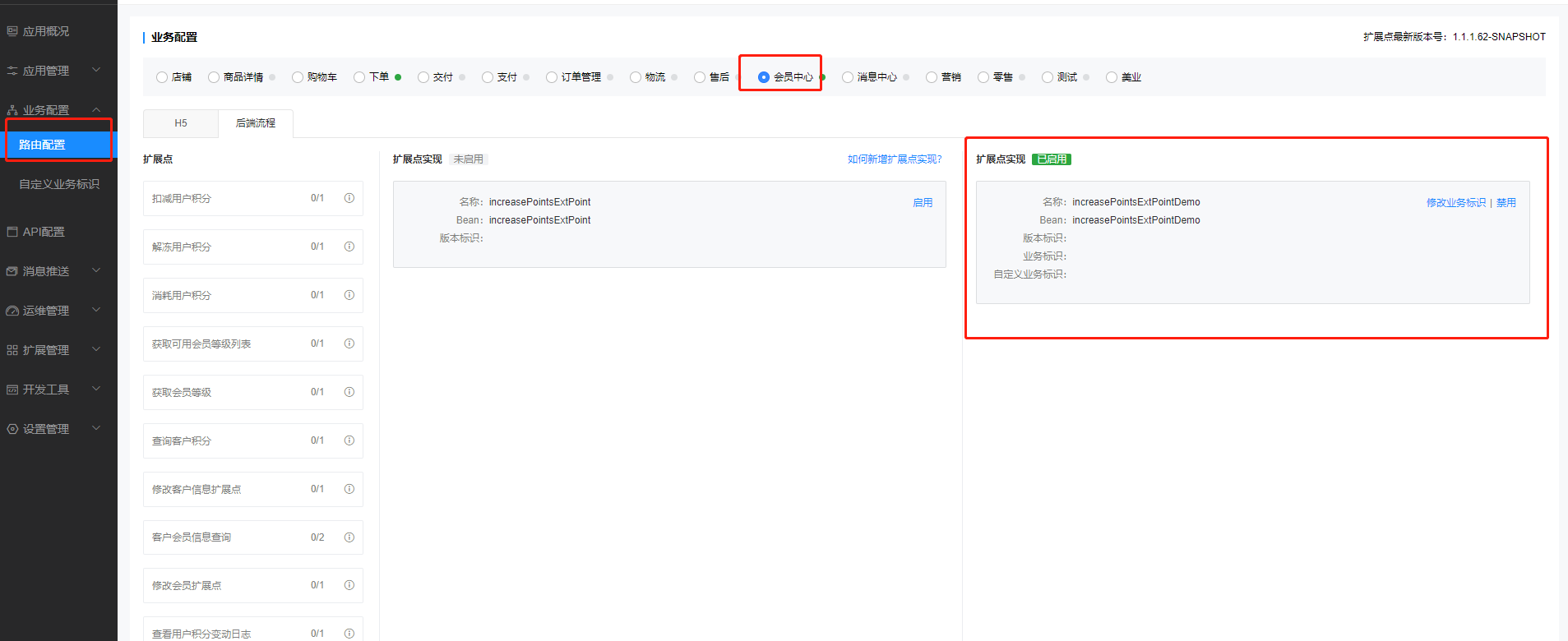
然后在控制台点击发布,在应用管理-发布管理,点击发布,选择服务端发布

发布成功后,我们在对应的微商城中的客户管理里面给上面插入的客户给积分(注意,这个用户的数据我已经提前插入到数据库中,不然是无法更新的

如果发现没有成功,建议在扩展点打一些日志,然后在运维管理-日志管理中查看对应的日志信息,如下所示可以看到已经成功进入扩展点并打了日志
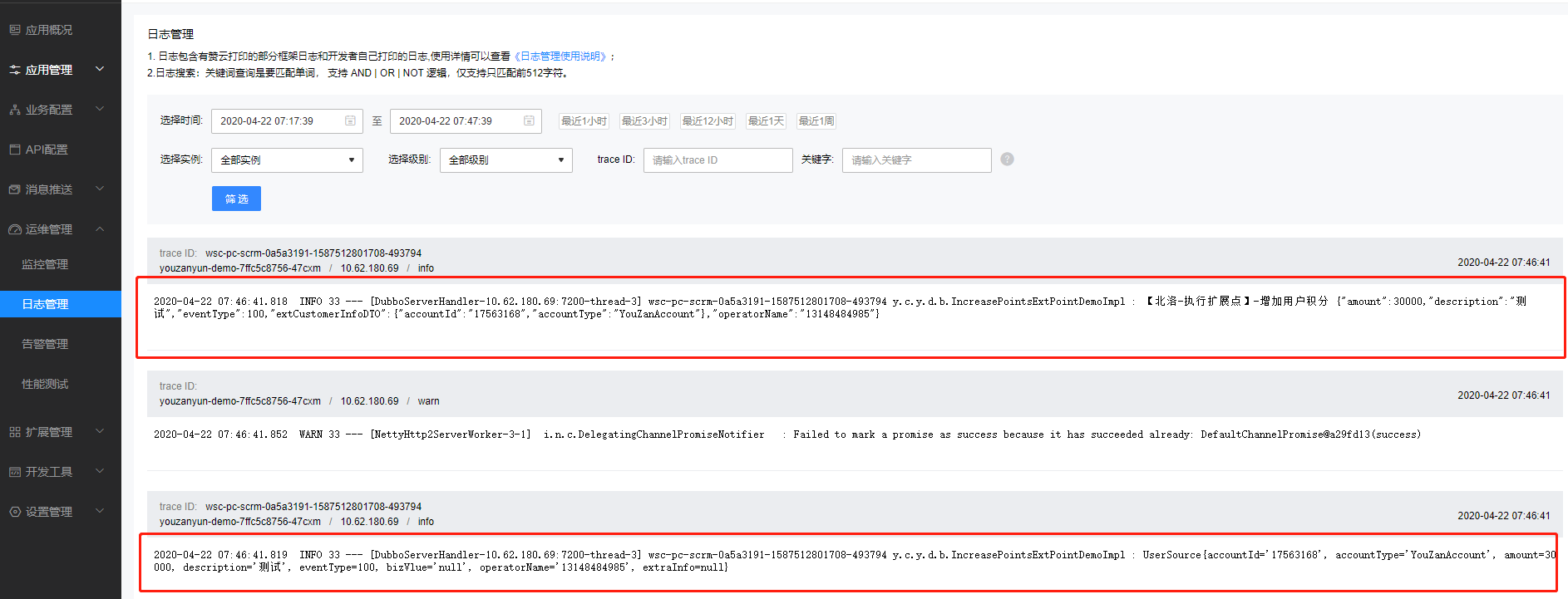
我们可以在数据库中执行
SELECT * FROM user_source;
|
可以看到积分已经变成3000了,表示整合mybatis 对数据库进行更新成功了
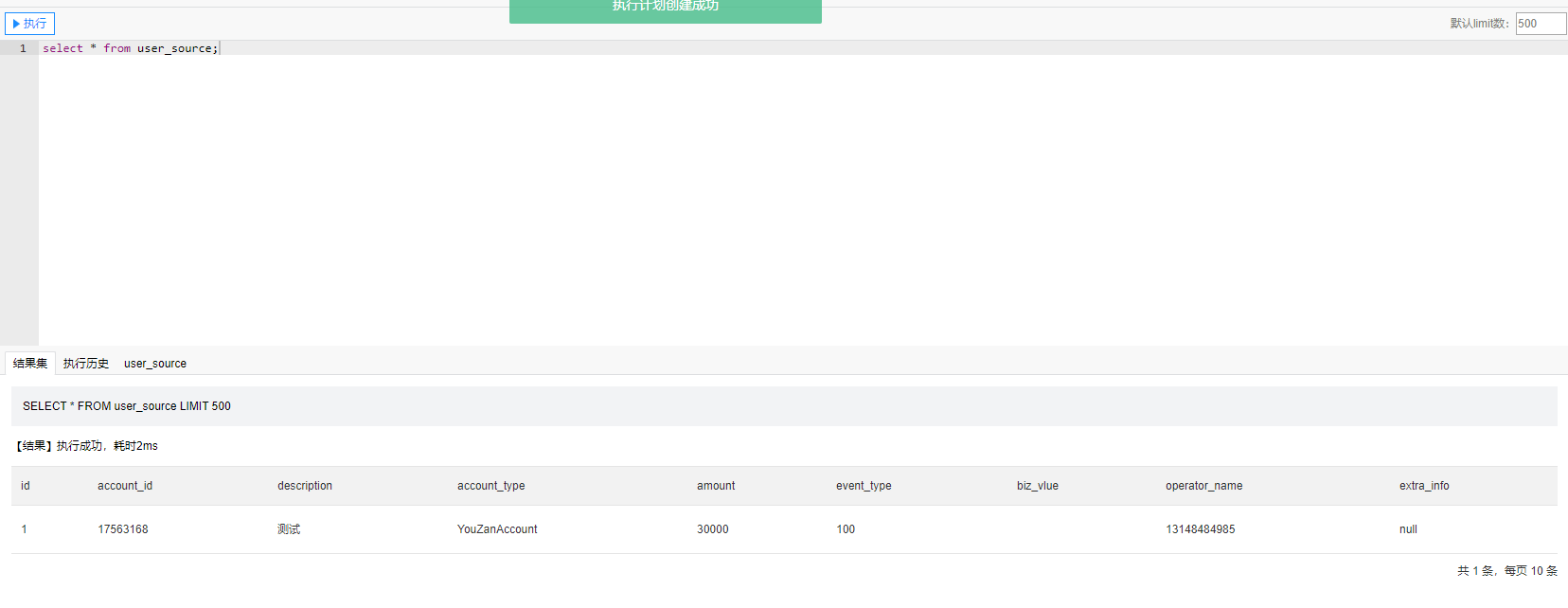
那么我们知道怎么去实现增加积分,我们也可以照葫芦画瓢的去实现查询和消耗等扩展点
相关问题
1.报错
2020-04-22 07:25:14.032 ERROR 31 --- [DubboServerHandler-10.62.180.70:7200-thread-2] wsc-pc-scrm-0a5b1aad-1587511513395-472276 y.c.y.d.b.IncreasePointsExtPointDemoImpl : 增加用户积分异常 {}

org.apache.ibatis.binding.BindingException: Invalid bound statement (not found): com.youzan.cloud.youzanyun.demo.dal.dao.mapper.UserSourceMapper.updateUserSource
|
解决,确认你的mybatis.mapperLocations 对应的路径是否正确
评论
0 条评论