Preface
After so many years of blogging, I’ve accumulated nearly 800 posts covering frontend, backend, DevOps, automation, AI, and many other fields. But the problem is—even I often can’t find things I’ve written before. Every time I want to look up the implementation approach for some technical point, I have to dig through directories and search keywords, which is extremely inefficient.
RAG (Retrieval-Augmented Generation) has been all the rage lately, and I thought—could I turn my own blog into a dedicated knowledge-base Q&A system? No sooner said than done. I spent an afternoon building a complete solution based on LangChain + Milvus + Alibaba Cloud Bailian, and the results were unexpectedly good.
Technology Choices
| Component | Choice | Notes |
|---|---|---|
| Vector database | Milvus 2.6 | High performance, supports distribution, deployed on the LAN via K8s |
| Embedding | Alibaba Cloud Bailian text-embedding-v3 |
1024 dimensions, excellent Chinese performance |
| LLM | Alibaba Cloud Bailian qwen-turbo |
Streaming output, fast response |
| Framework | LangChain | Handles document splitting, vector retrieval, and prompt engineering |
| Backend | FastAPI | Lightweight and efficient, with native SSE streaming support |
| Frontend | Plain HTML/CSS/JS | In the clean style of Zhihu Direct Answer |
Overall Architecture
|
Core Implementation
1. Importing Blog Documents into Milvus
First I needed to clean, split, and vectorize the blog’s Markdown files, then store them in Milvus.
|
2. Two-Stage Retrieval + Rerank
Direct top-5 vector retrieval might not be precise enough, so I switched to a coarse-rank then fine-rank two-stage strategy:
- Coarse rank: Recall 20 candidate documents from Milvus (COSINE similarity ≥ 0.45)
- Fine rank: Re-rank the candidates with Alibaba Cloud Bailian’s
gte-rerankmodel, taking the top 5
|
After reranking, answer quality improved noticeably—especially for fuzzy queries, it can bring the truly relevant documents to the front.
3. Strict Prompt Engineering
This is the soul of the whole system—it must be restricted to answering only questions relevant to the knowledge base, to prevent LLM hallucination.
|
4. Multi-Turn Dialogue and Session Memory
It supports multi-turn follow-ups. Once the session history exceeds 10 turns, it’s automatically compressed into a summary to avoid overly long context burning tokens.
|
5. FastAPI Streaming Interface
SSE (Server-Sent Events) is used to achieve a typewriter effect, making the experience more natural.
|
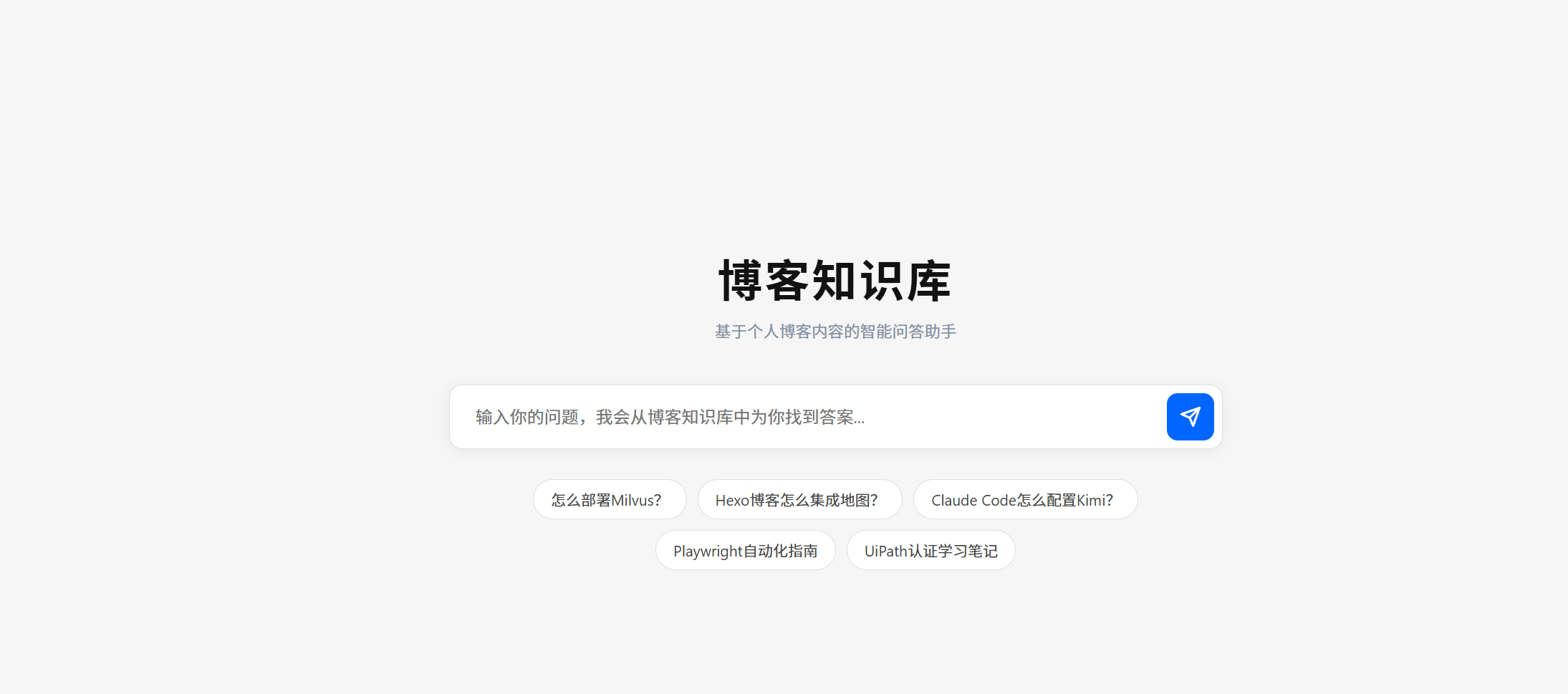
6. Frontend Design
I referenced the clean style of Zhihu Direct Answer, implemented in plain HTML/CSS/JS with no framework dependencies:
- Homepage: Large title + rounded search box + recommended question tags
- Chat page: Collapsible history sidebar on the left + message area on the right
- Dark/light theme toggle: One-click switch in the top right, with state saved in
localStorage - Markdown rendering: Integrated
marked.js, supporting code blocks, tables, lists, bold, etc. - Message area scrolling:
chat-messageshas a fixed height and scrolls independently when content overflows, with the input box always pinned to the bottom
7. Self-Built Monitoring Dashboard
Not wanting to depend on third-party monitoring platforms like Langfuse, I built my own monitoring dashboard with SQLite + a pure frontend, with zero extra dependencies.
Each /api/chat request is automatically logged, recording:
- Time consumed at each stage (vector retrieval, rerank, LLM generation)
- Number of recalled documents and similarity scores
- Deduplicated source documents
- Input / Output token consumption
- Request status (success/refused/error)
The dashboard page /admin provides:
- Top stat cards: total requests, average time, average time per stage, total tokens
- Request list: with mini time-consumption bar charts, so you can spot the bottleneck at a glance
- Status filter + keyword search + pagination
- Click to expand details: time breakdown, source documents, token consumption, input/output content
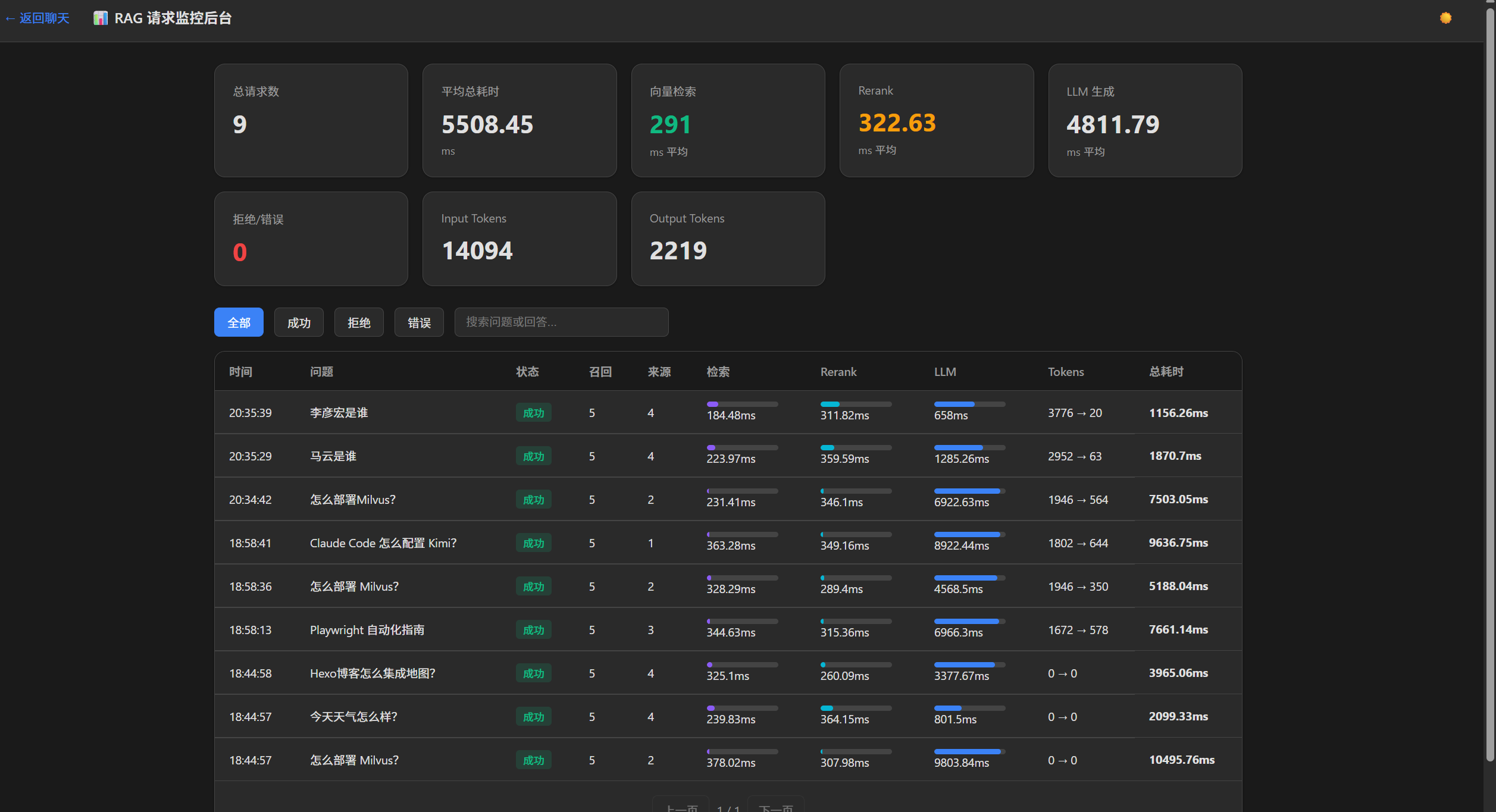
Real-world data revealed that Input tokens far exceed Output tokens—because every request stuffs the system prompt + the context of 5 retrieved documents into the LLM together. This also explains why the number of vector-retrieved documents needs to be controlled: the longer the context, the higher the token cost.
Potholes I Stepped Into
1. Milvus’s Port Isn’t the Default 19530
My Milvus is exposed via a K8s NodePort, and the actual port is 30001. You can only confirm this with kubectl get svc:
|
2. The Meaning of the Score in LangChain Milvus
For the COSINE metric, the score returned by LangChain’s similarity_search_with_score() is a similarity (larger means more similar), not a distance. At first I set a 0.4 threshold based on distance logic, which filtered out all the highly relevant documents.
3. Deduplicating Chunks from the Same Article
Once a blog post is split into multiple text blocks and stored in the vector store, retrieval may hit multiple chunks from the same article. If you don’t deduplicate, the source references will be displayed N times. The solution is to deduplicate the source path with a set() on the backend.
4. The Message Area Stretching the Page in a Flex Layout
At first, once there were many messages, they pushed the input box out of the viewport. The root cause is that in a Flex column layout, child elements default to min-height: auto, so even with flex: 1 and overflow-y: auto set, they won’t shrink.
The solution: add min-height: 0 to both chat-messages and its parent container main-area, and also set html, body to height: 100%; overflow: hidden to completely disable page-level scrolling.
5. Importing All 720 Articles Is Very Slow
720 articles split into 4400+ chunks, calling the Embedding API one by one, is extremely slow. The optimizations:
- DashScope’s
embed_documents()already does batching internally - Manually batch (25 per batch) and write directly to Milvus
- In the end, the full import takes about 6–8 minutes
Project Structure
|
Validating the Results
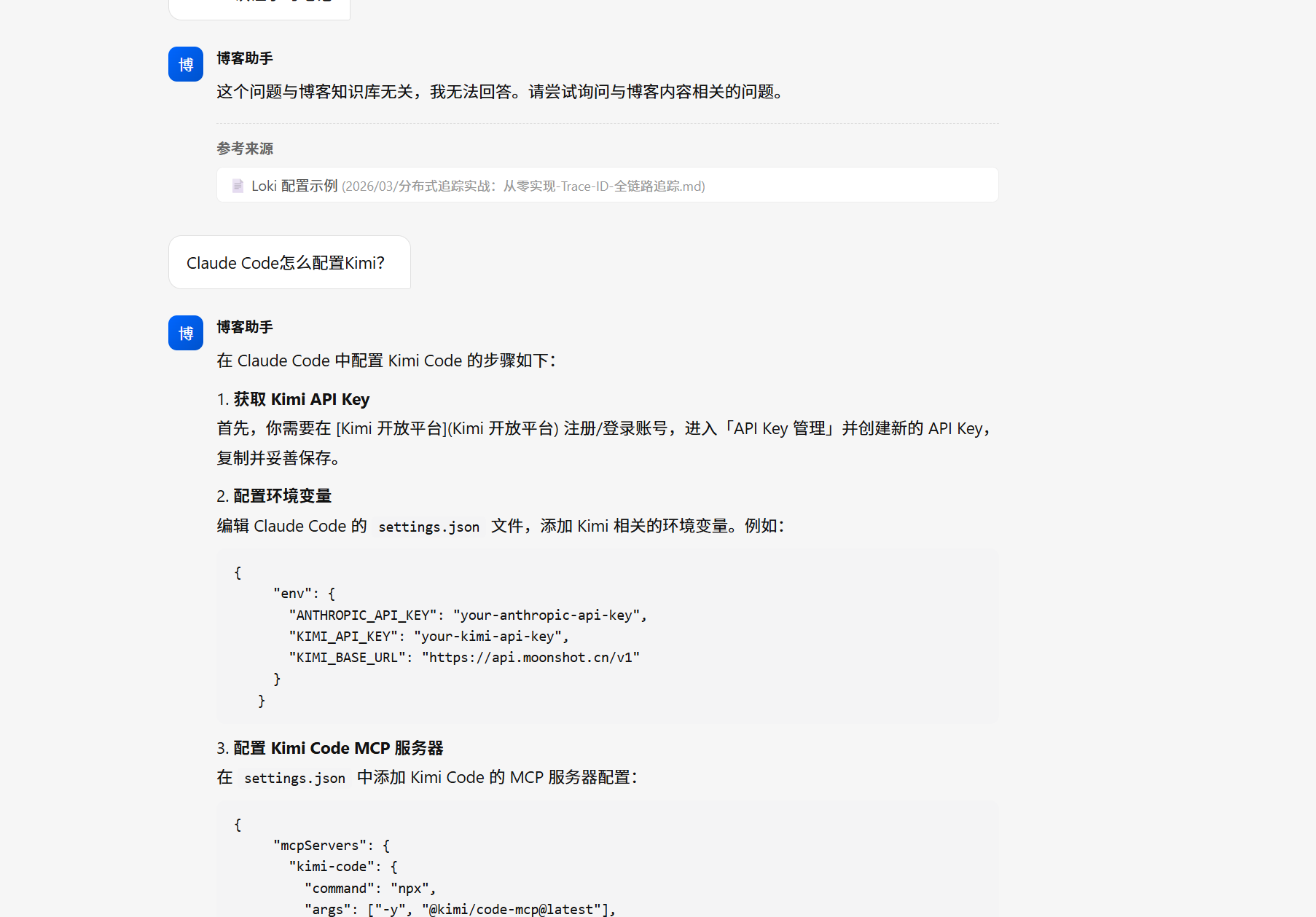
- ✅ Relevant question: “How do I deploy Milvus?” → retrieves blog content and answers in detailed steps
- ❌ Irrelevant question: “What’s the weather like today?” → directly refuses: “This question is unrelated to the blog knowledge base…”
Next Steps
- Full import: Currently only the latest 60 articles have been imported for testing; later I’ll load all 720
- Image/link references: Images and external links mentioned in answers can be displayed as-is
- Deploy and go live: Package with Docker Compose for easy migration
Summary
The whole project took less than half a day from zero to usable, thanks mainly to:
- LangChain abstracting the RAG flow very cleanly
- Milvus offering sufficiently strong vector retrieval performance
- Alibaba Cloud Bailian’s Embedding + LLM handled by one set of APIs, no need to juggle multiple platforms
What I’m most satisfied with is that prompt restriction—it makes the LLM honestly answer only things that are in the blog, without making things up. This is crucial when building a personal knowledge base.
评论
0 条评论