在微服务架构和前后端分离成为主流的今天,一个用户请求往往需要经过多个服务节点才能完成。当系统出现问题时,如何在海量日志中快速定位某次请求的完整链路 ,成为每个开发者必须面对的挑战。本文将详细介绍如何从零实现 Trace ID 全链路追踪系统。
一、为什么需要 Trace ID? 1.1 分布式系统的日志困境 想象这样一个场景:用户在网页上点击了一个按钮,这个请求先后经过了:
前端 → Nginx → API Gateway → 用户服务 → 订单服务 → 支付服务 → 数据库
当用户反馈”下单失败”时,你需要:
在 Nginx 日志中查找请求记录
在 API Gateway 日志中继续追踪
在各个微服务的日志中分别搜索
尝试通过时间戳关联不同服务的日志
问题显而易见 :
时间戳在不同机器上可能不一致
高并发下同一时间段有大量请求交织
无法确定哪些日志条目属于同一个用户请求
1.2 Trace ID 的价值 Trace ID(追踪 ID)是一个全局唯一的标识符,从请求进入系统开始生成,并在整个调用链中传递。它的核心价值在于:
能力
说明
全链路关联 将分散在各个服务中的日志串联成完整的故事
快速定位 通过唯一 ID 秒级检索相关日志
性能分析 追踪请求在各节点的耗时分布
故障排查 精确定位问题发生的具体服务
二、Trace ID 的核心设计原则 实现一个健壮的 Trace ID 系统,需要遵循以下三个核心原则:
flowchart LR
2.1 透传原则(Pass-Through) 如果请求头中已携带 Trace ID(如来自上游服务或客户端),必须原样透传 ,而非重新生成。这保证了跨服务边界的链路连续性。
2.2 服务端兜底原则(Server-Side Fallback) 如果请求头中没有 Trace ID,服务端必须主动生成一个。这确保即使客户端没有实现 Trace ID,服务端日志依然可追溯。
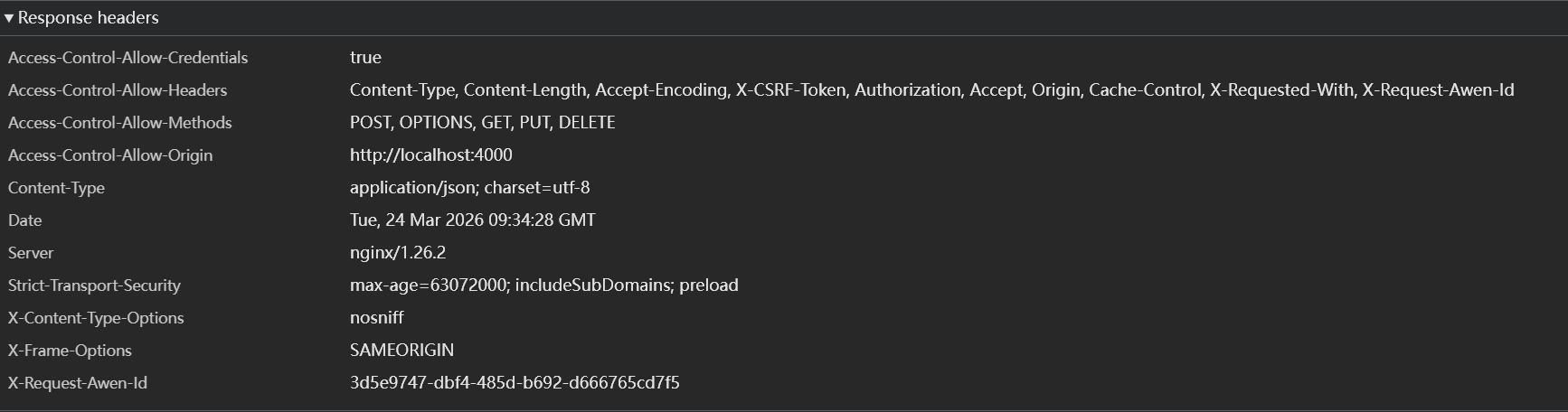
2.3 响应返回原则(Response Return) 服务端必须在响应头中返回本次请求使用的 Trace ID。这样当用户报告问题时,可以通过浏览器开发者工具直接获取 Trace ID,大幅提升排查效率。
三、后端实现:Go + Gin 下面是在 Go 的 Gin 框架中实现 Trace ID 中间件的完整代码。
3.1 Trace ID 中间件 package middlewareimport ("context" "github.com/gin-gonic/gin" "github.com/google/uuid" "log/slog" const TraceIDHeader = "X-Trace-ID" type ContextKeyTraceID struct {}func TraceIDMiddleware () return func (c *gin.Context) if traceID == "" {func GetTraceID (ctx context.Context) string {if traceID, ok := ctx.Value(ContextKeyTraceID{}).(string ); ok {return traceIDreturn ""
3.2 集成到 Gin 引擎 package mainimport ("github.com/gin-gonic/gin" "blog-api/internal/middleware" func main () "/api/v1/posts" , handler.GetPosts)"/api/v1/orders" , handler.CreateOrder)":8080" )
3.3 日志中间件集成 Trace ID 为了让日志自动包含 Trace ID,我们需要自定义日志中间件:
package middlewareimport ("log/slog" "time" "github.com/gin-gonic/gin" func LoggerMiddleware () return func (c *gin.Context) "HTTP Request" ,"trace_id" , traceID),"method" , c.Request.Method),"path" , path),"status" , c.Writer.Status()),"latency" , time.Since(start)),"client_ip" , c.ClientIP()),
3.4 Handler 中使用 Trace ID 在业务代码中,可以通过 context 获取 Trace ID 并传递给下游服务:
package handlerimport ("github.com/gin-gonic/gin" "blog-api/internal/middleware" "net/http" func CreateOrder (c *gin.Context) "POST" , "http://payment-service/charge" , body)200 , gin.H{"order_id" : "ORD-20250324-001" ,"trace_id" : traceID,"message" : "订单创建成功" ,
3.5 日志输出示例 配置 slog 输出 JSON 格式后,日志将如下所示:
{ "time" : "2026-03-24T17:30:00Z" , "level" : "INFO" , "msg" : "HTTP Request" , "trace_id" : "550e8400-e29b-41d4-a716-446655440000" , "method" : "POST" , "path" : "/api/v1/orders" , "status" : 200 , "latency" : "45.2ms" , "client_ip" : "192.168.1.100" }
通过 trace_id 字段,可以在日志系统中快速筛选出属于同一请求的所有日志条目。
四、前端实现:Hexo 博客集成 前端需要实现两个核心功能:生成 Trace ID 和统一封装请求函数。
4.1 生成 UUID 使用 Web Crypto API 生成标准 UUID v4:
function generateUUID (if (typeof crypto !== 'undefined' && crypto.randomUUID ) {return crypto.randomUUID ();return 'xxxxxxxx-xxxx-4xxx-yxxx-xxxxxxxxxxxx' .replace (/[xy]/g , function (c ) {const r = Math .random () * 16 | 0 ;const v = c === 'x' ? r : (r & 0x3 | 0x8 );return v.toString (16 );
4.2 API 请求封装 封装统一的 apiFetch 函数,自动注入 Trace ID 并提取响应中的 Trace ID:
async function apiFetch (url, options = {} ) {const traceID = generateUUID ();const headers = {'Content-Type' : 'application/json' ,'X-Trace-ID' : traceID,headers try {const response = await fetch (url, {const serverTraceID = response.headers .get ('X-Trace-ID' );if (serverTraceID) {console .log (`[Trace ID] ${serverTraceID} ` );window .__lastTraceID__ = serverTraceID;if (!response.ok ) {console .error (`[API Error] Trace ID: ${serverTraceID || traceID} , Status: ${response.status} ` );return response;catch (error) {console .error (`[Network Error] Trace ID: ${traceID} ` , error);throw error;
4.3 使用示例 在博客的评论提交、热力图数据获取等场景中调用:
async function submitComment (content ) {const response = await apiFetch ('https://api.example.com/comments' , {method : 'POST' ,body : JSON .stringify ({content : content,post_id : '分布式追踪实战' return await response.json ();async function getPosts (const response = await apiFetch ('https://api.example.com/posts' );return await response.json ();
4.4 调试面板(可选) 为了便于排查问题,可以在页面上显示当前的 Trace ID:
if (location.hostname === 'localhost' || location.search .includes ('debug=1' )) {const debugDiv = document .createElement ('div' );style .cssText = ` position: fixed; bottom: 10px; right: 10px; background: rgba(0,0,0,0.8); color: #0f0; padding: 8px 12px; border-radius: 4px; font-family: monospace; font-size: 12px; z-index: 9999; cursor: pointer; ` ;title = '点击复制 Trace ID' ;onclick = () => {const id = window .__lastTraceID__ || 'N/A' ;clipboard .writeText (id);alert ('Trace ID 已复制: ' + id);setInterval (() => {const id = window .__lastTraceID__ || 'N/A' ;textContent = `Trace ID: ${id.slice(0 , 8 )} ...` ;1000 );document .body .appendChild (debugDiv);
五、最佳实践 5.1 Trace ID 生成规范
方案
优点
缺点
推荐场景
UUID v4 实现简单,全局唯一
较长(36字符),无序
中小型系统
Snowflake 趋势递增,包含时间信息
需要协调节点 ID
高并发分布式系统
ULID 按时间排序,可读性好
需要额外库支持
日志检索频繁的场景
对于一般场景,推荐使用 UUID v4 ,简单可靠。
5.2 HTTP 头命名规范
推荐使用 X-Trace-ID 或 X-Request-ID
避免使用 Trace-ID(不带 X 前缀的自定义头可能与其他标准冲突)
保持全系统一致,包括 Nginx、API Gateway、后端服务
5.3 全链路传递 checklist □ 前端:请求时添加 X-Trace -ID 头log 中记录 $http_x_trace_idTrace IDTrace IDTrace IDTrace IDTrace IDTrace IDTrace ID 放入消息头或消息体
5.4 日志查询技巧 使用 ELK/Loki 等日志系统时,可以建立 trace_id 字段的索引:
scrape_configs: - job_name: api-server pipeline_stages: - json: expressions: trace_id: trace_id - labels: trace_id:
查询语法:
# 查找特定 Trace ID 的所有日志 = "api-server" } |= " trace_id= "550e8400-e29b-41d4-a716-446655440000"" # 统计某接口的慢请求 = "api-server" } | json | path = " /api/v1/orders" | latency > " 1 s"
5.5 性能考虑
Trace ID 生成对性能影响极小(UUID 生成约 50-100ns)
避免在日志中使用反射获取 Trace ID,直接使用 context 读取
对于超高并发场景,可以考虑对象池复用上下文对象
六、总结 Trace ID 是分布式系统中不可或缺的观测工具。通过本文介绍的三原则(透传、兜底、返回)和前后端实现,你可以:
秒级定位问题 :通过 Trace ID 快速检索相关日志提升用户体验 :用户反馈问题时直接提供 Trace ID降低排查成本 :避免在海量日志中大海捞针
参考链接:

评论
0 条评论