深夜提醒

现在是深夜,建议您注意休息,不要熬夜哦~

🏮 🏮 🏮

新年快乐

祝君万事如意心想事成!

share-image
中
ESC

Heart Sync: A Full-Stack Practical Guide to Android Kotlin + Jetpack Compose

English 阅读中文版

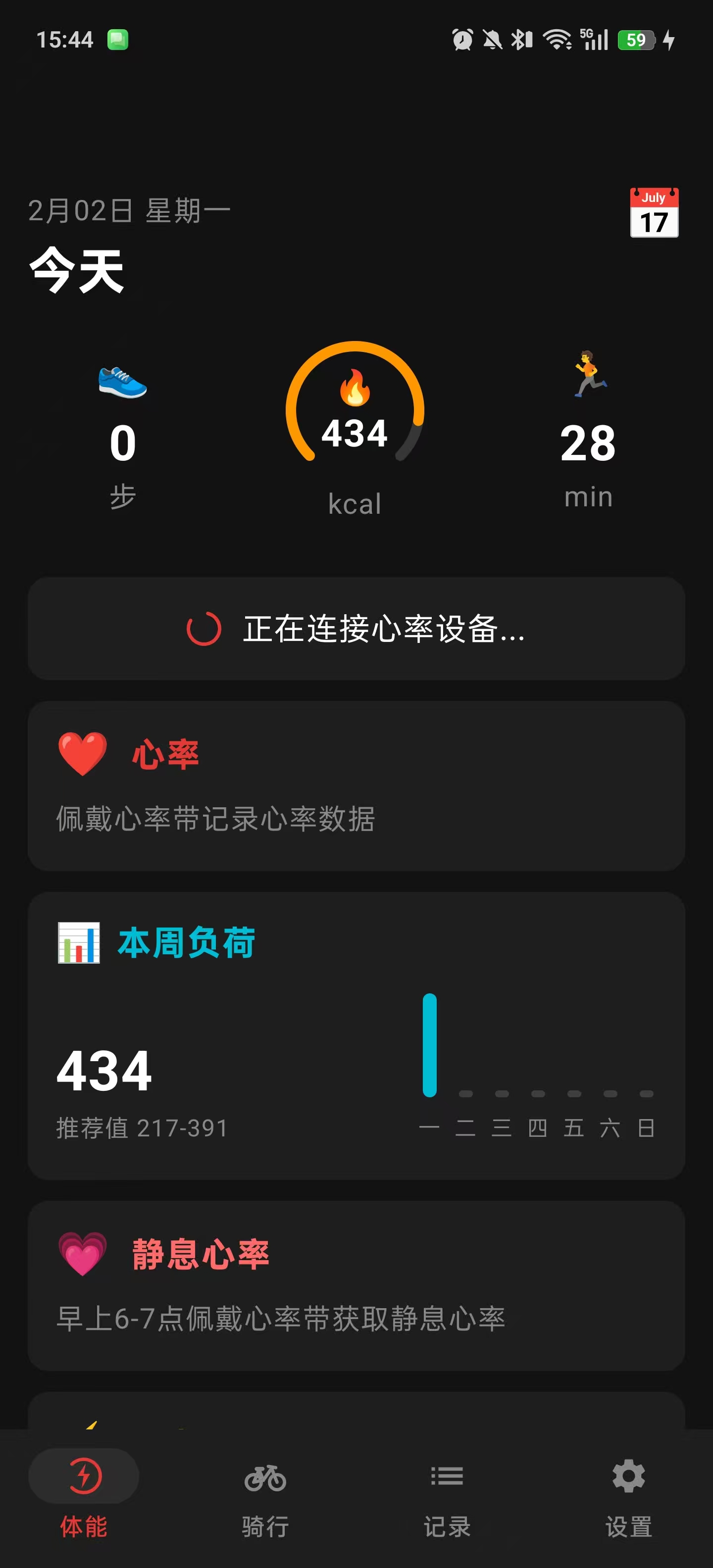
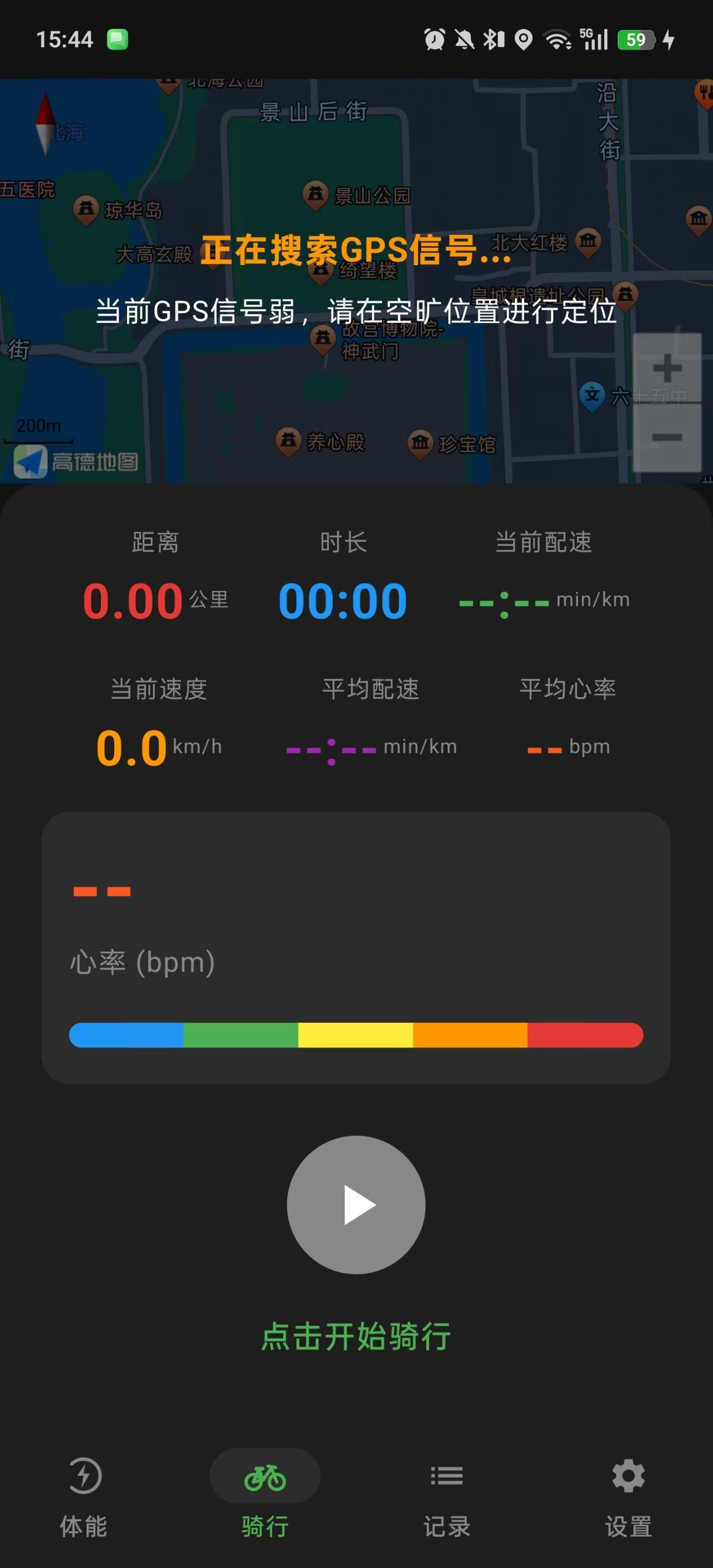
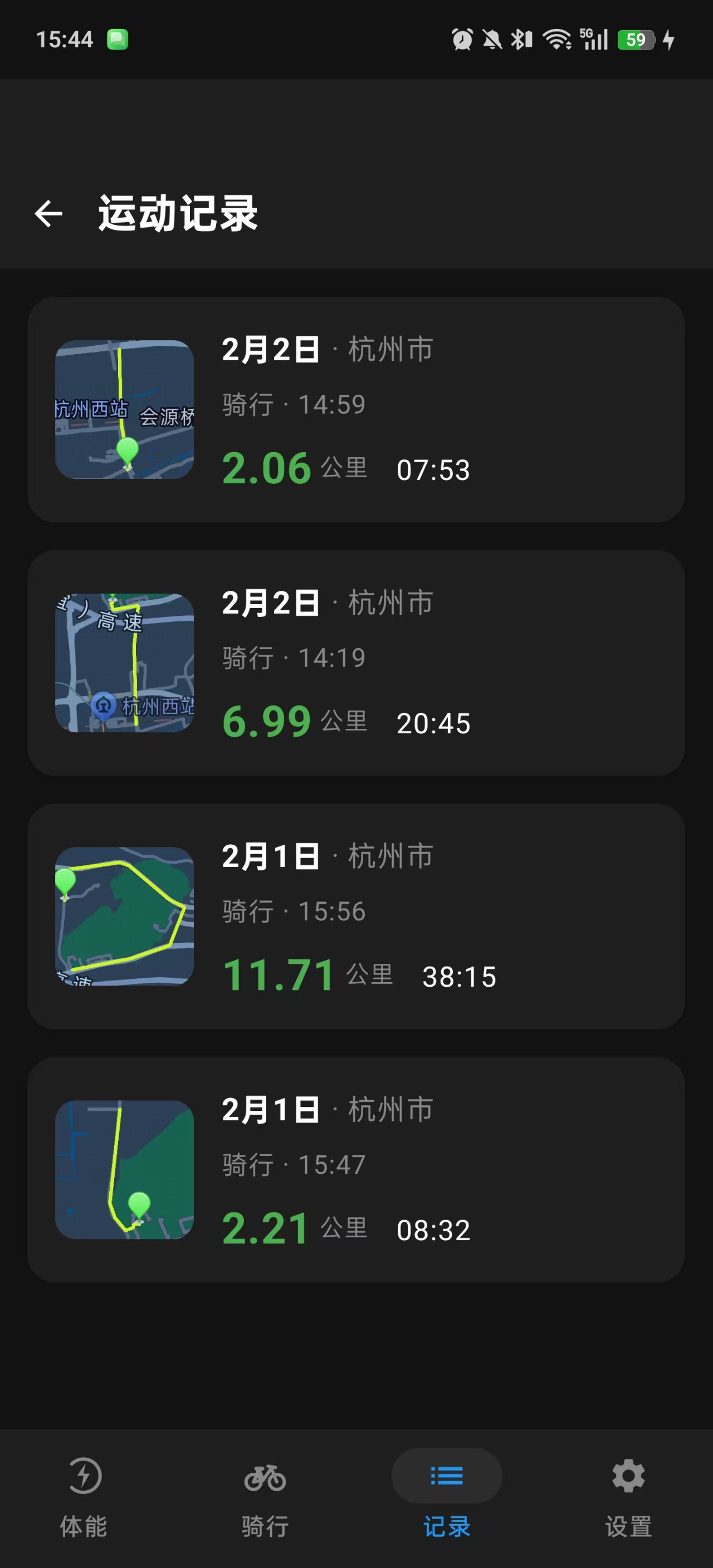
This article documents in detail the complete development process of a full-featured sports and health app, “Heart Sync.” The project covers core features such as GPS positioning and track tracking, Bluetooth heart-rate strap connection, HRV (heart rate variability) analysis, smart pause/resume, weight/blood pressure/blood glucose health management, user authentication and data sync, and GPX/TCX data export.

Table of Contents

  1. Project Overview and Architecture Design
  2. Tech Stack Selection and Dependency Configuration
  3. GPS Positioning and Kalman Filter Optimization
  4. Deep Integration of the AMap SDK
  5. Bluetooth BLE Device Connection
  6. HRV Heart Rate Variability Analysis
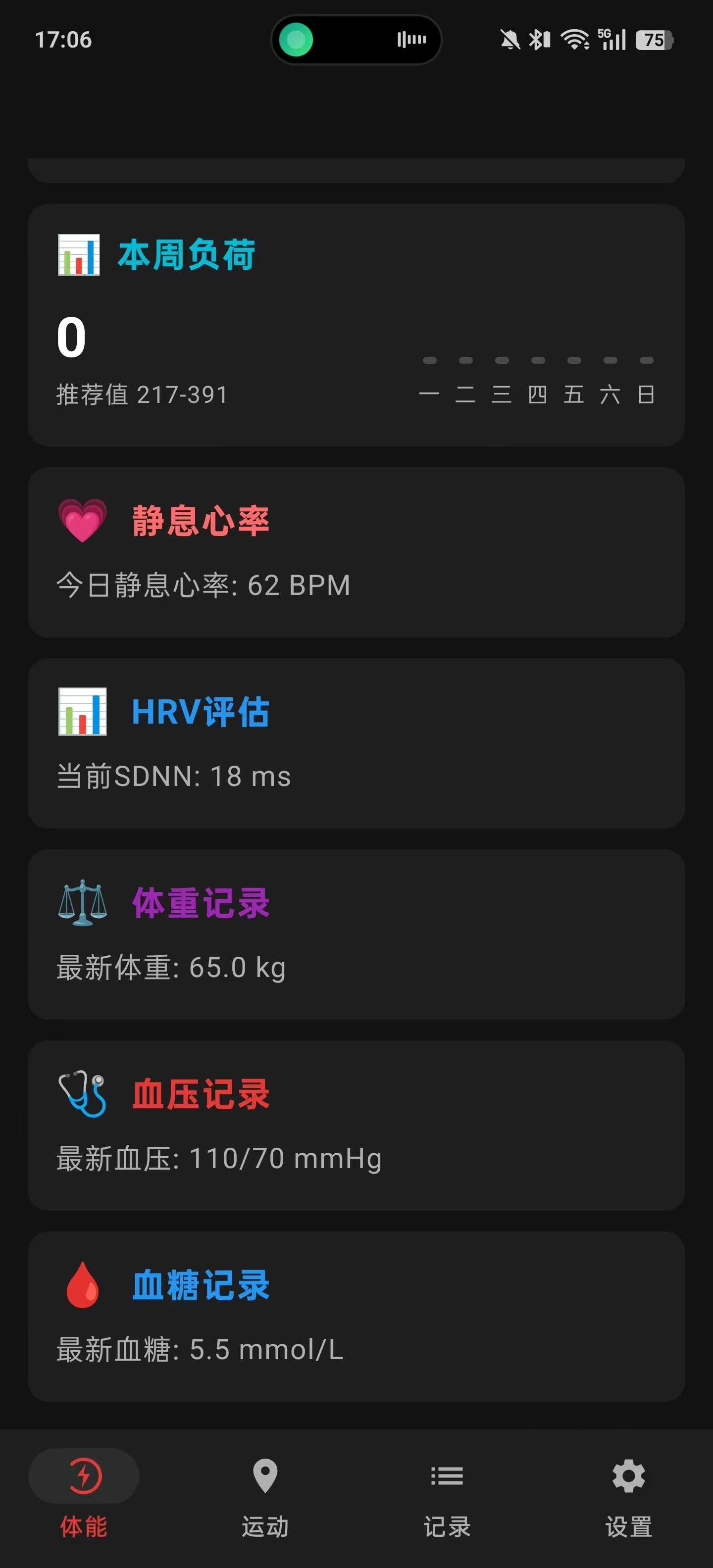
  7. Health Management Features
  8. Sports Data Calculation and Algorithms
  9. Smart Pause and Auto-Resume
  10. User Authentication and Data Sync
  11. Data Persistence and Export
  12. Jetpack Compose UI Implementation
  13. Pitfalls and Solutions
  14. Summary and Outlook

Screenshots


1. Project Overview and Architecture Design

1.1 Feature Overview

Heart Sync is a professional cycling workout-tracking and health-management app. Its main features include:

Workout tracking

  • Real-time GPS track tracking: high-precision positioning, Kalman-filter smoothing, track visualization
  • Bluetooth heart-rate monitoring: BLE heart-rate strap connection, real-time heart-rate display, heart-rate zone training
  • HRV analysis: heart rate variability measurement (SDNN, RMSSD), long-term trend tracking
  • Workout statistics: distance, pace, speed, duration, calorie burn, cumulative ascent
  • Smart pause/resume: automatically pause/resume workout recording based on stillness detection

Health management

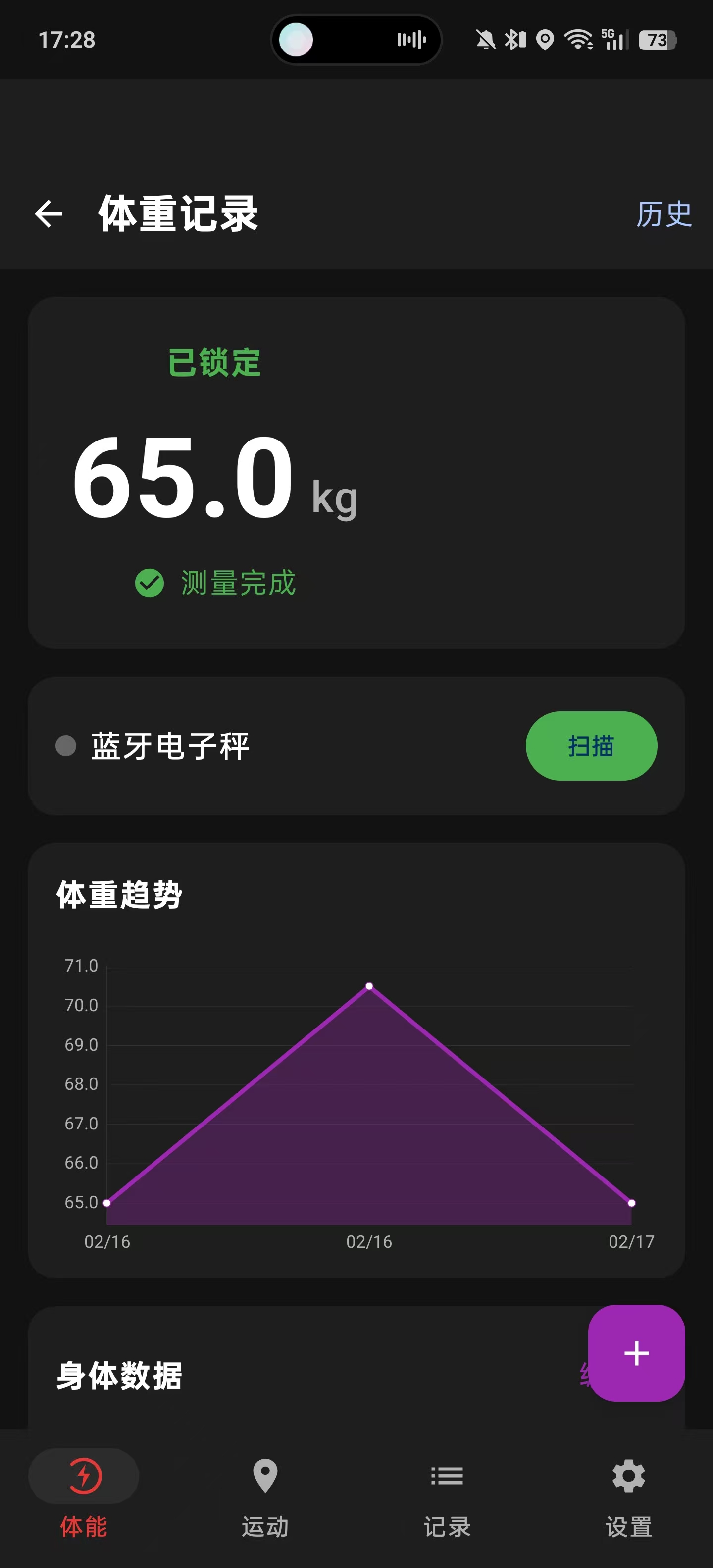
  • Weight records: Bluetooth electronic scale / manual entry, BMI calculation and trend analysis
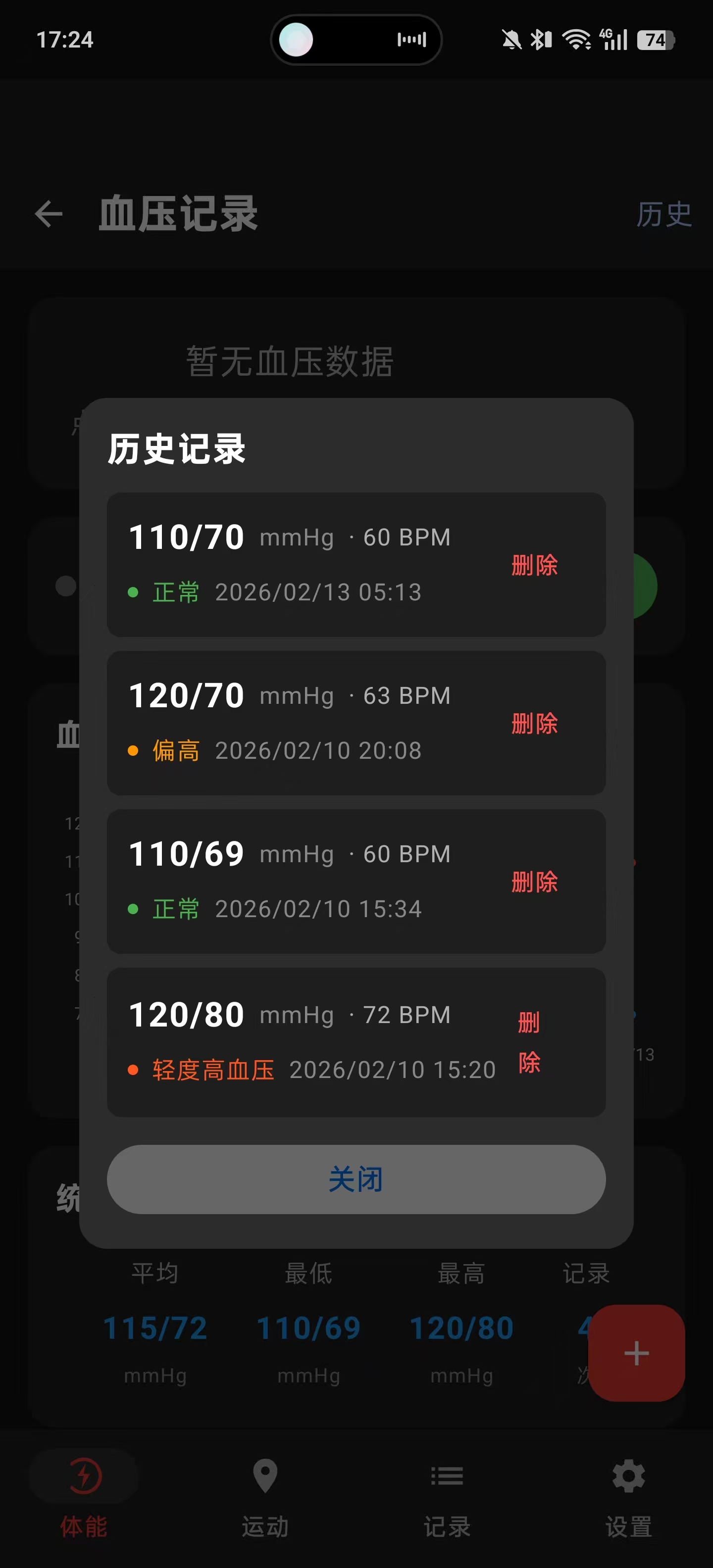
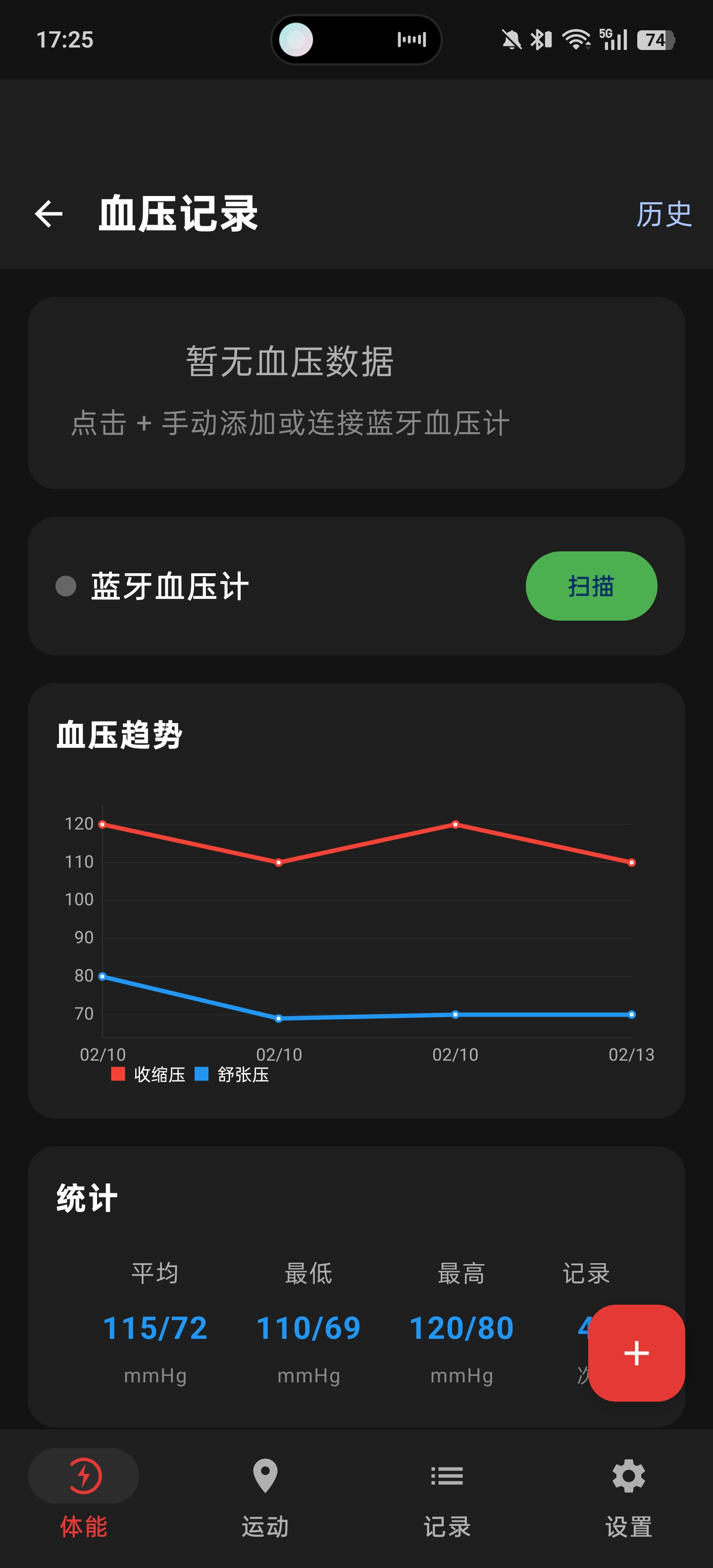
  • Blood pressure monitoring: Bluetooth blood pressure monitor / manual entry, BP grading and trend charts
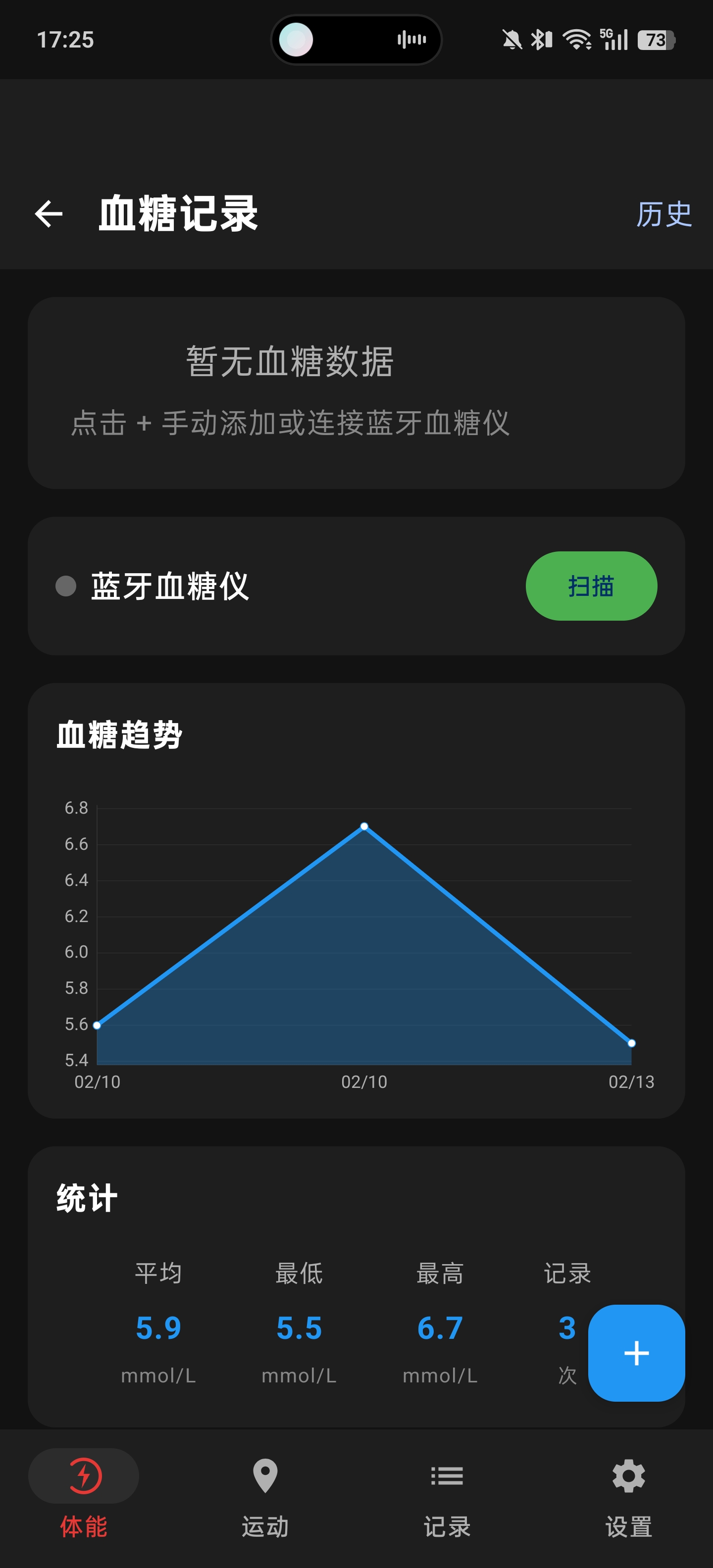
  • Blood glucose records: Bluetooth glucose meter / manual entry, glucose grading and trend tracking
  • Health trends: historical data visualization with MPAndroidChart

Data management

  • Map track display: AMap integration, track drawing, kilometer markers
  • Workout record management: history list, detail view, track thumbnails
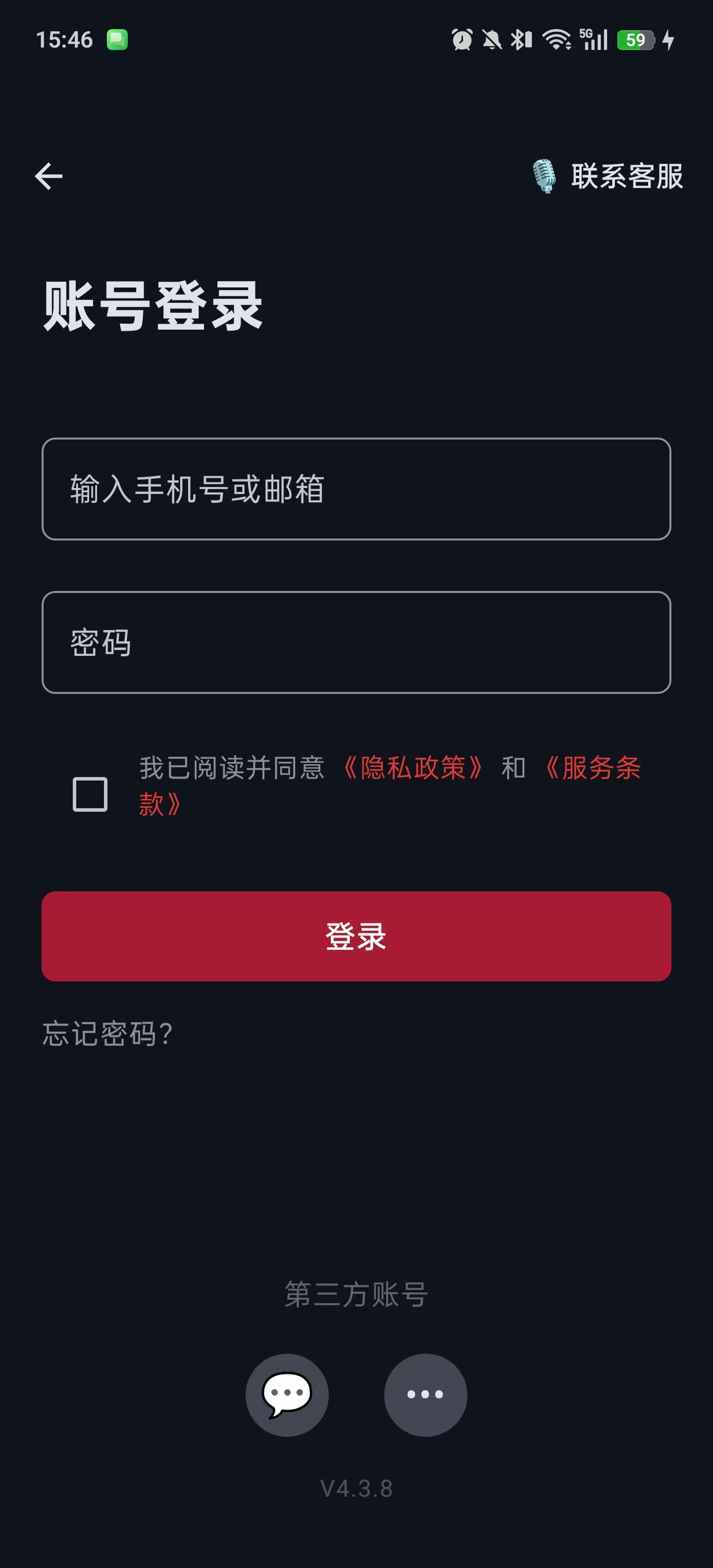
  • User authentication system: login/registration, JWT authentication, password change
  • Cloud data sync: bidirectional local-server sync, multi-device data sync
  • Data export and sharing: GPX and TCX standard-format export, compatible with platforms like Strava

1.2 Overall Architecture

The project adopts the MVVM (Model-View-ViewModel) architectural pattern:

┌─────────────────────────────────────────────────────────────┐
│ UI Layer │
│ ┌─────────────┐ ┌─────────────┐ ┌─────────────────────┐ │
│ │RunningScreen│ │RecordsScreen│ │ HealthScreen │ │
│ │ WithMap │ │ │ │ (weight/BP/glucose)│ │
│ └──────┬──────┘ └──────┬──────┘ └──────────┬──────────┘ │
│ │ │ │ │
├─────────┼────────────────┼─────────────────────┼─────────────┤
│ ▼ ▼ ▼ │
│ ViewModel Layer │
│ ┌─────────────────┐ ┌──────────────────────────────────┐ │
│ │ RunningViewModel│ │ HealthViewModel │ │
│ ├─────────────────┤ ├──────────────────────────────────┤ │
│ │ HrvViewModel │ │ BluetoothViewModel │ │
│ └────────┬────────┘ └─────────────────┬────────────────┘ │
│ │ │ │
├───────────┼─────────────────────────────┼────────────────────┤
│ ▼ ▼ │
│ Data Layer │
│ ┌───────────────┐ ┌───────────────┐ ┌─────────────────┐ │
│ │LocationTracker│ │BluetoothLeManager│ │Repository │ │
│ ├───────────────┤ ├───────────────┤ ├─────────────────┤ │
│ │HrvMeasurement │ │BluetoothScale │ │HealthRepository │ │
│ │ Manager │ │BluetoothBP │ │ │ │
│ │ │ │BluetoothGlucose│ │ │ │
│ └───────────────┘ └───────────────┘ └─────────────────┘ │
│ │ │
│ ▼ │
│ ┌───────────────────────────────────────────────────────┐ │
│ │ Network Layer (Retrofit) │ │
│ │ API Server: Go/Gin + MySQL 8.0 │ │
│ └───────────────────────────────────────────────────────┘ │
└─────────────────────────────────────────────────────────────┘

1.3 Data Model Design

Core data models use Kotlin Data Classes:

/**
* GPS track point
*/
data class GpsPoint(
val latitude: Double,
val longitude: Double,
val altitude: Double,
val timestamp: Instant,
val accuracy: Float,
val speed: Float = 0f,
val heartRate: Int = 0
)

/**
* Running session data
*/
data class RunningSession(
val id: String = UUID.randomUUID().toString(),
val startTime: Instant,
val endTime: Instant? = null,
val gpsPoints: List<GpsPoint> = emptyList(),
val totalDistanceMeters: Double = 0.0,
val totalDurationSeconds: Long = 0,
val averageSpeed: Float = 0f,
val maxSpeed: Float = 0f,
val averageHeartRate: Int = 0,
val maxHeartRate: Int = 0,
val calories: Int = 0,
val cityName: String = "",
val activityType: String = "cycling",
val totalAscent: Double = 0.0,
val thumbnailPath: String = ""
)

/**
* HRV measurement data
*/
data class HrvData(
val id: String = UUID.randomUUID().toString(),
val timestamp: Instant = Instant.now(),
val sdnn: Int, // standard deviation of NN intervals
val rmssd: Int, // root mean square of successive differences
val rrIntervals: List<Int>, // raw RR interval data
val duration: Int // measurement duration (seconds)
)

/**
* Health record base class
*/
sealed class HealthRecord {
abstract val id: String
abstract val timestamp: Instant
}

/**
* Weight record
*/
data class WeightRecord(
override val id: String = UUID.randomUUID().toString(),
override val timestamp: Instant = Instant.now(),
val weightKg: Double,
val bodyFatPercent: Double? = null,
val source: String = "manual" // manual/bluetooth
) : HealthRecord()

/**
* Blood pressure record
*/
data class BloodPressureRecord(
override val id: String = UUID.randomUUID().toString(),
override val timestamp: Instant = Instant.now(),
val systolic: Int, // systolic pressure (high)
val diastolic: Int, // diastolic pressure (low)
val pulse: Int, // pulse
val source: String = "manual"
) : HealthRecord()

/**
* Blood glucose record
*/
data class BloodGlucoseRecord(
override val id: String = UUID.randomUUID().toString(),
override val timestamp: Instant = Instant.now(),
val value: Double, // mmol/L
val measurementType: String, // fasting/after_meal/before_meal/bedtime/random
val source: String = "manual"
) : HealthRecord()

2. Tech Stack Selection and Dependency Configuration

2.1 Core Tech Stack

Domain Choice Version
UI framework Jetpack Compose BOM 2024.09.00
Architecture components ViewModel + StateFlow 2.6.1
Map service AMap SDK 3D map + location
Bluetooth Android BLE API native implementation
Heart-rate protocol ANT+ supports ANT+ heart-rate straps
Network Retrofit + OkHttp 2.9.0 / 4.11.0
Charting library MPAndroidChart 3.1.0
Image loading Coil 2.5.0
JSON parsing Gson 2.10.1

2.2 Gradle Dependency Configuration

// build.gradle.kts
plugins {
alias(libs.plugins.android.application)
alias(libs.plugins.kotlin.compose)
alias(libs.plugins.ksp)
}

android {
namespace = "com.awen.running"
compileSdk = 36

defaultConfig {
applicationId = "com.awen.running"
minSdk = 24
targetSdk = 36

// Specify supported CPU architectures (AMap SO libraries)
ndk {
abiFilters += listOf("arm64-v8a", "armeabi-v7a")
}
}

buildFeatures {
compose = true
}
}

dependencies {
// Jetpack Compose
implementation(platform("androidx.compose:compose-bom:2024.09.00"))
implementation("androidx.compose.ui:ui")
implementation("androidx.compose.material3:material3")

// Lifecycle
implementation("androidx.lifecycle:lifecycle-runtime-ktx:2.6.1")
implementation("androidx.lifecycle:lifecycle-viewmodel-compose:2.6.1")
implementation("androidx.lifecycle:lifecycle-runtime-compose:2.6.1")

// AMap SDK (local JAR)
implementation(fileTree(mapOf("dir" to "libs", "include" to listOf("*.jar"))))

// Charting library
implementation("com.github.PhilJay:MPAndroidChart:v3.1.0")

// Network
implementation("com.squareup.retrofit2:retrofit:2.9.0")
implementation("com.squareup.retrofit2:converter-gson:2.9.0")

// Image loading
implementation("io.coil-kt:coil-compose:2.5.0")

// Secure storage
implementation("androidx.security:security-crypto:1.1.0-alpha06")
}

2.3 Permission Configuration

<!-- AndroidManifest.xml -->
<manifest>
<!-- Location permissions -->
<uses-permission android:name="android.permission.ACCESS_FINE_LOCATION" />
<uses-permission android:name="android.permission.ACCESS_COARSE_LOCATION" />

<!-- Bluetooth permissions -->
<uses-permission android:name="android.permission.BLUETOOTH" />
<uses-permission android:name="android.permission.BLUETOOTH_ADMIN" />
<uses-permission android:name="android.permission.BLUETOOTH_SCAN" />
<uses-permission android:name="android.permission.BLUETOOTH_CONNECT" />

<!-- Network permissions -->
<uses-permission android:name="android.permission.INTERNET" />
<uses-permission android:name="android.permission.ACCESS_NETWORK_STATE" />
<uses-permission android:name="android.permission.ACCESS_WIFI_STATE" />

<!-- Storage permissions -->
<uses-permission android:name="android.permission.WRITE_EXTERNAL_STORAGE" />
<uses-permission android:name="android.permission.READ_EXTERNAL_STORAGE" />

<!-- Vibration permission -->
<uses-permission android:name="android.permission.VIBRATE" />
</manifest>

3. GPS Positioning and Kalman Filter Optimization

3.1 AMap Location SDK Integration

The AMap location SDK supports multi-source fusion positioning with GPS, WiFi, and cell towers, especially suited to mixed indoor/outdoor scenarios:

class AmapLocationTracker(private val context: Context) {

private var locationClient: AMapLocationClient? = null

// Kalman filter parameters
private var lastFilteredLat: Double? = null
private var lastFilteredLng: Double? = null
private var kalmanGain = 0.3

/**
* Create location options
* @param strictMode true=cycling mode (high precision), false=detection mode (indoor-friendly)
*/
private fun createLocationOption(strictMode: Boolean): AMapLocationClientOption {
return AMapLocationClientOption().apply {
// High-accuracy mode: GPS + WiFi + cell towers
locationMode = AMapLocationClientOption.AMapLocationMode.Hight_Accuracy

// Location interval: 1 second
interval = 1000L

// Whether to use sensors (improves positioning accuracy)
isSensorEnable = true

// WiFi scanning (key for indoor positioning)
isWifiScan = true

// GPS first (prefer GPS in cycling mode; allow WiFi positioning in detection mode)
isGpsFirst = strictMode

// Cache location (use cache in detection mode to speed up response)
isLocationCacheEnable = !strictMode
}
}

/**
* Get location update Flow
*/
fun getLocationUpdates(strictMode: Boolean = false): Flow<GpsPoint> = callbackFlow {
val client = AMapLocationClient(context)
locationClient = client

client.setLocationOption(createLocationOption(strictMode))

val listener = AMapLocationListener { location ->
if (location == null || location.errorCode != 0) return@AMapLocationListener

// Accuracy filter (cycling 30m, detection 500m)
val accuracyThreshold = if (strictMode) 30f else 500f
if (location.accuracy > accuracyThreshold) return@AMapLocationListener

// Abnormal speed filter (>50km/h=13.9m/s, a reasonable upper bound for cycling)
if (strictMode && location.speed > 13.9f) return@AMapLocationListener

// Apply Kalman filter
val (filteredLat, filteredLng) = applyKalmanFilter(
location.latitude,
location.longitude,
location.accuracy
)

val gpsPoint = GpsPoint(
latitude = filteredLat,
longitude = filteredLng,
altitude = location.altitude,
timestamp = Instant.ofEpochMilli(location.time),
accuracy = location.accuracy,
speed = location.speed
)

trySend(gpsPoint)
}

client.setLocationListener(listener)
client.startLocation()

awaitClose {
client.stopLocation()
client.onDestroy()
}
}
}

3.2 Kalman Filter Algorithm Implementation

Raw GPS data has noise and jumps; a Kalman filter can effectively smooth the track:

/**
* Kalman filter - smooths GPS data
*
* Principle: dynamically adjust the filter gain based on GPS accuracy
* - High accuracy (small accuracy): large gain, trust the new data more
* - Low accuracy (large accuracy): small gain, trust the historical data more
*/
private fun applyKalmanFilter(lat: Double, lng: Double, accuracy: Float): Pair<Double, Double> {
// First fix returns directly
if (lastFilteredLat == null || lastFilteredLng == null) {
lastFilteredLat = lat
lastFilteredLng = lng
return Pair(lat, lng)
}

// Dynamically adjust the Kalman gain based on accuracy
kalmanGain = when {
accuracy <= 5f -> 0.8 // High-accuracy GPS, high trust
accuracy <= 10f -> 0.5
accuracy <= 20f -> 0.3
accuracy <= 50f -> 0.2
else -> 0.1 // Low accuracy, low trust
}

// Filter formula: new value = old value + gain × (observed value - old value)
val filteredLat = lastFilteredLat!! + kalmanGain * (lat - lastFilteredLat!!)
val filteredLng = lastFilteredLng!! + kalmanGain * (lng - lastFilteredLng!!)

lastFilteredLat = filteredLat
lastFilteredLng = filteredLng

return Pair(filteredLat, filteredLng)
}

3.3 GPS Warm-up Mechanism

Initial GPS fixes have poor accuracy, so the first few points need to be discarded:

// GPS warm-up counter
private var gpsWarmupCounter = 0
private val GPS_WARMUP_POINTS = 5

private fun addGpsPoint(point: GpsPoint) {
// GPS warm-up period: discard the first 5 GPS points
gpsWarmupCounter++
if (gpsWarmupCounter <= GPS_WARMUP_POINTS) {
Log.d(TAG, "GPS warmup: skipping point $gpsWarmupCounter/$GPS_WARMUP_POINTS")
return
}

// Distance jump detection: a distance >50m between two points is judged a drift
if (currentPoints.isNotEmpty()) {
val prevPoint = currentPoints.last()
val distance = calculateDistance(prevPoint, point)

if (distance > 50.0) {
Log.w(TAG, "Distance jump detected: ${distance}m, skipping")
return
}
}

// Add the GPS point normally
currentPoints.add(point)
updateStatistics()
}

4. Deep Integration of the AMap SDK

4.1 SDK Integration Steps

  1. Download the SDK: download the full Android map SDK package from the AMap Open Platform
  2. Configure the JAR: put the JAR file into the app/libs/ directory
  3. Configure SO libraries: put the SO files into the corresponding architecture directories under app/src/main/jniLibs/
  4. Apply for a Key: create an app in the AMap console to get the API Key
<!-- AndroidManifest.xml -->
<application>
<!-- AMap API Key -->
<meta-data
android:name="com.amap.api.v2.apikey"
android:value="your_api_key_here" />
</application>

4.2 Privacy Compliance Configuration

The AMap SDK requires privacy-compliance settings in the Application:

class RunningApplication : Application() {
override fun onCreate() {
super.onCreate()

// AMap SDK privacy compliance
AMapLocationClient.updatePrivacyShow(this, true, true)
AMapLocationClient.updatePrivacyAgree(this, true)

// Initialize RetrofitClient
RetrofitClient.init(this)
}
}

4.3 Wrapping MapView in Compose

@Composable
fun AmapView(
modifier: Modifier = Modifier,
gpsPoints: List<GpsPoint> = emptyList(),
currentLocation: GpsPoint? = null,
isRunning: Boolean = false
) {
val context = LocalContext.current
val lifecycleOwner = LocalLifecycleOwner.current

val mapView = remember { MapView(context) }
var aMap by remember { mutableStateOf<AMap?>(null) }
var polyline by remember { mutableStateOf<Polyline?>(null) }

// Lifecycle management
DisposableEffect(lifecycleOwner) {
val observer = LifecycleEventObserver { _, event ->
when (event) {
Lifecycle.Event.ON_RESUME -> mapView.onResume()
Lifecycle.Event.ON_PAUSE -> mapView.onPause()
else -> {}
}
}
lifecycleOwner.lifecycle.addObserver(observer)

onDispose {
lifecycleOwner.lifecycle.removeObserver(observer)
mapView.onDestroy()
}
}

// Update the track
LaunchedEffect(gpsPoints, aMap) {
val map = aMap ?: return@LaunchedEffect

if (gpsPoints.isEmpty()) {
polyline?.remove()
return@LaunchedEffect
}

val latLngList = gpsPoints.map { LatLng(it.latitude, it.longitude) }

// Create or update the track line
if (polyline == null) {
val options = PolylineOptions()
.addAll(latLngList)
.width(12f)
.color(0xFF4CAF50.toInt()) // green
.geodesic(true)
polyline = map.addPolyline(options)

// Auto-zoom to the track extent
if (!isRunning && latLngList.size >= 2) {
val bounds = LatLngBounds.Builder()
.apply { latLngList.forEach { include(it) } }
.build()
map.animateCamera(CameraUpdateFactory.newLatLngBounds(bounds, 80))
}
} else {
polyline?.points = latLngList
}
}

// Render the map
AndroidView(
factory = {
mapView.apply {
onCreate(Bundle())
aMap = this.map

map.uiSettings.apply {
isZoomControlsEnabled = true
isCompassEnabled = true
isScaleControlsEnabled = true
}

map.mapType = AMap.MAP_TYPE_NORMAL
}
},
modifier = modifier
)
}

4.4 Reverse Geocoding (Getting the City Name)

class AmapGeocoder(private val context: Context) {

suspend fun getCityName(latitude: Double, longitude: Double): String {
return suspendCancellableCoroutine { continuation ->
val geocodeSearch = GeocodeSearch(context)

geocodeSearch.setOnGeocodeSearchListener(object : GeocodeSearch.OnGeocodeSearchListener {
override fun onRegeocodeSearched(result: RegeocodeResult?, code: Int) {
if (code == 1000 && result?.regeocodeAddress != null) {
val address = result.regeocodeAddress
val cityName = address.city.ifEmpty { address.province }
continuation.resume(cityName) {}
} else {
continuation.resume("Unknown city") {}
}
}

override fun onGeocodeSearched(result: GeocodeResult?, code: Int) {}
})

val query = RegeocodeQuery(
LatLonPoint(latitude, longitude),
200f, // search radius 200 meters
GeocodeSearch.AMAP
)

geocodeSearch.getFromLocationAsyn(query)
}
}
}

5. Bluetooth BLE Device Connection

5.1 BLE Heart Rate Service Specification

Heart-rate straps follow the Bluetooth standard Heart Rate Service:

UUID Name Description
0x180D Heart Rate Service Heart rate service
0x2A37 Heart Rate Measurement Heart rate measurement characteristic
0x2902 CCCD Client Characteristic Configuration Descriptor

5.2 BLE Heart Rate Manager Implementation

@SuppressLint("MissingPermission")
class BluetoothLeManager(private val context: Context) {

private val bluetoothAdapter: BluetoothAdapter? by lazy {
val bluetoothManager = context.getSystemService(Context.BLUETOOTH_SERVICE) as BluetoothManager
bluetoothManager.adapter
}

private var bluetoothGatt: BluetoothGatt? = null

private val _heartRate = MutableStateFlow(0)
val heartRate: StateFlow<Int> = _heartRate.asStateFlow()

private val _rrIntervals = MutableSharedFlow<Int>(extraBufferCapacity = 64)
val rrIntervals: SharedFlow<Int> = _rrIntervals.asSharedFlow()

private val _connectionState = MutableStateFlow(false)
val connectionState: StateFlow<Boolean> = _connectionState.asStateFlow()

// GATT callback
private val gattCallback = object : BluetoothGattCallback() {
override fun onConnectionStateChange(gatt: BluetoothGatt, status: Int, newState: Int) {
if (newState == BluetoothProfile.STATE_CONNECTED) {
_connectionState.value = true
gatt.discoverServices()
} else if (newState == BluetoothProfile.STATE_DISCONNECTED) {
_connectionState.value = false
}
}

override fun onServicesDiscovered(gatt: BluetoothGatt, status: Int) {
if (status == BluetoothGatt.GATT_SUCCESS) {
// Get the heart rate service
val service = gatt.getService(UUID.fromString("0000180d-0000-1000-8000-00805f9b34fb"))
val characteristic = service?.getCharacteristic(
UUID.fromString("00002a37-0000-1000-8000-00805f9b34fb")
)

if (characteristic != null) {
// Enable notifications
gatt.setCharacteristicNotification(characteristic, true)

val descriptor = characteristic.getDescriptor(
UUID.fromString("00002902-0000-1000-8000-00805f9b34fb")
)

if (Build.VERSION.SDK_INT >= Build.VERSION_CODES.TIRAMISU) {
gatt.writeDescriptor(descriptor, BluetoothGattDescriptor.ENABLE_NOTIFICATION_VALUE)
} else {
@Suppress("DEPRECATION")
descriptor.value = BluetoothGattDescriptor.ENABLE_NOTIFICATION_VALUE
@Suppress("DEPRECATION")
gatt.writeDescriptor(descriptor)
}
}
}
}

override fun onCharacteristicChanged(
gatt: BluetoothGatt,
characteristic: BluetoothGattCharacteristic,
value: ByteArray
) {
processHeartRateData(value)
}
}

/**
* Parse heart rate data
*
* Data format (per the Bluetooth spec):
* Byte 0: Flags
* - Bit 0: heart rate value format (0=UINT8, 1=UINT16)
* - Bit 3: energy-expenditure present flag
* - Bit 4: RR-interval present flag
* Byte 1(-2): heart rate value
* Byte N+: RR intervals (2 bytes each, unit 1/1024 second)
*/
private fun processHeartRateData(data: ByteArray) {
if (data.isEmpty()) return

val flag = data[0].toInt()

// Parse the heart rate value
val heartRate = if ((flag and 0x01) != 0) {
// UINT16 format
((data[2].toInt() and 0xFF) shl 8) or (data[1].toInt() and 0xFF)
} else {
// UINT8 format
data[1].toInt() and 0xFF
}
_heartRate.value = heartRate

// Parse RR intervals (for HRV calculation)
if ((flag and 0x10) != 0) {
var offset = if ((flag and 0x01) != 0) 3 else 2
if ((flag and 0x08) != 0) offset += 2 // skip the energy-expenditure field

while (offset + 2 <= data.size) {
val rrRaw = ((data[offset + 1].toInt() and 0xFF) shl 8) or (data[offset].toInt() and 0xFF)
val rrMs = (rrRaw * 1000) / 1024 // convert to milliseconds
_rrIntervals.tryEmit(rrMs)
offset += 2
}
}
}

fun connect(device: BluetoothDevice) {
bluetoothGatt = device.connectGatt(context, false, gattCallback)
}

fun disconnect() {
bluetoothGatt?.disconnect()
bluetoothGatt?.close()
bluetoothGatt = null
}
}

5.3 Bluetooth Scale Connection

@SuppressLint("MissingPermission")
class BluetoothScaleManager(private val context: Context) {

private val bluetoothAdapter: BluetoothAdapter? by lazy {
val bluetoothManager = context.getSystemService(Context.BLUETOOTH_SERVICE) as BluetoothManager
bluetoothManager.adapter
}

private var bluetoothGatt: BluetoothGatt? = null

private val _weightData = MutableSharedFlow<WeightData>(extraBufferCapacity = 1)
val weightData: SharedFlow<WeightData> = _weightData.asSharedFlow()

data class WeightData(
val weightKg: Double,
val bodyFatPercent: Double? = null,
val isStable: Boolean = false
)

private val gattCallback = object : BluetoothGattCallback() {
override fun onConnectionStateChange(gatt: BluetoothGatt, status: Int, newState: Int) {
if (newState == BluetoothProfile.STATE_CONNECTED) {
gatt.discoverServices()
}
}

override fun onServicesDiscovered(gatt: BluetoothGatt, status: Int) {
// Different brands of scales use different services and characteristics
// Common ones: 0x181B (Body Composition Service) or custom services
val service = gatt.getService(UUID.fromString("0000181b-0000-1000-8000-00805f9b34fb"))
val characteristic = service?.getCharacteristic(
UUID.fromString("00002a9c-0000-1000-8000-00805f9b34fb")
)

characteristic?.let { enableNotification(gatt, it) }
}

override fun onCharacteristicChanged(
gatt: BluetoothGatt,
characteristic: BluetoothGattCharacteristic,
value: ByteArray
) {
parseWeightData(value)
}
}

private fun parseWeightData(data: ByteArray) {
// Parse according to the specific protocol; here a common format is used as an example
if (data.size >= 4) {
// Assuming data format: Flags(1 byte) + Weight(2-3 bytes)
val flags = data[0].toInt()
val isStable = (flags and 0x01) != 0

val weightRaw = ((data[2].toInt() and 0xFF) shl 8) or (data[1].toInt() and 0xFF)
val weightKg = weightRaw / 100.0 // assume the unit is 0.01kg

_weightData.tryEmit(WeightData(weightKg, null, isStable))
}
}

fun connect(device: BluetoothDevice) {
bluetoothGatt = device.connectGatt(context, false, gattCallback)
}

fun disconnect() {
bluetoothGatt?.disconnect()
bluetoothGatt?.close()
bluetoothGatt = null
}
}

6. HRV Heart Rate Variability Analysis

6.1 HRV Overview

Heart rate variability (HRV) refers to the degree of variation in the time intervals between consecutive heartbeats. HRV is an important indicator for assessing autonomic nervous system function and cardiovascular health.

Common HRV metrics:

  • SDNN: standard deviation of all RR intervals, reflecting overall heart rate variability
  • RMSSD: root mean square of successive RR-interval differences, mainly reflecting parasympathetic activity
  • pNN50: the proportion of successive RR-interval differences exceeding 50ms

6.2 HRV Measurement Manager

class HrvMeasurementManager(
private val context: Context,
private val heartRateFlow: SharedFlow<Int>,
private val rrIntervalFlow: SharedFlow<Int>
) {
private val scope = CoroutineScope(SupervisorJob() + Dispatchers.Default)

private val _measurementState = MutableStateFlow<MeasurementState>(MeasurementState.Idle)
val measurementState: StateFlow<MeasurementState> = _measurementState.asStateFlow()

private val _currentHrvData = MutableStateFlow<HrvData?>(null)
val currentHrvData: StateFlow<HrvData?> = _currentHrvData.asStateFlow()

private var measurementJob: Job? = null
private val rrIntervals = mutableListOf<Int>()

sealed class MeasurementState {
object Idle : MeasurementState()
object Measuring : MeasurementState()
data class Complete(val data: HrvData) : MeasurementState()
data class Error(val message: String) : MeasurementState()
}

/**
* Start HRV measurement
* @param duration measurement duration (seconds), default 3 minutes
*/
fun startMeasurement(duration: Int = 180) {
if (_measurementState.value is MeasurementState.Measuring) return

rrIntervals.clear()
_measurementState.value = MeasurementState.Measuring

measurementJob = scope.launch {
// Collect RR-interval data
val rrJob = launch {
rrIntervalFlow.collect { rr ->
if (rr in 300..2000) { // filter out unreasonable RR intervals
rrIntervals.add(rr)
}
}
}

// Measurement countdown
delay(duration * 1000L)

rrJob.cancel()

// Calculate HRV metrics
if (rrIntervals.size >= 30) { // need at least 30 valid RR intervals
val hrvData = calculateHrvMetrics(rrIntervals, duration)
_currentHrvData.value = hrvData
_measurementState.value = MeasurementState.Complete(hrvData)
} else {
_measurementState.value = MeasurementState.Error("Insufficient valid data, please measure again")
}
}
}

fun stopMeasurement() {
measurementJob?.cancel()
_measurementState.value = MeasurementState.Idle
}

/**
* Calculate HRV metrics
*/
private fun calculateHrvMetrics(rrIntervals: List<Int>, duration: Int): HrvData {
// SDNN calculation
val meanRR = rrIntervals.average()
val variance = rrIntervals.map { (it - meanRR).pow(2) }.average()
val sdnn = sqrt(variance).toInt()

// RMSSD calculation
val successiveDiffs = rrIntervals.windowed(2) { (a, b) -> (b - a).toDouble() }
val rmssd = sqrt(successiveDiffs.map { it.pow(2) }.average()).toInt()

return HrvData(
sdnn = sdnn,
rmssd = rmssd,
rrIntervals = rrIntervals.toList(),
duration = duration
)
}

fun cleanup() {
stopMeasurement()
scope.cancel()
}
}

6.3 HRV Trend Analysis

class HrvRepository(private val context: Context) {

private val prefs = context.getSharedPreferences("hrv_data", Context.MODE_PRIVATE)
private val gson = Gson()

private val _hrvRecords = MutableStateFlow<List<HrvData>>(emptyList())
val hrvRecords: StateFlow<List<HrvData>> = _hrvRecords.asStateFlow()

init {
loadRecords()
}

fun saveHrvRecord(data: HrvData) {
val currentRecords = _hrvRecords.value.toMutableList()
currentRecords.add(0, data) // add to the head of the list

// Keep only the most recent 100 records
if (currentRecords.size > 100) {
currentRecords.removeAt(currentRecords.size - 1)
}

_hrvRecords.value = currentRecords

// Persist
val json = gson.toJson(currentRecords)
prefs.edit().putString("hrv_records", json).apply()
}

/**
* Get HRV trend data
* @param days number of days
*/
fun getHrvTrend(days: Int): List<HrvTrendPoint> {
val cutoffTime = Instant.now().minus(days.toLong(), ChronoUnit.DAYS)

return _hrvRecords.value
.filter { it.timestamp.isAfter(cutoffTime) }
.groupBy {
LocalDateTime.ofInstant(it.timestamp, ZoneId.systemDefault()).toLocalDate()
}
.map { (date, records) ->
HrvTrendPoint(
date = date,
avgSdnn = records.map { it.sdnn }.average().toInt(),
avgRmssd = records.map { it.rmssd }.average().toInt(),
recordCount = records.size
)
}
.sortedBy { it.date }
}

data class HrvTrendPoint(
val date: LocalDate,
val avgSdnn: Int,
val avgRmssd: Int,
val recordCount: Int
)
}

7. Health Management Features

7.1 Weight Management

class WeightViewModel(private val repository: HealthRepository) : ViewModel() {

private val _weightRecords = MutableStateFlow<List<WeightRecord>>(emptyList())
val weightRecords: StateFlow<List<WeightRecord>> = _weightRecords.asStateFlow()

private val _currentWeight = MutableStateFlow<Double?>(null)
val currentWeight: StateFlow<Double?> = _currentWeight.asStateFlow()

private val _bmi = MutableStateFlow<Double?>(null)
val bmi: StateFlow<Double?> = _bmi.asStateFlow()

fun addWeightRecord(weightKg: Double, bodyFatPercent: Double? = null) {
viewModelScope.launch {
val record = WeightRecord(
weightKg = weightKg,
bodyFatPercent = bodyFatPercent,
source = "manual"
)
repository.saveWeightRecord(record)
_currentWeight.value = weightKg
calculateBmi(weightKg)
}
}

fun addBluetoothWeight(weightKg: Double, bodyFatPercent: Double?) {
viewModelScope.launch {
val record = WeightRecord(
weightKg = weightKg,
bodyFatPercent = bodyFatPercent,
source = "bluetooth"
)
repository.saveWeightRecord(record)
_currentWeight.value = weightKg
calculateBmi(weightKg)
}
}

private fun calculateBmi(weightKg: Double) {
// Get the height from user configuration
val heightM = repository.getUserHeightCm() / 100.0
if (heightM > 0) {
_bmi.value = weightKg / (heightM * heightM)
}
}

/**
* Get the BMI category
*/
fun getBmiCategory(bmi: Double): String {
return when {
bmi < 18.5 -> "Underweight"
bmi < 24.0 -> "Normal"
bmi < 28.0 -> "Overweight"
else -> "Obese"
}
}
}

7.2 Blood Pressure Management

class BloodPressureViewModel(private val repository: HealthRepository) : ViewModel() {

private val _bpRecords = MutableStateFlow<List<BloodPressureRecord>>(emptyList())
val bpRecords: StateFlow<List<BloodPressureRecord>> = _bpRecords.asStateFlow()

fun addBloodPressureRecord(
systolic: Int,
diastolic: Int,
pulse: Int
) {
viewModelScope.launch {
val record = BloodPressureRecord(
systolic = systolic,
diastolic = diastolic,
pulse = pulse
)
repository.saveBloodPressureRecord(record)
}
}

/**
* Get the blood pressure category
*/
fun getBloodPressureCategory(systolic: Int, diastolic: Int): BpCategory {
return when {
systolic < 90 || diastolic < 60 -> BpCategory.LOW
systolic < 120 && diastolic < 80 -> BpCategory.NORMAL
systolic < 130 && diastolic < 80 -> BpCategory.ELEVATED
systolic < 140 || diastolic < 90 -> BpCategory.HIGH_STAGE1
systolic >= 140 || diastolic >= 90 -> BpCategory.HIGH_STAGE2
else -> BpCategory.UNKNOWN
}
}

enum class BpCategory(val label: String, val color: Color) {
LOW("Low", Color.Blue),
NORMAL("Normal", Color.Green),
ELEVATED("High-normal", Color.Yellow),
HIGH_STAGE1("Mild hypertension", Color(0xFFFFA500)),
HIGH_STAGE2("Moderate-severe hypertension", Color.Red),
UNKNOWN("Unknown", Color.Gray)
}
}

7.3 Blood Glucose Management

class BloodGlucoseViewModel(private val repository: HealthRepository) : ViewModel() {

private val _glucoseRecords = MutableStateFlow<List<BloodGlucoseRecord>>(emptyList())
val glucoseRecords: StateFlow<List<BloodGlucoseRecord>> = _glucoseRecords.asStateFlow()

fun addGlucoseRecord(value: Double, measurementType: String) {
viewModelScope.launch {
val record = BloodGlucoseRecord(
value = value,
measurementType = measurementType
)
repository.saveBloodGlucoseRecord(record)
}
}

/**
* Get the blood glucose category
*/
fun getGlucoseCategory(value: Double, measurementType: String): GlucoseCategory {
return when (measurementType) {
"fasting" -> when {
value < 3.9 -> GlucoseCategory.LOW
value < 6.1 -> GlucoseCategory.NORMAL
value < 7.0 -> GlucoseCategory.ELEVATED
else -> GlucoseCategory.HIGH
}
"after_meal" -> when {
value < 3.9 -> GlucoseCategory.LOW
value < 7.8 -> GlucoseCategory.NORMAL
value < 11.1 -> GlucoseCategory.ELEVATED
else -> GlucoseCategory.HIGH
}
else -> GlucoseCategory.UNKNOWN
}
}

enum class GlucoseCategory(val label: String, val color: Color, val description: String) {
LOW("Low", Color.Blue, "Blood glucose too low, please replenish sugar promptly"),
NORMAL("Normal", Color.Green, "Blood glucose is within the normal range"),
ELEVATED("High", Color.Yellow, "Blood glucose elevated, mind your diet"),
HIGH("Very high", Color.Red, "Blood glucose too high, consider consulting a doctor"),
UNKNOWN("Unknown", Color.Gray, "")
}
}

7.4 Health Trend Charts

@Composable
fun HealthTrendChart(
records: List<HealthRecord>,
modifier: Modifier = Modifier,
chartType: ChartType = ChartType.LINE
) {
val context = LocalContext.current

AndroidView(
modifier = modifier.fillMaxSize(),
factory = { ctx ->
LineChart(ctx).apply {
description.isEnabled = false
legend.isEnabled = true
setBackgroundColor(Color.TRANSPARENT.toArgb())

xAxis.apply {
position = XAxis.XAxisPosition.BOTTOM
textColor = Color.Gray.toArgb()
valueFormatter = object : ValueFormatter() {
private val formatter = SimpleDateFormat("MM/dd", Locale.getDefault())
override fun getFormattedValue(value: Float): String {
return formatter.format(Date(value.toLong()))
}
}
}

axisLeft.textColor = Color.Gray.toArgb()
axisRight.isEnabled = false
}
},
update = { chart ->
when (val firstRecord = records.firstOrNull()) {
is WeightRecord -> updateWeightChart(chart, records.filterIsInstance<WeightRecord>())
is BloodPressureRecord -> updateBpChart(chart, records.filterIsInstance<BloodPressureRecord>())
is BloodGlucoseRecord -> updateGlucoseChart(chart, records.filterIsInstance<BloodGlucoseRecord>())
}
}
)
}

private fun updateWeightChart(chart: LineChart, records: List<WeightRecord>) {
val entries = records.map {
Entry(it.timestamp.toEpochMilli().toFloat(), it.weightKg.toFloat())
}

val dataSet = LineDataSet(entries, "Weight(kg)").apply {
color = Color(0xFF4CAF50).toArgb()
lineWidth = 2f
setDrawCircles(true)
setDrawFilled(true)
fillColor = Color(0xFF4CAF50).toArgb()
fillAlpha = 30
}

chart.data = LineData(dataSet)
chart.invalidate()
}

8. Sports Data Calculation and Algorithms

8.1 Distance Calculation

Use Android’s native API to compute the spherical distance between two points:

private fun calculateDistance(p1: GpsPoint, p2: GpsPoint): Double {
val results = FloatArray(1)
android.location.Location.distanceBetween(
p1.latitude, p1.longitude,
p2.latitude, p2.longitude,
results
)
return results[0].toDouble()
}

8.2 Pace Calculation

Pace = time / distance, in minutes per kilometer

fun getPaceMinPerKm(): String {
if (totalDistanceMeters == 0.0) return "--:--"

// Pace = total time (seconds) / distance (kilometers)
val paceSeconds = totalDurationSeconds / (totalDistanceMeters / 1000.0)
val minutes = (paceSeconds / 60).toInt()
val seconds = (paceSeconds % 60).toInt()

return String.format("%d:%02d", minutes, seconds)
}

8.3 Calorie Calculation (Cycling MET Formula)

Calorie burn is calculated from the metabolic equivalent of task (MET); cycling’s MET values differ from running:

/**
* Cycling calorie formula: Calories = MET × weight(kg) × time(hours)
*
* Cycling MET is determined by exercise intensity (speed):
* | Speed (km/h) | MET | Intensity description |
* |-----------|------|-------------|
* | < 16 | 4.0 | Leisurely cycling |
* | 16-19 | 6.0 | Easy cycling |
* | 19-22 | 8.0 | Moderate intensity |
* | 22-25 | 10.0 | Brisk cycling |
* | 25-30 | 12.0 | Fast cycling |
* | > 30 | 15.8 | Racing |
*/
fun calculateCalories(weightKg: Double = 65.0): Int {
if (totalDurationSeconds == 0L || totalDistanceMeters == 0.0) return 0

val speedKmh = (totalDistanceMeters / 1000.0) / (totalDurationSeconds / 3600.0)

val met = when {
speedKmh < 16.0 -> 4.0 // leisurely cycling
speedKmh < 19.0 -> 6.0 // easy cycling
speedKmh < 22.0 -> 8.0 // moderate intensity
speedKmh < 25.0 -> 10.0 // brisk cycling
speedKmh < 30.0 -> 12.0 // fast cycling
else -> 15.8 // racing
}

val durationHours = totalDurationSeconds / 3600.0
return (met * weightKg * durationHours).toInt()
}

8.4 Heart Rate Zone Calculation (Heart Rate Reserve Method)

/**
* Calculate heart rate zones using the heart rate reserve method
* Heart rate reserve = max heart rate - resting heart rate
* Each zone = resting heart rate + heart rate reserve × percentage
*/
fun calculateHeartRateZones(maxHr: Int, restingHr: Int): HeartRateZones {
val reserveHr = maxHr - restingHr

return HeartRateZones(
zone1 = HeartRateZone("Warm-up", restingHr, restingHr + (reserveHr * 0.50).toInt(), Color.Gray),
zone2 = HeartRateZone("Fat burn", restingHr + (reserveHr * 0.50).toInt(), restingHr + (reserveHr * 0.60).toInt(), Color.Blue),
zone3 = HeartRateZone("Aerobic", restingHr + (reserveHr * 0.60).toInt(), restingHr + (reserveHr * 0.70).toInt(), Color.Green),
zone4 = HeartRateZone("Threshold", restingHr + (reserveHr * 0.70).toInt(), restingHr + (reserveHr * 0.80).toInt(), Color.Yellow),
zone5 = HeartRateZone("Anaerobic", restingHr + (reserveHr * 0.80).toInt(), maxHr, Color.Red)
)
}

data class HeartRateZone(
val name: String,
val minHr: Int,
val maxHr: Int,
val color: Color
)

data class HeartRateZones(
val zone1: HeartRateZone,
val zone2: HeartRateZone,
val zone3: HeartRateZone,
val zone4: HeartRateZone,
val zone5: HeartRateZone
) {
fun getZoneForHeartRate(hr: Int): HeartRateZone {
return when {
hr <= zone1.maxHr -> zone1
hr <= zone2.maxHr -> zone2
hr <= zone3.maxHr -> zone3
hr <= zone4.maxHr -> zone4
else -> zone5
}
}
}

9. Smart Pause and Auto-Resume

9.1 Feature Description

During cycling, the app implements smart pause and auto-resume:

  • Auto pause: automatically pauses when speed < 0.5m/s for 10 seconds
  • Auto resume: automatically resumes when speed ≥ 0.5m/s for 5 seconds after a pause
  • GPS track continuity during pause: keeps recording GPS points during a pause (keeping the track continuous) but doesn’t count them toward distance or duration

9.2 Implementation Code

// Timer for zero speed (used for auto pause)
private var zeroSpeedCounter = 0
private val AUTO_PAUSE_THRESHOLD = 10 // auto pause after speed is 0 for 10 seconds

// Timer for non-zero speed (used for auto resume)
private var nonZeroSpeedCounter = 0
private val AUTO_RESUME_THRESHOLD = 5 // auto resume after speed is non-zero for 5 seconds

/**
* Detect whether auto pause or auto resume is needed
*/
private fun checkAutoPause(speed: Float) {
if (speed < 0.5f) { // speed below 0.5m/s is treated as stationary
zeroSpeedCounter++
nonZeroSpeedCounter = 0 // reset the non-zero speed counter
if (zeroSpeedCounter >= AUTO_PAUSE_THRESHOLD && !_isPaused.value) {
Log.d(TAG, "Auto pause triggered: speed=0 for ${zeroSpeedCounter}s")
pauseRiding()
}
} else {
zeroSpeedCounter = 0
// While paused, check whether auto resume is needed
if (_isPaused.value) {
nonZeroSpeedCounter++
Log.d(TAG, "Non-zero speed detected while paused: ${nonZeroSpeedCounter}/${AUTO_RESUME_THRESHOLD}s")
if (nonZeroSpeedCounter >= AUTO_RESUME_THRESHOLD) {
Log.d(TAG, "Auto resume triggered: speed>0 for ${nonZeroSpeedCounter}s")
resumeRiding()
}
} else {
nonZeroSpeedCounter = 0
}
}
}

/**
* Pause riding
*/
fun pauseRiding() {
if (!_isRunning.value || _isPaused.value) return

Log.d(TAG, "Pausing cycling...")
_isPaused.value = true
pauseStartTime = Instant.now()
vibrate(200) // vibrate to signal pause
}

/**
* Resume riding
*/
fun resumeRiding() {
if (!_isRunning.value || !_isPaused.value) return

Log.d(TAG, "Resuming cycling...")

// Calculate the pause duration and accumulate it
pauseStartTime?.let {
pausedDuration += Duration.between(it, Instant.now()).seconds
}

_isPaused.value = false
pauseStartTime = null
zeroSpeedCounter = 0
nonZeroSpeedCounter = 0 // reset the non-zero speed counter
vibrate(200) // vibrate to signal resume
}

9.3 GPS Track Handling During Pause

locationFlow.collect { gpsPoint ->
// Attach the heart rate to the GPS point
val pointWithHeartRate = gpsPoint.copy(heartRate = _currentHeartRate.value)
_currentLocation.value = pointWithHeartRate
_currentSpeed.value = gpsPoint.speed

// Detect speed for auto pause/resume (detect regardless of pause state)
checkAutoPause(gpsPoint.speed)

// Also record GPS points while paused (to keep the track continuous), but don't count distance
if (_isPaused.value) {
// While paused, only record the GPS point's location, without computing distance
addGpsPointWithoutDistance(pointWithHeartRate)
} else {
// During normal activity, record the GPS point and compute distance
addGpsPoint(pointWithHeartRate)
}
}

10. User Authentication and Data Sync

10.1 JWT Token Authentication

object RetrofitClient {

private const val BASE_URL = "https://api.awen.me/api/v1/"

private lateinit var appContext: Context
private var token: String? = null

fun init(context: Context) {
appContext = context.applicationContext
// Restore the token from encrypted storage
token = EncryptedStorage.getToken(context)
}

fun setToken(newToken: String) {
token = newToken
// Persist the token encrypted
EncryptedStorage.saveToken(appContext, newToken)
}

fun hasToken(): Boolean = !token.isNullOrEmpty()

fun clearToken() {
token = null
EncryptedStorage.clearToken(appContext)
}

private val okHttpClient = OkHttpClient.Builder()
.addInterceptor { chain ->
val request = chain.request().newBuilder().apply {
token?.let { addHeader("Authorization", "Bearer $it") }
}.build()
chain.proceed(request)
}
.connectTimeout(30, TimeUnit.SECONDS)
.readTimeout(30, TimeUnit.SECONDS)
.build()

private val retrofit = Retrofit.Builder()
.baseUrl(BASE_URL)
.client(okHttpClient)
.addConverterFactory(GsonConverterFactory.create())
.build()

val apiService: ApiService = retrofit.create(ApiService::class.java)
}

10.2 Encrypted Storage

object EncryptedStorage {
private const val ANDROID_KEYSTORE = "AndroidKeyStore"
private const val KEY_ALIAS = "heart_sync_key"
private const val PREFS_NAME = "encrypted_prefs"

private fun getMasterKey(context: Context): MasterKey {
return MasterKey.Builder(context, KEY_ALIAS)
.setKeyScheme(MasterKey.KeyScheme.AES256_GCM)
.build()
}

private fun getEncryptedSharedPreferences(context: Context): SharedPreferences {
return EncryptedSharedPreferences.create(
context,
PREFS_NAME,
getMasterKey(context),
EncryptedSharedPreferences.PrefKeyEncryptionScheme.AES256_SIV,
EncryptedSharedPreferences.PrefValueEncryptionScheme.AES256_GCM
)
}

fun saveToken(context: Context, token: String) {
getEncryptedSharedPreferences(context).edit()
.putString("jwt_token", token)
.apply()
}

fun getToken(context: Context): String? {
return getEncryptedSharedPreferences(context).getString("jwt_token", null)
}

fun clearToken(context: Context) {
getEncryptedSharedPreferences(context).edit()
.remove("jwt_token")
.apply()
}
}

10.3 Workout Record Cloud Sync

class RunningRecordsRepository(context: Context) {

private val api = RetrofitClient.apiService

/**
* Sync records from the server
*/
fun syncFromServer() {
if (!RetrofitClient.hasToken()) return

scope.launch {
try {
val response = api.getSessions(page = 1, pageSize = 100)
if (response.isSuccessful) {
val apiResponse = response.body()
if (apiResponse?.code == 0 && apiResponse.data != null) {
val serverRecords = apiResponse.data.sessions.map { it.toRunningSession() }

// Merge local and server records
val localRecords = _records.value
val localRecordsMap = localRecords.associateBy { it.id }
val serverIds = serverRecords.map { it.id }.toSet()

// Upload records unique to the local side to the server
val localOnlyRecords = localRecords.filter { it.id !in serverIds }
localOnlyRecords.forEach { record ->
uploadToServer(record)
}

// Merge records: if the local side has GPS data, prefer the local version
val mergedServerRecords = serverRecords.map { serverRecord ->
val localRecord = localRecordsMap[serverRecord.id]
if (localRecord != null && localRecord.gpsPoints.isNotEmpty()
&& serverRecord.gpsPoints.isEmpty()) {
serverRecord.copy(gpsPoints = localRecord.gpsPoints)
} else {
serverRecord
}
}
val mergedRecords = (mergedServerRecords + localOnlyRecords)
.distinctBy { it.id }
.sortedByDescending { it.startTime }

_records.value = mergedRecords
saveToLocal(mergedRecords)
}
}
} catch (e: Exception) {
Log.e(TAG, "Sync error", e)
}
}
}
}

11. Data Persistence and Export

11.1 GPX Format Export

object GpxExporter {

fun generateGpxContent(session: RunningSession): String {
val sb = StringBuilder()

sb.appendLine("""<?xml version="1.0" encoding="UTF-8"?>""")
sb.appendLine("""<gpx version="1.1" creator="Heart Sync"
xmlns="http://www.topografix.com/GPX/1/1"
xmlns:gpxtpx="http://www.garmin.com/xmlschemas/TrackPointExtension/v1">""")

sb.appendLine(" <metadata>")
sb.appendLine(" <name>Cycling Session ${session.id}</name>")
sb.appendLine(" <time>${session.startTime}</time>")
sb.appendLine(" </metadata>")

sb.appendLine(" <trk>")
sb.appendLine(" <name>Cycling Track</name>")
sb.appendLine(" <type>cycling</type>")
sb.appendLine(" <trkseg>")

session.gpsPoints.forEach { point ->
sb.appendLine(" <trkpt lat=\"${point.latitude}\" lon=\"${point.longitude}\">")
sb.appendLine(" <ele>${point.altitude}</ele>")
sb.appendLine(" <time>${point.timestamp}</time>")

if (point.heartRate > 0) {
sb.appendLine(" <extensions>")
sb.appendLine(" <gpxtpx:TrackPointExtension>")
sb.appendLine(" <gpxtpx:hr>${point.heartRate}</gpxtpx:hr>")
sb.appendLine(" </gpxtpx:TrackPointExtension>")
sb.appendLine(" </extensions>")
}

sb.appendLine(" </trkpt>")
}

sb.appendLine(" </trkseg>")
sb.appendLine(" </trk>")
sb.appendLine("</gpx>")

return sb.toString()
}
}

11.2 Sharing Feature

fun shareGpxFile(context: Context, session: RunningSession) {
val gpxContent = GpxExporter.generateGpxContent(session)
val fileName = "heart_sync_${session.startTime.epochSecond}.gpx"

// Write to the cache directory
val file = File(context.cacheDir, fileName)
file.writeText(gpxContent)

// Get the FileProvider URI
val uri = FileProvider.getUriForFile(
context,
"${context.packageName}.fileprovider",
file
)

// Create the share Intent
val shareIntent = Intent().apply {
action = Intent.ACTION_SEND
type = "application/gpx+xml"
putExtra(Intent.EXTRA_STREAM, uri)
putExtra(Intent.EXTRA_SUBJECT, "Cycling track: ${session.startTime}")
addFlags(Intent.FLAG_GRANT_READ_URI_PERMISSION)
}

context.startActivity(Intent.createChooser(shareIntent, "Share track"))
}

12. Jetpack Compose UI Implementation

12.1 Main Screen Structure

@Composable
fun MainScreen(
navController: NavHostController = rememberNavController()
) {
Scaffold(
bottomBar = { BottomNavigationBar(navController) }
) { paddingValues ->
NavHost(
navController = navController,
startDestination = "running",
modifier = Modifier.padding(paddingValues)
) {
composable("running") { RunningScreenWithMap() }
composable("records") { RecordsScreen() }
composable("health") { HealthScreen() }
composable("settings") { SettingsScreen() }
}
}
}

@Composable
fun BottomNavigationBar(navController: NavHostController) {
val items = listOf(
NavigationItem("Workout", Icons.Default.DirectionsBike, "running"),
NavigationItem("Records", Icons.Default.List, "records"),
NavigationItem("Health", Icons.Default.Favorite, "health"),
NavigationItem("Settings", Icons.Default.Settings, "settings")
)

NavigationBar {
val currentRoute = currentRoute(navController)
items.forEach { item ->
NavigationBarItem(
icon = { Icon(item.icon, contentDescription = item.label) },
label = { Text(item.label) },
selected = currentRoute == item.route,
onClick = { navController.navigate(item.route) }
)
}
}
}

12.2 Workout Data Card

@Composable
fun RunningDataPanel(
distance: Double,
duration: Long,
pace: String,
heartRate: Int,
modifier: Modifier = Modifier
) {
Card(
modifier = modifier
.fillMaxWidth()
.padding(16.dp),
colors = CardDefaults.cardColors(
containerColor = Color(0xFF1E1E1E).copy(alpha = 0.9f)
),
shape = RoundedCornerShape(16.dp)
) {
Column(
modifier = Modifier.padding(20.dp)
) {
// Distance (large text)
Text(
text = String.format("%.2f", distance / 1000),
fontSize = 48.sp,
fontWeight = FontWeight.Bold,
color = Color.White
)
Text(
text = "km",
fontSize = 14.sp,
color = Color.Gray
)

Spacer(modifier = Modifier.height(16.dp))

// Other data
Row(
modifier = Modifier.fillMaxWidth(),
horizontalArrangement = Arrangement.SpaceEvenly
) {
DataItem("Duration", TimeUtils.formatDuration(duration), Icons.Default.Timer)
DataItem("Pace", pace, Icons.Default.Speed)
DataItem("Heart rate", "$heartRate", Icons.Default.Favorite)
}
}
}
}

@Composable
private fun DataItem(label: String, value: String, icon: ImageVector) {
Column(horizontalAlignment = Alignment.CenterHorizontally) {
Icon(icon, contentDescription = label, tint = Color.Gray)
Spacer(modifier = Modifier.height(4.dp))
Text(text = value, color = Color.White, fontWeight = FontWeight.Bold)
Text(text = label, color = Color.Gray, fontSize = 12.sp)
}
}

13. Pitfalls and Solutions

13.1 GPS Indoor Positioning Fails

Problem: Indoor GPS positioning can’t be obtained, yet the AMap app can locate.

Cause: The accuracy threshold filter is too strict (100 meters); indoor WiFi positioning accuracy is usually 200–500 meters.

Solution:

// Relax the accuracy threshold to 500 meters in detection mode
val accuracyThreshold = if (strictMode) 30f else 500f

13.2 Location Permission Dialog Doesn’t Show

Problem: The permission dialog doesn’t appear when entering the cycling page.

Cause: Android 10+ cannot request foreground and background location permissions at the same time.

Solution:

// Request only the foreground location permission
val locationPermissions = arrayOf(
Manifest.permission.ACCESS_FINE_LOCATION,
Manifest.permission.ACCESS_COARSE_LOCATION
)
// Remove ACCESS_BACKGROUND_LOCATION

13.3 GPS Track Lost After Pause

Problem: After auto pause and resuming, breaks appear in the track.

Cause: GPS points recording stops completely during a pause.

Solution:

// Keep recording GPS points during a pause (not counted toward distance)
if (_isPaused.value) {
addGpsPointWithoutDistance(pointWithHeartRate)
} else {
addGpsPoint(pointWithHeartRate)
}

13.4 Token Plaintext Storage Security Risk

Problem: The JWT token is stored in ordinary SharedPreferences and can be read on rooted devices.

Solution: Use encrypted storage with Android Keystore.

// Use EncryptedSharedPreferences
val prefs = EncryptedSharedPreferences.create(
context,
"encrypted_prefs",
masterKey,
EncryptedSharedPreferences.PrefKeyEncryptionScheme.AES256_SIV,
EncryptedSharedPreferences.PrefValueEncryptionScheme.AES256_GCM
)

13.5 Inaccurate HRV Measurement Data

Problem: HRV measurement results fluctuate greatly and differ considerably from professional devices.

Cause:

  1. RR-interval data isn’t filtered for outliers
  2. Measurement duration is insufficient
  3. The user doesn’t stay still

Solution:

// 1. Filter unreasonable RR intervals (300-2000ms is the normal range)
if (rr in 300..2000) {
rrIntervals.add(rr)
}

// 2. Increase the measurement duration to 3 minutes
fun startMeasurement(duration: Int = 180) { ... }

// 3. Remind the user to stay still
Text("Please stay still, breathe deeply, and don't speak")

14. Summary and Outlook

14.1 Project Highlights

  1. Complete workout tracking: GPS positioning + Kalman filter + smart pause/resume
  2. Multi-device Bluetooth support: heart-rate strap, scale, blood pressure monitor, glucose meter
  3. Professional HRV analysis: SDNN and RMSSD metric calculation and trend tracking
  4. Comprehensive health management: weight, blood pressure, blood glucose records with trend charts
  5. Secure data storage: Android Keystore encryption protecting sensitive information
  6. Standard data formats: GPX/TCX export, compatible with mainstream sports platforms

14.2 Future Optimization Directions

  • Power meter support: connect ANT+ power meters for power-based training
  • Training plans: training plans based on heart rate and power
  • Social features: workout data sharing, friend competitions
  • AI analysis: workout performance analysis and suggestions based on historical data
  • Smartwatch: Wear OS version development

References

文章作者:阿文
文章链接: https://www.awen.me/post/a173a8fe.html
版权声明:本博客所有文章除特别声明外,均采用 CC BY-NC-SA 4.0 许可协议。转载请注明来自 阿文的博客!
本文于 2026-02-26 18:00 发布,已超过半年(232天),请注意甄别内容是否已过期。

评论

0 条评论
😀😃😄 😁😅😂 🤣😊😇 🙂🙃😉 😌😍🥰 😘😗😙 😚😋😛 😝😜🤪 🤨🧐🤓 😎🥸🤩 🥳😏😒 😞😔😟 😕🙁☹️ 😣😖😫 😩🥺😢 😭😤😠 😡🤬🤯 😳🥵🥶 😱😨😰 😥😓🤗 🤔🤭🤫 🤥😶😐 😑😬🙄 😯😦😧 😮😲🥱 😴🤤😪 😵🤐🥴 🤢🤮🤧 😷🤒🤕 🤑🤠😈 👿👹👺 🤡💩👻 💀☠️👽 👾🤖🎃 😺😸😹 😻😼😽 🙀😿😾 👍👎👏 🙌👐🤲 🤝🤜🤛 ✌️🤞🤟 🤘👌🤏 👈👉👆 👇☝️✋ 🤚🖐️🖖 👋🤙💪 🦾🖕✍️ 🙏💅🤳 💯💢💥 💫💦💨 🕳️💣💬 👁️‍🗨️🗨️🗯️ 💭💤❤️ 🧡💛💚 💙💜🖤 🤍🤎💔 ❣️💕💞 💓💗💖 💘💝💟 ☮️✝️☪️ 🕉️☸️✡️ 🔯🕎☯️ ☦️🛐⛎ ♈♉♊ ♋♌♍ ♎♏♐ ♑♒♓ 🆔⚛️🉑 ☢️☣️📴 📳🈶🈚 🈸🈺🈷️ ✴️🆚💮 🉐㊙️㊗️ 🈴🈵🈹 🈲🅰️🅱️ 🆎🆑🅾️ 🆘❌⭕ 🛑⛔📛 🚫💯💢 ♨️🚷🚯 🚳🚱🔞 📵🚭❗ ❕❓❔ ‼️⁉️🔅 🔆〽️⚠️ 🚸🔱⚜️ 🔰♻️✅ 🈯💹❇️ ✳️❎🌐 💠Ⓜ️🌀 💤🏧🚾 ♿🅿️🈳 🈂🛂🛃 🛄🛅🛗 🚀🛸🚁 🚉🚆🚅 ✈️🛫🛬 🛩️💺🛰️
加载中...

留言反馈

😀😃😄 😁😅😂 🤣😊😇 🙂🙃😉 😌😍🥰 😘😗😙 😚😋😛 😝😜🤪 🤨🧐🤓 😎🥸🤩 🥳😏😒 😞😔😟 😕🙁☹️ 😣😖😫 😩🥺😢 😭😤😠 😡🤬🤯 😳🥵🥶 😱😨😰 😥😓🤗 🤔🤭🤫 🤥😶😐 😑😬🙄 😯😦😧 😮😲🥱 😴🤤😪 😵🤐🥴 🤢🤮🤧 😷🤒🤕 🤑🤠😈 👿👹👺 🤡💩👻 💀☠️👽 👾🤖🎃 😺😸😹 😻😼😽 🙀😿😾 👍👎👏 🙌👐🤲 🤝🤜🤛 ✌️🤞🤟 🤘👌🤏 👈👉👆 👇☝️✋ 🤚🖐️🖖 👋🤙💪 🦾🖕✍️ 🙏💅🤳 💯💢💥 💫💦💨 🕳️💣💬 👁️‍🗨️🗨️🗯️ 💭💤❤️ 🧡💛💚 💙💜🖤 🤍🤎💔 ❣️💕💞 💓💗💖 💘💝💟 ☮️✝️☪️ 🕉️☸️✡️ 🔯🕎☯️ ☦️🛐⛎ ♈♉♊ ♋♌♍ ♎♏♐ ♑♒♓ 🆔⚛️🉑 ☢️☣️📴 📳🈶🈚 🈸🈺🈷️ ✴️🆚💮 🉐㊙️㊗️ 🈴🈵🈹 🈲🅰️🅱️ 🆎🆑🅾️ 🆘❌⭕ 🛑⛔📛 🚫💯💢 ♨️🚷🚯 🚳🚱🔞 📵🚭❗ ❕❓❔ ‼️⁉️🔅 🔆〽️⚠️ 🚸🔱⚜️ 🔰♻️✅ 🈯💹❇️ ✳️❎🌐 💠Ⓜ️🌀 💤🏧🚾 ♿🅿️🈳 🈂🛂🛃 🛄🛅🛗 🚀🛸🚁 🚉🚆🚅 ✈️🛫🛬 🛩️💺🛰️