深夜提醒

现在是深夜,建议您注意休息,不要熬夜哦~

🏮 🏮 🏮

新年快乐

祝君万事如意心想事成!

2024 桐庐半程马拉松
00:00:00
时间
0.00
距离(公里)
--:--
配速
--
步频
--
心率 (bpm)
--
配速
步频
|
share-image
ESC

GNS3 1.5.3使用IOU模拟思科路由交换实验

GNS3 是一款用来模拟思科CCIE考试的模拟器,在1.x版本以后加入了IOU功能,能够模拟一些以前无法模拟的实验,对于学习路由交换来说是非常有帮助的,但是GN31.5.3使用IOU很麻烦,中文资料非常少,我这边自己借鉴了国外的一些英文资料和YouTube上看的视频教程整理一份,供各位使用

安装

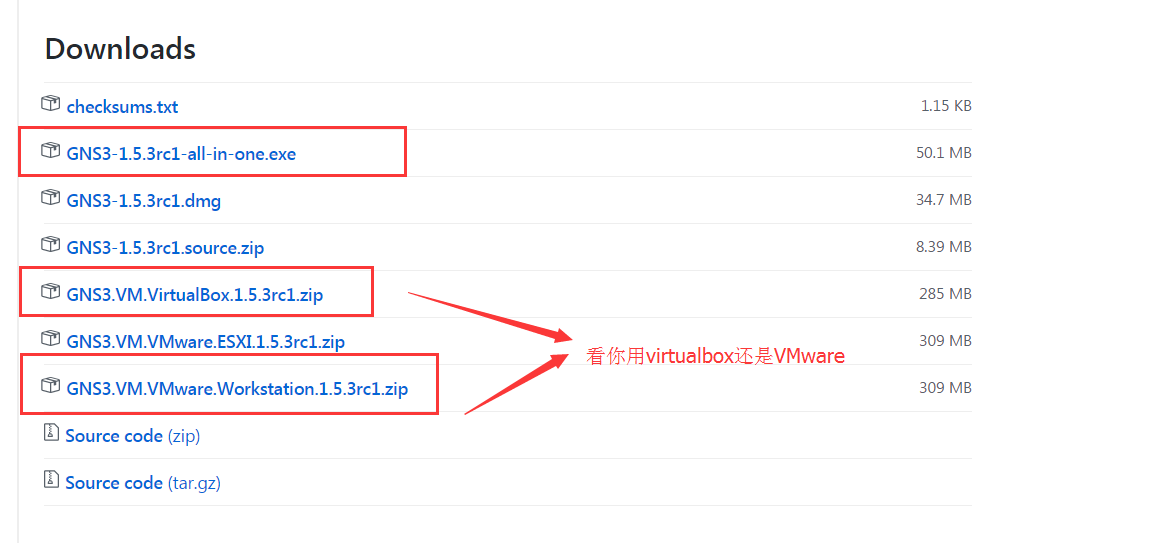
去GitHub下载https://github.com/GNS3/gns3-gui/releases 目前稳定版本是1.5.3
1

镜像文件根据你自己的实际情况下载virtualbox的还是VMware的,反正下载下来之后用虚拟机软件导入镜像打开就可以

国内镜像站

国内使用又拍云CDN 加速下载
ftp 地址: v0.ftp.upyun.com
username: gns3
password:https://www.awen.me

配置

1.打开虚拟机,你可以看到虚拟机的IP地址
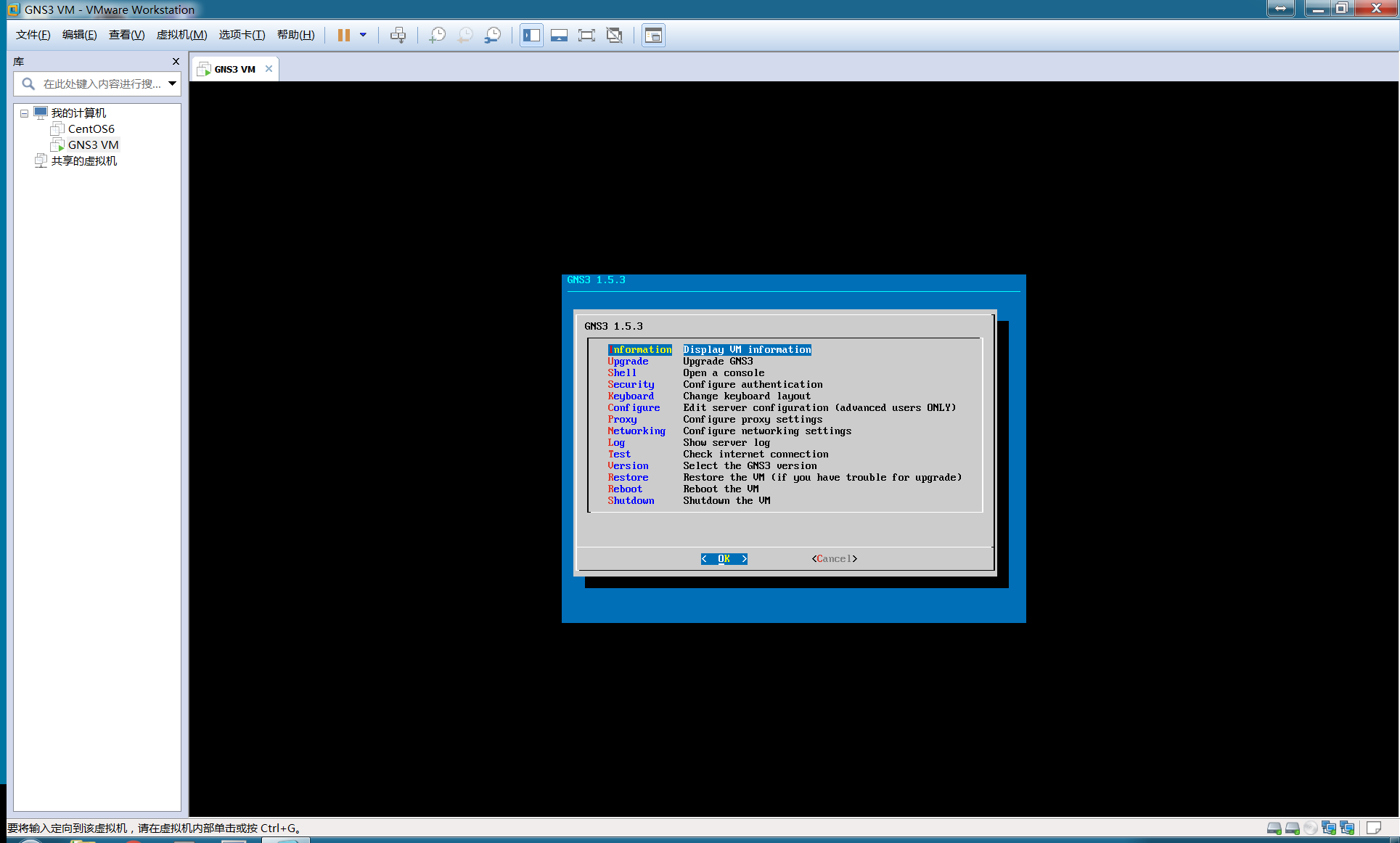
2
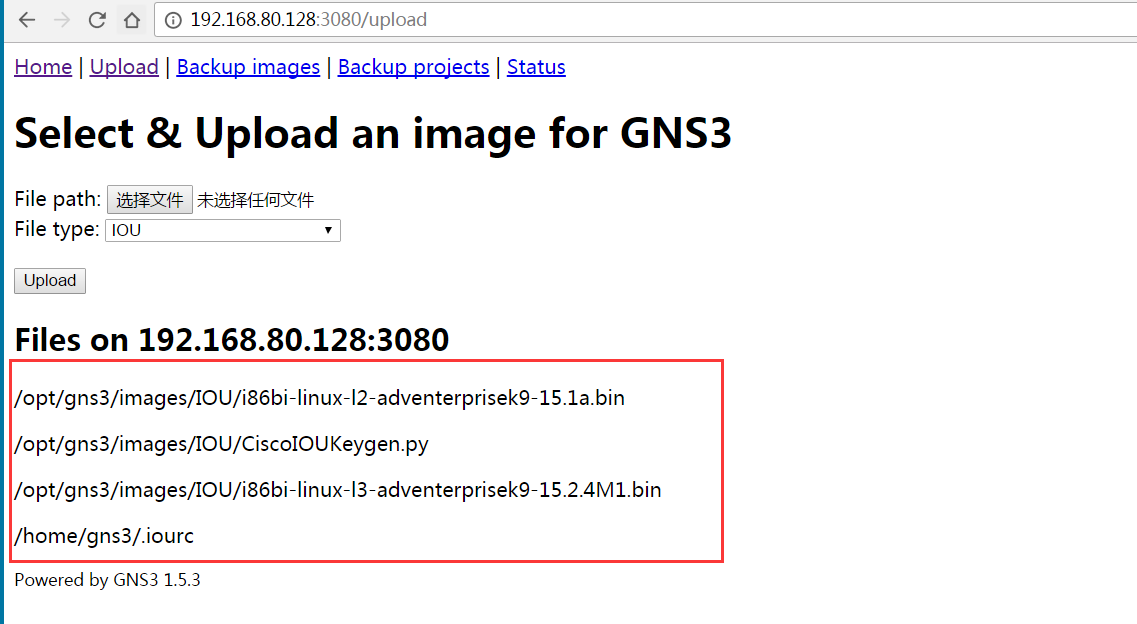
然后通过浏览器打开http://192.168.80.128:3080/upload上传如图所示的一些文件
3

文件可以在我的百度网盘获取链接:http://pan.baidu.com/s/1skWYnWL 密码:9fim

其中

  • i86bi-linux-l2-adventerprisek9-15.1a.bin 是模拟switch的镜像
  • i86bi-linux-l3-adventerprisek9-15.2.4M1.bin 是模拟router的镜像
  • .iourc 是cisco的license
  • CiscoIOUKeygen.py 用来计算cisco license的脚本

通过ssh工具连接虚拟机,ssh gns3@192.168.80.128 password:gns3

gns3@gns3vm:~$ cd /opt/
gns3/ lost+found/
gns3@gns3vm:~$ cd /opt/gns3/
images/ projects/
gns3@gns3vm:~$ cd /opt/gns3/images/IOU/
gns3@gns3vm:/opt/gns3/images/IOU$ ls
CiscoIOUKeygen.py i86bi-linux-l2-adventerprisek9-15.1a.bin i86bi-linux-l3-adventerprisek9-15.2.4M1.bin
CiscoIOUKeygen.py.md5sum i86bi-linux-l2-adventerprisek9-15.1a.bin.md5sum i86bi-linux-l3-adventerprisek9-15.2.4M1.bin.md5sum
gns3@gns3vm:/opt/gns3/images/IOU$ python3 CiscoIOUKeygen.py
*********************************************************************
Cisco IOU License Generator - Kal 2011, python port of 2006 C version
Modified to work with python3 by c_d 2014
hostid=00000000, hostname=gns3vm, ioukey=25e

Add the following text to ~/.iourc:
[license]
gns3vm = 73635fd3b0a13ad0;

You can disable the phone home feature with something like:
echo '127.0.0.127 xml.cisco.com' >> /etc/hosts

将上面计算得到的

[license]
gns3vm = 73635fd3b0a13ad0;

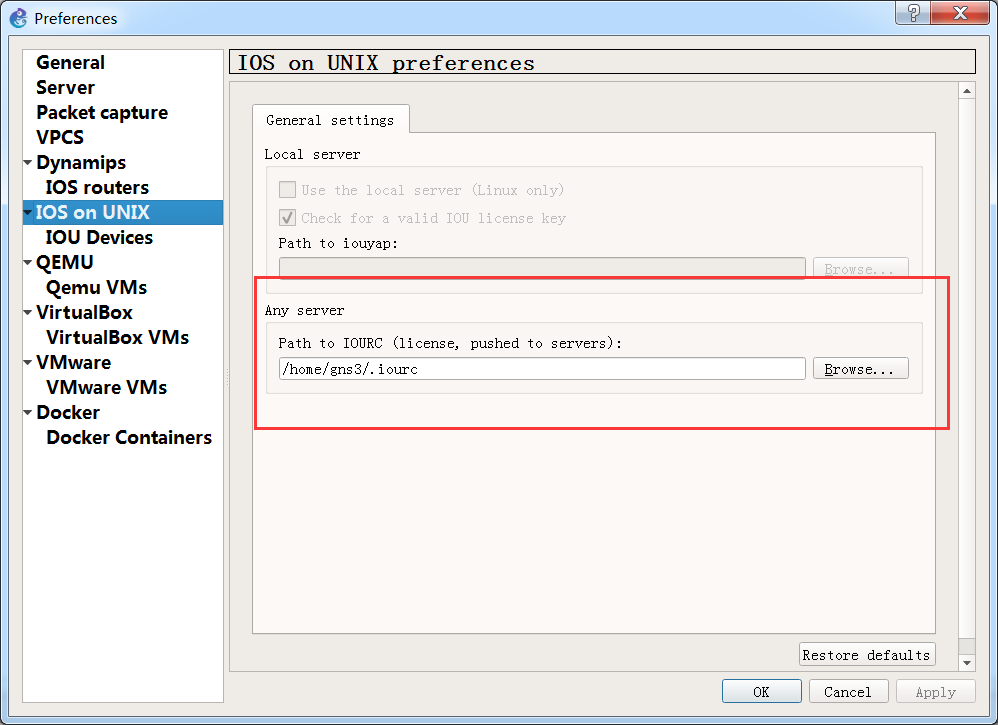
内容保存在/home/gns3/.iourc文件中

启动gns3.选择edit–preferences–找到IOS on UNIX,如图所示,配置IOURC文件的路径
4
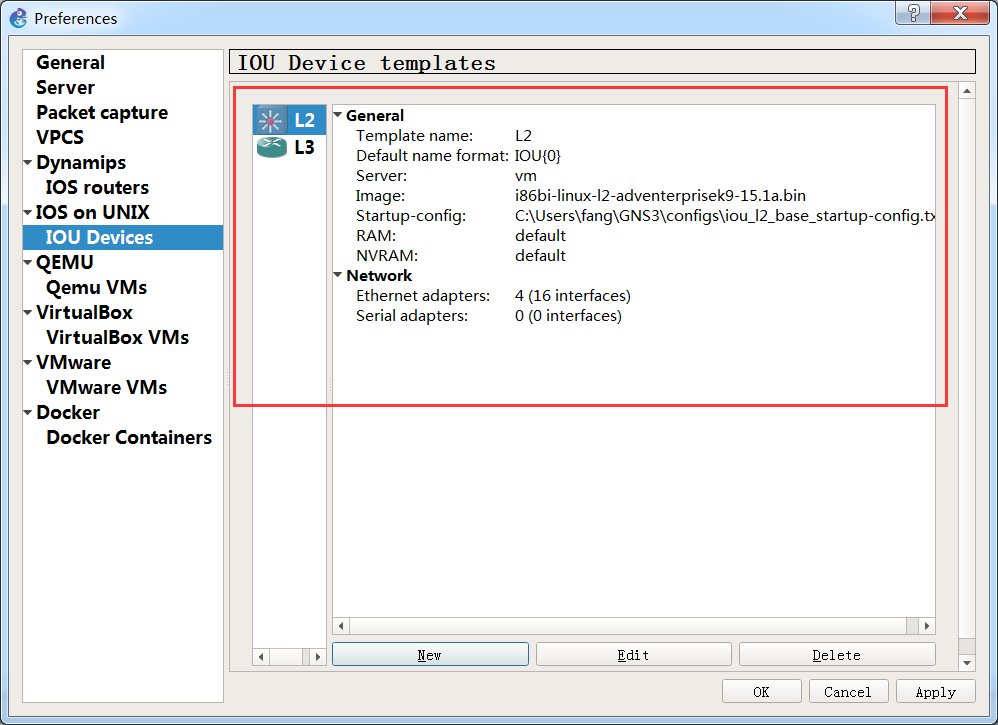
切换到IOU Devices,添加设备

5

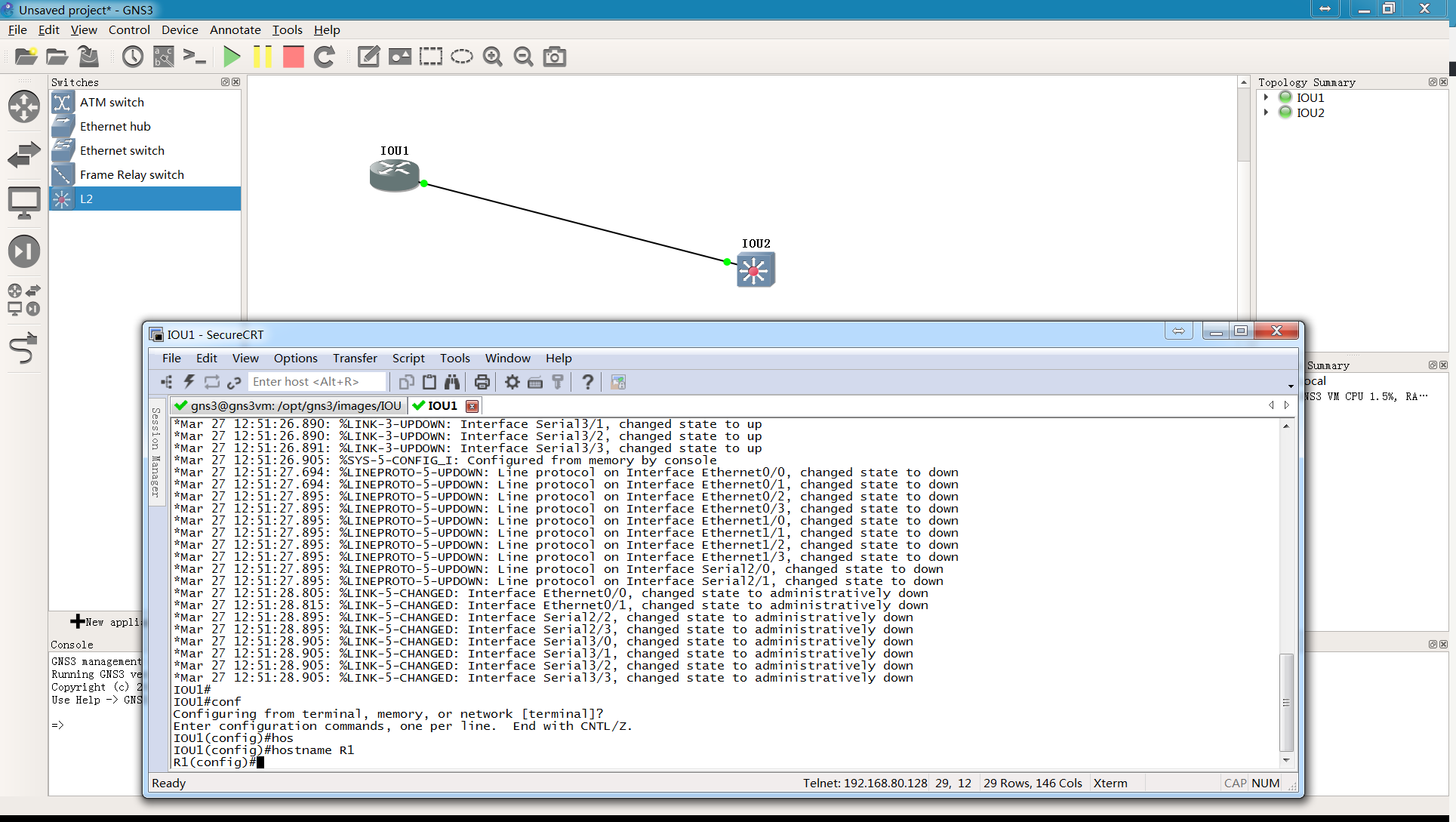
OK,现在你可以拖动设备到工作台,然后启动了

6

视频教程

文章作者:阿文
文章链接: https://www.awen.me/post/749459895.html
版权声明:本博客所有文章除特别声明外,均采用 CC BY-NC-SA 4.0 许可协议。转载请注明来自 阿文的博客
本文于 2017-06-15 13:31 发布,已超过半年(3195天),请注意甄别内容是否已过期。

评论

0 条评论
😀😃😄 😁😅😂 🤣😊😇 🙂🙃😉 😌😍🥰 😘😗😙 😚😋😛 😝😜🤪 🤨🧐🤓 😎🥸🤩 🥳😏😒 😞😔😟 😕🙁☹️ 😣😖😫 😩🥺😢 😭😤😠 😡🤬🤯 😳🥵🥶 😱😨😰 😥😓🤗 🤔🤭🤫 🤥😶😐 😑😬🙄 😯😦😧 😮😲🥱 😴🤤😪 😵🤐🥴 🤢🤮🤧 😷🤒🤕 🤑🤠😈 👿👹👺 🤡💩👻 💀☠️👽 👾🤖🎃 😺😸😹 😻😼😽 🙀😿😾 👍👎👏 🙌👐🤲 🤝🤜🤛 ✌️🤞🤟 🤘👌🤏 👈👉👆 👇☝️ 🤚🖐️🖖 👋🤙💪 🦾🖕✍️ 🙏💅🤳 💯💢💥 💫💦💨 🕳️💣💬 👁️‍🗨️🗨️🗯️ 💭💤❤️ 🧡💛💚 💙💜🖤 🤍🤎💔 ❣️💕💞 💓💗💖 💘💝💟 ☮️✝️☪️ 🕉️☸️✡️ 🔯🕎☯️ ☦️🛐 🆔⚛️🉑 ☢️☣️📴 📳🈶🈚 🈸🈺🈷️ ✴️🆚💮 🉐㊙️㊗️ 🈴🈵🈹 🈲🅰️🅱️ 🆎🆑🅾️ 🆘 🛑📛 🚫💯💢 ♨️🚷🚯 🚳🚱🔞 📵🚭 ‼️⁉️🔅 🔆〽️⚠️ 🚸🔱⚜️ 🔰♻️ 🈯💹❇️ ✳️🌐 💠Ⓜ️🌀 💤🏧🚾 🅿️🈳 🈂🛂🛃 🛄🛅🛗 🚀🛸🚁 🚉🚆🚅 ✈️🛫🛬 🛩️💺🛰️
您的评论由 AI 智能审核,一般1分钟内会展示,若不展示请确认你的评论是否符合社区和法律规范
加载中...

选择联系方式

留言反馈

😀😃😄 😁😅😂 🤣😊😇 🙂🙃😉 😌😍🥰 😘😗😙 😚😋😛 😝😜🤪 🤨🧐🤓 😎🥸🤩 🥳😏😒 😞😔😟 😕🙁☹️ 😣😖😫 😩🥺😢 😭😤😠 😡🤬🤯 😳🥵🥶 😱😨😰 😥😓🤗 🤔🤭🤫 🤥😶😐 😑😬🙄 😯😦😧 😮😲🥱 😴🤤😪 😵🤐🥴 🤢🤮🤧 😷🤒🤕 🤑🤠😈 👿👹👺 🤡💩👻 💀☠️👽 👾🤖🎃 😺😸😹 😻😼😽 🙀😿😾 👍👎👏 🙌👐🤲 🤝🤜🤛 ✌️🤞🤟 🤘👌🤏 👈👉👆 👇☝️ 🤚🖐️🖖 👋🤙💪 🦾🖕✍️ 🙏💅🤳 💯💢💥 💫💦💨 🕳️💣💬 👁️‍🗨️🗨️🗯️ 💭💤❤️ 🧡💛💚 💙💜🖤 🤍🤎💔 ❣️💕💞 💓💗💖 💘💝💟 ☮️✝️☪️ 🕉️☸️✡️ 🔯🕎☯️ ☦️🛐 🆔⚛️🉑 ☢️☣️📴 📳🈶🈚 🈸🈺🈷️ ✴️🆚💮 🉐㊙️㊗️ 🈴🈵🈹 🈲🅰️🅱️ 🆎🆑🅾️ 🆘 🛑📛 🚫💯💢 ♨️🚷🚯 🚳🚱🔞 📵🚭 ‼️⁉️🔅 🔆〽️⚠️ 🚸🔱⚜️ 🔰♻️ 🈯💹❇️ ✳️🌐 💠Ⓜ️🌀 💤🏧🚾 🅿️🈳 🈂🛂🛃 🛄🛅🛗 🚀🛸🚁 🚉🚆🚅 ✈️🛫🛬 🛩️💺🛰️