深夜提醒

现在是深夜,建议您注意休息,不要熬夜哦~

🏮 🏮 🏮

新年快乐

祝君万事如意心想事成!

share-image
中
ESC

Distributed Tracing in Practice: Implementing End-to-End Trace ID Tracking from Scratch

English 阅读中文版

Today, with microservice architecture and front-end/back-end separation as the mainstream, a single user request often has to pass through multiple service nodes to complete. When the system has a problem, how to quickly locate the complete chain of a single request within a sea of logs becomes a challenge every developer has to face. This article explains in detail how to implement an end-to-end Trace ID tracking system from scratch.

Distributed tracing Trace ID cover

1. Why Do We Need Trace IDs?

1.1 The Logging Predicament of Distributed Systems

Imagine this scenario: a user clicks a button on a web page, and this request passes through:

Frontend → Nginx → API Gateway → User Service → Order Service → Payment Service → Database

When the user reports “the order failed,” you need to:

  1. Search the Nginx logs for the request record
  2. Continue tracing it in the API Gateway logs
  3. Search separately in each microservice’s logs
  4. Try to correlate logs from different services via timestamps

The problems are obvious:

  • Timestamps may be inconsistent across machines
  • Under high concurrency, a huge number of requests interleave in the same time window
  • You can’t tell which log entries belong to the same user request

1.2 The Value of a Trace ID

A Trace ID is a globally unique identifier, generated from the moment a request enters the system and passed along the entire call chain. Its core value:

Capability Description
Full-chain correlation String the logs scattered across services into one complete story
Fast location Retrieve related logs in seconds via a unique ID
Performance analysis Track the time spent at each node of a request
Troubleshooting Pinpoint exactly which service the problem occurred in

2. The Core Design Principles of a Trace ID

To implement a robust Trace ID system, you need to follow these three core principles:

flowchart LR
A[Client request] -->|Carry TraceID| B[Server entry]
B -->|Pass TraceID| C[Downstream service A]
B -->|Pass TraceID| D[Downstream service B]
C -->|Pass TraceID| E[Downstream service C]
B -->|Return TraceID| F[Client response]

style B fill:#4CAF50,color:#fff
style F fill:#2196F3,color:#fff

2.1 Pass-Through Principle

If the request header already carries a Trace ID (say, from an upstream service or client), it must be passed through as-is, not regenerated. This guarantees chain continuity across service boundaries.

2.2 Server-Side Fallback Principle

If the request header has no Trace ID, the server must generate one proactively. This ensures that even if the client hasn’t implemented Trace IDs, the server logs remain traceable.

2.3 Response Return Principle

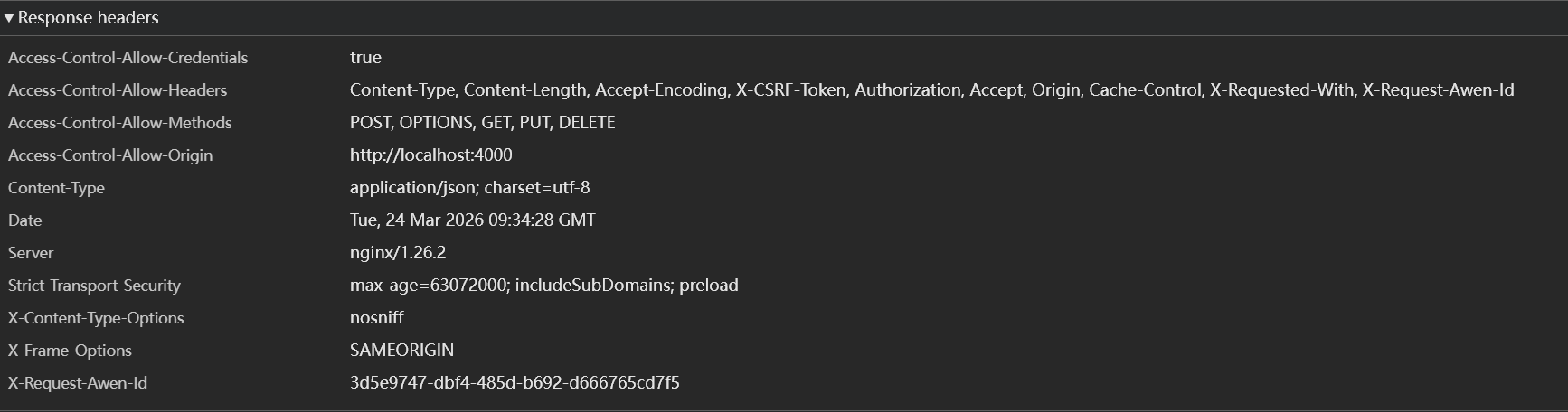
The server must return the Trace ID used for this request in the response header. That way, when a user reports a problem, the Trace ID can be obtained directly via the browser’s developer tools, greatly improving troubleshooting efficiency.

3. Backend Implementation: Go + Gin

Below is the complete code for implementing a Trace ID middleware in Go’s Gin framework.

3.1 Trace ID Middleware

package middleware

import (
"context"
"github.com/gin-gonic/gin"
"github.com/google/uuid"
"log/slog"
)

// TraceIDHeader is the Trace ID field name in the HTTP header
const TraceIDHeader = "X-Trace-ID"

// ContextKeyTraceID is the key type for storing the Trace ID in context (to avoid collisions)
type ContextKeyTraceID struct{}

// TraceIDMiddleware injects/passes through a Trace ID for each request
func TraceIDMiddleware() gin.HandlerFunc {
return func(c *gin.Context) {
traceID := c.GetHeader(TraceIDHeader)

// If the client didn't provide one, the server generates a fallback
if traceID == "" {
traceID = uuid.New().String()
}

// Store it in context, for subsequent logging and business logic
ctx := context.WithValue(c.Request.Context(), ContextKeyTraceID{}, traceID)
c.Request = c.Request.WithContext(ctx)

// Return the Trace ID in the response header
c.Header(TraceIDHeader, traceID)

c.Next()
}
}

// GetTraceID extracts the Trace ID from context
func GetTraceID(ctx context.Context) string {
if traceID, ok := ctx.Value(ContextKeyTraceID{}).(string); ok {
return traceID
}
return ""
}

3.2 Integrating into the Gin Engine

package main

import (
"github.com/gin-gonic/gin"
"blog-api/internal/middleware"
)

func main() {
r := gin.Default()

// Register the Trace ID middleware globally (it needs to come before the logging middleware)
r.Use(middleware.TraceIDMiddleware())

// Other middleware and routes...
r.Use(middleware.LoggerMiddleware())

// Register business routes
r.GET("/api/v1/posts", handler.GetPosts)
r.POST("/api/v1/orders", handler.CreateOrder)

r.Run(":8080")
}

3.3 Logging Middleware Integrated with the Trace ID

To make logs automatically include the Trace ID, we need a custom logging middleware:

package middleware

import (
"log/slog"
"time"
"github.com/gin-gonic/gin"
)

func LoggerMiddleware() gin.HandlerFunc {
return func(c *gin.Context) {
start := time.Now()
path := c.Request.URL.Path

// Get the Trace ID
traceID := GetTraceID(c.Request.Context())

// Handle the request
c.Next()

// Record the access log
slog.Info("HTTP Request",
slog.String("trace_id", traceID),
slog.String("method", c.Request.Method),
slog.String("path", path),
slog.Int("status", c.Writer.Status()),
slog.Duration("latency", time.Since(start)),
slog.String("client_ip", c.ClientIP()),
)
}
}

3.4 Using the Trace ID in Handlers

In business code, you can get the Trace ID from context and pass it to downstream services:

package handler

import (
"github.com/gin-gonic/gin"
"blog-api/internal/middleware"
"net/http"
)

func CreateOrder(c *gin.Context) {
// Get the Trace ID from context
traceID := middleware.GetTraceID(c.Request.Context())

// When calling a downstream service, pass the Trace ID
req, _ := http.NewRequest("POST", "http://payment-service/charge", body)
req.Header.Set(middleware.TraceIDHeader, traceID)

// Send the request...

c.JSON(200, gin.H{
"order_id": "ORD-20250324-001",
"trace_id": traceID,
"message": "Order created successfully",
})
}

3.5 Sample Log Output

After configuring slog to output JSON, the logs look like this:

{
"time": "2026-03-24T17:30:00Z",
"level": "INFO",
"msg": "HTTP Request",
"trace_id": "550e8400-e29b-41d4-a716-446655440000",
"method": "POST",
"path": "/api/v1/orders",
"status": 200,
"latency": "45.2ms",
"client_ip": "192.168.1.100"
}

Via the trace_id field, you can quickly filter out all the log entries belonging to the same request in the logging system.

4. Frontend Implementation: Hexo Blog Integration

The front end needs to implement two core features: generating a Trace ID and a unified request wrapper function.

4.1 Generating a UUID

Use the Web Crypto API to generate a standard UUID v4:

/**
* Generate a standard UUID v4
* @returns {string} UUID string, e.g.: 550e8400-e29b-41d4-a716-446655440000
*/
function generateUUID() {
// Check whether crypto.randomUUID is supported
if (typeof crypto !== 'undefined' && crypto.randomUUID) {
return crypto.randomUUID();
}

// Fallback
return 'xxxxxxxx-xxxx-4xxx-yxxx-xxxxxxxxxxxx'.replace(/[xy]/g, function(c) {
const r = Math.random() * 16 | 0;
const v = c === 'x' ? r : (r & 0x3 | 0x8);
return v.toString(16);
});
}

4.2 API Request Wrapper

Wrap a unified apiFetch function that automatically injects the Trace ID and extracts the Trace ID from the response:

/**
* API request wrapper with Trace ID
* @param {string} url - request URL
* @param {Object} options - fetch options
* @returns {Promise<Response>}
*/
async function apiFetch(url, options = {}) {
// Generate a new Trace ID
const traceID = generateUUID();

// Merge the request headers
const headers = {
'Content-Type': 'application/json',
'X-Trace-ID': traceID,
...options.headers
};

try {
const response = await fetch(url, {
...options,
headers
});

// Extract the Trace ID returned by the server (may differ from what was sent if the server regenerated one)
const serverTraceID = response.headers.get('X-Trace-ID');
if (serverTraceID) {
console.log(`[Trace ID] ${serverTraceID}`);
// Can be stored in global state or localStorage so users can view it when reporting issues
window.__lastTraceID__ = serverTraceID;
}

// If the response is not 2xx, print an error log
if (!response.ok) {
console.error(`[API Error] Trace ID: ${serverTraceID || traceID}, Status: ${response.status}`);
}

return response;
} catch (error) {
console.error(`[Network Error] Trace ID: ${traceID}`, error);
throw error;
}
}

4.3 Usage Examples

Called in scenarios like blog comment submission and heatmap data fetching:

// Submit a comment
async function submitComment(content) {
const response = await apiFetch('https://api.example.com/comments', {
method: 'POST',
body: JSON.stringify({
content: content,
post_id: 'distributed-tracing-in-practice'
})
});

return await response.json();
}

// Get the post list
async function getPosts() {
const response = await apiFetch('https://api.example.com/posts');
return await response.json();
}

4.4 Debug Panel (optional)

To make troubleshooting easier, you can display the current Trace ID on the page:

// Add debug info to the page (development environment)
if (location.hostname === 'localhost' || location.search.includes('debug=1')) {
const debugDiv = document.createElement('div');
debugDiv.style.cssText = `
position: fixed;
bottom: 10px;
right: 10px;
background: rgba(0,0,0,0.8);
color: #0f0;
padding: 8px 12px;
border-radius: 4px;
font-family: monospace;
font-size: 12px;
z-index: 9999;
cursor: pointer;
`;

// Click to copy the Trace ID
debugDiv.title = 'Click to copy the Trace ID';
debugDiv.onclick = () => {
const id = window.__lastTraceID__ || 'N/A';
navigator.clipboard.writeText(id);
alert('Trace ID copied: ' + id);
};

// Update the display
setInterval(() => {
const id = window.__lastTraceID__ || 'N/A';
debugDiv.textContent = `Trace ID: ${id.slice(0, 8)}...`;
}, 1000);

document.body.appendChild(debugDiv);
}

5. Best Practices

5.1 Trace ID Generation Standards

Approach Pros Cons Recommended Scenario
UUID v4 Simple to implement, globally unique Long (36 chars), unordered Small and medium systems
Snowflake Trend-increasing, contains time info Requires coordinating node IDs High-concurrency distributed systems
ULID Time-sortable, good readability Requires extra library support Scenarios with frequent log retrieval

For general scenarios, UUID v4 is recommended — simple and reliable.

5.2 HTTP Header Naming Standards

  • Prefer X-Trace-ID or X-Request-ID
  • Avoid Trace-ID (a custom header without the X prefix may conflict with other standards)
  • Keep it consistent across the whole system, including Nginx, the API Gateway, and backend services

5.3 Full-Chain Propagation Checklist

□ Frontend: add the X-Trace-ID header on requests
□ Nginx: record $http_x_trace_id in the access log
□ API Gateway: pass through or generate the Trace ID
□ Backend services:
□ Middleware extracts/generates the Trace ID
□ Logs automatically include the Trace ID
□ The response header returns the Trace ID
□ Pass through the Trace ID when calling downstream services
□ Database: optional, record the application-supplied Trace ID in the slow query log
□ Message queue: put the Trace ID into the message header or body

5.4 Log Querying Techniques

When using log systems like ELK/Loki, you can build an index on the trace_id field:

# Loki configuration example
scrape_configs:
- job_name: api-server
pipeline_stages:
- json:
expressions:
trace_id: trace_id
- labels:
trace_id:

Query syntax:

# Find all logs for a specific Trace ID
{app="api-server"} |= "trace_id=\"550e8400-e29b-41d4-a716-446655440000\""

# Count slow requests for a given endpoint
{app="api-server"}
| json
| path = "/api/v1/orders"
| latency > "1s"

5.5 Performance Considerations

  • Trace ID generation has minimal performance impact (UUID generation is about 50-100ns)
  • Avoid using reflection to get the Trace ID in logs; read it directly from context
  • For extremely high-concurrency scenarios, consider an object pool to reuse context objects

6. Summary

A Trace ID is an indispensable observability tool in a distributed system. Through the three principles introduced in this article (pass-through, fallback, return) and the front-end/back-end implementation, you can:

  1. Locate problems in seconds: quickly retrieve related logs via the Trace ID
  2. Improve user experience: users can provide the Trace ID directly when reporting issues
  3. Reduce troubleshooting cost: avoid looking for a needle in a haystack of logs
clip_1774344899049_epn1b2.png

Reference links:

文章作者:阿文
文章链接: https://www.awen.me/post/6e1ebc4a.html
版权声明:本博客所有文章除特别声明外,均采用 CC BY-NC-SA 4.0 许可协议。转载请注明来自 阿文的博客!
本文于 2026-03-24 17:30 发布,已超过半年(206天),请注意甄别内容是否已过期。

评论

0 条评论
😀😃😄 😁😅😂 🤣😊😇 🙂🙃😉 😌😍🥰 😘😗😙 😚😋😛 😝😜🤪 🤨🧐🤓 😎🥸🤩 🥳😏😒 😞😔😟 😕🙁☹️ 😣😖😫 😩🥺😢 😭😤😠 😡🤬🤯 😳🥵🥶 😱😨😰 😥😓🤗 🤔🤭🤫 🤥😶😐 😑😬🙄 😯😦😧 😮😲🥱 😴🤤😪 😵🤐🥴 🤢🤮🤧 😷🤒🤕 🤑🤠😈 👿👹👺 🤡💩👻 💀☠️👽 👾🤖🎃 😺😸😹 😻😼😽 🙀😿😾 👍👎👏 🙌👐🤲 🤝🤜🤛 ✌️🤞🤟 🤘👌🤏 👈👉👆 👇☝️✋ 🤚🖐️🖖 👋🤙💪 🦾🖕✍️ 🙏💅🤳 💯💢💥 💫💦💨 🕳️💣💬 👁️‍🗨️🗨️🗯️ 💭💤❤️ 🧡💛💚 💙💜🖤 🤍🤎💔 ❣️💕💞 💓💗💖 💘💝💟 ☮️✝️☪️ 🕉️☸️✡️ 🔯🕎☯️ ☦️🛐⛎ ♈♉♊ ♋♌♍ ♎♏♐ ♑♒♓ 🆔⚛️🉑 ☢️☣️📴 📳🈶🈚 🈸🈺🈷️ ✴️🆚💮 🉐㊙️㊗️ 🈴🈵🈹 🈲🅰️🅱️ 🆎🆑🅾️ 🆘❌⭕ 🛑⛔📛 🚫💯💢 ♨️🚷🚯 🚳🚱🔞 📵🚭❗ ❕❓❔ ‼️⁉️🔅 🔆〽️⚠️ 🚸🔱⚜️ 🔰♻️✅ 🈯💹❇️ ✳️❎🌐 💠Ⓜ️🌀 💤🏧🚾 ♿🅿️🈳 🈂🛂🛃 🛄🛅🛗 🚀🛸🚁 🚉🚆🚅 ✈️🛫🛬 🛩️💺🛰️
加载中...

留言反馈

😀😃😄 😁😅😂 🤣😊😇 🙂🙃😉 😌😍🥰 😘😗😙 😚😋😛 😝😜🤪 🤨🧐🤓 😎🥸🤩 🥳😏😒 😞😔😟 😕🙁☹️ 😣😖😫 😩🥺😢 😭😤😠 😡🤬🤯 😳🥵🥶 😱😨😰 😥😓🤗 🤔🤭🤫 🤥😶😐 😑😬🙄 😯😦😧 😮😲🥱 😴🤤😪 😵🤐🥴 🤢🤮🤧 😷🤒🤕 🤑🤠😈 👿👹👺 🤡💩👻 💀☠️👽 👾🤖🎃 😺😸😹 😻😼😽 🙀😿😾 👍👎👏 🙌👐🤲 🤝🤜🤛 ✌️🤞🤟 🤘👌🤏 👈👉👆 👇☝️✋ 🤚🖐️🖖 👋🤙💪 🦾🖕✍️ 🙏💅🤳 💯💢💥 💫💦💨 🕳️💣💬 👁️‍🗨️🗨️🗯️ 💭💤❤️ 🧡💛💚 💙💜🖤 🤍🤎💔 ❣️💕💞 💓💗💖 💘💝💟 ☮️✝️☪️ 🕉️☸️✡️ 🔯🕎☯️ ☦️🛐⛎ ♈♉♊ ♋♌♍ ♎♏♐ ♑♒♓ 🆔⚛️🉑 ☢️☣️📴 📳🈶🈚 🈸🈺🈷️ ✴️🆚💮 🉐㊙️㊗️ 🈴🈵🈹 🈲🅰️🅱️ 🆎🆑🅾️ 🆘❌⭕ 🛑⛔📛 🚫💯💢 ♨️🚷🚯 🚳🚱🔞 📵🚭❗ ❕❓❔ ‼️⁉️🔅 🔆〽️⚠️ 🚸🔱⚜️ 🔰♻️✅ 🈯💹❇️ ✳️❎🌐 💠Ⓜ️🌀 💤🏧🚾 ♿🅿️🈳 🈂🛂🛃 🛄🛅🛗 🚀🛸🚁 🚉🚆🚅 ✈️🛫🛬 🛩️💺🛰️