安装
[root@localhost ~]# yum -y install samba samba-client samba-common
放行端口
|
##原理
windows 和samba服务进行通信使用的是NETBIOS协议
linux和linux 之间通信使用的是SMB协议
配置文件
[root@server samba]# cat smb.conf
# See smb.conf.example for a more detailed config file or
# read the smb.conf manpage.
# Run 'testparm' to verify the config is correct after
# you modified it.

[global]
	workgroup = myshare
	security = user
	map to guest = bad user
	passdb backend = tdbsam

	printing = cups
	printcap name = cups
	load printers = yes
	cups options = raw
[homes]
	comment = Home Directories
	valid users = %S, %D%w%S
	browseable = No
	read only = No
	inherit acls = Yes

[printers]
	comment = All Printers
	path = /var/tmp
	printable = Yes
	create mask = 0600
	browseable = No

[print$]
	comment = Printer Drivers
	path = /var/lib/samba/drivers
	write list = root
	create mask = 0664
	directory mask = 0775
[share]
	path=/smbshare
	public=yes
	writable=yes
[share1]
	path=/smbu
	valid users = smbuser1,smbuser2,@g1
	writable=yes
配置匿名访问配置
[global]
        workgroup = myshare
        security = user
        map to guest = bad user # 添加此行
        passdb backend = tdbsam

        printing = cups
        printcap name = cups
        load printers = yes
        cups options = raw
末尾曾加
[share]
        path = /smbshare
        public = yes
        writable=yes
重启
|
|
后面连接出错,请先关selinux 然后重启服务
客户端连接
[root@node-server-1 ~]# mount -t cifs //192.168.50.156/public /media/
mount: wrong fs type, bad option, bad superblock on //192.168.50.156/public,
       missing codepage or helper program, or other error
       (for several filesystems (e.g. nfs, cifs) you might
       need a /sbin/mount.<type> helper program)

       In some cases useful info is found in syslog - try
       dmesg | tail or so.
需要安装
yum -y install cifs-utils
windows连接
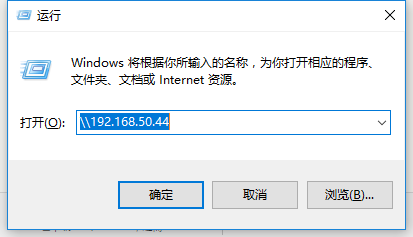
然后再次连接
[root@desktop ~]# mount -t cifs //172.10.100.128/share /media/
Password for root@//172.10.100.128/share:
[root@desktop ~]# cd /media/
[root@desktop media]# ls
ls: reading directory .: Permission denied
[root@desktop media]#
添加用户
1.创建samba用户
[root@server samba]# useradd -s /sbin/nologin smbuser1
[root@server samba]# smbpasswd -a smbuser1
New SMB password:
Retype new SMB password:
Added user smbuser1.
配置文件假如 smbuser1
[share1]
	path=/smbu
	valid users = smbuser1
	writable=yes
挂载
mount -t cifs //172.10.100.128/share1 -o username=smbuser1 /mnt/u1/
设置开机启动
[root@desktop mnt]# cat /etc/fstab

#
# /etc/fstab
# Created by anaconda on Sat May  6 22:20:05 2017
#
# Accessible filesystems, by reference, are maintained under '/dev/disk'
# See man pages fstab(5), findfs(8), mount(8) and/or blkid(8) for more info
#
/dev/mapper/cl-root     /                       xfs     defaults        0 0
UUID=8567c1db-cc09-442e-83ce-cfcdd1f8f0df /boot                   xfs     defaults        0 0
/dev/mapper/cl-swap     swap                    swap    defaults        0 0
//172.10.100.128/share1 /mnt/u4 cifs defaults, username=smbuser1,password=123456 0 0
多用户设置
1.创建多个 Samba 用户
[root@server samba]# useradd -s /sbin/nologin smbuser2
[root@server samba]# smbpasswd -a smbuser2
New SMB password:
Retype new SMB password:
Added user smbuser2.
[root@server samba]# groupadd g1
[root@server samba]# useradd -s /sbin/nologin -g g1 smbu3
[root@server samba]# smbpasswd -a smbu3
New SMB password:
Retype new SMB password:
Added user smbu3.
2.配置文件修改为
[share1]
	path=/smbu
	valid users = smbuser1,smbuser2,@g1 //多个用户用,隔开,@代表组,这里表示组1
	writable=yes
3.客户端挂载
mount -t cifs //172.10.100.128/share1 -o username=smbuser1 /mnt/u1/
mount -t cifs //172.10.100.128/share1 -o username=smbuser2 /mnt/u2/
mount -t cifs //172.10.100.128/share1 -o username=smbu3 /mnt/u3/
4.配置文件多个用户共享
[root@desktop samba]# cat /etc/fstab

#
# /etc/fstab
# Created by anaconda on Sat May  6 22:20:05 2017
#
# Accessible filesystems, by reference, are maintained under '/dev/disk'
# See man pages fstab(5), findfs(8), mount(8) and/or blkid(8) for more info
#
/dev/mapper/cl-root     /                       xfs     defaults        0 0
UUID=8567c1db-cc09-442e-83ce-cfcdd1f8f0df /boot                   xfs     defaults        0 0
/dev/mapper/cl-swap     swap                    swap    defaults        0 0
//172.10.100.128/share1 /mnt/u4 cifs defaults,credentials=/smb.mount 0 0
创建一个文件
[root@desktop samba]# cat /smb.mount
username=smbuser1
password=123456
username=smbuser2
password=123456
挂载
|
故障处理
1.报错 Unable to find suitable address.
|
检查防火墙
版权声明:本博客所有文章除特别声明外,均采用 CC BY-NC-SA 4.0 许可协议。转载请注明来自 阿文的博客!
评论
0 条评论