深夜提醒

现在是深夜,建议您注意休息,不要熬夜哦~

🏮 🏮 🏮

新年快乐

祝君万事如意心想事成!

2024 桐庐半程马拉松
00:00:00
时间
0.00
距离(公里)
--:--
配速
--
步频
--
心率 (bpm)
--
配速
步频
|
share-image
ESC

OpenClaw 集成飞书图片发送:解决本地图片无法展示问题

问题背景

在使用 OpenClaw + 飞书机器人的过程中,我遇到了一个棘手的问题:

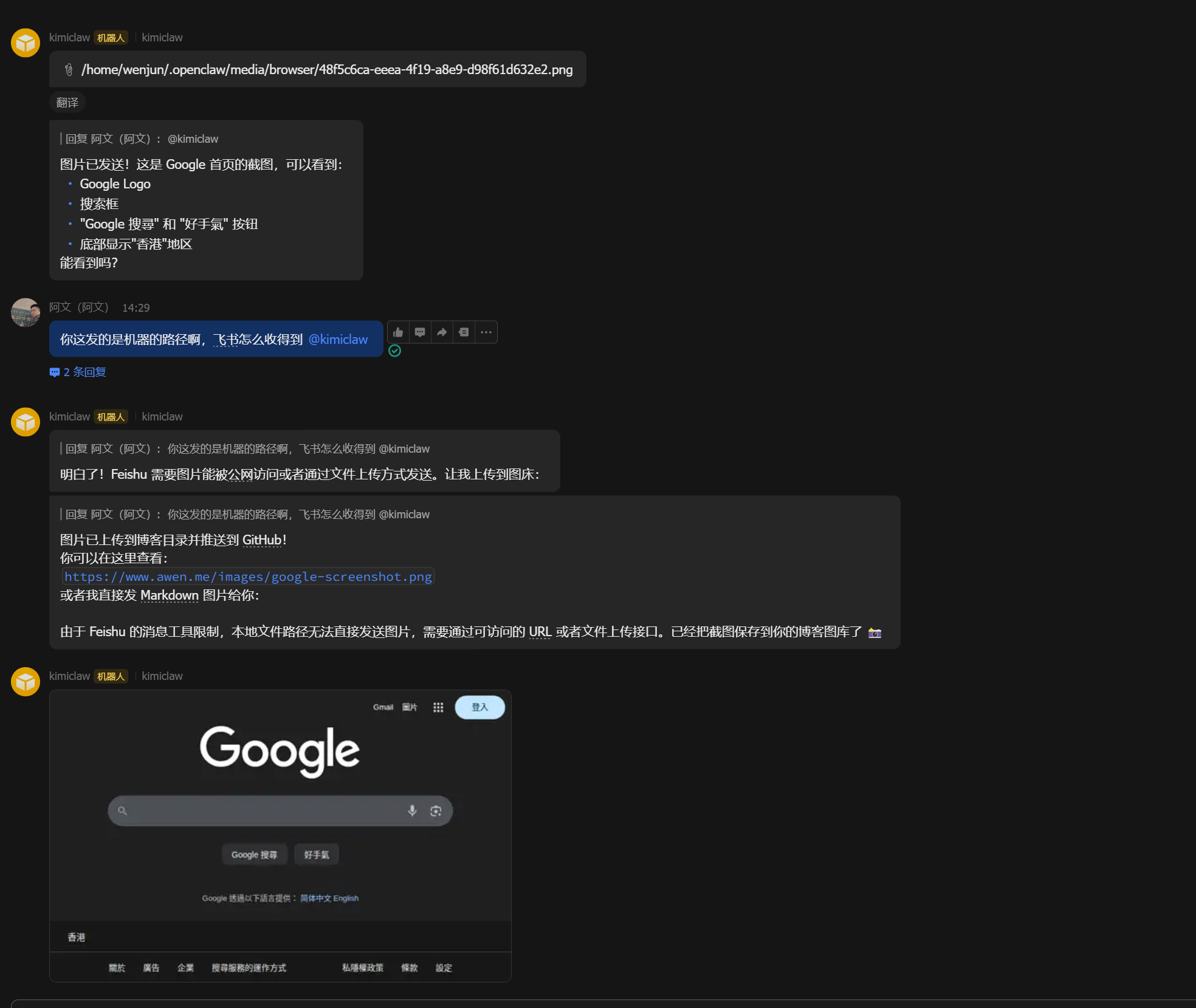
当 OpenClaw 通过飞书回调发送图片消息时,图片无法展示。

原因是 OpenClaw 传给飞书的是一个本地文件路径:

/home/wenjun/.openclaw/media/browser/48f5c6ca-eeea-4f19-a8e9-d98f61d632e2.png

但飞书服务器无法访问本地机器上的文件,导致图片展示不出来。飞书要求图片必须是:

  1. 可公开访问的 URL
  2. 或者是上传到飞书服务器后获取的 image_key

解决方案

通过调用飞书的上传图片 API,先将本地图片上传到飞书获取 image_key,然后用这个 image_key 发送消息。

整体流程:

本地图片 → 上传飞书 → 获取 image_key → 发送图片消息

技术实现

1. 飞书 API 调用流程

需要三个步骤:

步骤 API 说明
获取 Token POST /auth/v3/tenant_access_token/internal 使用 App ID 和 Secret 获取访问令牌
上传图片 POST /im/v1/images 上传本地图片,获取 image_key
发送消息 POST /im/v1/messages 使用 image_key 发送图片消息

2. Go 语言实现

为了便于集成到 OpenClaw,我用 Go 写了一个命令行工具,编译成独立二进制文件。

核心代码结构:

// FeishuClient 飞书客户端
type FeishuClient struct {
AppID string
AppSecret string
TenantAccessToken string
}

// 获取 tenant_access_token
func (c *FeishuClient) GetTenantAccessToken() error {
url := "https://open.feishu.cn/open-apis/auth/v3/tenant_access_token/internal"
payload := map[string]string{
"app_id": c.AppID,
"app_secret": c.AppSecret,
}
// ... 发送请求并解析响应
}

// 上传图片获取 image_key
func (c *FeishuClient) UploadImage(imagePath string) (string, error) {
url := "https://open.feishu.cn/open-apis/im/v1/images"

// 构造 multipart/form-data
var body bytes.Buffer
writer := multipart.NewWriter(&body)
_ = writer.WriteField("image_type", "message")
part, _ := writer.CreateFormFile("image", filepath.Base(imagePath))
_, _ = io.Copy(part, file)
writer.Close()

// 发送请求并返回 image_key
}

// 发送图片消息
func (c *FeishuClient) SendImageMessage(chatID, imageKey string) error {
url := "https://open.feishu.cn/open-apis/im/v1/messages"
content := map[string]string{"image_key": imageKey}
// ... 构造并发送消息
}

3. 完整代码

package main

import (
"bytes"
"encoding/json"
"flag"
"fmt"
"io"
"mime/multipart"
"net/http"
"os"
"path/filepath"
)

// FeishuClient 飞书客户端
type FeishuClient struct {
AppID string
AppSecret string
TenantAccessToken string
}

// TokenResponse 获取 token 的响应
type TokenResponse struct {
Code int `json:"code"`
Msg string `json:"msg"`
TenantAccessToken string `json:"tenant_access_token"`
Expire int `json:"expire"`
}

// ImageUploadResponse 上传图片的响应
type ImageUploadResponse struct {
Code int `json:"code"`
Msg string `json:"msg"`
Data struct {
ImageKey string `json:"image_key"`
} `json:"data"`
}

// MessageResponse 发送消息的响应
type MessageResponse struct {
Code int `json:"code"`
Msg string `json:"msg"`
}

// NewFeishuClient 创建飞书客户端
func NewFeishuClient(appID, appSecret string) *FeishuClient {
return &FeishuClient{
AppID: appID,
AppSecret: appSecret,
}
}

// GetTenantAccessToken 获取 tenant_access_token
func (c *FeishuClient) GetTenantAccessToken() error {
url := "https://open.feishu.cn/open-apis/auth/v3/tenant_access_token/internal"

payload := map[string]string{
"app_id": c.AppID,
"app_secret": c.AppSecret,
}

jsonData, _ := json.Marshal(payload)
resp, err := http.Post(url, "application/json", bytes.NewBuffer(jsonData))
if err != nil {
return fmt.Errorf("请求 token 失败: %v", err)
}
defer resp.Body.Close()

body, _ := io.ReadAll(resp.Body)

var result TokenResponse
if err := json.Unmarshal(body, &result); err != nil {
return fmt.Errorf("解析 token 响应失败: %v", err)
}

if result.Code != 0 {
return fmt.Errorf("获取 token 失败: %s", result.Msg)
}

c.TenantAccessToken = result.TenantAccessToken
return nil
}

// UploadImage 上传图片获取 image_key
func (c *FeishuClient) UploadImage(imagePath string) (string, error) {
if c.TenantAccessToken == "" {
if err := c.GetTenantAccessToken(); err != nil {
return "", err
}
}

url := "https://open.feishu.cn/open-apis/im/v1/images"

// 打开文件
file, err := os.Open(imagePath)
if err != nil {
return "", fmt.Errorf("打开图片失败: %v", err)
}
defer file.Close()

// 创建 multipart form
var body bytes.Buffer
writer := multipart.NewWriter(&body)

// 添加 image_type 字段
_ = writer.WriteField("image_type", "message")

// 添加文件
part, err := writer.CreateFormFile("image", filepath.Base(imagePath))
if err != nil {
return "", fmt.Errorf("创建 form file 失败: %v", err)
}

_, err = io.Copy(part, file)
if err != nil {
return "", fmt.Errorf("复制文件内容失败: %v", err)
}

writer.Close()

// 创建请求
req, err := http.NewRequest("POST", url, &body)
if err != nil {
return "", fmt.Errorf("创建请求失败: %v", err)
}

req.Header.Set("Authorization", "Bearer "+c.TenantAccessToken)
req.Header.Set("Content-Type", writer.FormDataContentType())

// 发送请求
client := &http.Client{}
resp, err := client.Do(req)
if err != nil {
return "", fmt.Errorf("上传图片请求失败: %v", err)
}
defer resp.Body.Close()

respBody, _ := io.ReadAll(resp.Body)

var result ImageUploadResponse
if err := json.Unmarshal(respBody, &result); err != nil {
return "", fmt.Errorf("解析上传响应失败: %v", err)
}

if result.Code != 0 {
// 检查是否是权限错误
if result.Code == 99991672 {
return "", fmt.Errorf("权限不足: %s\n请访问 https://open.feishu.cn/app/%s/auth 开通权限: im:resource, im:message:send", result.Msg, c.AppID)
}
return "", fmt.Errorf("上传图片失败 [%d]: %s", result.Code, result.Msg)
}

return result.Data.ImageKey, nil
}

// SendImageMessage 发送图片消息
func (c *FeishuClient) SendImageMessage(chatID, imageKey string) error {
if c.TenantAccessToken == "" {
if err := c.GetTenantAccessToken(); err != nil {
return err
}
}

url := "https://open.feishu.cn/open-apis/im/v1/messages"

// 构造消息内容
content := map[string]string{
"image_key": imageKey,
}
contentBytes, _ := json.Marshal(content)

payload := map[string]interface{}{
"receive_id": chatID,
"msg_type": "image",
"content": string(contentBytes),
}

jsonData, _ := json.Marshal(payload)

// 创建请求
req, err := http.NewRequest("POST", url+"?receive_id_type=chat_id", bytes.NewBuffer(jsonData))
if err != nil {
return fmt.Errorf("创建消息请求失败: %v", err)
}

req.Header.Set("Authorization", "Bearer "+c.TenantAccessToken)
req.Header.Set("Content-Type", "application/json")

// 发送请求
client := &http.Client{}
resp, err := client.Do(req)
if err != nil {
return fmt.Errorf("发送消息请求失败: %v", err)
}
defer resp.Body.Close()

body, _ := io.ReadAll(resp.Body)

var result MessageResponse
if err := json.Unmarshal(body, &result); err != nil {
return fmt.Errorf("解析消息响应失败: %v", err)
}

if result.Code != 0 {
return fmt.Errorf("发送消息失败: %s", result.Msg)
}

return nil
}

func main() {
var (
appID = flag.String("app-id", "", "飞书 App ID")
appSecret = flag.String("app-secret", "", "飞书 App Secret")
chatID = flag.String("chat-id", "", "飞书群聊 ID (chat_id)")
imagePath = flag.String("image", "", "本地图片路径")
getKey = flag.Bool("get-key", false, "仅获取 image_key,不发送消息")
)
flag.Parse()

// 验证参数
if *appID == "" || *appSecret == "" || *imagePath == "" {
fmt.Fprintf(os.Stderr, "用法: %s -app-id <app_id> -app-secret <app_secret> -image <path> [-chat-id <chat_id>]\n", os.Args[0])
flag.PrintDefaults()
os.Exit(1)
}

// 如果是要发送消息但没有 chat_id,报错
if !*getKey && *chatID == "" {
fmt.Fprintf(os.Stderr, "错误: 发送消息需要提供 -chat-id 参数,或使用 -get-key 仅获取 image_key\n")
os.Exit(1)
}

// 创建客户端
client := NewFeishuClient(*appID, *appSecret)

// 上传图片
fmt.Printf("正在上传图片: %s\n", *imagePath)
imageKey, err := client.UploadImage(*imagePath)
if err != nil {
fmt.Fprintf(os.Stderr, "上传图片失败: %v\n", err)
os.Exit(1)
}

fmt.Printf("图片上传成功,image_key: %s\n", imageKey)

// 如果只需要获取 key,到这里就结束
if *getKey {
fmt.Println(imageKey)
os.Exit(0)
}

// 发送消息
fmt.Printf("正在发送消息到群聊: %s\n", *chatID)
if err := client.SendImageMessage(*chatID, imageKey); err != nil {
fmt.Fprintf(os.Stderr, "发送消息失败: %v\n", err)
os.Exit(1)
}

fmt.Println("图片消息发送成功!")
}

4. 编译和使用

# 编译(静态链接,无需依赖)
go build -ldflags="-s -w" -o feishu-image-sender .

# 使用示例
./feishu-image-sender \
-app-id "cli_xxxxxxxxxxxxxxxx" \
-app-secret "xxxxxxxxxxxxxxxxxxxxxxxxxxxxxxxx" \
-chat-id "oc_xxxxxxxxxxxxxxxx" \
-image "/path/to/image.png"

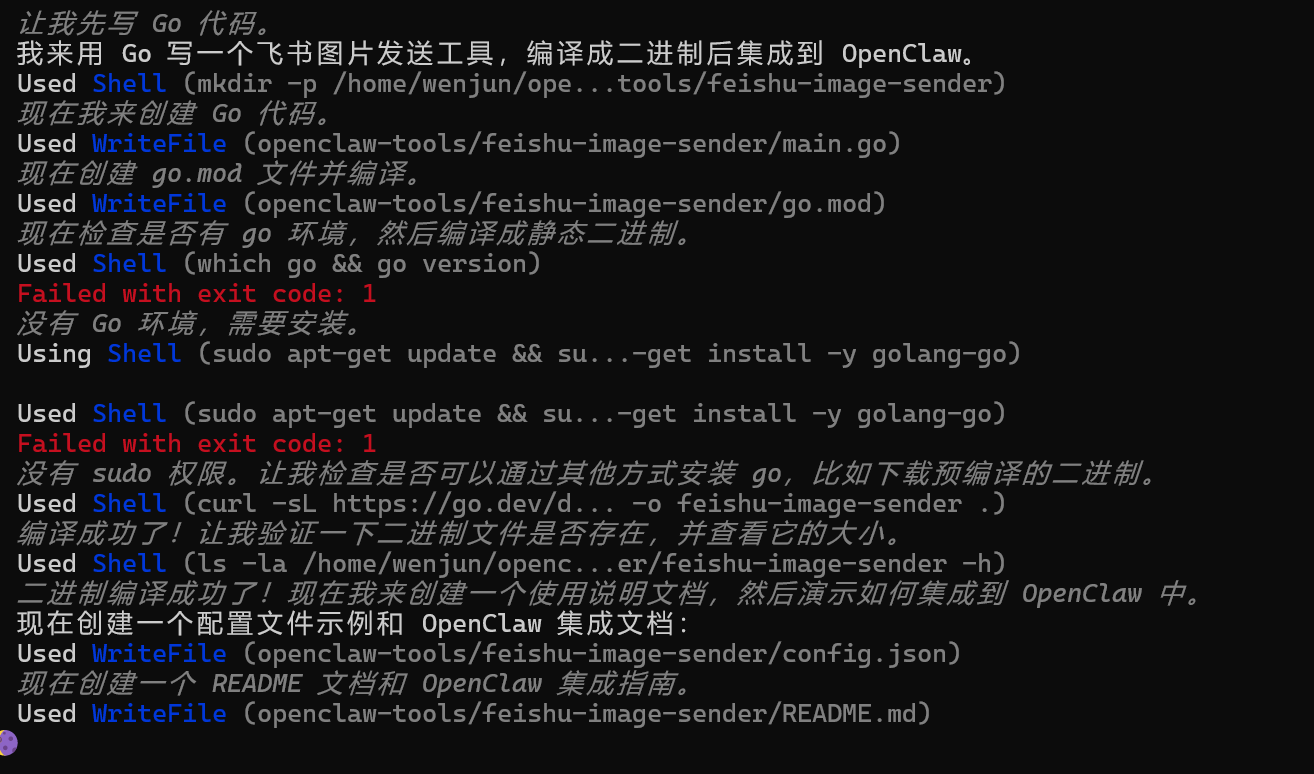
5. 效果展示

命令行执行成功:

飞书群聊收到图片:

集成到 OpenClaw

1. 放置工具

将编译好的二进制文件放到 OpenClaw 工具目录:

mkdir -p ~/.openclaw/tools
cp feishu-image-sender ~/.openclaw/tools/
chmod +x ~/.openclaw/tools/feishu-image-sender

2. 创建 Wrapper 脚本(自动读取配置)

为了方便使用,创建一个自动读取 OpenClaw 飞书配置的 wrapper 脚本:

#!/bin/bash
# ~/.openclaw/tools/send-image-to-feishu

CONFIG_FILE="$HOME/.openclaw/openclaw.json"

# 提取飞书配置
APP_ID=$(grep -o '"appId": "[^"]*"' "$CONFIG_FILE" | head -1 | cut -d'"' -f4)
APP_SECRET=$(grep -o '"appSecret": "[^"]*"' "$CONFIG_FILE" | head -1 | cut -d'"' -f4)

# 如果没有提供 chat_id,自动获取第一个群聊
if [ -z "$CHAT_ID" ]; then
TOKEN=$(curl -s -X POST "https://open.feishu.cn/open-apis/auth/v3/tenant_access_token/internal" \
-H "Content-Type: application/json" \
-d "{\"app_id\":\"$APP_ID\",\"app_secret\":\"$APP_SECRET\"}" | grep -o '"tenant_access_token":"[^"]*"' | cut -d'"' -f4)

CHAT_ID=$(curl -s -X GET "https://open.feishu.cn/open-apis/im/v1/chats" \
-H "Authorization: Bearer $TOKEN" | grep -o '"chat_id":"[^"]*"' | head -1 | cut -d'"' -f4)
fi

# 执行发送
~/.openclaw/tools/feishu-image-sender \
-app-id "$APP_ID" \
-app-secret "$APP_SECRET" \
-chat-id "$CHAT_ID" \
-image "$1"

3. 在 Skill 中定义工具

在 Skill 的 TOOLS.md 中添加:

## send_feishu_image

Send a local image to Feishu chat group.

### Parameters
- `image_path`: Path to local image file

### Command
```bash
~/.openclaw/tools/send-image-to-feishu -image "{{image_path}}"

Example

When user says “把这张图片发到飞书群”:

~/.openclaw/tools/send-image-to-feishu -image "/home/xxx/.openclaw/media/xxx.png"

## 飞书权限配置

使用前需要确保飞书应用有以下权限:

1. `im:resource` 或 `im:resource:upload` - 上传图片资源
2. `im:message:send` - 发送消息
3. `im:chat:readonly` - 获取群聊信息

在 [飞书开放平台](https://open.feishu.cn/app) → 你的应用 → 权限管理 中开通。

## 总结

通过编写一个简单的 Go 命令行工具,我们解决了 OpenClaw + 飞书场景下本地图片无法发送的问题。整个过程涉及:

1. 理解飞书图片消息的机制(需要 image_key)
2. 调用飞书上传图片 API
3. 编译成独立二进制便于集成
4. 创建 wrapper 脚本自动读取 OpenClaw 配置

最终实现了**一行命令发送本地图片到飞书群聊**的便捷体验。

完整代码已开源:[GitHub 仓库链接]

---

**相关阅读:**
- [博客评论飞书审批机器人:实现留言实时通知与一键审批](/2026-博客评论飞书审批机器人-实现留言实时通知与一键审批/)
- [飞书开放平台文档 - 上传图片](https://open.feishu.cn/document/server-docs/im-v1/image/create)
文章作者:阿文
文章链接: https://www.awen.me/post/3d8e7a2f.html
版权声明:本博客所有文章除特别声明外,均采用 CC BY-NC-SA 4.0 许可协议。转载请注明来自 阿文的博客

评论

0 条评论
😀😃😄 😁😅😂 🤣😊😇 🙂🙃😉 😌😍🥰 😘😗😙 😚😋😛 😝😜🤪 🤨🧐🤓 😎🥸🤩 🥳😏😒 😞😔😟 😕🙁☹️ 😣😖😫 😩🥺😢 😭😤😠 😡🤬🤯 😳🥵🥶 😱😨😰 😥😓🤗 🤔🤭🤫 🤥😶😐 😑😬🙄 😯😦😧 😮😲🥱 😴🤤😪 😵🤐🥴 🤢🤮🤧 😷🤒🤕 🤑🤠😈 👿👹👺 🤡💩👻 💀☠️👽 👾🤖🎃 😺😸😹 😻😼😽 🙀😿😾 👍👎👏 🙌👐🤲 🤝🤜🤛 ✌️🤞🤟 🤘👌🤏 👈👉👆 👇☝️ 🤚🖐️🖖 👋🤙💪 🦾🖕✍️ 🙏💅🤳 💯💢💥 💫💦💨 🕳️💣💬 👁️‍🗨️🗨️🗯️ 💭💤❤️ 🧡💛💚 💙💜🖤 🤍🤎💔 ❣️💕💞 💓💗💖 💘💝💟 ☮️✝️☪️ 🕉️☸️✡️ 🔯🕎☯️ ☦️🛐 🆔⚛️🉑 ☢️☣️📴 📳🈶🈚 🈸🈺🈷️ ✴️🆚💮 🉐㊙️㊗️ 🈴🈵🈹 🈲🅰️🅱️ 🆎🆑🅾️ 🆘 🛑📛 🚫💯💢 ♨️🚷🚯 🚳🚱🔞 📵🚭 ‼️⁉️🔅 🔆〽️⚠️ 🚸🔱⚜️ 🔰♻️ 🈯💹❇️ ✳️🌐 💠Ⓜ️🌀 💤🏧🚾 🅿️🈳 🈂🛂🛃 🛄🛅🛗 🚀🛸🚁 🚉🚆🚅 ✈️🛫🛬 🛩️💺🛰️
您的评论由 AI 智能审核,一般1分钟内会展示,若不展示请确认你的评论是否符合社区和法律规范
加载中...

选择联系方式

留言反馈

😀😃😄 😁😅😂 🤣😊😇 🙂🙃😉 😌😍🥰 😘😗😙 😚😋😛 😝😜🤪 🤨🧐🤓 😎🥸🤩 🥳😏😒 😞😔😟 😕🙁☹️ 😣😖😫 😩🥺😢 😭😤😠 😡🤬🤯 😳🥵🥶 😱😨😰 😥😓🤗 🤔🤭🤫 🤥😶😐 😑😬🙄 😯😦😧 😮😲🥱 😴🤤😪 😵🤐🥴 🤢🤮🤧 😷🤒🤕 🤑🤠😈 👿👹👺 🤡💩👻 💀☠️👽 👾🤖🎃 😺😸😹 😻😼😽 🙀😿😾 👍👎👏 🙌👐🤲 🤝🤜🤛 ✌️🤞🤟 🤘👌🤏 👈👉👆 👇☝️ 🤚🖐️🖖 👋🤙💪 🦾🖕✍️ 🙏💅🤳 💯💢💥 💫💦💨 🕳️💣💬 👁️‍🗨️🗨️🗯️ 💭💤❤️ 🧡💛💚 💙💜🖤 🤍🤎💔 ❣️💕💞 💓💗💖 💘💝💟 ☮️✝️☪️ 🕉️☸️✡️ 🔯🕎☯️ ☦️🛐 🆔⚛️🉑 ☢️☣️📴 📳🈶🈚 🈸🈺🈷️ ✴️🆚💮 🉐㊙️㊗️ 🈴🈵🈹 🈲🅰️🅱️ 🆎🆑🅾️ 🆘 🛑📛 🚫💯💢 ♨️🚷🚯 🚳🚱🔞 📵🚭 ‼️⁉️🔅 🔆〽️⚠️ 🚸🔱⚜️ 🔰♻️ 🈯💹❇️ ✳️🌐 💠Ⓜ️🌀 💤🏧🚾 🅿️🈳 🈂🛂🛃 🛄🛅🛗 🚀🛸🚁 🚉🚆🚅 ✈️🛫🛬 🛩️💺🛰️