Free SSL certificates issued by Let’s Encrypt or ZeroSSL are only valid for 90 days and need to be renewed periodically. If your site uses Aliyun CDN, every renewal also requires manually uploading the new certificate to Aliyun and updating the CDN configuration — a process that is tedious and error-prone.
This article introduces a complete automation solution that achieves:
Automatic certificate renewal
Automatic upload to Aliyun CAS (Certificate Center)
Automatic update of the CDN domain certificate
Automatic CDN cache refresh (the critical step!)
Automatic cleanup of old certificates
Automatic update of the local server certificate
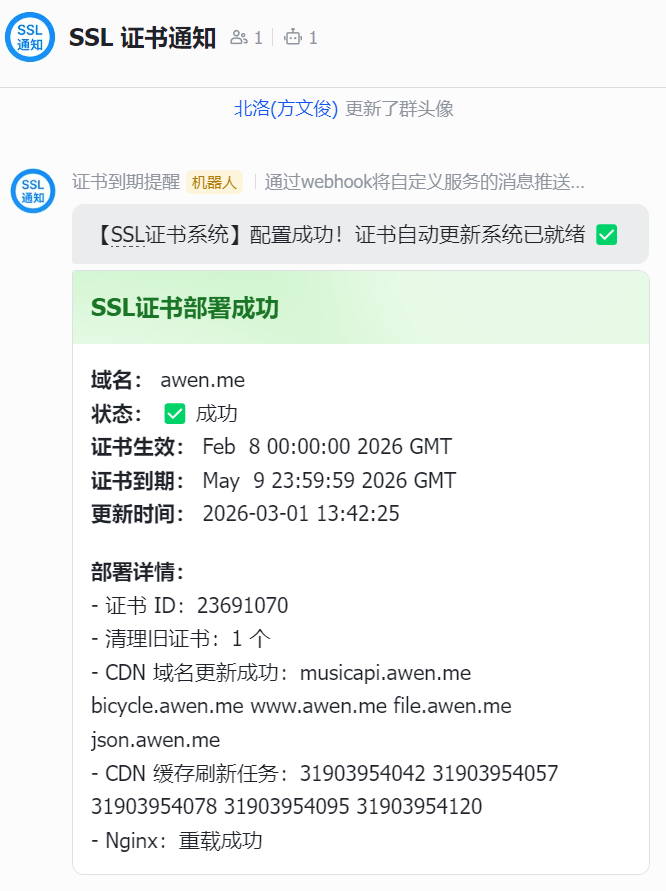
Feishu notifications (to keep track of certificate status in real time)
# Send a Feishu notification send_feishu_notify() { local title="$1" local content="$2" local is_success="$3"
if [ -z "$FEISHU_WEBHOOK" ]; then return fi
local timestamp=$(date +%s) local sign=$(generate_feishu_sign "$timestamp""$FEISHU_SECRET") local status_color="green" [ "$is_success" != "true" ] && status_color="red"
# Check the certificate files if [ ! -f "$CERT_FULLCHAIN_PATH" ] || [ ! -f "$CERT_KEY_PATH" ]; then log"Error: certificate file does not exist" send_feishu_notify "SSL certificate deployment failed""Certificate file does not exist""false" exit 1 fi
# Read the certificate contents CERT_CONTENT=$(cat"$CERT_FULLCHAIN_PATH") KEY_CONTENT=$(cat"$CERT_KEY_PATH")
# ============================================ # Step 1: Upload the certificate to Aliyun CAS # ============================================ log"Step 1: Uploading certificate to Aliyun CAS..."
if [ $? -ne 0 ]; then log"Failed to upload certificate: $UPLOAD_RESULT" send_feishu_notify "SSL certificate upload failed""${UPLOAD_RESULT}""false" exit 1 fi
if [ -z "$CERT_ID" ]; then log"Unable to obtain certificate ID: $UPLOAD_RESULT" send_feishu_notify "SSL certificate upload failed""Unable to obtain certificate ID""false" exit 1 fi
# ============================================ # Step 2: Clean up old certificates # ============================================ log"Step 2: Cleaning up old certificates (keeping the most recent $KEEP_CERT_COUNT)..."
if [ "$DELETE_COUNT" -gt 0 ]; then log"Will delete $DELETE_COUNT old certificates, keeping the newest $KEEP_CERT_COUNT"
echo"$OLD_CERTS" | tail -n "$DELETE_COUNT" | whileread -r OLD_CERT_ID; do if [ "$OLD_CERT_ID" != "$CERT_ID" ]; then log"Deleting old certificate: $OLD_CERT_ID" aliyun cas DeleteUserCertificate \ --CertId "$OLD_CERT_ID" \ --RegionId "$ALIBABA_CLOUD_REGION_ID" 2>&1 | tail -1 fi done else log"Certificate count ($TOTAL_COUNT) does not exceed the keep count ($KEEP_CERT_COUNT); no cleanup needed" fi
if [ $? -eq 0 ]; then REFRESH_TASK_ID=$(echo"$REFRESH_RESULT" | grep -oE '"RefreshTaskId": "[^"]*"' | cut -d'"' -f4) log" Refresh task submitted successfully, TaskId: $REFRESH_TASK_ID" else log" Failed to refresh $CDN_DOMAIN: $REFRESH_RESULT" fi done
# ============================================ # Step 5: Update the server's local certificate # ============================================ log"Step 5: Updating the server's local certificate..."
# Feishu bot configuration (notification messages must contain the SSL keyword) export FEISHU_WEBHOOK="https://open.feishu.cn/open-apis/bot/v2/hook/413ff0ff-48ee-4c86-8e63-6ca304a7bb2e" export FEISHU_SECRET="VVoXnUMsjQKEZtWbkZhIoh"# signature secret; fill in when signature verification is enabled
Note: The Feishu bot requires the message content to contain the “SSL” keyword; the notification titles in the script already contain phrases like “SSL certificate deployment succeeded/failed”.
Or just modify the configuration items directly in the script:
Every dayat2:00 │ ▼ acme.sh --cron (checks whether the certificate is expiring) │ ├── not expiring → skip │ └── 30 days before expiry │ ▼ renew certificate automatically │ ▼ trigger renew-hook │ ▼ run deploy.sh
Script Execution Flow
Step
Action
API
Description
1
Upload certificate
UploadUserCertificate
Upload to Aliyun CAS
2
Clean up old certificates
DeleteUserCertificate
Keep only the newest N
3
Update CDN certificate
SetCdnDomainSSLCertificate
Bind the new certificate to the CDN
4
Refresh CDN cache
RefreshObjectCaches
Critical! Ensures the new certificate takes effect
5
Update local certificate
cp
Copy to the nginx directory
6
Reload nginx
nginx -s reload
Make the new certificate take effect
7
Feishu notification
Webhook
Send the deployment result notification
Key Question: Why Refresh the CDN Cache?
If you don’t refresh the CDN cache, users may still see the old certificate!
CDN nodes cache SSL certificate information. Even if you update the certificate in the console, edge nodes may still be using the cached old certificate, causing:
The browser shows the certificate as expired
The certificate fingerprint doesn’t match
Some users access fine while others get errors
Solution:
The script adds a RefreshObjectCaches call to submit a cache refresh task immediately after updating the certificate. It usually takes effect globally within 5-10 minutes.
评论
0 条评论