Preface As a tech blogger, I’ve always wanted to establish a more direct connection with my readers. Although a message board is a traditional asynchronous form of communication, the immediacy and interactivity of real-time chat is something a message board can’t replace. After some research and development, I added a complete WebSocket real-time live chat system to my blog.
This article will document in detail the whole system’s design ideas, technology choices, implementation process, and the pitfalls I hit. I hope it helps developers with similar needs.
Requirements analysis Before I started coding, I clarified the core requirements of the system:
Functional requirements
Two-sided support
Visitor side: anonymous access, chat without registration
Admin side: I need to receive messages in real time and reply
Messaging features
Real-time send/receive of text messages
Image message support (base64 encoded)
Message history (the conversation isn’t lost when changing pages)
Status display
Admin online/offline status
“Other party is typing” hint
Connection status display
Interaction design
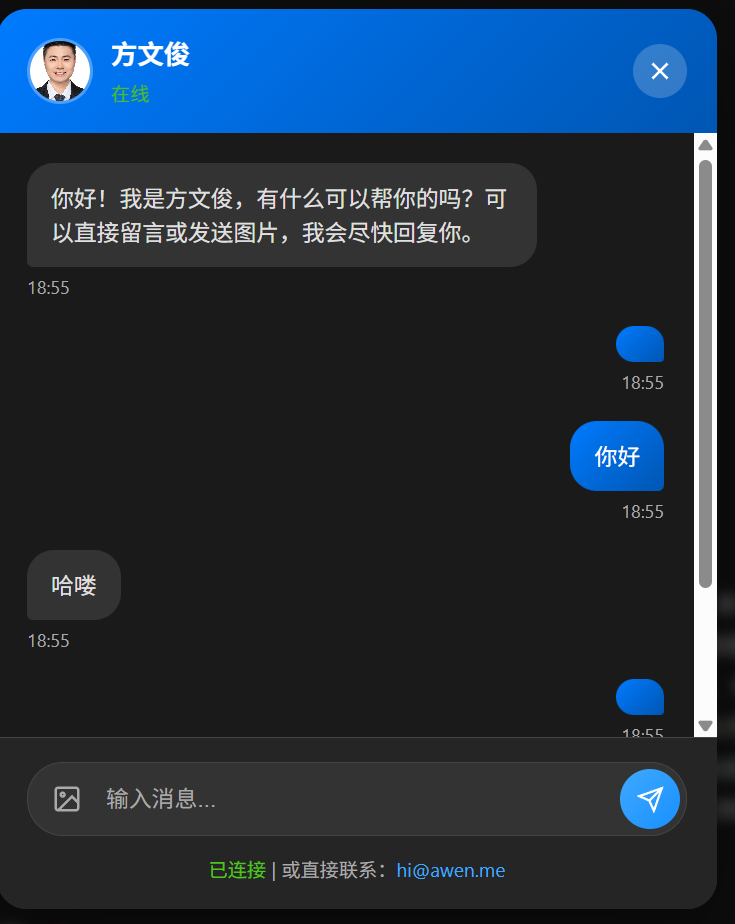
Floating message bubble in the bottom-right corner
A choice popup: chat online / leave a message
Available site-wide (not just the résumé page)
Non-functional requirements
Security : prevent XSS and CSRF, be CSP-compliantPerformance : messages arrive instantly, support reconnectionCompatibility : support mainstream browsersSimple deployment : a single binary + Nginx
Technical architecture Overall architecture ┌─────────────────────────────────────────────────────────────┐button │ │ Choice popup │ │ WebSocket chat window │ │.awen .me │ │ www.awen .me │
Tech stack choices
Layer
Technology
Reason for the choice
Frontend
Hexo + EJS
The blog itself is Hexo; just modify the theme directly
Backend
Go + Gin
Excellent performance, good WebSocket support, simple deployment
Database
MySQL
Stores message history and session info
Cache
Redis
Admin online status, session management
Deployment
Nginx + Systemd
A mature production-environment solution
Backend implementation (Go) Project structure blog_api/ / / / / / /
WebSocket Hub design It uses the classic “Hub” pattern to manage all connections:
type Hub struct {chan *Clientchan *Clientmap [string ]*Client map [uint ]*Client chan *Messagetype Client struct {chan []byte string bool uint
Design highlights :
Visitors are identified by session_id, so refreshing the page doesn’t lose the conversation
Admins are identified by user_id, supporting multiple devices online at once
Channels are used for concurrency-safe connection management
Message protocol design JSON is used as the message format:
type Message struct {string `json:"type"` string `json:"from"` string `json:"content"` string `json:"session_id"` bool `json:"has_image"` `json:"created_at"`
Core handler implementation func (h *ChatWSHandler) nil )if err != nil {"WebSocket upgrade failed: %v" , err)return "session_id" )if sessionID == "" {make (chan []byte , 256 ),false ,go client.WritePump()go client.ReadPump()"connected" ,"连接成功" ,func (h *ChatWSHandler) "userID" )if !exists {"error" : "未登录" })return nil )
Special handling for JWT auth When a WebSocket connects, the browser can’t set custom headers, so the token is passed via a query parameter :
func Auth () return func (c *gin.Context) "Authorization" )if token == "" && c.Query("token" ) != "" {"Bearer " + c.Query("token" )"userID" , userID)
Frontend connection example:
const token = localStorage .getItem ('admin_token' );const ws = new WebSocket (`wss://blogapi.awen.me/api/v1/chat/ws/admin?token=${token} ` );
Database models type ChatSession struct {uint `gorm:"primaryKey"` string `gorm:"uniqueIndex;size:64"` string `gorm:"size:100"` string `gorm:"size:500"` int `gorm:"default:1"` type ChatMessage struct {uint `gorm:"primaryKey"` string `gorm:"index;size:64"` int `gorm:"default:1"` string `gorm:"type:text"` bool `gorm:"default:false"` bool `gorm:"default:false"`
Frontend implementation (Hexo theme modifications) Overall approach Hexo is a static blog and can’t run server-side code directly. My approach:
Layout layer : inject a global chat component into layout.ejsStyle isolation : use a Shadow DOM-like idea, prefixing CSS class names to avoid conflictsCDN resources : use inline SVG for icons, no external font dependency
Component structure layout.ejsMessage bubble button (message -bubble)Leave a message buttonwindow (chat-modal)Message list Input box + image sendingMessage form popup (message -modal)
Key code implementation 1. Dynamically creating the chat window To avoid polluting the HTML structure, the chat window is created entirely dynamically with JavaScript:
(function (var chatModal = document .createElement ('div' );className = 'chat-modal' ;id = 'chatModal' ;innerHTML = ` <div class="chat-overlay"></div> <div class="chat-dialog"> <div class="chat-header"> <div class="chat-header-info"> <div class="chat-avatar"> <img src="https://file.awen.me/blog/avatar.jpg?e=2106345600&st=0ezB6OTKOaPSAtjzocSAhQ" alt="博主"> </div> <div class="chat-header-text"> <h3>方文俊</h3> <p id="chatStatusText">连接中...</p> </div> </div> <button type="button" class="chat-close" id="chatClose">...</button> </div> <div class="chat-body" id="chatBody">...</div> <div class="chat-footer">...</div> </div> ` ;document .body .appendChild (chatModal);
2. WebSocket connection management var ws = null ;var sessionID = localStorage .getItem ('chat_session_id' );var reconnectTimer = null ;function connectWebSocket (var wsUrl = 'wss://blogapi.awen.me/api/v1/chat/ws' ;var params = [];if (sessionID) {push ('session_id=' + encodeURIComponent (sessionID));push ('source=' + encodeURIComponent (document .title ));push ('url=' + encodeURIComponent (window .location .href ));new WebSocket (wsUrl + '?' + params.join ('&' ));onopen = function (console .log ('[WebSocket] 已连接' );updateConnectionStatus (true );onmessage = function (event ) {var msg = JSON .parse (event.data );handleMessage (msg);onclose = function (console .log ('[WebSocket] 连接断开,3秒后重连' );updateConnectionStatus (false );setTimeout (connectWebSocket, 3000 );onerror = function (error ) {console .error ('[WebSocket] 错误:' , error);
3. Message handling logic function handleMessage (msg ) {switch (msg.type ) {case 'connected' :session_id ;localStorage .setItem ('chat_session_id' , sessionID);loadChatHistory (sessionID);break ;case 'message' :if (msg.from === 'admin' ) {addMessage (msg.content , false ); playNotificationSound ();break ;case 'image' :if (msg.from === 'admin' ) {addImageMessage (msg.content , false );playNotificationSound ();break ;case 'typing' :showTypingStatus ();break ;case 'admin_status' :updateAdminStatus (msg.content === 'online' );break ;
4. Image sending implementation Images are transmitted base64-encoded; although this increases size, it’s good enough for a chat scenario:
function sendImage (file ) {if (file.size > 5 * 1024 * 1024 ) {showToast ('图片大小不能超过 5MB' , 'error' );return ;var reader = new FileReader ();onload = function (e ) {var base64 = e.target .result ;addImageMessage (base64, true );send (JSON .stringify ({type : 'image' ,content : base64readAsDataURL (file);
CSS styling design Written in Stylus, with dark mode support:
.chat-modal position fixedtop 0 left 0 right 0 bottom 0 z-index 9999 display flexalign-items centerjustify-content centeropacity 0 pointer-events nonetransition opacity 0.3s ease.active opacity 1 pointer-events auto.chat-dialog width 90% max-width 480px height 600px max-height 80vh background var (--card-bg)border-radius 20px box-shadow 0 20px 60px rgba (0 , 0 , 0 , 0.3 )display flexflex-direction columnoverflow hidden[data-theme="dark" ] .chat-dialog background #1e1e1e [data-theme="dark" ] .chat-bubble background #2a2a2a color #e0e0e0
Admin-side implementation The admin side needs:
Login authentication
Visitor list (who’s chatting with me)
Real-time message send/receive
Quick replies
Admin-side interface I made it a standalone single-page app, placed in source/admin/index.html, deployed along with GitHub Pages or Hexo:
<div class ="admin-layout" > <aside class ="visitor-list" > <div class ="visitor-item active" data-session ="xxx" > <img src ="avatar.png" class ="visitor-avatar" > <div class ="visitor-info" > <h4 > 访客 #1234</h4 > <p > 在线</p > </div > <span class ="unread-badge" > 3</span > </div > </aside > <main class ="chat-area" > <div class ="chat-messages" id ="messages" > </div > <div class ="chat-input" > <input type ="text" id ="msgInput" placeholder ="输入回复..." > <button id ="sendBtn" > 发送</button > </div > </main > </div >
Login flow async function login (username, password ) {const res = await fetch ('https://blogapi.awen.me/api/v1/login' , {method : 'POST' ,headers : { 'Content-Type' : 'application/json' },body : JSON .stringify ({ username, password })const data = await res.json ();localStorage .setItem ('admin_token' , data.token );connectAdminWebSocket (data.token );function connectAdminWebSocket (token ) {const ws = new WebSocket (`wss://blogapi.awen.me/api/v1/chat/ws/admin?token=${token} ` onmessage = (event ) => {const msg = JSON .parse (event.data );if (msg.type === 'visitor_list' ) {updateVisitorList (msg.data );else if (msg.type === 'message' ) {appendMessage (msg);
Deployment configuration Nginx configuration The key is WebSocket upgrade support:
server {listen 443 ssl http2;server_name blogapi.awen.me;ssl_certificate /path/to/cert.pem;ssl_certificate_key /path/to/key.pem;location /api/v1/chat/ws {proxy_pass http://localhost:8083;proxy_http_version 1 .1 ;proxy_set_header Upgrade $http_upgrade ;proxy_set_header Connection "upgrade" ;proxy_set_header Host $host ;proxy_set_header X-Real-IP $remote_addr ;proxy_set_header X-Forwarded-For $proxy_add_x_forwarded_for ;proxy_set_header X-Forwarded-Proto $scheme ;proxy_read_timeout 86400 ;location /api/ {proxy_pass http://localhost:8083;proxy_set_header Host $host ;proxy_set_header X-Real-IP $remote_addr ;
Systemd service [Unit] Description =Blog API ServiceAfter =network.target[Service] Type =simpleUser =fangwenjunWorkingDirectory =/opt/blog-apiExecStart =/opt/blog-api/blog-apiRestart =alwaysRestartSec =5 Environment ="ADMIN_INITIAL_PASSWORD=xxx" Environment ="DB_HOST=localhost" Environment ="JWT_SECRET=xxx" [Install] WantedBy =multi-user.target
Pitfall log 1. CSP blocks the WebSocket connection Problem : The browser reports an error
Connecting to 'wss://blogapi.awen.me/api/v1/chat/ws' violates
the following Content Security Policy directive:
"connect-src 'self' https://blogapi.awen.me ..."
Cause : The CSP connect-src only allows https://, not wss://
Fix :
<meta http-equiv ="Content-Security-Policy" content ="...; connect-src 'self' https://blogapi.awen.me wss://blogapi.awen.me; ..." >
Problem : Clicking the overlay or the close button doesn’t make the choice popup disappear
Cause : openChoiceModal() manually sets style.display = 'block', but closeChoiceModal() only removes the CSS class and doesn’t clear the inline style
Fix :
function closeChoiceModal (classList .remove ('active' );style .display = '' ; document .body .style .overflow = '' ;
3. Duplicate code on the résumé page Problem : At first, chat was only implemented on the résumé page; other pages showed “please go to the résumé page”
Fix : Extract the chat code into layout.ejs so it’s shared site-wide
4. WebSocket auth issue Problem : When a WebSocket connects, it can’t carry headers, so the JWT can’t be passed
Fix : Pass the token via a query parameter, and make the backend middleware handle it compatibly:
if token == "" && c.Query("token" ) != "" {"Bearer " + c.Query("token" )
Results Visitor-side experience
On any page , click the bubble in the bottom-right corner
Choose “Chat online” or “Leave a message”
The chat window pops up and automatically connects the WebSocket
Messages are sent/received in real time, with image support
Admin-side experience
Visit https://www.awen.me/admin
After logging in, the WebSocket connects automatically
Visitor list on the left, chat window on the right
Red-dot reminders for unread messages
Summary This development effort to add a real-time chat system to my blog taught me a lot:
WebSocket practice : from theory to deployment, understanding connection management, heartbeat keep-alive, and reconnection mechanismsFrontend-backend separation : the combination of a Hexo static site + a Go API is very flexibleSecurity considerations : CSP, XSS protection, and JWT auth are all indispensableUser experience : details like the message bubble, status hints, and history records matter a lot
The full code is open-sourced. If you’d also like to add similar functionality to your blog, feel free to refer to:
If you have any questions, you can reach me directly via the chat button at the top of the article 😄
Reference resources
That’s the end of this article—thanks for reading!

评论
0 条评论