格式化磁盘
1.创建一个逻辑卷并格式化为 xfs格式,然后查看 uuid
[root@localhost ~]
/dev/myvg/xfs: UUID="e7710906-95db-4468-9527-73c25a7e944f" TYPE="xfs"
|
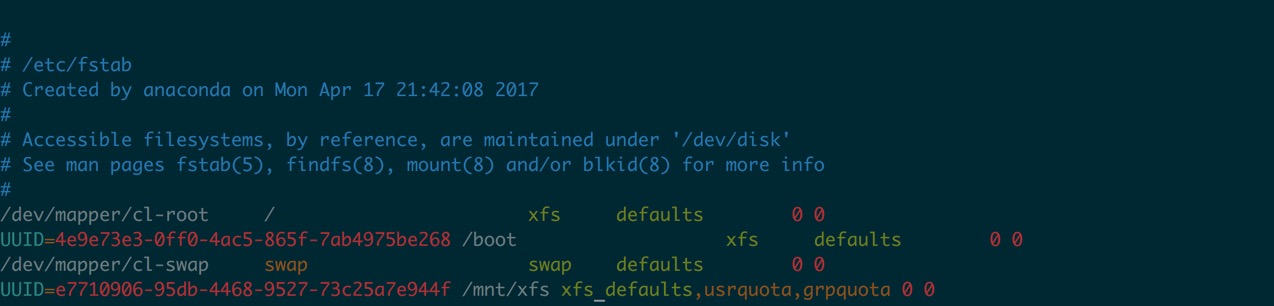
2.编辑/etc/fstab 文件,添加
UUID=e7710906-95db-4468-9527-73c25a7e944f /mnt/xfs xfs defaults,usrquota,grpquota 0 0
|
3.查看并挂载
创建目录
[root@localhost ~]# mkdir -p /mnt/xfs
[root@localhost ~]# mount -a
|
查看是否启动配额
[root@localhost ~]# mount | tail -1
/dev/mapper/myvg-xfs on /mnt/xfs type xfs (rw,relatime,seclabel,attr2,inode64,usrquota,grpquota)
|
4.创建配额
设置块的软限制为12m 硬限制为20 文件数软限制为3 硬限制为5
[root@localhost ~]# xfs_quota -x -c 'limit bsoft=12m bhard=20m isoft=3 ihard=5 zhangsan' /mnt/xfs/
|
5.查看配额
[root@localhost ~]
User quota on /mnt/xfs (/dev/mapper/myvg-xfs)
Blocks
User ID Used Soft Hard Warn/Grace
---------- --------------------------------------------------
root 0 0 0 00 [--------]
zhangsan 51200 12288 20480 00 [--none--]
Group quota on /mnt/xfs (/dev/mapper/myvg-xfs)
Blocks
Group ID Used Soft Hard Warn/Grace
---------- --------------------------------------------------
root 0 0 0 00 [--------]
zhangsan 51200 0 0 00 [--------]
|
6.赋予目录权限
[root@localhost ~]# setfacl -m user:zhangsan:rwx /mnt/xfs/
[root@localhost ~]# setfacl -m group:zhangsan:rwx /mnt/xfs/
|
7.切换到 zhangsan 测试写入文件数量
[zhangsan@localhost xfs]$ pwd
/mnt/xfs
[zhangsan@localhost xfs]$ touch a{1..10}
touch: cannot touch ‘a6’: Disk quota exceeded
touch: cannot touch ‘a7’: Disk quota exceeded
touch: cannot touch ‘a8’: Disk quota exceeded
touch: cannot touch ‘a9’: Disk quota exceeded
touch: cannot touch ‘a10’: Disk quota exceeded
[zhangsan@localhost xfs]$ ls
a1  a2  a3  a4  a5
|
发现最多只能写入5个文件
8.测试块
由于限制了文件数,所以,这里先删除一个文件
[zhangsan@localhost xfs]$ ls
a1  a2  a3  a4  a5
[zhangsan@localhost xfs]$ rm -rf a5
|
写入12m 文件,已经达到块的软现在,没有报错,成功写入 文件
[zhangsan@localhost xfs]$ dd if=/dev/zero of=my.iso bs=1M count=12
12+0 records in
12+0 records out
12582912 bytes (13 MB) copied, 0.00998071 s, 1.3 GB/s
|
再次写入12m 文件,命名为 my1.iso,并且删除一个文件,因为限制了文件数为5 写入失败,因为总共已经超过20m 了
   [zhangsan@localhost xfs]$ ls
a1  a2  a3  a4  my.iso
[zhangsan@localhost xfs]$ rm -rf a4
[zhangsan@localhost xfs]$ ls
a1  a2  a3  my.iso
[zhangsan@localhost xfs]$ dd if=/dev/zero of=my1.iso bs=1M count=12
dd: error writing ‘my1.iso’: Disk quota exceeded
9+0 records in
8+0 records out
8388608 bytes (8.4 MB) copied, 0.00518743 s, 1.6 GB/s
|
查看
[root@localhost ~]
User quota on /mnt/xfs (/dev/mapper/myvg-xfs)
Blocks
User ID Used Soft Hard Warn/Grace
---------- --------------------------------------------------
root 0 0 0 00 [--------]
zhangsan 20480 12288 20480 00 [6 days]
Group quota on /mnt/xfs (/dev/mapper/myvg-xfs)
Blocks
Group ID Used Soft Hard Warn/Grace
---------- --------------------------------------------------
root 0 0 0 00 [--------]
zhangsan 20480 0 0 00 [--------]
|
也可以使用edquota 去设置
[root@localhost ~]
Disk quotas for user zhangsan (uid 1010):
Filesystem blocks soft hard inodes soft hard
/dev/mapper/myvg-xfs 20480 12288 20480 5 3 5
|
默认情况下是限制用户,限制组,可以参考如下命令
[root@localhost ~]# xfs_quota -x -c 'limit bsoft=10m bhard=30m isoft=10 ihard=30 -g zhangsan' /mnt/xfs/
|
然后
[root@localhost ~]
Disk quotas for group zhangsan (gid 1012):
Filesystem blocks soft hard inodes soft hard
/dev/mapper/myvg-xfs 20480 10240 30720 5 10 30
|
评论
0 条评论