深夜提醒

现在是深夜,建议您注意休息,不要熬夜哦~

🏮 🏮 🏮

新年快乐

祝君万事如意心想事成!

share-image
中
ESC

Building an Intelligent Agent with LangGraph That Supports Skill Auto-Discovery and Memory Storage

English 阅读中文版

Building an Intelligent Agent with LangGraph That Supports Skill Auto-Discovery and Memory Storage

This article introduces how to use LangGraph to build an intelligent Agent with automatic Skill discovery, memory storage, and local command execution, plus a clean web chat interface.

Project Overview

Recently I’ve become deeply interested in AI Agent technology, especially LangGraph, a framework for building stateful AI workflows. Compared with traditional LLM calls, its biggest feature is support for loops, persistence, and conditional branching, which makes it very well suited for building complex agent systems.

Based on LangGraph, I implemented an Agent system with the following features:

  • ✅ Documentation-driven Skill system: each Skill has detailed Markdown documentation, and the AI understands the skill’s capabilities from the docs
  • ✅ Smart Skill selection: automatically selects the most suitable Skills based on user input, rather than loading every tool
  • ✅ Skill auto-discovery: automatically loads feature modules under the skills/ directory
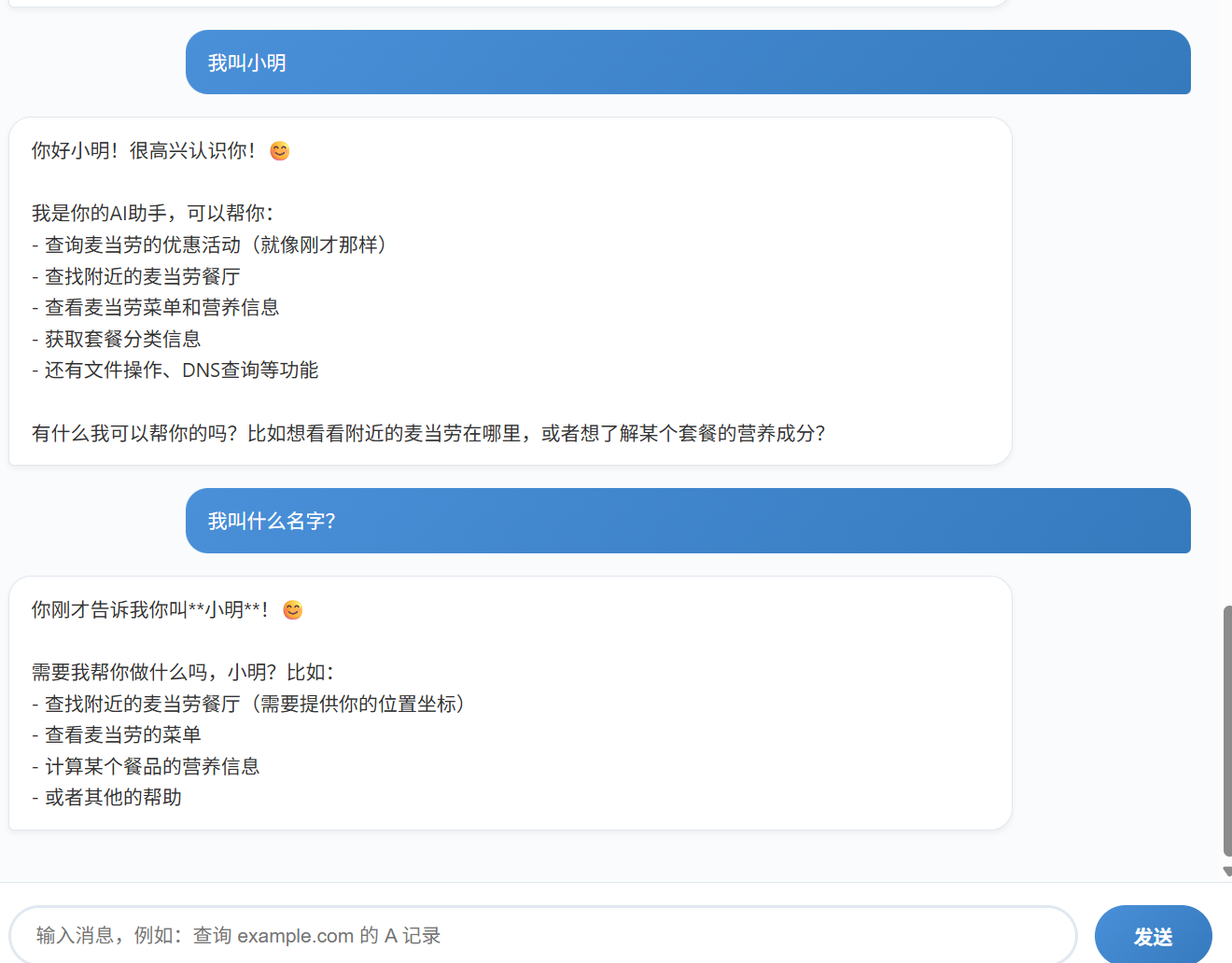
  • ✅ Memory storage: uses MemorySaver to save conversation state and supports multi-session isolation
  • ✅ Local command execution: safely executes system commands via a CLI Skill (such as dig domain queries)
  • ✅ File operations: supports reading, writing, and listing files in the project directory
  • ✅ McDonald’s service: a McDonald’s ordering assistant based on FastMCP
  • ✅ Amap service: integrates the Amap API for geocoding, POI search, and route planning
  • ✅ GPS location service: automatically gets the current location, supporting IP geolocation and coordinate parsing
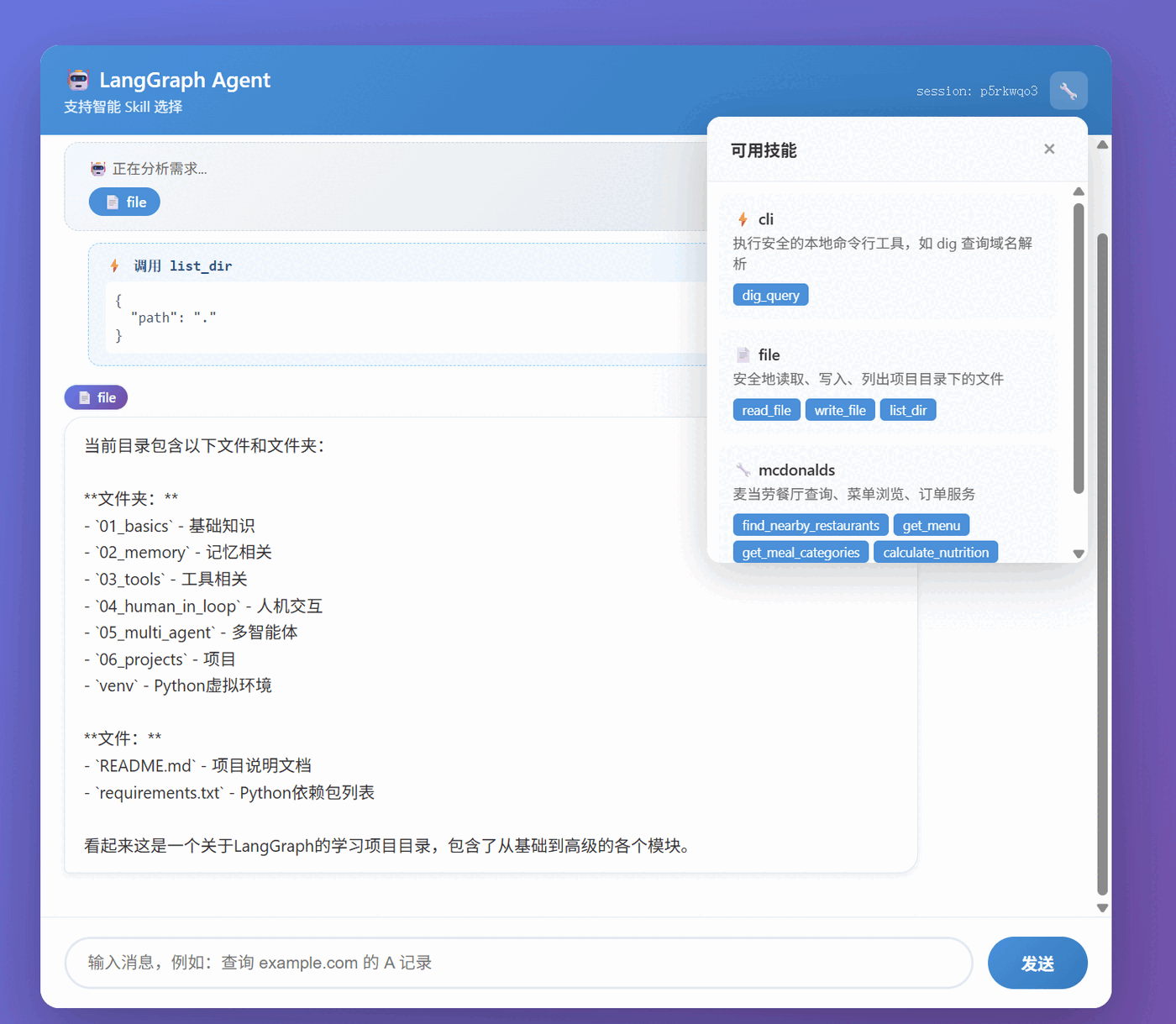
  • ✅ Front-end skill display: the chat interface shows the invoked skills and tools in real time
  • ✅ FastMCP integration: compatible with the MCP protocol and can run an MCP server standalone

clip_1774836693846_emqq7r.png

Documentation-Driven Skill System

Traditional Agent systems usually bind all tools to the LLM and let the LLM decide which one to call. The problems with that approach are:

  1. Performance drops when there are too many tools: the LLM has to process a huge number of tool descriptions
  2. Context interference: irrelevant tools affect the LLM’s judgment
  3. Hard to extend: adding a tool requires modifying the core code

I adopted a documentation-driven approach similar to OpenClaw:

System Architecture

┌─────────────────┐     ┌──────────────────┐     ┌─────────────────┐
│ User input │────▶│ Skill Selector │────▶│ Select relevant Skills │
└─────────────────┘ └──────────────────┘ └─────────────────┘
│
▼
┌──────────────────┐
│ Read Skill docs │
│ - Use cases │
│ - Tool descriptions│
│ - Usage examples │
└──────────────────┘

Skill Document Format

Each Skill has a Markdown document located at skills/docs/{skill_name}_skill.md:

# CLI Skill - Command-line tools

## Description
Executes safe local command-line tools. Currently supports the dig command for querying a domain's DNS resolution records.

## Use cases
Call this skill when the user needs the following information:
- Query a domain's IP address (A record)
- Query a domain's IPv6 address (AAAA record)
- Query a domain's mail server (MX record)
- ...

## Tool functions

### dig_query
Queries a domain's DNS resolution records.

**Parameters:**
| Name | Type | Required | Description |
|--------|------|------|------|
| domain | string | yes | The domain to query |
| record_type | string | no | The DNS record type |

**Example usage:**
```python
dig_query(domain="example.com", record_type="A")

### Skill Selector Implementation

```python
class SkillSelector:
"""Selects the most suitable Skill based on user input"""

def __init__(self, skills: List[Skill]):
self.skills = skills
self.skill_docs = self._build_skill_docs()

def select_skills(self, user_input: str) -> List[str]:
"""Select the Skills that should be activated based on user input"""
system_prompt = f"""Based on the user's input, determine which skills need to be activated.

{self.skill_docs}

Selection rules:
1. Analyze the user's intent and needs
2. Choose the most relevant skills (you may choose more than one)
3. If the user is just chatting, return "none"
4. Return only a comma-separated list of skill names

Output format: skill1,skill2 or none"""

messages = [
SystemMessage(content=system_prompt),
HumanMessage(content=f"User input: {user_input}")
]

response = llm.invoke(messages)
# Parse the returned skill names...
return selected_skills

Workflow

  1. User input: “Query the A record of example.com”
  2. Skill selection: the AI analyzes and selects the cli skill
  3. Tool binding: bind only the tools of the cli skill to the LLM
  4. Execution: the LLM calls the dig_query tool
  5. Result returned: show the query result

The advantages of this approach:

  • Precise matching: load only the relevant skills, reducing interference
  • Extensible: adding a skill only requires adding docs and an implementation
  • Transparent and controllable: you can see which skills the AI selected

clip_1774836830535_omvcpk.png

Architecture Design

Core Components

agent_web_chat/
├── agent.py # LangGraph Agent core
├── main.py # FastAPI web service
├── mcdonalds_mcp_server.py # FastMCP McDonald's server (can run standalone)
├── skills/
│ ├── base.py # Skill base class (supports reading docs)
│ ├── __init__.py # Auto-discover all skills
│ ├── skill_selector.py # Skill selector
│ ├── cli_skill.py # dig command query
│ ├── file_skill.py # Local file operations
│ ├── gaode_skill.py # Amap service
│ ├── location_skill.py # GPS location service
│ ├── mcdonalds_skill.py # McDonald's service (FastMCP integration)
│ └── docs/ # Skill docs directory
│ ├── cli_skill.md
│ ├── file_skill.md
│ ├── gaode_skill.md
│ ├── location_skill.md
│ └── mcdonalds_skill.md
├── templates/
│ └── index.html # Chat page (shows skill invocations)
└── static/
└── style.css # Styles

Tech Stack

Component Technology Description
Agent framework LangGraph Build stateful AI workflows
LLM DeepSeek API deepseek-chat model
Web framework FastAPI High-performance async web framework
Template engine Jinja2 HTML template rendering
Memory storage MemorySaver LangGraph’s built-in in-memory store

Skill System Design

1. Skill Base Class

All Skills inherit from a unified base class, following the principle of convention over configuration:

from abc import ABC, abstractmethod
from typing import List
from langchain_core.tools import BaseTool

class Skill(ABC):
"""Skill base class. All skills must inherit from it and implement the following methods"""

@property
@abstractmethod
def name(self) -> str:
"""Skill name"""
pass

@property
@abstractmethod
def description(self) -> str:
"""Skill description"""
pass

@abstractmethod
def get_tools(self) -> List[BaseTool]:
"""Return the list of tools this skill provides"""
pass

2. Auto-Discovery Mechanism

By iterating over the skills/ directory, all skill modules are imported and registered automatically:

def discover_skills() -> List[Skill]:
"""Automatically discover and instantiate all skills"""
skills = []
current_dir = os.path.dirname(os.path.abspath(__file__))

for filename in sorted(os.listdir(current_dir)):
if filename.endswith("_skill.py"):
module_name = filename[:-3]
try:
module = importlib.import_module(f"." + module_name, package=__name__)
for name, obj in inspect.getmembers(module):
if (
inspect.isclass(obj)
and issubclass(obj, Skill)
and obj is not Skill
and not inspect.isabstract(obj)
):
instance = obj()
skills.append(instance)
print(f"[skills] loaded: {instance.name}")
except Exception as e:
print(f"[skills] failed to load {module_name}: {e}")

return skills

The benefit of this design is: adding a skill only requires creating a new _skill.py file under the skills/ directory, with no need to modify any other code.

3. CLI Skill - dig Domain Query

The first implemented Skill is the CLI tool, which supports querying domain resolution using the system dig command:

@tool
def dig_query(domain: str, record_type: str = "A") -> str:
"""
Query a domain's DNS resolution records using the dig command
"""
if not shutil.which("dig"):
return "Error: the dig command is not installed on this system"

# Safety check: only allow letters, digits, dots, hyphens, underscores
safe_domain = "".join(c for c in domain if c.isalnum() or c in ".-_")
safe_record = "".join(c for c in record_type if c.isalnum())

try:
result = subprocess.run(
["dig", safe_domain, safe_record, "+short"],
capture_output=True,
text=True,
timeout=15,
check=False,
)
output = result.stdout.strip()
if not output:
return f"No {safe_record} record found for {safe_domain}"
return f"dig {safe_domain} {safe_record} query result:\n{output}"
except subprocess.TimeoutExpired:
return "Error: dig command timed out"

Security considerations:

  • Apply a character whitelist filter to user input to prevent command injection
  • Set a timeout to avoid long hangs
  • Use the +short flag to return only the key information, reducing output noise

4. File Skill - File Operations

Supports safe local file read/write operations:

# The base directory allowed for operations (project root)
BASE_DIR = os.path.abspath(os.path.join(os.path.dirname(__file__), "..", "..", ".."))

def _sanitize_path(path: str) -> str:
"""Restrict the path to within BASE_DIR to prevent directory traversal"""
if not os.path.isabs(path):
path = os.path.join(BASE_DIR, path)
resolved = os.path.abspath(path)
if not resolved.startswith(BASE_DIR + os.sep) and resolved != BASE_DIR:
raise ValueError(f"Path out of bounds: {path}")
return resolved

Tool functions provided:

  • read_file(path) - read file contents
  • write_file(path, content) - write a file
  • list_dir(path) - list directory contents

5. McDonald’s Skill - McDonald’s Service (based on FastMCP)

The McDonald’s Skill demonstrates how to integrate a third-party API based on the FastMCP framework:

What is FastMCP?

FastMCP is the MCP (Model Context Protocol) Python framework developed by Prefect. Its features:

  • 🚀 Simple and easy to use: create an MCP server in a few lines of code
  • 🛠️ Feature-rich: supports Tools, Resources, and Prompts
  • 🔗 Standards-compatible: conforms to the Anthropic MCP protocol spec

McDonald’s MCP Server

from fastmcp import FastMCP

mcp = FastMCP("McDonald's China")

@mcp.tool()
def find_nearby_restaurants(latitude: float, longitude: float) -> str:
"""Find nearby McDonald's restaurants"""
# ...

@mcp.tool()
def get_menu(category: Optional[str] = None) -> str:
"""Get the McDonald's menu"""
# ...

@mcp.resource("mcdonalds://menu/{category}")
def get_menu_resource(category: str) -> str:
"""Expose the menu as a resource"""
# ...

@mcp.prompt("order_meal")
def order_meal_prompt(meal_type: str = "burger combo") -> str:
"""Ordering suggestion prompt"""
return f"Please recommend a {meal_type} for me..."

if __name__ == "__main__":
mcp.run(transport="stdio")

Integrating into the Agent

Wrap the FastMCP service through the unified Skill base class:

class McDonaldsSkill(Skill):
"""McDonald's service Skill"""

@property
def name(self) -> str:
return "mcdonalds"

@property
def description(self) -> str:
return "McDonald's restaurant lookup, menu browsing, nutrition calculation, promotions"

def get_tools(self) -> List[BaseTool]:
return [
find_nearby_restaurants, # Find nearby restaurants
get_menu, # Get the menu
get_meal_categories, # Menu categories
calculate_nutrition, # Nutrition calculation
check_promotions # Promotion lookup
]

Usage Examples

Example 1: Query the burger menu

User: I want McDonald's, let me see what burgers there are
System: 🤖 Analyzing the request...
→ mcdonalds

AI: 🍔 Burger menu:
• Big Mac - ¥25.5 (double beef patty with special sauce)
• McSpicy Chicken Burger - ¥22.0 (crispy chicken thigh with spicy sauce)
• Grilled Chicken Burger - ¥24.0 (char-grilled chicken thigh with fresh vegetables)
...

Example 2: Calculate nutrition info

User: How many calories are in a Big Mac, large fries, and medium Coke
System: 🤖 Analyzing the request...
→ mcdonalds

AI: 🍟 Nutrition info for Big Mac, large fries, medium Coke:
🔥 Calories: 1230 kcal
🥩 Protein: 31 g
🧈 Fat: 54 g
🍞 Carbohydrates: 160 g

⚠️ High in calories; consider pairing with exercise or splitting the meal

Example 3: Multi-Skill collaboration

User: Show me what files are in the current directory, then recommend a nearby McDonald's
System: 🤖 Analyzing the request...
→ file, mcdonalds

AI: 📁 The current directory contains:
- 01_basics - basics related
- 02_memory - memory related
...

To find a nearby McDonald's, I need your location.
You can tell me your city or a specific address.

Running the MCP Server Standalone

The McDonald’s MCP server can also run standalone:

# Using stdio transport
python mcdonalds_mcp_server.py

# Using HTTP transport
python mcdonalds_mcp_server.py --transport http --port 8001

# Using the FastMCP CLI
fastmcp dev mcdonalds_mcp_server.py

Claude Desktop configuration:

{
"mcpServers": {
"mcdonalds": {
"command": "python",
"args": ["/path/to/mcdonalds_mcp_server.py"]
}
}
}

Complete Code Implementation - McDonald’s Service

The McDonald’s service Skill implemented on top of FastMCP, showing how to integrate a third-party API:

class McDonaldsSkill(Skill):
"""McDonald's service Skill"""

@property
def name(self) -> str:
return "mcdonalds"

@property
def description(self) -> str:
return "McDonald's restaurant lookup, menu browsing, order service"

def get_tools(self) -> List[BaseTool]:
return [
find_nearby_restaurants, # Find nearby restaurants
get_menu, # Get the menu
calculate_nutrition, # Calculate nutrition
check_promotions # Check promotions
]

Usage example:

User: I want McDonald's, let me see what burgers there are
System: 🤖 selected skills: ['mcdonalds']
AI: McDonald's has the following burgers: Big Mac (¥25.5), McSpicy Chicken Burger (¥22.0)...

Multi-Skill collaboration example:

User: Show me what files are in the current directory, then recommend a nearby McDonald's
System: 🤖 selected skills: ['file', 'mcdonalds']
AI: The current directory has... To find a McDonald's, I need your location...

6. Gaode Skill - Amap Service

Integrates the Amap API to provide professional map and LBS services:

Tool Function Example
geocode Geocoding Address to coordinates
regeocode Reverse geocoding Coordinates to address
search_poi POI search Search nearby places
route_planning Route planning Driving/walking/transit routes
get_weather Weather query City weather forecast
get_district_info Administrative divisions Province/city/district lookup

Usage example:

User: How do I get from Tiananmen in Beijing to the Capital Airport
System: 🤖 selected skills: ['gaode']
AI: 🗺️ Driving route planning: distance 28.5 km, estimated time 45 minutes...

7. Location Skill - GPS Location Service

Automatically gets the device location, supporting multiple positioning methods:

Tool Function Description
get_current_location Get current location IP location + GPS
get_location_by_ip IP location Based on network location
get_gps_coordinates GPS coordinates From device GPS
parse_address_from_coords Coordinate parsing Lat/long to address

Use case - when the user says “nearby” but doesn’t provide a location:

User: What McDonald's restaurants are nearby
System: 🤖 selected skills: ['location', 'gaode', 'mcdonalds']
→ location: get current coordinates 121.4737,31.2304 (Shanghai)
→ gaode: search for nearby McDonald's
→ mcdonalds: return restaurant info

AI: 📍 Got your location: Shanghai
🍟 Found 3 nearby McDonald's restaurants:
1. McDonald's Shanghai Nanjing East Road (1200 m away)
2. ...

Complete Code Implementation

Below is the complete code for each Skill file:

skills/base.py - Skill Base Class Definition

"""
Skill base class definition
"""

from abc import ABC, abstractmethod
from typing import List
from langchain_core.tools import BaseTool


class Skill(ABC):
"""Skill base class. All skills must inherit from it and implement the following methods"""

@property
@abstractmethod
def name(self) -> str:
"""Skill name"""
pass

@property
@abstractmethod
def description(self) -> str:
"""Skill description"""
pass

@abstractmethod
def get_tools(self) -> List[BaseTool]:
"""Return the list of tools this skill provides"""
pass

skills/__init__.py - Auto-Discovery and Registration

"""
Skill auto-discovery and registration
Automatically loads all modules under the skills directory that end with _skill.py
"""

import os
import importlib
import inspect
from typing import List
from langchain_core.tools import BaseTool
from .base import Skill


def discover_skills() -> List[Skill]:
"""Automatically discover and instantiate all skills"""
skills = []
current_dir = os.path.dirname(os.path.abspath(__file__))

for filename in sorted(os.listdir(current_dir)):
if filename.endswith("_skill.py"):
module_name = filename[:-3]
try:
module = importlib.import_module(f"." + module_name, package=__name__)
for name, obj in inspect.getmembers(module):
if (
inspect.isclass(obj)
and issubclass(obj, Skill)
and obj is not Skill
and not inspect.isabstract(obj)
):
instance = obj()
skills.append(instance)
print(f"[skills] loaded: {instance.name}")
except Exception as e:
print(f"[skills] failed to load {module_name}: {e}")

return skills


def get_all_tools() -> List[BaseTool]:
"""Get the tools provided by all skills"""
tools = []
for skill in discover_skills():
tools.extend(skill.get_tools())
return tools

skills/cli_skill.py - CLI Command Tool

"""
CLI Skill - supports executing safe local commands
Currently supports dig for domain resolution queries
"""

import subprocess
import shutil
from typing import List
from langchain_core.tools import tool, BaseTool
from .base import Skill


class CliSkill(Skill):
"""Command-line tool Skill"""

@property
def name(self) -> str:
return "cli"

@property
def description(self) -> str:
return "Execute safe local command-line tools, such as dig for domain resolution"

def get_tools(self) -> List[BaseTool]:
return [dig_query]


@tool
def dig_query(domain: str, record_type: str = "A") -> str:
"""
Query a domain's DNS resolution records using the dig command

Args:
domain: the domain to query, e.g. "example.com"
record_type: the DNS record type, e.g. "A", "AAAA", "MX", "NS", "TXT", "CNAME"
"""
if not shutil.which("dig"):
return "Error: the dig command is not installed on this system. Please install the bind-utils or dnsutils package."

# Safety check: only allow letters, digits, dots, hyphens, underscores
safe_domain = "".join(c for c in domain if c.isalnum() or c in ".-_")
safe_record = "".join(c for c in record_type if c.isalnum())

if not safe_domain:
return "Error: invalid domain format"

try:
result = subprocess.run(
["dig", safe_domain, safe_record, "+short"],
capture_output=True,
text=True,
timeout=15,
check=False,
)
output = result.stdout.strip()
if result.returncode != 0:
return f"dig failed: {result.stderr.strip()}"
if not output:
return f"No {safe_record} record found for {safe_domain} (or the result was empty)."
return f"dig {safe_domain} {safe_record} query result:\n{output}"
except subprocess.TimeoutExpired:
return "Error: dig command timed out"
except Exception as e:
return f"Error: exception while running dig: {e}"

skills/file_skill.py - File Operation Tool

"""
File Skill - command scripts for operating on local files
Supports reading, writing, and listing directory contents
"""

import os
from typing import List
from langchain_core.tools import tool, BaseTool
from .base import Skill

# The base directory allowed for operations (current working directory)
BASE_DIR = os.path.abspath(os.path.join(os.path.dirname(__file__), "..", "..", ".."))


def _sanitize_path(path: str) -> str:
"""Restrict the path to within BASE_DIR to prevent directory traversal"""
# First resolve to an absolute path (if relative, base it on BASE_DIR)
if not os.path.isabs(path):
path = os.path.join(BASE_DIR, path)
resolved = os.path.abspath(path)
# Make sure it's under BASE_DIR
if not resolved.startswith(BASE_DIR + os.sep) and resolved != BASE_DIR:
raise ValueError(f"Path out of bounds: {path}")
return resolved


class FileSkill(Skill):
"""Local file operation Skill"""

@property
def name(self) -> str:
return "file"

@property
def description(self) -> str:
return "Safely read, write, and list files in the project directory"

def get_tools(self) -> List[BaseTool]:
return [read_file, write_file, list_dir]


@tool
def read_file(path: str) -> str:
"""
Read the contents of a text file at the specified path

Args:
path: file path (relative to the project root, or an absolute path)
"""
try:
target = _sanitize_path(path)
if not os.path.isfile(target):
return f"Error: file does not exist: {target}"
with open(target, "r", encoding="utf-8") as f:
content = f.read()
return f"Contents of [{target}]:\n```\n{content}\n```"
except ValueError as e:
return f"Error: {e}"
except Exception as e:
return f"Failed to read file: {e}"


@tool
def write_file(path: str, content: str) -> str:
"""
Write content to a text file at the specified path (overwrite)

Args:
path: file path (relative to the project root, or an absolute path)
content: the text content to write
"""
try:
target = _sanitize_path(path)
os.makedirs(os.path.dirname(target), exist_ok=True)
with open(target, "w", encoding="utf-8") as f:
f.write(content)
return f"Successfully wrote file: {target}"
except ValueError as e:
return f"Error: {e}"
except Exception as e:
return f"Failed to write file: {e}"


@tool
def list_dir(path: str = ".") -> str:
"""
List the files and subdirectories in the specified directory

Args:
path: directory path (relative to the project root, or an absolute path); defaults to the current directory
"""
try:
target = _sanitize_path(path)
if not os.path.isdir(target):
return f"Error: directory does not exist: {target}"
items = os.listdir(target)
if not items:
return f"Directory {target} is empty"
lines = [f"📁 Contents of {target}:"]
for item in sorted(items):
full = os.path.join(target, item)
prefix = "📂" if os.path.isdir(full) else "📄"
lines.append(f" {prefix} {item}")
return "\n".join(lines)
except ValueError as e:
return f"Error: {e}"
except Exception as e:
return f"Failed to list directory: {e}"

LangGraph Agent Implementation

State Definition

class AgentState(TypedDict):
messages: Annotated[list, add_messages]

Using the add_messages annotation automatically appends new messages to the list, simplifying state management.

Graph Structure

builder = StateGraph(AgentState)
builder.add_node("chatbot", chatbot_node)
builder.add_node("tools", ToolNode(tools=tools))

builder.add_edge(START, "chatbot")
builder.add_conditional_edges(
"chatbot",
tools_condition,
{"tools": "tools", END: END}
)
builder.add_edge("tools", "chatbot")

# Memory storage
checkpointer = MemorySaver()
graph = builder.compile(checkpointer=checkpointer)

Execution flow:

  1. User input enters the chatbot node
  2. The LLM decides whether a tool call is needed
  3. If so, route to the tools node via tools_condition
  4. After tool execution it returns to the chatbot node
  5. The LLM generates the final reply

Multi-Session Support

Session isolation is achieved via thread_id:

def run_agent(user_input: str, thread_id: str = "default") -> str:
config = {"configurable": {"thread_id": thread_id}}
result = graph.invoke(
{"messages": [HumanMessage(content=user_input)]},
config=config
)
# Return the last AI message
for msg in reversed(result["messages"]):
if isinstance(msg, AIMessage):
return msg.content
return "(no reply)"

Each session has its own independent memory, without affecting the others. Users can start a new conversation by setting a different thread_id.

Web Chat Interface - Skill Visualization

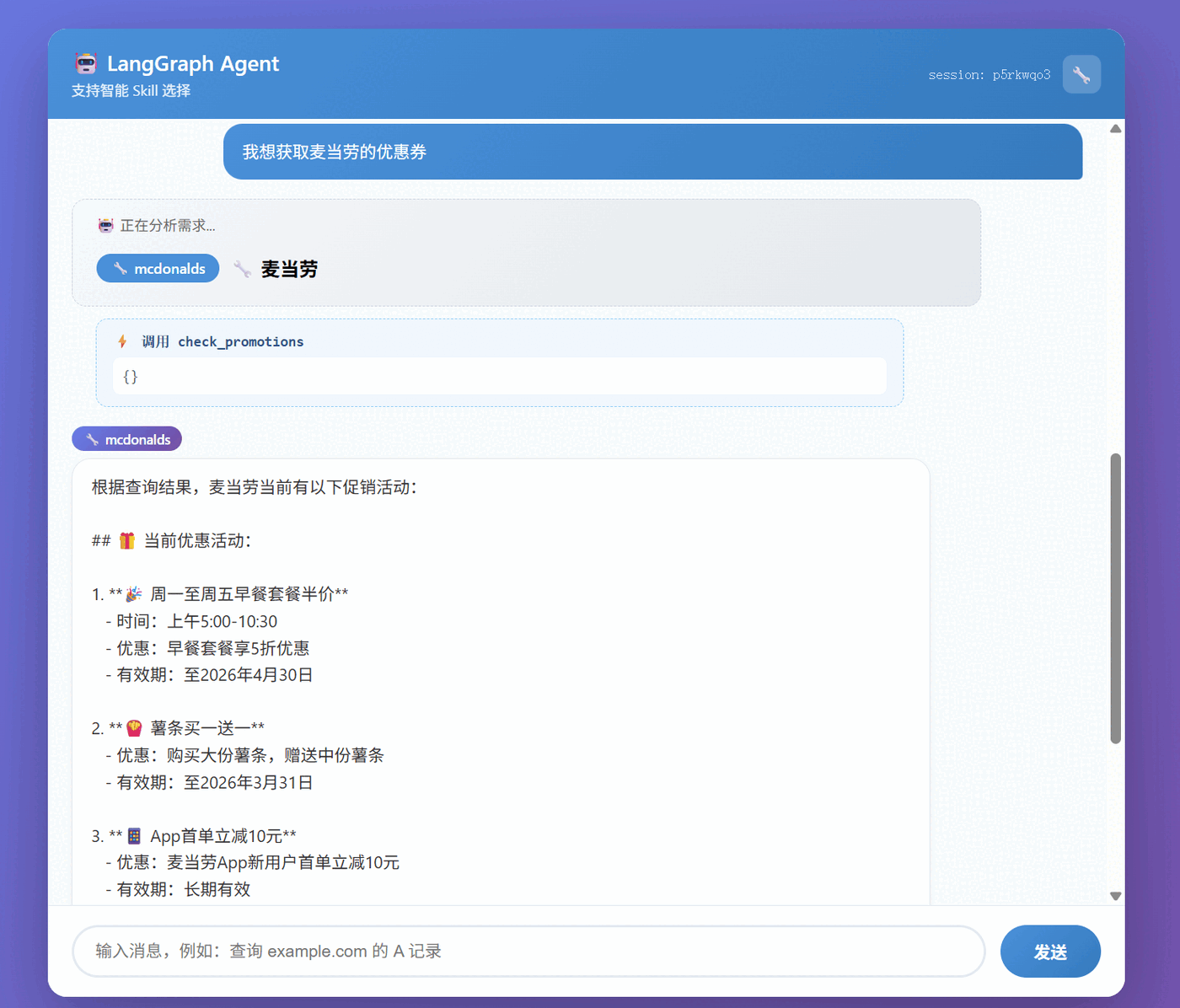
The front-end not only shows the conversation, it also shows in real time the skills the AI selected and invoked:

Interface Features

  1. Skill panel: click the 🔧 button to view all available skills and their docs
  2. Skill selection display: shows which skills the AI chose to handle the request
  3. Tool call display: shows the specific tool calls and parameters
  4. Skill tags: shows the skill identifier used next to the AI’s reply

Interface Screenshot Description

┌─────────────────────────────────────────┐
│ 🤖 LangGraph Agent [🔧] session: abc│
├─────────────────────────────────────────┤
│ │
│ You: Query the A record of baidu.com │
│ │
│ 🤖 Analyzing the request... │
│ → cli │
│ │
│ ⚡ Calling dig_query │
│ {"domain": "baidu.com", ...} │
│ │
│ [cli] A records for baidu.com: │
│ 1. 111.63.65.103 │
│ 2. 124.237.177.164 │
│ ... │
│ │
└─────────────────────────────────────────┘

API Design

class ChatResponse(BaseModel):
reply: str
thread_id: str
active_skills: List[str] # list of activated skills
skill_calls: List[Dict] # skill call history

@app.post("/chat", response_model=ChatResponse)
async def chat(req: ChatRequest):
thread_id = req.thread_id or str(uuid.uuid4())
result = run_agent(req.message, thread_id=thread_id)

return ChatResponse(
reply=result["reply"],
thread_id=thread_id,
active_skills=result.get("active_skills", []),
skill_calls=result.get("skill_calls", [])
)

Front-End Implementation

// Show the skill selection
function showSkillSelection(skills) {
const div = document.createElement('div');
div.className = 'message skill-selection';
div.innerHTML = `
<div class="skill-selection-bubble">
<div class="skill-selection-title">🤖 Analyzing the request...</div>
<div class="skill-selection-list">
${skills.map(s => `<span class="selected-skill">${s}</span>`).join(' → ')}
</div>
</div>
`;
messagesEl.appendChild(div);
}

// Show the tool call
function showToolCall(toolName, args) {
const div = document.createElement('div');
div.className = 'message tool-call';
div.innerHTML = `
<div class="tool-call-bubble">
<div class="tool-call-title">⚡ Calling ${toolName}</div>
<div class="tool-call-args">${JSON.stringify(args, null, 2)}</div>
</div>
`;
messagesEl.appendChild(div);
}

Usage Examples

Example 1: Query domain resolution

User input: Look up the A record of example.com

System processing:

  1. Skill selection: analyze user intent → select the cli skill
  2. Tool call: call dig_query(domain="example.com", record_type="A")
  3. Result returned:
🤖 Analyzing the request...
→ cli

⚡ Calling dig_query
{"domain": "example.com", "record_type": "A"}

[cli] Query result:
The A record of example.com has two IP addresses:
1. 104.18.26.120
2. 104.18.27.120

2. File operations

User: List the files in the current directory

Agent:

The current directory contains the following files and folders:

📂 Folders:
- 01_basics - basics related
- 02_memory - memory related
- 03_tools - tools related
- 04_human_in_loop - human-in-the-loop related
- 05_multi_agent - multi-agent related
- 06_projects - projects related
- venv - Python virtual environment

📄 Files:
- README.md - project documentation
- requirements.txt - Python dependency list

Example 3: McDonald’s ordering assistant

User: I want McDonald’s, let me see what burgers there are

System processing:

  1. Skill selection: analyze user intent → select the mcdonalds skill
  2. Tool call: call get_menu(category="burger")
  3. Result returned:
🤖 Analyzing the request...
→ mcdonalds

⚡ Calling get_menu
{"category": "burger"}

[mcdonalds] 🍔 Burger menu:

• Big Mac - ¥25.5
Double beef patty with special sauce

• McSpicy Chicken Burger - ¥22.0
Crispy chicken thigh with spicy sauce

• Grilled Chicken Burger - ¥24.0
Char-grilled chicken thigh with fresh vegetables

• Double Cheeseburger - ¥21.0
Double beef with double cheese

• Angus Thick Beef Cheeseburger - ¥35.0
100% Angus beef

Example 4: Nutrition calculator

User: How many calories are in a Big Mac, large fries, and medium Coke

System processing:

  1. Skill selection: analyze user intent → select the mcdonalds skill
  2. Tool call: call calculate_nutrition(items=["Big Mac", "large fries", "medium Coke"])
  3. Result returned:
🤖 Analyzing the request...
→ mcdonalds

⚡ Calling calculate_nutrition
{"items": ["Big Mac", "large fries", "medium Coke"]}

[mcdonalds] 🍟 Nutrition info:

🔥 Calories: 1230 kcal
🥩 Protein: 31 g
🧈 Fat: 54 g
🍞 Carbohydrates: 160 g

⚠️ High in calories; consider pairing with exercise or splitting the meal

Example 5: Multi-Skill collaboration

User: Show me what files are in the current directory, then recommend a nearby McDonald’s

System processing:

  1. Skill selection: analyze the compound intent → select the file + mcdonalds skills
  2. Sequential calls:
    • Call list_dir(path=".") to list the files
    • Call find_nearby_restaurants(...) to find restaurants
🤖 Analyzing the request...
→ file, mcdonalds

⚡ Calling list_dir
{"path": "."}

[file] 📁 Current directory contents:
📂 01_basics
📂 02_memory
📂 03_tools
...

⚡ Calling find_nearby_restaurants
{"latitude": 31.2304, "longitude": 121.4737}

[mcdonalds] 🍟 Found 3 nearby McDonald's restaurants:

1. McDonald's Shanghai Nanjing East Road
📍 Address: 100 Nanjing East Road, Huangpu District, Shanghai
📏 Distance: 1200 m
⏰ Hours: 06:00-23:00
🛎️ Services: McDelivery, Drive-Thru, 24 hours
📞 Phone: 021-12345678
...

Example 6: Memory test

User: My name is Xiaoming

Agent: Hi Xiaoming! Nice to meet you.

User: What’s my name?

Agent: Your name is Xiaoming, you just told me.

clip_1774837293342_wun304.png

How to Run

1. Install dependencies

pip install langgraph langchain langchain-openai fastapi uvicorn jinja2 python-multipart fastmcp

2. Start the service

cd 06_projects/agent_web_chat
uvicorn main:app --host 0.0.0.0 --port 8000

3. Access the interface

Open your browser and go to http://localhost:8000 to start chatting with the Agent.

Summary and Outlook

Through this project, I gained a deep understanding of LangGraph’s core concepts:

  1. State management: use TypedDict to define state, with annotations for automatic merging
  2. Conditional edges: tools_condition lets the LLM decide autonomously whether to call a tool
  3. Persistence: MemorySaver provides out-of-the-box memory
  4. Looped workflow: after tool execution it automatically returns to the chat node, forming a closed loop

Directions that could be extended in the future:

  • 🔮 More Skills: add web search, database queries, code execution, and so on
  • 🌐 Streaming output: use WebSocket for a typewriter-style streaming response
  • 🔐 User authentication: add a login system to support multi-user isolation
  • 🧠 Long-term memory: hook up a vector database for cross-session long-term memory

LangGraph provides powerful infrastructure for building complex AI applications, and it’s worth a try.


文章作者:阿文
文章链接: https://www.awen.me/post/14efbf68.html
版权声明:本博客所有文章除特别声明外,均采用 CC BY-NC-SA 4.0 许可协议。转载请注明来自 阿文的博客!
本文于 2026-03-30 09:30 发布,已超过半年(201天),请注意甄别内容是否已过期。

评论

0 条评论
😀😃😄 😁😅😂 🤣😊😇 🙂🙃😉 😌😍🥰 😘😗😙 😚😋😛 😝😜🤪 🤨🧐🤓 😎🥸🤩 🥳😏😒 😞😔😟 😕🙁☹️ 😣😖😫 😩🥺😢 😭😤😠 😡🤬🤯 😳🥵🥶 😱😨😰 😥😓🤗 🤔🤭🤫 🤥😶😐 😑😬🙄 😯😦😧 😮😲🥱 😴🤤😪 😵🤐🥴 🤢🤮🤧 😷🤒🤕 🤑🤠😈 👿👹👺 🤡💩👻 💀☠️👽 👾🤖🎃 😺😸😹 😻😼😽 🙀😿😾 👍👎👏 🙌👐🤲 🤝🤜🤛 ✌️🤞🤟 🤘👌🤏 👈👉👆 👇☝️✋ 🤚🖐️🖖 👋🤙💪 🦾🖕✍️ 🙏💅🤳 💯💢💥 💫💦💨 🕳️💣💬 👁️‍🗨️🗨️🗯️ 💭💤❤️ 🧡💛💚 💙💜🖤 🤍🤎💔 ❣️💕💞 💓💗💖 💘💝💟 ☮️✝️☪️ 🕉️☸️✡️ 🔯🕎☯️ ☦️🛐⛎ ♈♉♊ ♋♌♍ ♎♏♐ ♑♒♓ 🆔⚛️🉑 ☢️☣️📴 📳🈶🈚 🈸🈺🈷️ ✴️🆚💮 🉐㊙️㊗️ 🈴🈵🈹 🈲🅰️🅱️ 🆎🆑🅾️ 🆘❌⭕ 🛑⛔📛 🚫💯💢 ♨️🚷🚯 🚳🚱🔞 📵🚭❗ ❕❓❔ ‼️⁉️🔅 🔆〽️⚠️ 🚸🔱⚜️ 🔰♻️✅ 🈯💹❇️ ✳️❎🌐 💠Ⓜ️🌀 💤🏧🚾 ♿🅿️🈳 🈂🛂🛃 🛄🛅🛗 🚀🛸🚁 🚉🚆🚅 ✈️🛫🛬 🛩️💺🛰️
加载中...

留言反馈

😀😃😄 😁😅😂 🤣😊😇 🙂🙃😉 😌😍🥰 😘😗😙 😚😋😛 😝😜🤪 🤨🧐🤓 😎🥸🤩 🥳😏😒 😞😔😟 😕🙁☹️ 😣😖😫 😩🥺😢 😭😤😠 😡🤬🤯 😳🥵🥶 😱😨😰 😥😓🤗 🤔🤭🤫 🤥😶😐 😑😬🙄 😯😦😧 😮😲🥱 😴🤤😪 😵🤐🥴 🤢🤮🤧 😷🤒🤕 🤑🤠😈 👿👹👺 🤡💩👻 💀☠️👽 👾🤖🎃 😺😸😹 😻😼😽 🙀😿😾 👍👎👏 🙌👐🤲 🤝🤜🤛 ✌️🤞🤟 🤘👌🤏 👈👉👆 👇☝️✋ 🤚🖐️🖖 👋🤙💪 🦾🖕✍️ 🙏💅🤳 💯💢💥 💫💦💨 🕳️💣💬 👁️‍🗨️🗨️🗯️ 💭💤❤️ 🧡💛💚 💙💜🖤 🤍🤎💔 ❣️💕💞 💓💗💖 💘💝💟 ☮️✝️☪️ 🕉️☸️✡️ 🔯🕎☯️ ☦️🛐⛎ ♈♉♊ ♋♌♍ ♎♏♐ ♑♒♓ 🆔⚛️🉑 ☢️☣️📴 📳🈶🈚 🈸🈺🈷️ ✴️🆚💮 🉐㊙️㊗️ 🈴🈵🈹 🈲🅰️🅱️ 🆎🆑🅾️ 🆘❌⭕ 🛑⛔📛 🚫💯💢 ♨️🚷🚯 🚳🚱🔞 📵🚭❗ ❕❓❔ ‼️⁉️🔅 🔆〽️⚠️ 🚸🔱⚜️ 🔰♻️✅ 🈯💹❇️ ✳️❎🌐 💠Ⓜ️🌀 💤🏧🚾 ♿🅿️🈳 🈂🛂🛃 🛄🛅🛗 🚀🛸🚁 🚉🚆🚅 ✈️🛫🛬 🛩️💺🛰️