I wanted music in the living room in the evening. The speaker is a Xiaomi S12, and the player on my phone is MusicFree — an open-source app running my own plugins. It has no cast button.
Two workarounds exist: pair over Bluetooth, or open the Mi Home app and let it play its own stuff. Bluetooth turns the phone into a transmitter — lock the screen, walk away, switch apps, and it dies. And Mi Home’s library is not my library. Everything I actually want to hear lives behind my own plugins.
So I decided to give MusicFree casting.
First find out what the speaker actually is, before writing any code
I wrote a small probe (castprobe, Rust, no UPnP library) to do exactly one thing: find the DLNA renderers on the LAN and pull down their descriptors.
The answer surprised me — the Xiaomi speaker is a plain DLNA MediaRenderer. DMR-1.50, descriptor served on port 9999, and besides the standard AVTransport, RenderingControl and ConnectionManager it also advertises Xiaomi’s private Queue:1 / Playlist:1 / Favorites:1 (all with AddURI, so in theory you can dump a whole playlist into the speaker and let it play through by itself), plus Tencent QPlay:2.
Which means: no Xiaomi account, no token, no reverse-engineering miio. The door was standing open.
Discovery nearly talked me out of it. Sending multicast M-SEARCH to 239.255.255.250:1900 from machine 160 gave 0 responses. Broadcasting to 255.255.255.255 gave 0 as well. What worked was unicasting M-SEARCH at every IP, 192.168.1.1–254. That single result dictated how the code had to be written: a ControlPoint that only listens for SSDP multicast will never see a device on some networks, so it must carry its own unicast sweep as a fallback.
The architecture got one correction
My first plan was “run a permanent service on 160”: the box is always up, nginx is there, the music library is there, it’s convenient. In the end I settled on the opposite: everything inside the phone app — a Kotlin ControlPoint plus an HTTP relay started by the app itself, with 160 reduced to a build machine.
The reason is concrete: the voice-request path already existed for a long time; the only thing missing was where the audio should play. Another always-on service is another thing I’d have to watch for crashes. The phone owns the queue — it’s the one component that actually knows the real URL of the track currently loaded.
Once it ran, the bugs came in a queue
Every SOAP call returned nothing
SetAVTransportURI returned 200, Play returned 200, and the position stayed at 0 forever.
The cause: Java’s DocumentBuilderFactory is not namespace-aware by default. getElementsByTagName("GetPositionInfoResponse") never matches the u:GetPositionInfoResponse the speaker replies with, because of the prefix. You have to compare local names: tagName.substringAfterLast(':').
The nastiest part wasn’t the difficulty, it was the symptom: no exception, just an empty result. It looks like “the speaker isn’t playing”, when it’s really “I failed to understand what the speaker said”.
Pressing play while casting sent Play but never the URI
While casting, the local player is loaded with a placeholder source like musicfree://proposed-audio; the real URL goes to the speaker. But trackPlayer.play() has a shortcut branch — “if this is already the current track, just resume”. So the speaker received a Play with no source and stayed silent forever.
Two fixes: the resume branch now also requires getState() !== "idle", and the non-casting isCurrentMusic shortcut is blocked with !castService.isCasting so the track gets its source resolved again through setTrackSource → playTrack.
The speaker only understands http, and my downloaded songs are file://
For a track that’s already downloaded, my plugin hands out file:///storage/emulated/0/.../xxx.mp3. The speaker is not going to read my phone’s filesystem. So the relay grew a local-file mode: publishFile() registers a path and returns http://<phone-ip>:<ephemeral-port>/stream/f1, and serveFile() uses RandomAccessFile to cut out a 206 range.
There’s a piece of protocol semantics worth writing down: the speaker always asks with User-Agent: xiaoai, Range: bytes=0-, Connection: close, and mid-track it drops the connection and comes back with bytes=46414- to resume. So the server must honour open-ended ranges and answer 206 with Content-Range.
My first attempt was lazy: I hung one song on python3 -m http.server to test. The speaker connected, state went PLAYING, RelTime sat dead at 00:00:00 — because that server ignores Range, so the speaker never got the bytes it asked for and simply stopped reporting progress. Swap in an implementation that answers 206 and RelTime ticks 1/3/5/7/9/11, with sound. “It connected but there’s no audio” and “it didn’t connect” are two entirely different illnesses.
False “track finished” reports
When a track ends, the Xiaomi speaker doesn’t go STOPPED. It restarts the same track in place and stays PLAYING the whole time. So the only way to detect the end is a position wrap-around. My first version treated any drop back to 0 as “finished” — which misfired when the app went to the background and polling got throttled, or when someone restarted the speaker from Mi Home mid-track: it grabbed the next song for no reason.
Now there’s an extra condition: the previous poll must already have been within 20 seconds of the end (position >= duration - 20) before a wrap counts as a real end-of-track.
I blamed my network twice, wrongly
Once I concluded “the speaker won’t take a LAN stream”. The real cause: 160’s ufw defaults to deny incoming and only permits 22 / 53317 / 65422, so my own server was blocking the speaker’s connections. The relay log had not a single request — that’s what gave it away.
Once the phone showed ip neigh ... FAILED with 100% packet loss towards the speaker, and I declared the access point was doing client isolation. Several minutes later: same phone, 0% loss, port 9999 OPEN. Not isolation — just the speaker’s power saving / ARP ageing hiccuping.
Now, before I state any “the network is down” conclusion, I re-run ping first.
The moment it worked
Real hardware: PJZ110 + S12, 2026-10-18 07:17.
On 160 I ran a separate script that does exactly one thing: poll the speaker’s GetPositionInfo once per second and print it. Deliberately bypassing the app, so the app couldn’t grade its own homework.
The chain went like this: the Kotlin ControlPoint in the app finds the speaker by unicast sweep → SetAVTransportURI with DIDL-Lite carrying title, artist, album and the media URL http://192.168.1.179:<ephemeral-port>/stream/f1 → Play → my independent poller on 160 reports back PLAYING, TrackDuration = 00:04:29, RelTime advancing one second per second, and TrackURI pointing at my phone’s own address.
The speaker dialled back into my phone to fetch the audio. No server installed, no root, no Xiaomi account, no token.
What one iteration costs
Worth recording for whoever picks this up next. The Android side is Kotlin, built on 160 with ./gradlew assembleDebug — 23 seconds incremental — and installed as app-arm64-v8a-debug.apk. The JS side never needs a rebuild: the debug APK doesn’t embed the bundle, Metro runs on 160 port 8082, the phone gets adb reverse tcp:8081 tcp:8082, so restarting the app picks up the change. Near-zero iteration cost is exactly why it was safe to keep changing things.
Three ways in
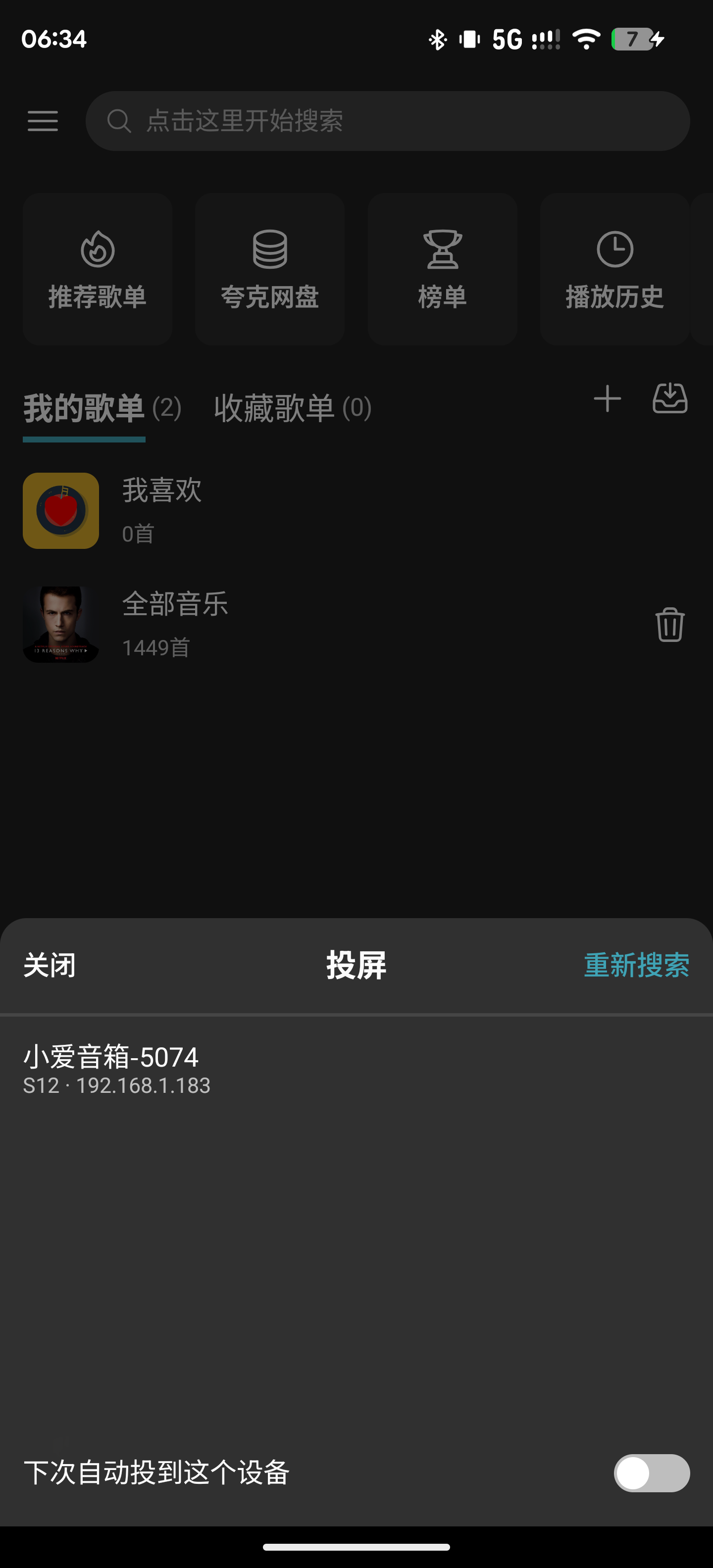
The cast icon on the playback bar opens the device panel: pick a device, connect, remember it, and the next app start casts straight back to it.
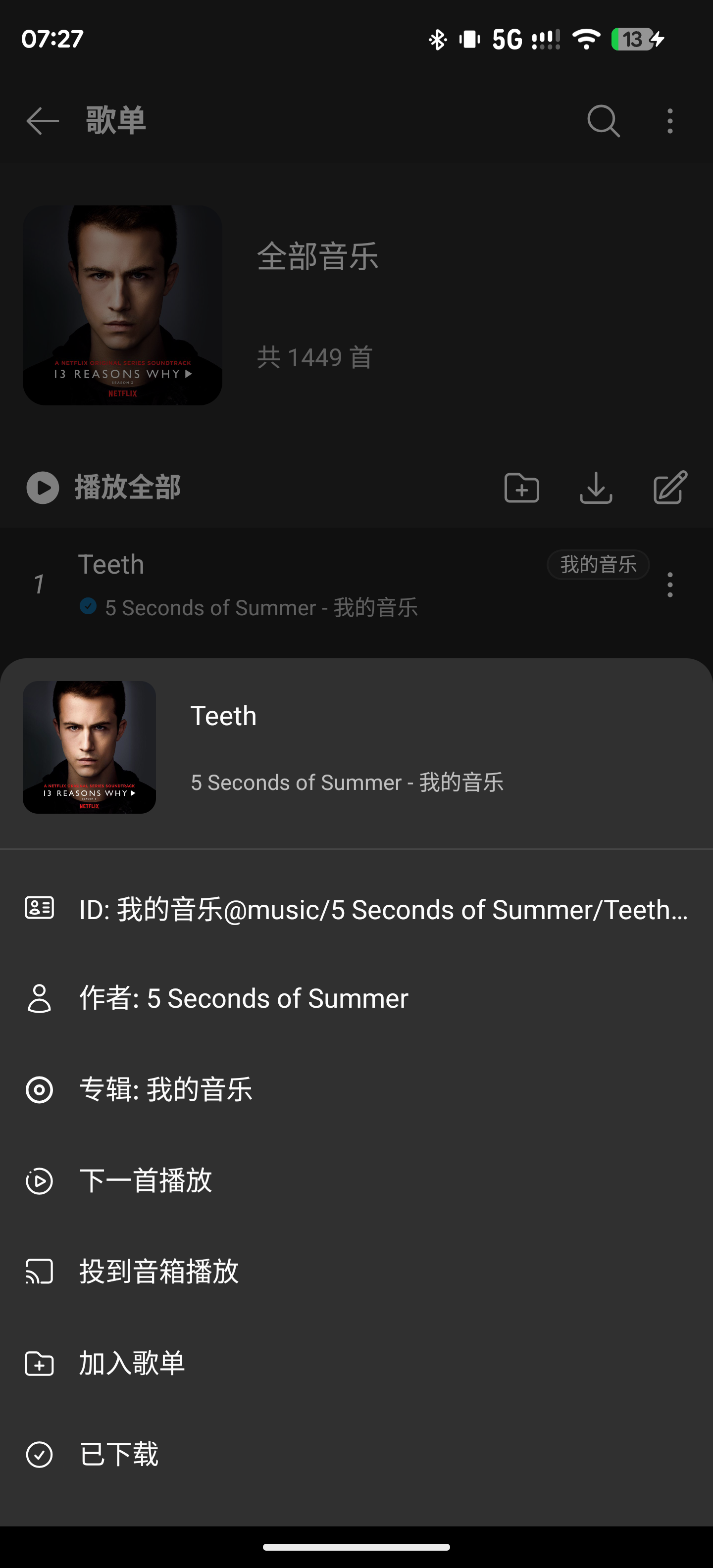
The ⋮ menu on each song gained “投到音箱播放” (cast to speaker). If I’m already casting, it pushes that track straight over; if not, it reconnects to the remembered device first, and if that fails it opens the panel and plays the track as soon as I pick one. I don’t want to have to shout across the room to get a song out of a speaker.
The old voice path, musicfree://play?q=<song name>, is wired up too: search, play, source lands on the speaker — no need to come back to the phone and tap anything.
Still unverified
Seekreturns 200; I haven’t measured how accurately it lands.- Auto-advance through a queue while casting. Xiaomi exposes the private
Queue:1/Playlist:1services, andAddURIcan push a whole playlist into the speaker to play by itself — I only implemented single-track pushing, and haven’t taken that shortcut. - “Back to the phone” does fall back, but I haven’t lived with it yet.
- React Native panels and modals have not a single node in
uiautomator dump, so UI automation has to locate them by screenshot pixels. I wrote a pure-Node PNG decoder that finds a colour’s bounding box just to tap one button. Sometimes the test script is harder than the feature.
MusicFree is open source, and a missing feature won’t appear just because I need it. But DLNA is a public protocol, and the speaker openly serves its descriptor on port 9999, spelling out every service, action and argument it understands.
The protocol is right there. Just write it.
评论
0 条评论