可以通过 SSH 的方式在一个内网访问另外一个内网,我们把他称为 SSH 反向代理
原理
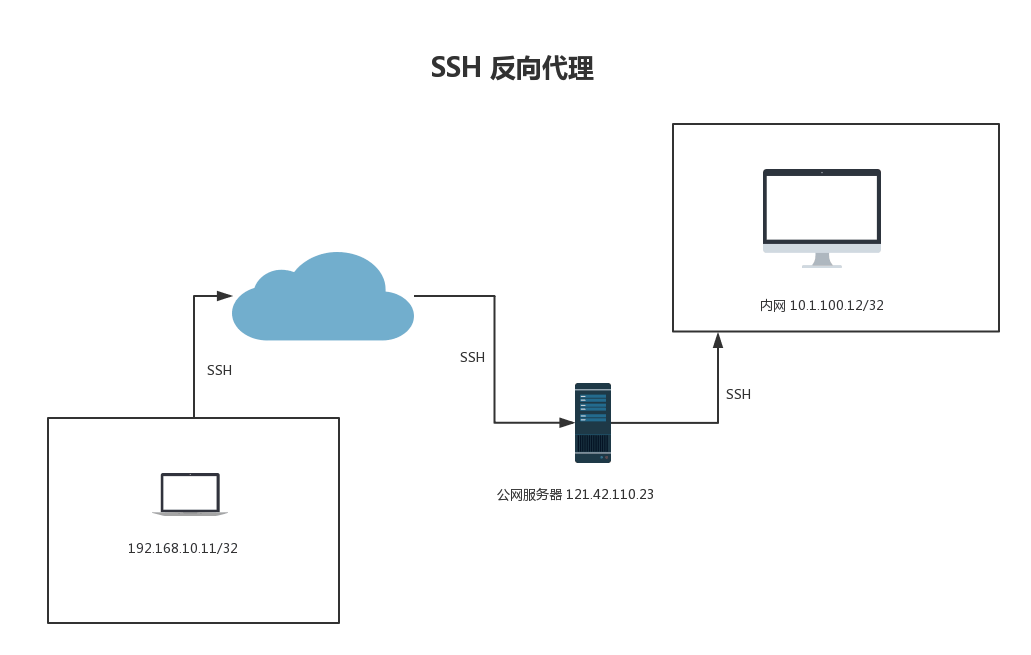
1.首先 内网机器 10.1.100.12 通过 SSH 反向代理连接到公网服务器 121.42.110.23,并且映射一个端口给公网服务器,假设这个端口是333;
2.客户端192.168.10.11 通过隧道连接到公网 IP 的333端口,并在本地起一个 socks5 端口,通过连接这个端口实现访问10.1.100.12 网段内的资源
方法一
直接使用原生 SSH,但是该方法会导致 SSH 断网从而网络中断。不稳定
方案二
使用 autossh,本文主要讲解这个方案
内网机器A 配置
1.安装 supervisor 和 autossh
yum -y install epel-release

yum -y install supervisor  autossh
|
2.配置 /etc/supervisord.conf,内容如下
[unix_http_server]
file=/tmp/supervisor.sock
[supervisord]
logfile=/tmp/supervisord.log
logfile_maxbytes=50MB
logfile_backups=10
loglevel=info
pidfile=/tmp/supervisord.pid
nodaemon=false
minfds=1024
minprocs=200
[rpcinterface:supervisor]
supervisor.rpcinterface_factory = supervisor.rpcinterface:make_main_rpcinterface
[program:autossh]
command=/usr/bin/autossh -M 7281 -fCNR 7280:localhost:22 root@1.1.1.1
autostart=true
startsecs=10
autorestart=true
startretries=3
|
其中
/usr/bin/autossh -M 7281 -fCNR 7280:localhost:22 root@1.1.1.1
|
- -M 7281 启动一个监听端口,如果 ssh 端口则自动启动进程
- -f 后台运行
- C 压缩数据包
- N 不允许执行远程命令
- R 7280:localhost:22 将内网主机的22端口和 VPS 的1234端口绑定,相当于远程端口映射
在连接时候配置ssh 密钥连接,建议所有机器都做
ssh-keygen -t rsa

ssh-copy-id root@xxxxx
|
2.启动
systemctl enable supervisord
 systemctl start supervisord
|
公网机器
不需要做什么特别的配置,不过建议所有的 ssh 配置都设置下下面的参数。另外放行下相关端口
UseDNS no
ClientAliveInterval 60
ClientAliveCountMax 3
GSSAPIAuthentication no
GatewayPorts  yes
|
内网机器 B
方案1
1.以 mac 客户端为例,安装 autossh
2.配置文件 ~/Library/LaunchAgents/homebrew.mxcl.autossh.plist
<?xml version="1.0" encoding="UTF-8"?>
<!DOCTYPE plist PUBLIC "-//Apple Computer//DTD PLIST 1.0//EN"
"http://www.apple.com/DTDs/PropertyList-1.0.dtd">
<plist version="1.0">
  <dict>
    <key>Label</key>
    <string>homebrew.mxcl.autossh</string>
    <key>ProgramArguments</key>
    <array>
    <string>/usr/local/bin/autossh</string>
    <string>-M</string>
    <string>8111</string>
    <string>-N</string>
    <string>xxx@vpn</string>
    <string>-D</string>
    <string>localhost:6080</string>
    <string>-C</string>
    <string>-i</string>
    <string>/Users/wenjun/.ssh/id_rsa</string>
    </array>
    <key>KeepAlive</key>
    <true/>
    <key>RunAtLoad</key>
    <true/>
</dict>
</plist>
|
3.设置为开机启动
launchctl load ~/Library/LaunchAgents/homebrew.mxcl.autossh.plist
|
4.配置 socks5 为 127.0.0.1:6080,配合 surge 可以实现根据域名代理,非常的方便。
不过似乎这种方式如果长时间不连接就有问题,我现在使用方案2
方案2
使用 SSH proxy,简单配置下即可。需要使用的时候开启下即可。
方案3
直接在服务端配置 socks5,不过这种方案安全性非常低。万一被人扫到 socks 端口会十分的不安全,不推荐。
评论
0 条评论