My watch has been recording my sleep, heart rate, HRV and runs for a long time. All of it is visible in the official app—but visible is all it is. The curves are pre-drawn, the scores are pre-computed. If I want to recompute something under a different definition, or pull the raw data out and do something else with it, there is essentially no exit.
So I wrote my own: Vitaloop (元环), an open-source, local-first Android sports-and-health dashboard. Flutter for the UI, Rust for the data core, the watch connected directly over classic Bluetooth, data synced into SQLite on the phone, and readiness, sleep and training load all computed locally. Beyond the client, the optional sync server is open source too.
It is a v0.1 preview right now, and both the client and the server are AGPL-3.0.
1. Drawing the Boundaries First
It is not a cloud health product, and it is not a generic watch-face or notification-sync tool. The positioning is one thing: land the data from a Huawei / Honor watch on the device, then recompute it under my own rules.
- Every local feature works without logging in: home overview, sleep detail, workout records, statistics, readiness
- No cloud service by default, no ad SDKs, no product telemetry
- Accounts, cloud sync and live sharing only appear after the user fills in their own server address
- The public source and public builds contain no private domains, ephemeris service, API keys or signing certificates
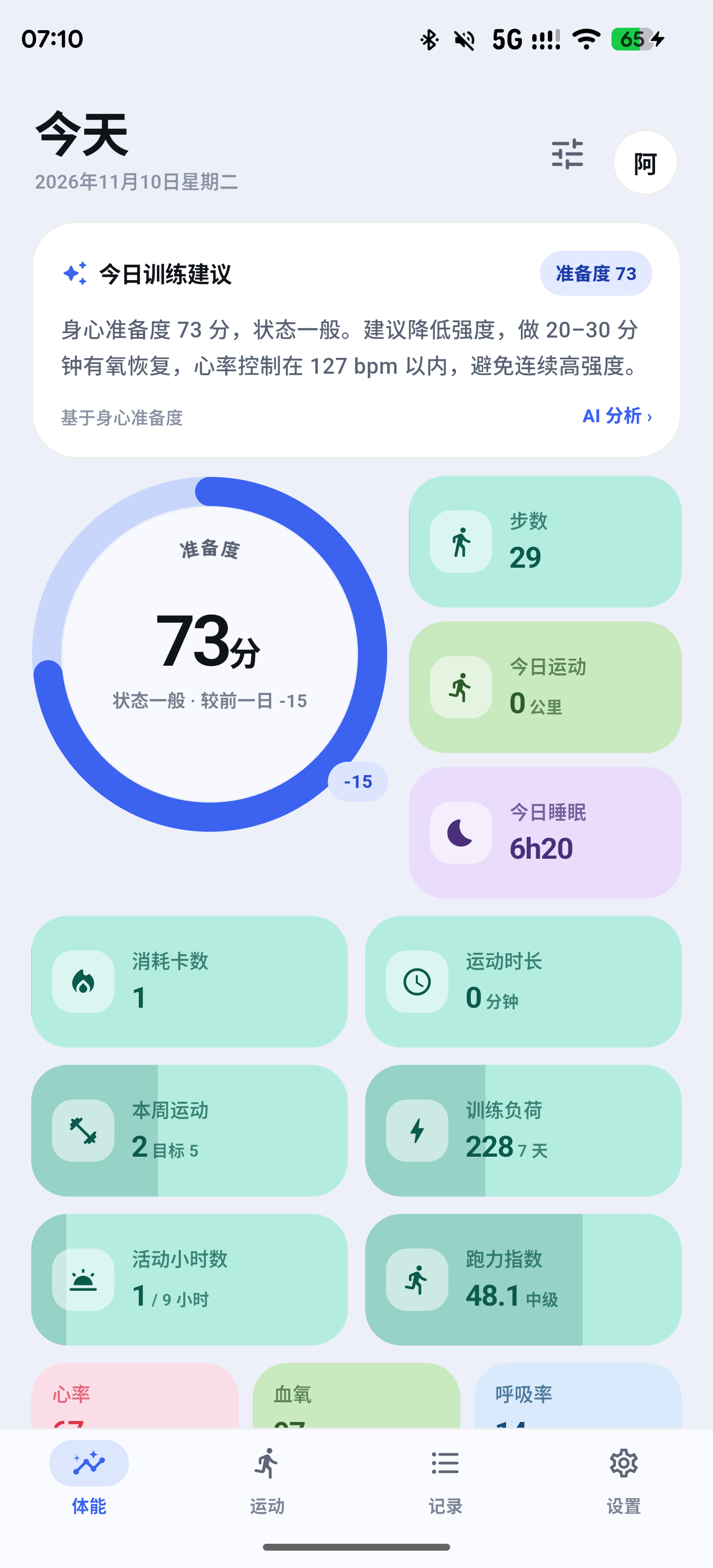
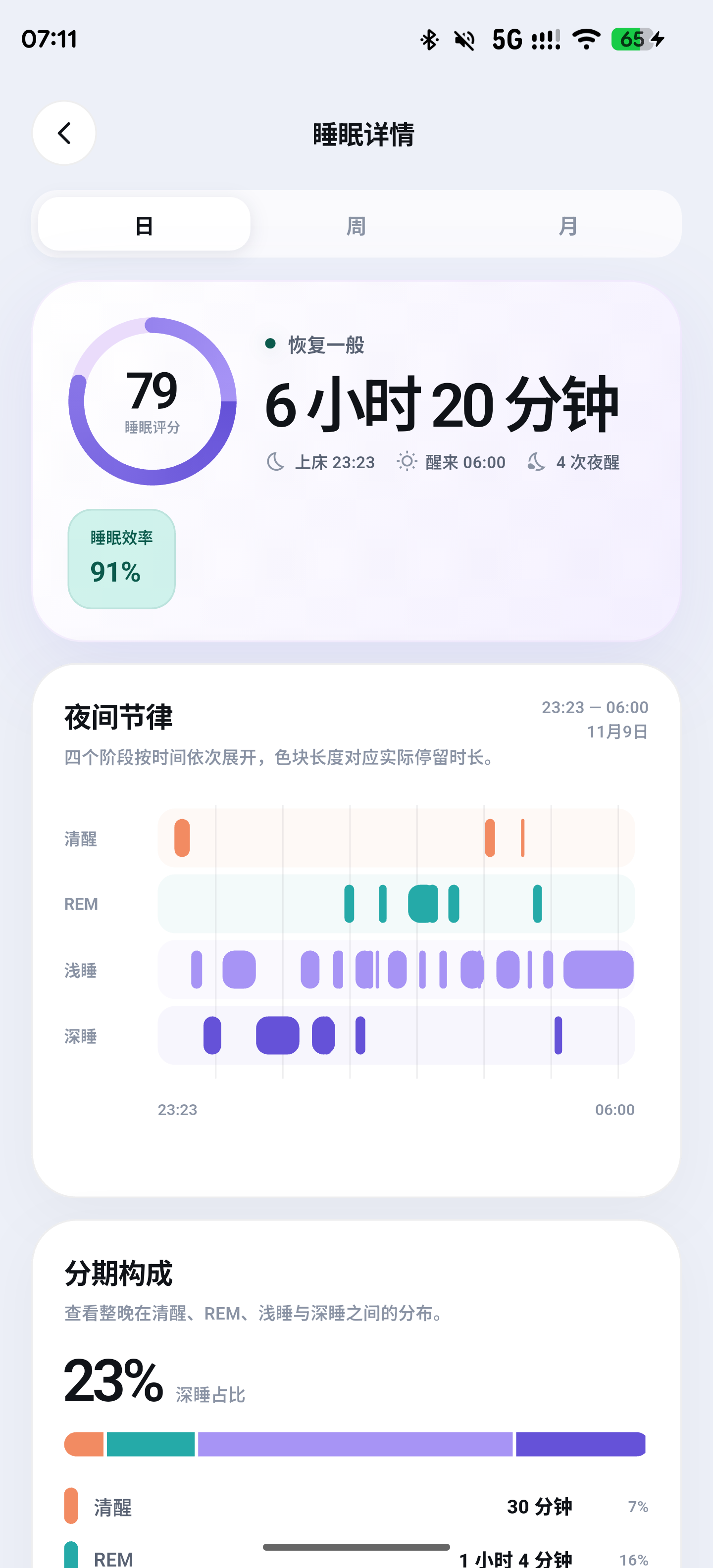
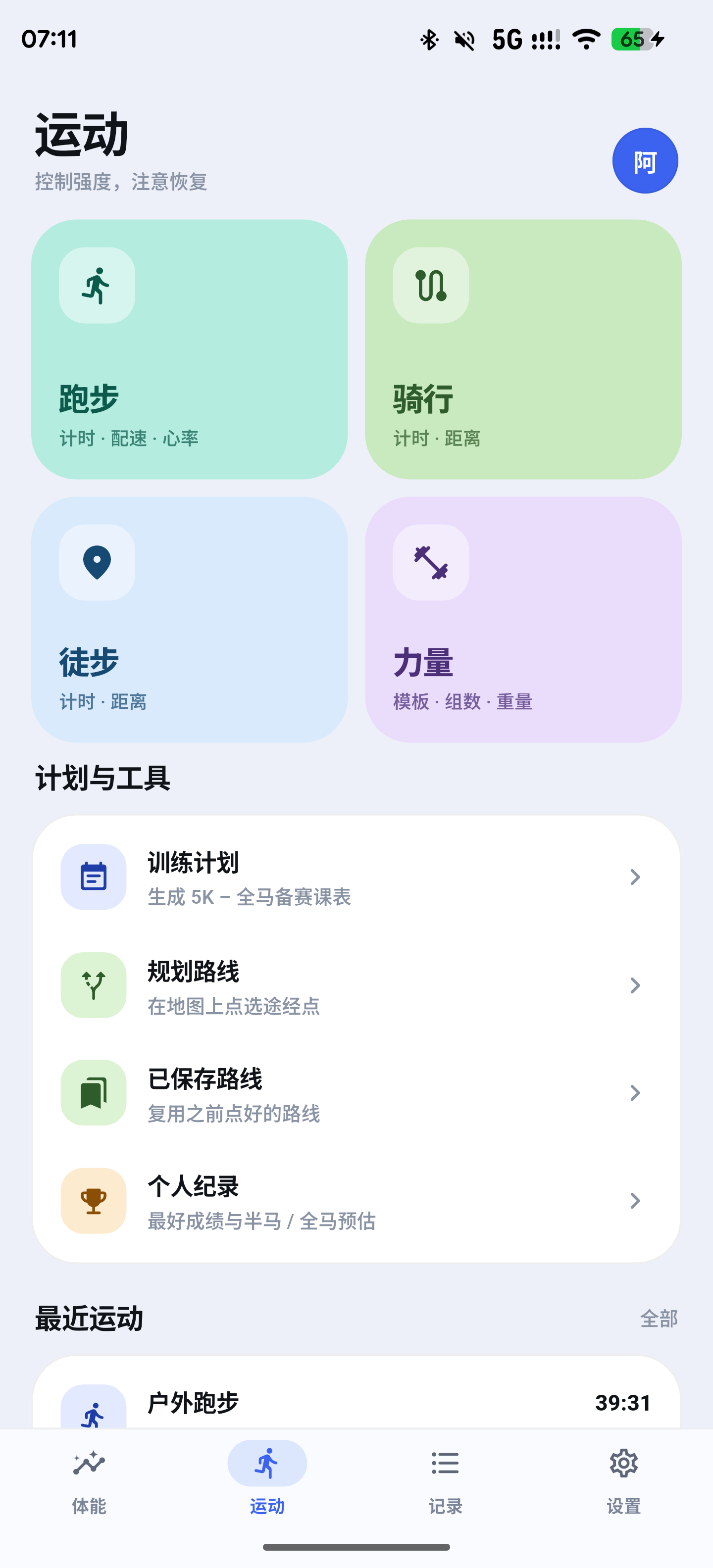
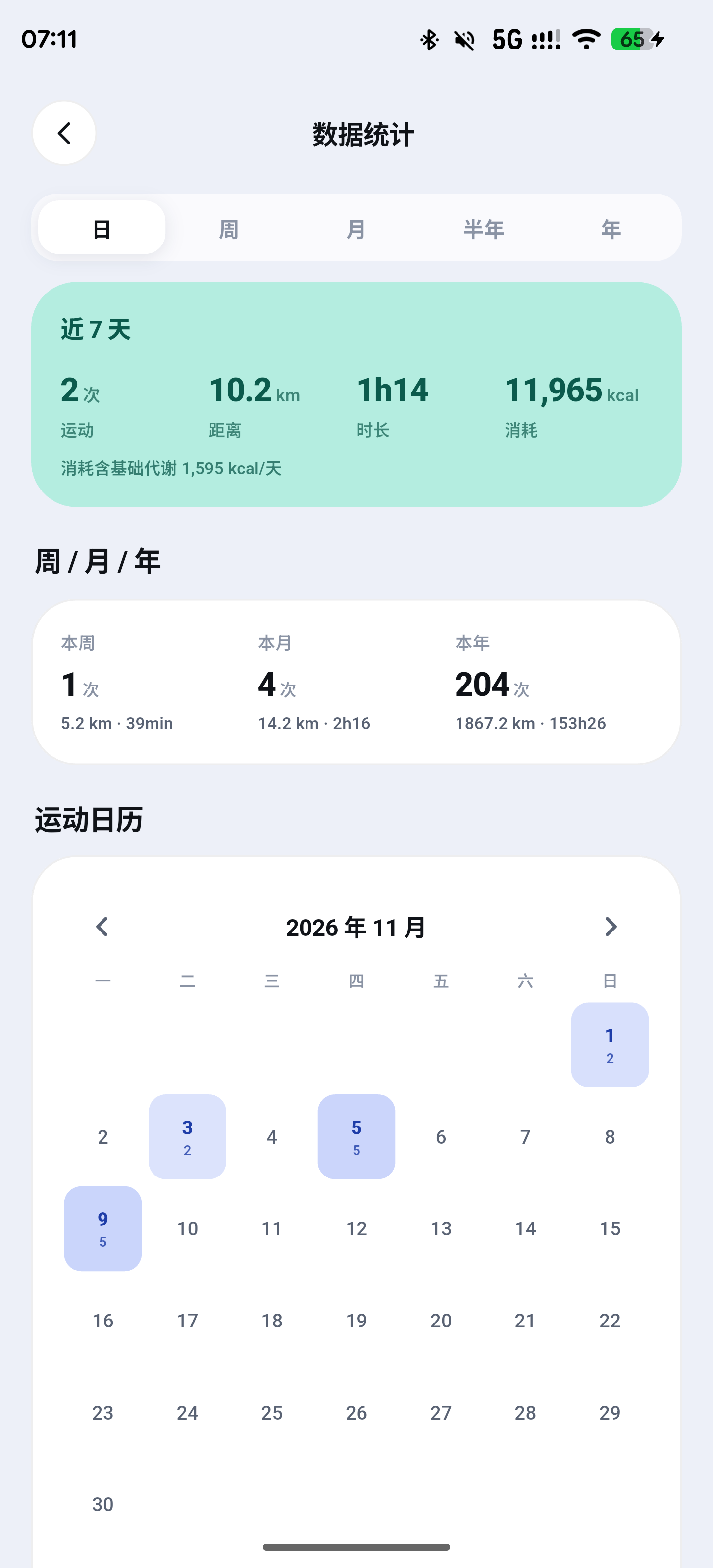
The four main screens in light theme:
 |
 |
 |
 |
Dark theme:
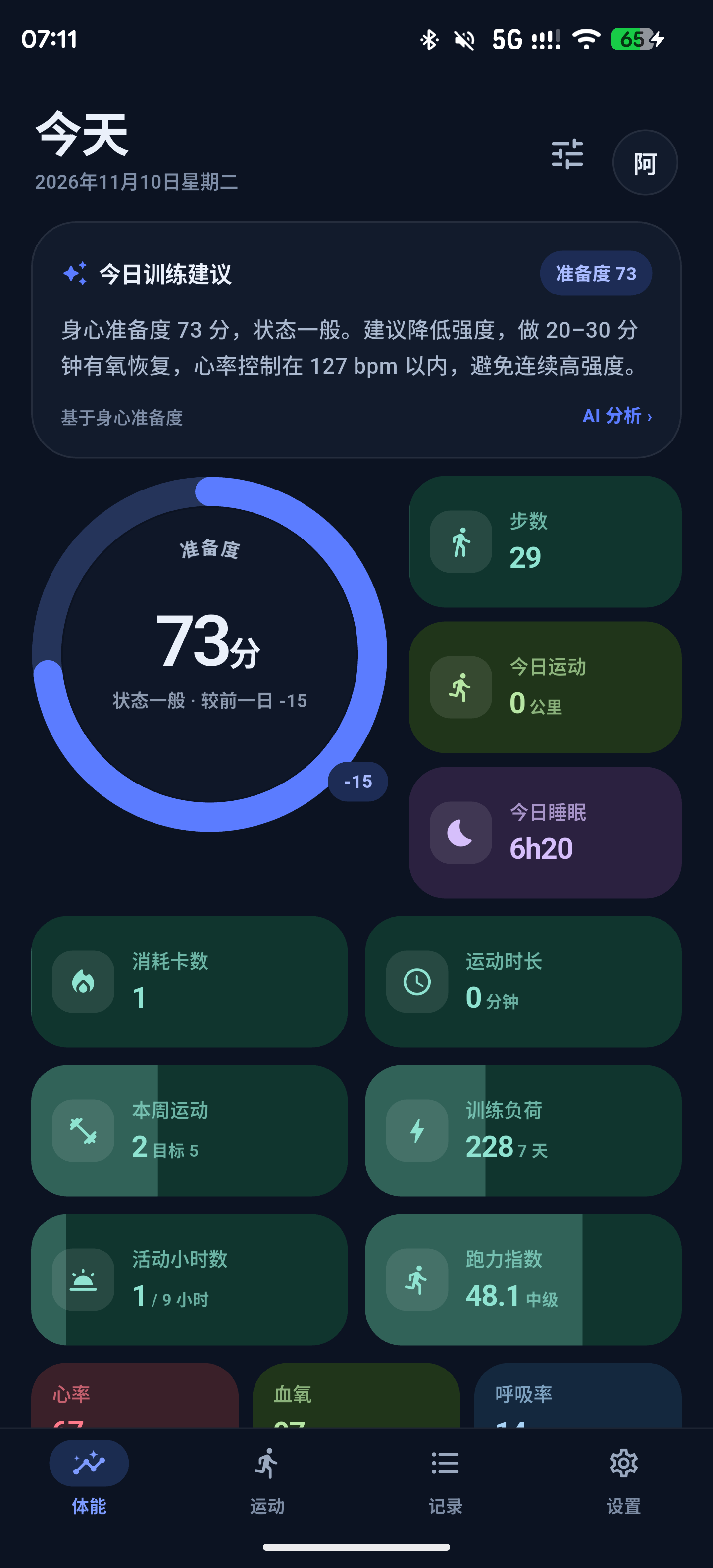 |
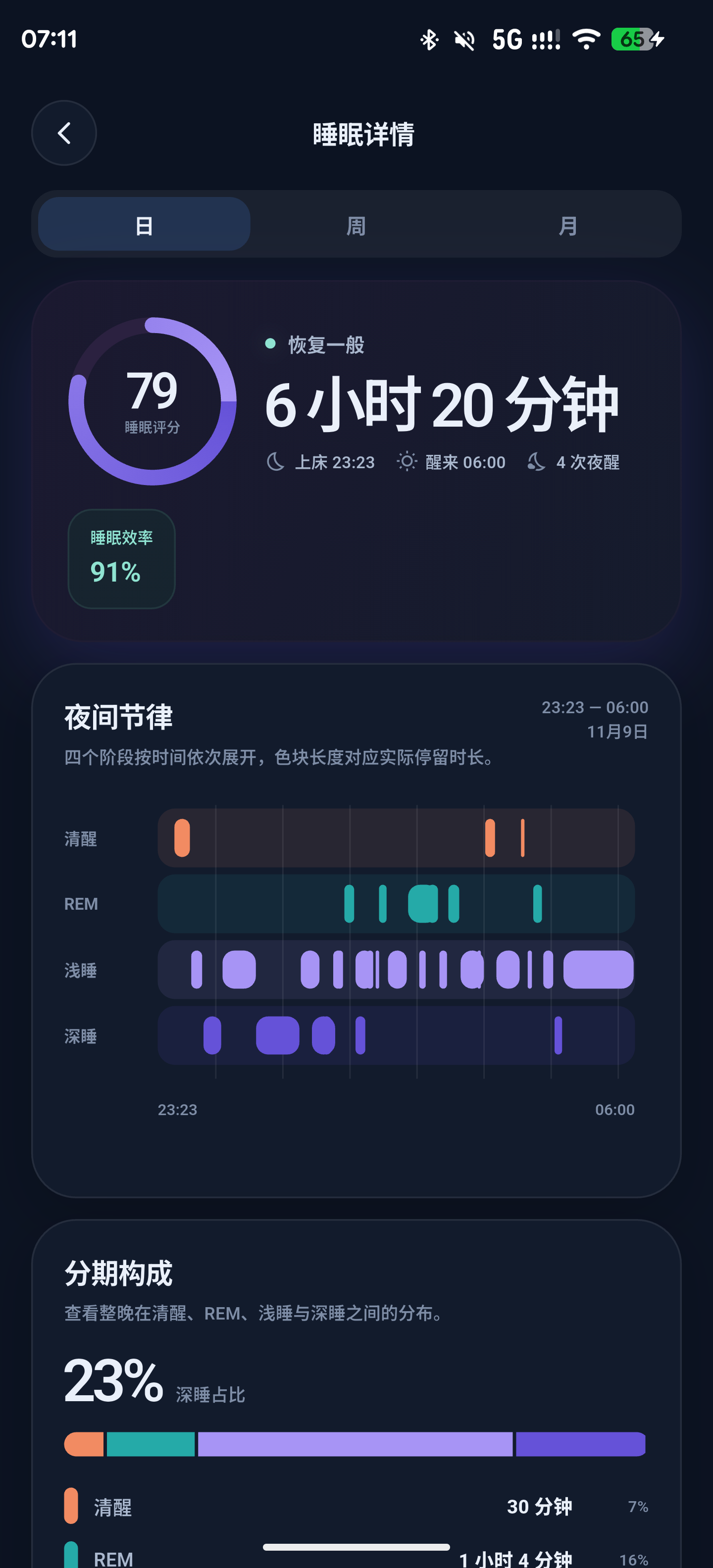 |
The device data in these screenshots is for demonstration only.
2. Why Flutter + Rust
Pure Kotlin would have worked, but what I wanted was “change the UI however I like, never let the data pipeline drift.” The responsibilities on the two sides are cut cleanly:
- Dart side: 103 files, about 56k lines, covering screens, charts, theming and copy in nine languages
- Rust side: about 17k lines of hand-written code (plus 7,000+ lines of bindings generated by
flutter_rust_bridge), covering SQLite reads and writes, sleep reconstruction, readiness computation, legacy data migration and cloud sync - Android side: 264 Java / Kotlin files, most of them the Huawei watch protocol layer
The bridge surface is surprisingly narrow: Rust exposes only three API modules—health, navigation and types—and the corresponding lib/src/rust/api/ on the Dart side is generated. The UI never touches SQL directly, every write goes through a fixed entry point, so “how did the data get in” has exactly one path and is easy to test.
For state management I did not use Riverpod or Bloc—just a ChangeNotifier with dependency injection, which is enough. The real complexity in this project is not in the UI layer.
3. Connecting to the Watch Directly: RFCOMM + HiChain
Sync runs over classic Bluetooth RFCOMM, and authentication runs over Huawei’s HiChain. The protocol implementation is adapted from Gadgetbridge‘s Huawei / Honor support, and the source keeps the AGPL-3.0 attribution—there is no shortcut here, you have to follow the packet formats somebody else already walked through.
The key packets are roughly: AccountRelated (account), FitnessData (health data dictionary), FileDownloadService0A / FileDownloadService2C (file-style downloads), P2P, GpsAndTime, Ephemeris and so on. The watch is not a “query interface”—it is “you send one request and it replies with a batch of events at its own pace.” So the client has to handle an event stream, not request-response.
Pairing comes in two flavors, and this is where new users get stuck most often:
| Situation | What you need | What to do |
|---|---|---|
| The watch has never been bound to the official app (or you are willing to factory-reset it) | Your Huawei account on the phone | Pair directly, first time |
| The watch is already bound to the official app and you do not want to factory-reset | HiChain credentials migrated over from an older app version | Install the older app version to complete the migration |
On first pairing, the app asks the user for the Huawei account the watch is currently bound to, sends SendExtendedAccountRequest, a dialog pops up on the watch and you tap “Allow”; only after the auth key is negotiated does the data dictionary get released.
The two easiest traps:
- Unbinding the watch inside the official app invalidates the auth key outright—only a factory reset gets you going again
- The official app and Vitaloop fighting over the same Bluetooth connection will keep kicking each other offline
So if you previously paired your watch with my old sync tool, Vitaloop migrates the authkey / huawei_account / fake_android_id credential set directly, with no re-pairing needed. To switch back to the official app, uninstall Vitaloop or kill its background process.
4. Data Lands Locally First, Cloud Comes Later
All data goes into on-device SQLite first, and Rust accesses it through rusqlite. Tables are split between “facts” and “derivations”:
|
The Android layer serializes watch events to JSON and hands them to Rust; ingest_watch_data() writes them to the database inside one transaction. Two rules have to hold here:
- Idempotence: if the same event arrives twice, it must not produce two records; deletions are expressed as tombstones, which is the only way cloud sync can propagate “this was deleted”
- Authoritative values are not overwritten by samples: “total steps today” and “total sleep last night” from the watch are authoritative, and straggling samples that arrive later can only add detail—they must not shrink the totals
Both sound like platitudes, and both happen every single day in real-device syncing. store.rs and watch.rs carry 34 + 19 tests specifically watching these boundaries.
5. Sleep Is the Dirtiest Part
The sleep data the watch gives you is really two different things: one is total duration, the other is stage segments (deep / light / REM / awake). They frequently disagree: total duration 7h12m, stages summing to 6h48m. Add them up naively and you inflate; trust the stages alone and you undercount.
Vitaloop reconstructs the sessions instead of copying them:
- Fragments are merged into sessions using the sleep window’s anchor
- Daytime fragments are clustered at 10-minute intervals; only what clusters counts as a nap, and what does not is dropped as daytime noise
- Stages are de-duplicated by interval union, so the same minute is never counted twice
- When the stage sum disagrees with the authoritative total, deep / light / REM are scaled proportionally so that the three add up to the watch’s total
“Scale proportionally” does not sound elegant, but it is the only approach that satisfies both “respect the watch’s total duration” and “show the stage composition.” Half of the 19 tests in watch.rs verify exactly this against all kinds of malformed fragments.
6. How “Can I Train Today” Is Actually Computed
The readiness score on the home screen has its weights written out explicitly:
| Component | Weight | How it is computed |
|---|---|---|
| Sleep | 80% | Base 80 points, 6 hours as the neutral point, ±0.15 per extra/missing minute; deep sleep neutral at 2 hours, ±1 point per extra/missing minute; −5 points per awake episode |
| HRV | 7% | Compared against your personal baseline; baseline scores 50, +1.5 points per 1% above |
| Resting heart rate | 4% | Your personal baseline scores 75; +3 points per bpm below, −3 per bpm above |
| Recovery time | 4% | Starts at 100, −1 point per 3 minutes of recovery time from that day’s workouts |
| Stress | 3% | Stress index mapped inversely |
| Skin temperature | 2% | No penalty within 0.3°C of baseline, then −4.5 points per 0.1°C |
Three design decisions are worth explaining:
Sleep at 80% was not picked out of thin air. The other metrics are either noisy (skin temperature, stress) or sparsely sampled (HRV is a handful of points per night). Sleep is the only input that is stable, present every night, and genuinely affects how the next day goes.
Missing components are not filled with 0—they trigger re-normalization. If a metric has no data that day, its weight is dropped and the remainder is redistributed proportionally. If there is no body data at all, recovery time is excluded entirely—“I did not work out today” must not be allowed to push the score to 100 on its own.
Levels and advice are written separately. There was a version where the level said “suitable for normal training” and the advice said “keep the intensity down”—the same card arguing with itself. Now level_for() only describes the state, advice_for() only gives the action, and their thresholds are aligned.
When the watch computed its own sleep score, that score takes priority and the local formula does not override it—the official vendor knows its watch sensors better than I do.
7. Maps and Long Screenshots Without Commercial SDKs
The track map in workout detail uses PMTiles single-file tiles + MapLibre + Protomaps, with Liberty light and dark styles, an orange track, kilometer markers and road names. The tile source is filled in by the user; public builds ship with no map service address at all.
You can also switch to Amap raster tiles; the Tencent and Baidu entry points are kept for builds where you are willing to configure your own official SDK keys.
Long-screenshot sharing is another slog: scroll, stitch, wait for the cards to finish rendering, hide the share and export buttons, cap the output at 18 megapixels, and remember the original scroll position. Skimp on any of these details and the exported image comes out broken, black, or missing a section.
8. Privacy Is Not a Slogan, It Is a Build Parameter
This project handles privacy fairly bluntly:
- The cloud address is a compile-time parameter:
--dart-define=VITALOOP_CLOUD_URL=https://sync.example.com, with no default value in the source - Without an address, the login page cannot even reach account features, while local data features are completely unaffected
- Permissions are requested on demand, and each one has a degraded path: deny location and there is no track, deny notifications and background reliability suffers, but existing local data is always viewable
- Ephemeris downloads, live tracking, audio streaming, camera streaming and update checks make no network requests at all until a URL is configured
The data is mine, so whether to show it to an AI should also be my choice. Which is why the server is a separate, optional and equally open-source thing—next section.
9. The Server Is Open Source Too: One Binary, One Directory
The client works without logging in; if you want to sync your data to your own machine, the companion server vitaloop-server is open source as well. It speaks the same language as the app: about 4,600 lines of Rust, 37 tests, compiled into a single static musl binary whose only runtime dependencies are flate2 (for legacy gzip snapshots and the tile upstream) and ureq (rustls). The container stage is scratch—no shell in the image, no package manager.
It does four things:
- Accounts: email + password registration and login, passwords stored as salted SHA-256 with 60k rounds, sessions as Bearer tokens valid for 30 days
- Sync:
GET/PUT /v1/health/datatakes full snapshots (gzip bytes written to disk verbatim, never parsed server-side),PUT /v1/health/deltaappends incremental patch logs that get merged on read—the client only uploads what changed, and the server does not care what the fields mean - Workouts and maps: workout records cached per account;
/style.jsonand/tiles/{z}/{x}/{y}.mvtproxy Protomaps PMTiles with a local cache, which is where the MapLibre map in the app gets its tiles - Blog data:
/blog/daily-fitnessexposes one account’s daily metrics read-only under a separate token, and this blog’s running-data page reads it directly
Storage is not a database, it is a file tree:
|
That choice is deliberate: backing up is tar on a directory, migrating is rsync on a directory, and deleting everything for good is removing the directory—no “please contact support to close your account.”
MCP is the most unusual layer in there. POST /mcp uses Streamable HTTP + JSON-RPC 2.0, one request and one response, with no dependency on SSE; it reuses the account’s Bearer session and exposes 14 read-only tools:
| Tool | Content |
|---|---|
health_summary |
Overview for the last N days (weight, blood pressure, blood glucose, sleep, steps, resting HR, HRV, SpO2, stress, temperature) |
blood_pressure / blood_glucose / weight / temperature |
The corresponding records |
sleep |
Sleep sessions, time in bed, official scores and stages |
hrv / stress / spo2 / heart_rate |
The corresponding time series |
workouts / daily_metrics / metric_points |
Workouts, daily aggregates, generic metrics |
query_table |
Any read-only table within the whitelist |
|
Time parameters are uniformly Unix milliseconds, daily aggregates use date_day (epoch days), and numeric values get no unit conversion—semantics stay identical to the watch, and conversion is left to the caller. “Read-only” is also a hard constraint: query_table only accepts whitelisted tables, and there are no write operations at all.
Deployment is one line:
|
In production, put Nginx / Caddy in front for HTTPS. The repository contains no domains, host addresses or credentials; the public address is inferred from the reverse proxy’s Host header, or set explicitly with PUBLIC_BASE_URL.
Both the server and the client are AGPL-3.0: use it, modify it, sell it however you like—but if you offer your modified version to others as a network service, you have to give those users the complete source. The server code itself makes the point that there is nothing mysterious about it: a few thousand lines, one data directory, no hidden cloud, no background service.
10. Running It
Client:
|
Signing is read only from environment variables (the four VITALOOP_KEYSTORE-style ones) and never written into the repository.
Server:
|
There are currently 105 Rust tests and 31 Dart test files, covering readiness boundaries, sleep reconstruction, legacy data migration and sync strategy. The verification environment is a OnePlus phone (Android 10+) with a Huawei Watch GT 5; other watch models and other vendors’ background battery-saving policies will very likely need extra adaptation—which is also the contribution an AGPL project welcomes most.
The repositories are here:
- Client: monkey-wenjun/vitaloop-app
- Server: monkey-wenjun/vitaloop-server
One last word on why I built this: the data from my watch grows out of my own body. Letting somebody else display it is fine. Doing the math is best left to me.
评论
0 条评论