On Monday morning, I sat in front of my computer, staring blankly at an error message on the screen.
It was the tenth-something hour of my revamp of an open-source clipboard tool. From the initial “let’s give it a try,” to later fighting to the death with all kinds of bizarre bugs, to finally integrating the PicGo image-hosting feature as well — this experience gave me a clearer understanding of AI programming assistants.
Origin: A Handy Clipboard Tool
It all started with a computer switch.
When I used a MacBook, I relied on the software Paste. Good-looking UI, handy controls, well-organized history management. But it’s subscription-based — $29.99 a year, or $89.99 to buy outright.
Later I switched to a Windows laptop. The built-in clipboard worked, but it always felt lacking. I searched GitHub for alternatives and didn’t find anything I really liked. Then I found EcoPaste — built on Rust, modern UI, full-featured — but its style wasn’t the kind I liked.
Originally, the story should have ended there. EcoPaste is open-source; just download and use it.
But the problem was I had some needs of my own: I wanted to integrate the PicGo image-host feature to upload images directly when writing articles. And with this Rust codebase, I wanted to tweak the UI and interactions to my own habits.
In the past, I might have just given up. I basically don’t know Rust syntax, and relearning a whole language for a clipboard tool would cost too much time.
But this time I wanted to try: if I let AI assist, could I reshape this project into what I want without deeply learning Rust?
Project Architecture
First, let me understand the project structure before the revamp. This is a typical Tauri app, using a front-end/back-end separated architecture:
|
The data flow is roughly: system clipboard changes → Rust backend listens → stores to SQLite → React frontend reads and displays → user action → triggers the corresponding feature (like uploading to an image host).
Day One: From “Seems Doable” to “Nothing But Pitfalls”
I woke up at past five on Saturday morning, my head full of the code structure I’d read the night before. I just got up and started working.
First I sorted out my plan:
- Keep EcoPaste’s core clipboard listening and storage logic
- Adjust the UI layout to better fit my habits
- Integrate PicGo’s image-host upload feature
The first half went fairly smoothly. With AI’s help, I quickly understood the project structure, changed a few UI components, and got the basic skeleton up. By noon, a runnable base version had taken shape.
But the real torment started in the afternoon.
I hit my first bizarre problem: after copying an image, the preview list was blank. The logs clearly showed the image data had been captured, but the UI just wouldn’t display it.
I threw the problem at AI, and it gave several possible causes and fixes. I tried them — didn’t work.
Tried a second time, a third time. Each time AI confidently said “this should fix it,” but running it was the same as before.
The UI freezing when switching categories, abnormal image preview sizes, no prompt when an upload failed… problems popped up one after another. By three in the afternoon, I stared at the screen feeling like I was playing whack-a-mole — fix one, two more pop up.
That day I worked until eleven at night. In between I ate two meals; the rest of the time I was basically slogging it out with bugs. Eventually the main problems were solved, but I was completely exhausted.
Day Two: Integrating PicGo, Closing the Last Mile
On Sunday morning, once I’d recovered, I started thinking about integrating the PicGo image host.
This feature is important to me. When writing a blog, I’d screenshot, then manually open PicGo to upload, then copy the link back to insert. If I could do it directly in the clipboard tool, it’d be much more efficient.
But there was a pitfall: EcoPaste’s original architecture didn’t account for external API calls, so I needed to find the right entry point. And PicGo’s API spec, error handling, and callback notifications all had to be redesigned.
Another day of repeated debugging. How to refresh the UI after uploading to Aliyun OSS, how to prompt the user when an upload fails, how to compress large images… the details were endless.
By evening, I finally got the whole chain working. Copy image → auto/manual upload → get URL → one-click copy in Markdown format. Testing on Windows was basically fine.
The project is open-sourced as ClipVault, currently supporting Windows, Linux, and macOS on x86 and ARM architectures. But honestly, I’ve only deeply tested it on Windows; I can’t guarantee the other platforms are problem-free.
Reflections After Calming Down
After finishing this project, my biggest takeaway is: don’t mythologize AI.
Nowadays all kinds of marketing accounts hype OpenAI and Claude as godlike, as if with AI, people who can’t program could build complex software. But my real experience is — AI really can help, but its limitations are very obvious.
What AI Is Good At
- Quick onboarding: I don’t know Rust, but through AI’s explanations I quickly understood the project structure and where the key code was
- Generating boilerplate: Repetitive template code, AI generates quickly and accurately
- Providing ideas: When stuck, AI can offer multiple possible solutions to open up my thinking
What AI Is Not Good At
- Solving complex bugs: That image-not-displaying problem — AI gave four or five different fixes without solving it. In the end I diagnosed it myself by adding logs and breakpoint debugging, tracing it to a timing issue in asynchronous data sync
- Context understanding: When a problem involves interactions across multiple modules, AI tends to “fix the head and ignore the tail” — fixing A but breaking B
- Validating assumptions: AI gives plausible explanations, but they aren’t necessarily correct
The most typical was the UI-freezing-on-switch problem. AI first said it was a state-management issue and had me change this and that, wasting two hours. Later I discovered it was actually a memory leak from an event listener — the listener wasn’t removed properly, so after the component unmounted it was still trying to update an already-destroyed UI.
A skilled Rust developer could probably pinpoint the problem in minutes. But someone like me, unfamiliar with Rust, even given a whole day plus AI assistance, might not locate the root cause.
That’s what I want to say: professional knowledge still matters.
AI Hallucination: The Answer You Think Is Right May Be Wrong
While looking up open-source licenses, I also hit a classic AI-hallucination case.
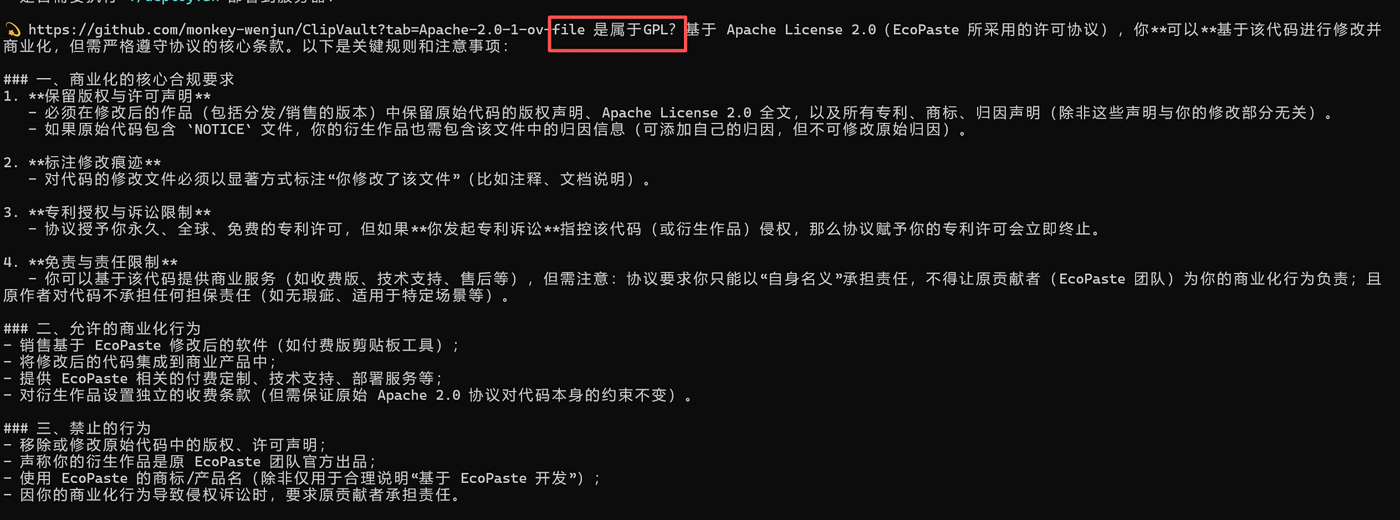
In the image above, I asked AI about the specific terms of the Apache License 2.0. AI’s answer looked professional and organized, but part of it was inaccurate. For example, some restrictions it mentioned don’t actually exist in Apache 2.0, or were described incorrectly.
This is the classic manifestation of AI hallucination — confidently giving a wrong answer that looks especially convincing.
If you don’t have the relevant expertise, or haven’t formed the habit of verifying, you can easily be led astray. Just like learning to program — if you copy and paste AI’s code without testing it, it could cause big problems once deployed.
So my advice is:
- Cross-verify important information, especially legal and security-related content
- Always run the code AI gives you, to see whether it really works
- Keep a skeptical mind, even top models like GPT-4 and Claude can make mistakes
- Build a basic knowledge framework, so you can judge whether AI’s answer is reasonable
AI is a powerful assistant, but it’s not a god. It errs too, and its errors are often more subtle and harder to notice than a person’s.
AI is a powerful tool, but it can’t replace your understanding of underlying principles. When you don’t know how to describe a problem or which direction to investigate, AI can’t help you either. At times, a wrong direction from AI even wastes more of your time.
A Few Suggestions for Friends Wanting to Try AI Programming
AI can lower the entry barrier, but it can’t remove the learning cost. If you want to seriously build a project, you still need some foundation — at least enough to judge whether AI’s suggestions are reasonable
Be prepared for complex projects. AI assistance ≠ automation; you’ll still need a lot of debugging and verification time
When stuck, try analyzing it quietly yourself. Sometimes stepping away from the screen and drawing the data flow on paper is more effective than repeatedly chatting with AI
Move in small steps and verify promptly. Don’t change too much at once, or when a problem appears it’s hard to tell whether it’s AI’s approach or your implementation that’s wrong
Choosing an Open-Source License
Before deciding to open-source the project, I actually hesitated.
After all, this thing is based on EcoPaste, and EcoPaste inherits from yet another open-source project. About open-source licenses, I actually only half-understood — what’s the difference between all these letter combinations like GPL, MIT, Apache? If I modify someone else’s code, can I keep it closed-source and commercial?
So I just had AI give me a crash course. From copyleft to permissive, from virality to patent grants, I spent an evening going through the entire open-source license system.
It turns out EcoPaste uses the Apache License 2.0 — a permissive license, which means I can choose to go closed-source and commercialize, as long as I keep the copyright notice. In other words, even if I made ClipVault paid software, there’d be no legal obstacle.
But in the end I decided to open-source it anyway.
On one hand, to thank EcoPaste and the other open-source projects for their contributions; on the other, because I feel: since I stood on the shoulders of those before me, those after me should be able to stand on my shoulders too. This experience of collaborating with AI and figuring out Rust from scratch might have a little reference value for others wanting to try something similar.
So ClipVault is fully open-source, also under the Apache License 2.0. Anyone can use, modify, and distribute it freely, and even commercialize it — as long as they keep the copyright notice and mark their modifications. If you find it useful, just take it; if you find a bug, PRs are welcome; if you want to build on it, no problem at all.
Technology should be open, and knowledge should flow.
Final Thoughts
This experience of developing ClipVault was essentially a “reinventing the wheel” exercise. There are already plenty of good clipboard tools on the market; I did this mainly to practice, and to satisfy my own needs along the way.
But the process gave me a more concrete understanding of AI’s boundaries. It really has changed the way I write code and made me dare to try tech stacks I wouldn’t have touched before. But it hasn’t, and can’t, replace a person’s judgment and debugging ability.
So, if you see all kinds of anxious articles about “AI replacing programmers,” don’t take them too seriously. However powerful the tool, it still depends on who’s using it.
Professional knowledge, problem-decomposition ability, debugging experience — these are your real core competitiveness.
Project URL: ClipVault
If you’ve also had a similar experience with AI-assisted development, feel free to share in the comments. What pitfalls you hit, what insights you gained — let’s talk.
评论
0 条评论