On October 2nd, my WeChat Reading membership expired. I didn’t renew.
It’s not that I begrudged the money — it’s that every time I used it on my e-ink device, I was fighting with it: want to highlight a sentence? Wrestle with two tiny circular handles. Want to know how much you’ve read? There isn’t even a stats page.
The day after my membership lapsed, I acted on an idea I’d been nursing for half a month — I wrote myself an e-ink reader.
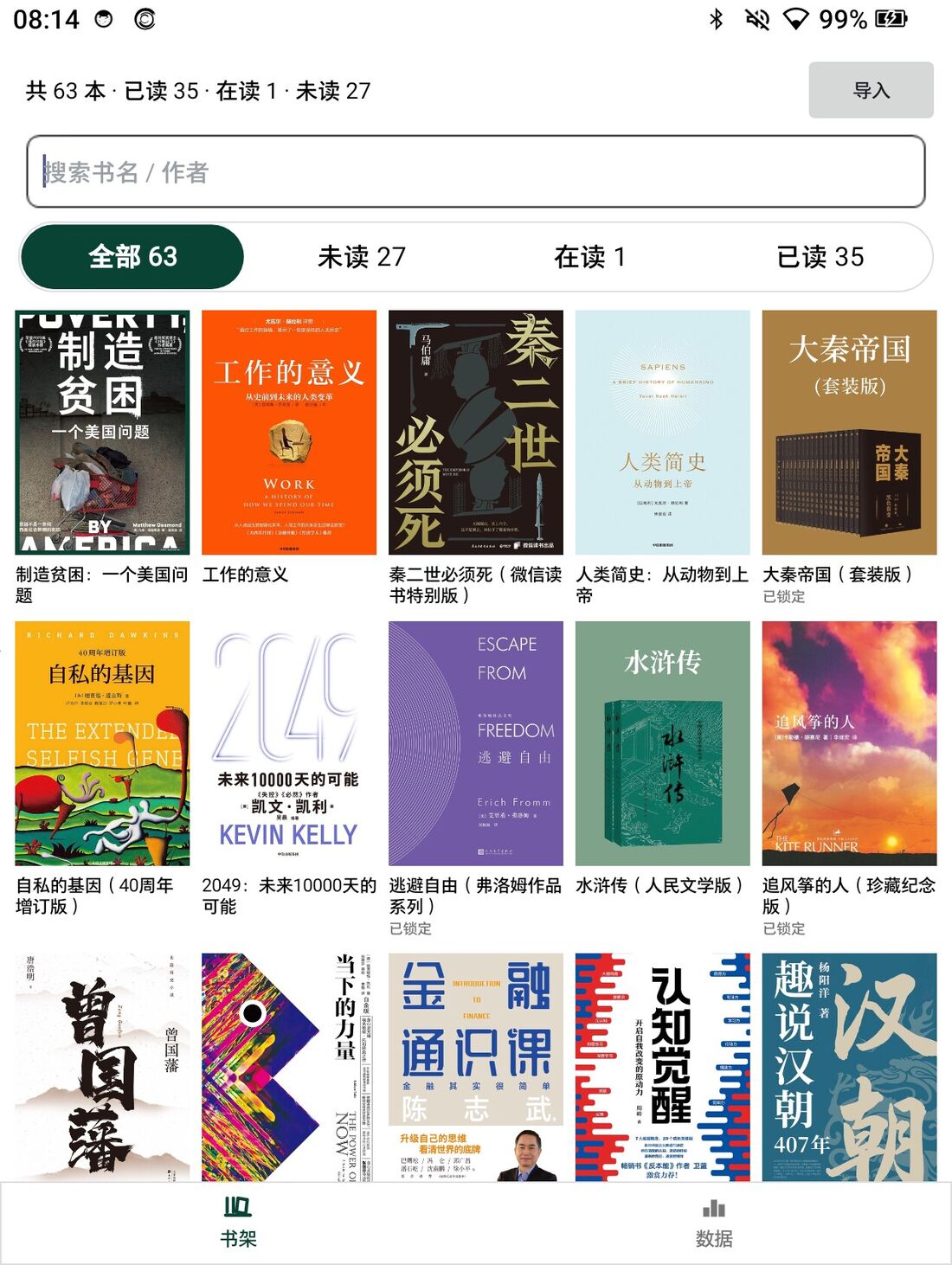
What’s Painful About WeChat Reading on My Hanvon
My reading device is a Hanvon Clear7 (HANVON P7): 7-inch e-ink, Android 14, 1264×1680. Using WeChat Reading on it, two things are particularly agonizing.
First: no reading stats page. How long you’ve read, how much more this month compared to last, cumulative hours this year — the e-ink version shows none of it. The phone version has it; the e-ink version doesn’t. Pages turn busily enough, but looking back, nothing can prove you’ve read.
Second: highlighting can’t be done by sentence or paragraph. E-ink is different from phones: slow refresh, ghosting, and dragging that selection handle with your finger is a “press—wait—press again—wait again” experience. All I want to express is “I want to highlight this sentence,” but every time I end up wrestling with handles. And the selection range is unpredictably large or small — misjudge and you have to start over.
My need is actually very simple: tap once, highlight that sentence; glance up, see how many hours I’ve read this week.
So I Wrote My Own
I wrote a reader for this device, package name com.awen.ereader. While at it, I also replaced Hanvon’s stock launcher and reader (can switch back anytime; nothing in the system was modified).
The bookshelf currently holds 63 books: 35 finished, 1 in progress, 27 unread. Epub covers are extracted directly from the book; txt/md files get a typographically generated cover based on the title; three tabs for unread/reading/finished; long-press a book to mark as read, export notes, or remove from shelf; the side page-turn buttons navigate the cursor on the bookshelf.
Several implementation trade-offs, all forced by this device:
- No Gradle. A personal-use e-ink reader doesn’t need to carry an entire Android build system:
aapt2 + javac + d8 + zipalign + apksigner— five steps,./build.shone command to produce the APK, no network dependency fetching, changing one line and reinstalling takes just over ten seconds. - Epub parsing done manually. zip →
META-INF/container.xml→ opf → spine, extractingdc:title,dc:creator, and each chapter title along the way. TXT files are strictly decoded as UTF-8, falling back to GB18030 on failure (very common for older Chinese books). - Typesetting uses
StaticLayoutwith screen-based pagination: font size 12–40, line spacing, paragraph spacing, margins, first-line indent, justified alignment, three background modes (white/cream/night), custom fonts — changes take effect immediately and maintain position.
E-Ink Is Not a Normal Screen
Writing this app, half the time wasn’t spent on features but on catering to this screen:
- It refreshes slowly and leaves ghosting. So during bookshelf scrolling, no full refreshes at all; only after settling for 2 seconds does a full refresh occur, at most once per 6 seconds; page turns batch up 6 pages before doing one full-screen refresh.
- The side page-turn buttons appear to the system as volume keys. By default, one press pops up a giant volume overlay that requires two refreshes on e-ink and leaves a screen of ghosting. Now the app intercepts these keys: cursor navigation on the bookshelf, page turns while reading, never pops up the volume bar again.
- A separate “full refresh” key (
KEYCODE_REFRESH) is reserved — if any page looks unpleasant, press once to clean it. - The reading page never shows toast notifications. That rounded-corner white-background-with-app-icon toast looks like a system notification on e-ink, covering text and leaving ghosting — bookmarks, highlights, note saves, copy operations simply complete silently. No “bookmark added” confirmation.
Highlighting: One Tap, Let the Sentence Handle the Rest
This was the thing I most wanted to solve. The current flow:
- Long-press text — only the character/word under your finger gets selected (using Android’s built-in ICU word segmentation; “microscope” won’t split into “micro/scope”);
- The action bar has two buttons: Full Sentence / Full Paragraph — pressing either automatically expands the selection to the complete sentence or paragraph;
- Short-press “Highlight” highlights directly (using the last line style); long-press brings up the line-style/color picker card.
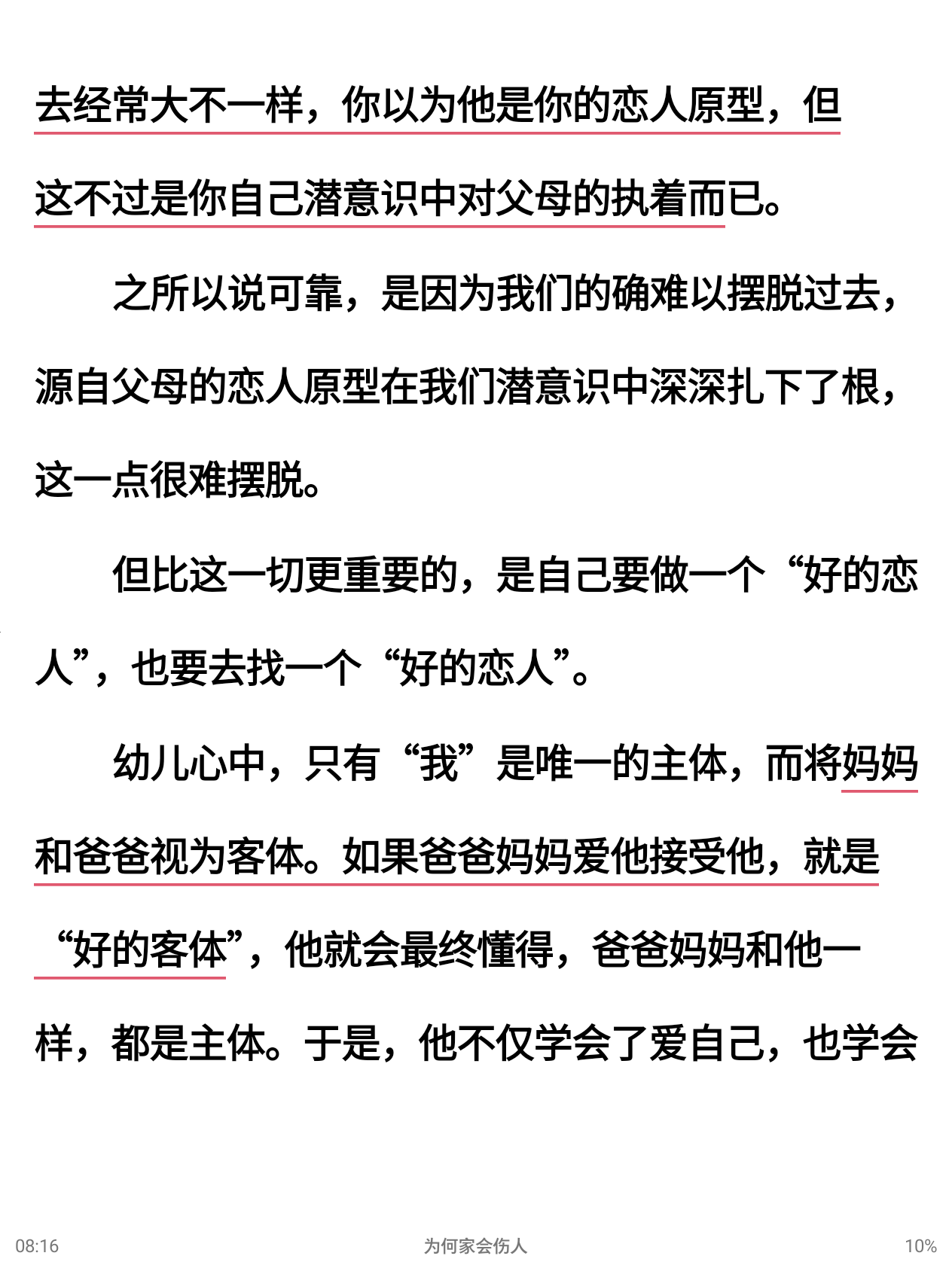
Highlights are drawn directly on the text, conforming across lines; tapping a highlighted passage shows the excerpt and notes, with delete option. Dictionary lookup is in the same flow: pinyin pronunciation displays offline (system ICU’s Han-Latin, no network wait), definitions and Chinese-English translation are delegated to a model — if offline or no model configured, pronunciation still displays.
I Added a Stats Page
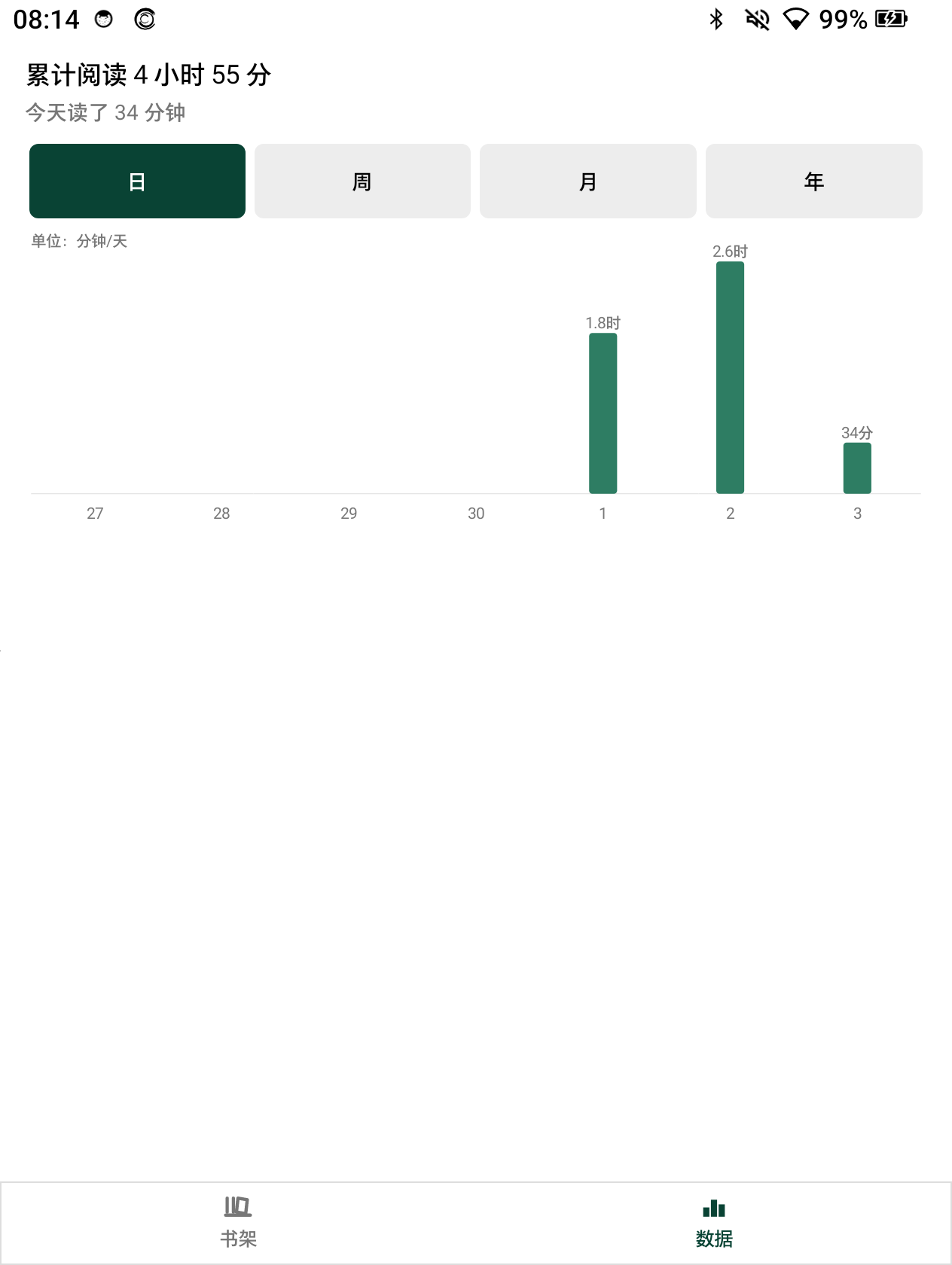
Cumulative reading time, today’s reading, bar charts switchable between daily/weekly/monthly/yearly views. Exactly the page I could never find in WeChat Reading’s e-ink version.
Where the Books Come From
While my membership was still active, I migrated the books I wanted to read: wrote a browser extension to capture WeChat Reading’s web version text, save as markdown, convert to epub, and push to my self-hosted machine (a Rust sync service with zero third-party crates — signing and credential envelopes all self-implemented). The reader syncs on open — progress, notes, bookmarks all together.
So when my membership expired on October 2nd, my bookshelf migration was already complete.
Three Bugs Fixed Along the Way
Writing this post required screenshots, and while screenshotting I got annoyed by my own code again — fixed three things on the spot:
- “Full Sentence” was cutting at right quotation marks. Books often contain sentences like “want to become a ‘good partner’ and also find a ‘good partner’” — the original logic treated right quotation marks as sentence-ending punctuation, so “full sentence” only selected up to
'good partner'and stopped. Current rule: first scan to the actual。!?, then carry along any trailing closing quotation marks. - “Paragraph spacing 0” still inserted a blank line. Settings said 0 = paragraphs flush, but the code returned early on 0, and the blank line still occupied a full line — no matter how you adjusted, it wouldn’t go away. That mysterious blank line before paragraphs when reading “Why Home Hurts” — that was it.
- Spaces between Chinese and English were chaotic. This epub was converted from PDF; the text was littered with inserted spaces like “自己总 算看到” and “一 个月后.” Now: Chinese-English boundaries always get exactly one space (
换iPhone4→换 iPhone4); spaces between Chinese characters and between Chinese and full-width punctuation are all removed — this one book alone cleaned up over a hundred instances.
Current Status
- Bookshelf: 63 books. Currently reading “Why Home Hurts” (upgraded edition), 10%.
- Text-to-speech is off by default: Doubao voice synthesis costs 2.8 yuan per 10,000 characters; a 280,000-character book read start to finish costs about 78 yuan — more expensive than the membership. The code is preserved; flip a switch to re-enable.
- Not yet available: pdf / mobi / azw3, full-text search, vocabulary book.
I’ll still use WeChat Reading — for book reviews and seeing other people’s highlights. But “on my own e-ink screen, tap once to highlight a sentence, glance up to see how much I’ve read” — this, I decided to build myself.
评论
0 条评论